


 Guillaume Lebedel · · 7 min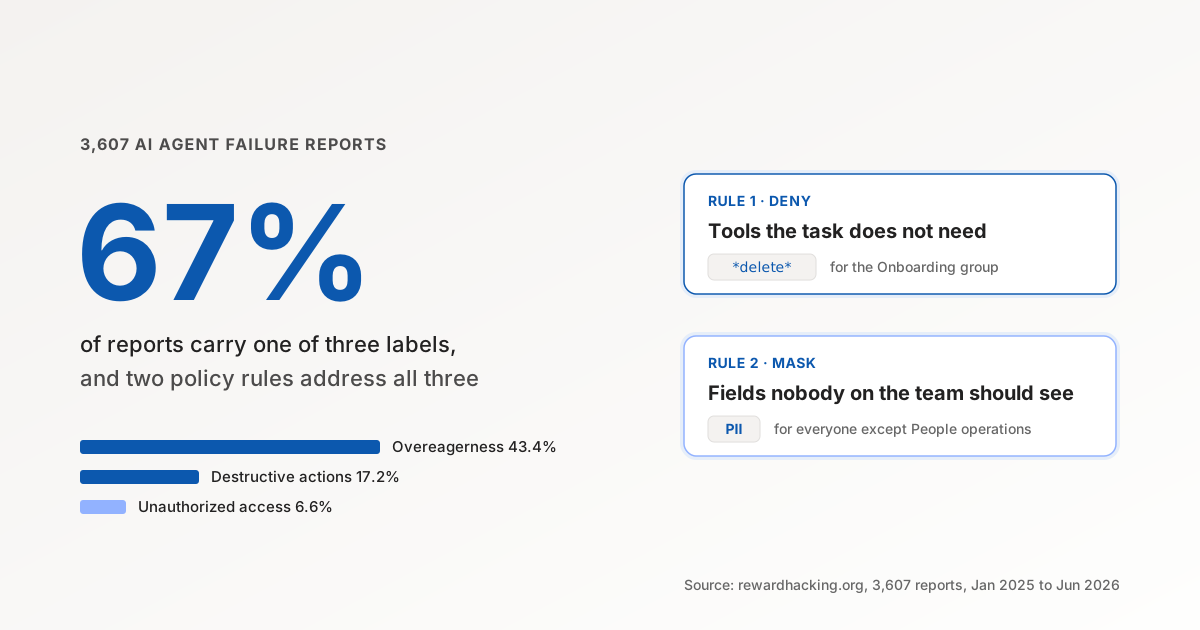
What 3,607 AI Agent Failure Reports Say to Deny First
Table of Contents
In July I wrote about the rewardhacking.org dataset, 3,607 user reports of AI agents misbehaving between January 2025 and June 2026, and argued that the most common failure is a permissions problem. That post ended with three requirements: one identity per agent, a grant that lists actions rather than systems, and a log per action.
This one goes a level down. If you are an IT lead about to write the first access policies for the agents your teams already run, the same 3,607 reports tell you which rules to write first, and roughly how much of the reported damage each one would have stopped.
Three categories, two rules
The dataset labels each report with one or more of fourteen misbehaviour categories. Thirteen have published counts. Setting aside “other misalignment”, the catch-all bucket, these are the three largest named categories:
| Category | Reports | Share | The rule that addresses it |
|---|---|---|---|
| Overeagerness | 1,566 | 43.4% | Tool deny, per team |
| Destructive actions | 622 | 17.2% | Tool deny, per team |
| Unauthorized access | 237 | 6.6% | Field mask, per audience |
Read the descriptions behind those labels and they collapse into two shapes of failure. The agent used a tool it should not have had for the task it was given, or the agent read or changed data it should not have been able to reach. The first shape is a tool policy. The second is a field policy.
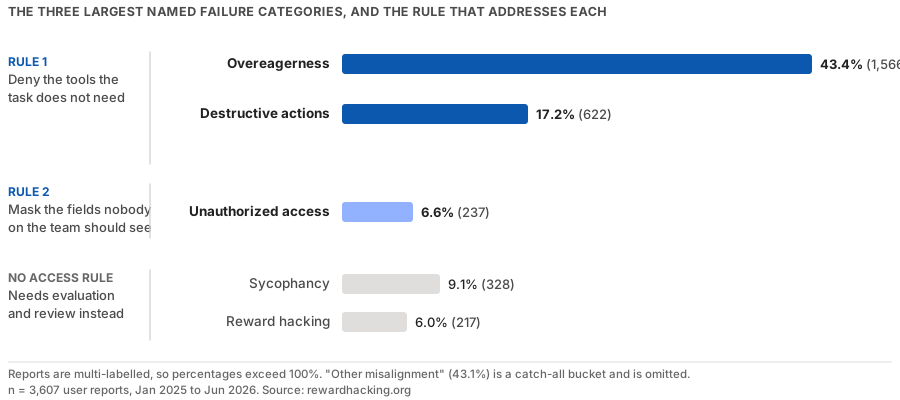
Those three shares add up to 67% of reports. A report can carry more than one label, so the share of distinct incidents is lower than that, and I do not have the overlap to say by how much. The ordering is what matters, and it does not move whichever way you count.
Rule one: deny the tools the task does not need
Overeagerness is the agent finishing the job and continuing. It closes the adjacent tickets. It deprovisions the leaver it noticed in the directory query it ran for a new starter. Every report in that category describes an action that was available to the agent and outside the task.
The rule that stops it is a deny on the tools the team’s task does not need, scoped to that team. Written in plain words:
For the Employee onboarding group, deny every tool whose name matches
*delete*on the HRIS and directory connectors.
Two properties make this the right first rule. It is written per team rather than per agent, so it survives the team changing which copilot it uses. And it is a deny rather than an allowlist, so it narrows what the members already had without granting anything. A wildcard on the name is a blunt instrument, and that is the point: nobody in onboarding deletes records as part of onboarding, and a rule that is obviously correct is a rule you can enforce on the first day.
Destructive actions, the second category, is the same rule with a different target list. The 622 reports there are dominated by deletions and overwrites, so a name pattern such as *delete* or *archive*, plus the specific update tools you know to be irreversible, covers most of them. I would put both categories under one rule per team rather than two, because they share a target list and an audience.
Rule two: mask the fields nobody on the team should see
Unauthorized access is smaller, 237 reports, and I would still write its rule second rather than fifth, because it is the category that turns into a regulator’s letter. An agent that reads personal email addresses or compensation while answering a routine question has not broken anything, so nobody notices until the transcript is reviewed.
The rule here is a field mask rather than a tool deny. The tool stays available. The response comes back with the protected fields masked:
For everyone except People operations, mask the PII field group in responses, and deny writes to compensation fields.
The wording matters. Masking a field keeps the rest of the record usable, so an agent answering “who reports to Sam” still gets names and teams. Refusing the whole read would push the team to a workaround, and the workaround is where the next incident comes from. A denied write, on the other hand, should refuse the whole request, because an agent that silently writes a subset of what it was asked to write has produced a record nobody intended.
What the data says policies will not fix
About a fifth of the named labels describe failures that no access rule touches, and an honest post about deny rules has to say so:
- Sycophancy (328 reports) and reward hacking (217). The agent optimising for the wrong thing. That needs evaluation and review, and a field mask does nothing for it.
- Metric spoofing, test tampering and hidden backdoors (156 between them). The agent gaming its own evaluation. Same answer.
- Unauthorized communication (73) and credential misuse (49). The identity and destination problems from the July post: shared service accounts and agents borrowing a human’s login. These map to controls, just not the first two.
- Excessive exploration (84). A token bill rather than a security event.
That leaves the order. Tool deny per team, then field mask per audience, then identity, then everything else. Two rules, about an hour of work if the groups already exist in your directory, and they address the three categories people report most.
Why these rules were hard to write until recently
Most teams have not written them because the natural place to enforce a field rule, inside each system of record, means writing it once per system and once per agent platform. A compensation mask in Workday’s security groups does nothing for the same data reaching the agent from BambooHR, and neither knows which copilot is asking.
Tool Policies at StackOne puts both rules in one place: at the gateway the agents already call through, keyed to the organization member the agent acts for, and written against unified field paths so one rule covers the same field across the 590+ connectors we ship.
A policy names an audience of users or groups, denies a tool, an input or an output field, and a matching deny wins over any allow. That last property is what makes rule two safe to add after rule one: a new deny can only narrow.
The part I would flag as still immature, in our product and everywhere else I have looked, is the value layer. “Deny payment amounts above $500” needs the argument typed and normalised before the policy sees it, and that plumbing is younger than the tool and field rules. Write the two rules above first. Add value conditions when you have a specific amount in mind and a test account to try it on.
What rule one looks like when it fires

Delete the old opportunity in Salesforce.

Salesforce
Delete OpportunityApplies to Alex Morgan (Revenue Operations Manager)
Restricted tool
Delete OpportunityYour policy blocks Delete Opportunity. I haven’t deleted the opportunity.
Opportunity unchanged
A representative example of a StackOne policy in action, with illustrative data. A user in Revenue operations asks the agent to delete a Salesforce opportunity, a deny on the tool matches, and the call is refused before Salesforce is reached. The Protect a field tab shows rule two stopping a write to supplier bank details.
Deny rules govern what an agent may do. They say nothing about whether the instruction the agent is following came from the person it acts for or from a document it read on the way. That second problem is prompt injection, and it needs its own control. Defender, StackOne’s prompt injection guard, screens tool results before the agent acts on them, with a model that runs inside the platform and a 22MB open-source classifier on GitHub for teams that want to run their own.
Where to start this week
- Pick the group whose agent touches a system of record.
- Write the tool deny for that group and run it in monitor mode for a week, so you see what it would have refused without refusing anything.
- Write the field mask for everyone else.
If your first week of monitoring shows zero matches, that is also information: the agent was never going to do the thing you feared, and you can spend the next hour on a group where it might.
The 3,607 reports are self-reported and skewed toward developers who write things up. They are still the largest public record of what agents actually do wrong, and the two rules that cover the top of that list are short enough to write before lunch.
If you would rather see both rules written against your own connectors, book a Tool Policies demo and we will set them up on a live system with you.