


OAuth for AI Agents: How It Works and the Benefits of Owning the OAuth App
Table of Contents
If you’re connecting an AI agent to your users’ SaaS tools through StackOne, you’ve probably hit this question:
“Do all of my end users each have to register their own OAuth app?”
The answer is no. People conflate two concepts under one word: the application you register, and the authorization each user grants.
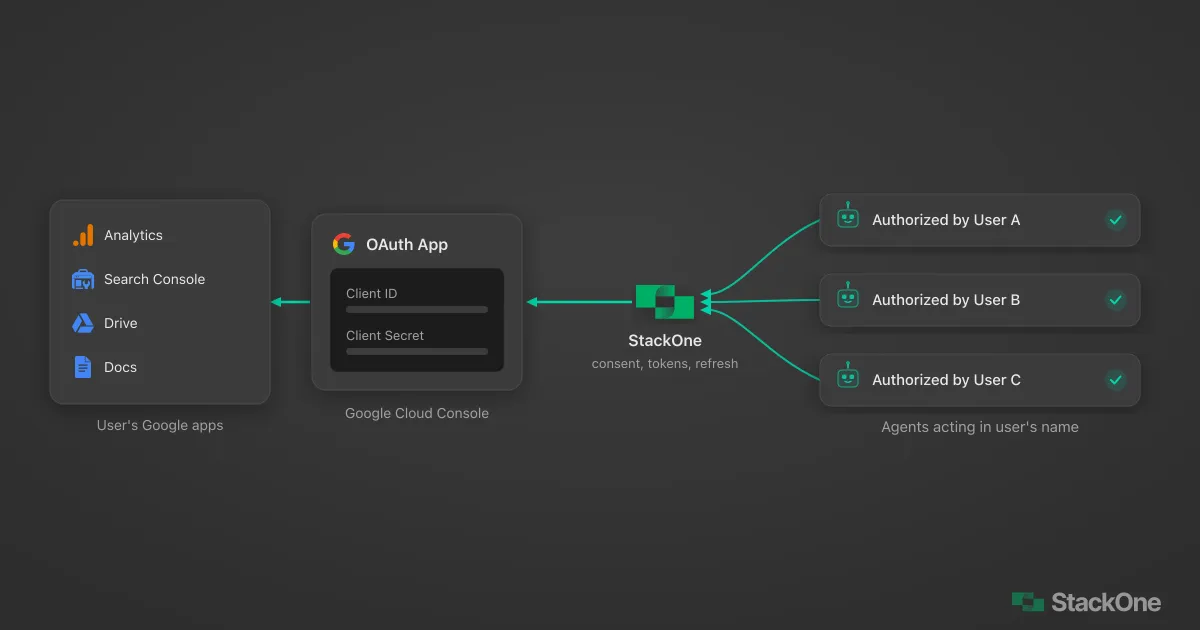
Whether those accounts belong to your users or to you, the model is identical: you own the one app, and each connected account is its own authorization. A platform connecting thousands of users and a developer wiring an agent to their own stack are doing the same work at different scale.
And your agent? It acts through those authorizations, operating in each user’s SaaS account on their behalf, without ever touching a credential. Here’s how that works.
What Is OAuth for AI Agents?
OAuth for AI agents is an authorization framework that gives an agent scoped permission to act inside your external apps and services on your behalf, without ever touching your password. You set those permissions up front, and the agent cannot go beyond them.
OAuth has two layers:
- The app is what you register once with a provider like Google, HubSpot, or BambooHR. It carries a Client ID and Client Secret, a name that shows on the consent screen, the scopes you request, and a callback URI. It represents your product asking for access.
- The authorization is the grant a user creates when they approve access to their account. It produces a token tied to that single user, and it happens once per user.
How an AI Agent Acts on a User’s Behalf
Your agent connects to a user’s account by calling it through StackOne using an authorization that user has already granted. The agent requests an action (“create the contact,” “pull the candidate,” “update the deal”), and StackOne attaches the right user’s access token behind the scenes and makes the action call.
That authorization comes from a one-time approval. When an account is connected, access is approved at the provider (a redirect to Google, HubSpot, and so on) for the scopes you set during setup. You can create an auth link so users authenticate through the StackOne hub. From then on, your agent acts through it.
The agent references which user it’s acting for, and StackOne resolves the rest. In the SDK, that reference is an accountId. Your STACKONE_API_KEY authenticates you, and the user’s OAuth token stays inside StackOne.
import { StackOneToolSet } from "@stackone/ai";

const toolset = new StackOneToolSet(); // uses your STACKONE_API_KEY

// accountIds selects which users' authorizations the agent acts through
const tools = toolset.getTools({ accountIds: ["user-account-id"] });
So when you have a thousand users connected, you have a thousand authorizations sitting underneath one OAuth app. The app is the shared identity; each connected account is a per-user grant your agent can act through.
Where OAuth for AI Agents Is Heading
OAuth was built for a user clicking through a browser, not for an agent acting on their behalf hours later. The IETF is working on an extension for exactly this: the On-Behalf-Of User Authorization for AI Agents draft adds requested_actor and actor_token parameters so a token can carry both who the user is and which agent is acting for them. It is not ratified. Today StackOne uses the standard Authorization Code flow, with each agent acting through a user’s stored authorization; the emerging spec would make the agent’s identity explicit at the protocol level.
The Auth You Won’t Have to Build
Against the single OAuth app you configured, StackOne’s AI agent authentication handles the parts you’d otherwise build yourself. It:
- Runs the OAuth redirect and consent flow when a user connects
- Exchanges the authorization code for tokens
- Stores those tokens, encrypted and isolated per user
- Refreshes them automatically so connections don’t silently expire
- Attaches the correct user’s access token to each agent call at request time
Your agent code never holds a secret, never refreshes a token, and never branches on which provider it’s talking to. It says what to do and for whom; StackOne handles identity and execution.
Why Owning Your OAuth App Matters
With StackOne, you register and own the OAuth app. If that sounds like the very work you’re trying to avoid, it’s actually what you want. For anyone who takes integrations seriously, especially enterprise IT and security, owning the app is the point: it’s your identity with that provider, not a third party’s.
4 Benefits of Owning Your OAuth App
Registering your own OAuth app gives you:
- Your brand on the consent screen. When a user approves access, they see your company name and logo asking for permission, not a third party’s. That’s what users expect, and it’s the difference between a trustworthy flow and one that makes people hesitate.
- Dedicated rate limits. Providers meter API access per registered app. Google, for instance, applies API quotas per project, so when the app is yours, that quota is yours alone, not pooled with anyone else’s traffic. For an agent firing calls across many users, predictable throughput is the difference between scaling smoothly and hitting a wall you don’t control.
- Security ownership and control. Your security team holds the credentials, sets the scopes the agent can request, and can rotate the secret or revoke the app at any time. The scopes you configure are exactly what users see and approve on the consent screen. Access lives in your provider account, under your policies, with your audit trail, not somewhere you can’t see.
- Compliance and marketplace eligibility. If you need to satisfy a provider’s review process or list your integration in a marketplace like the Slack App Directory, Google Workspace Marketplace, or HubSpot App Marketplace, you’ll need your own registered app to meet those requirements.
For an enterprise buyer, none of these are nice-to-haves. They’re the baseline for letting an agent into production against real customer data.
The walkthrough above sets up Shopify OAuth; your agent then connects through the Shopify MCP server.
How to Set Up Your OAuth App
The flow is short, and it only happens once per connector, not once per user:
- Register an OAuth app in the provider’s developer console.
- Set the callback (redirect) URI to StackOne’s endpoint. The format is:
https://api.stackone.com/connect/oauth2/{connector}/callbackReplace{connector}with the actual connector key, for examplegoogledriveorsharepoint. - Copy the Client ID and Client Secret into a new OAuth auth config for that connector in StackOne, along with the scopes you need.
- Mark it as the default config for the connector so it’s the one your users hit when they connect an account.
From there, every user who connects authorizes against your app, sees your branding, and draws on your rate limits, and StackOne keeps handling the token exchange, storage, and refresh so your agent can act through each grant.
A handy detail: you can run more than one auth config for the same connector. Each has a “Default Configuration” setting in StackOne’s Auth Configs dashboard, and you can switch which one is the default once you have more than one. That lets you keep a sandbox app and a production app side by side, or offer both an API-key and an OAuth path to different users, and change which one new connections use without touching the others. Existing linked accounts keep using the config they connected with.
When you’re ready, the guide to using your own OAuth apps walks through it.
Frequently Asked Questions
Do users need to register their own OAuth app?
How does an AI agent act on behalf of a user with OAuth?
Why register your own OAuth app instead of using a shared one?
What is the OAuth callback URI for StackOne?
https://api.stackone.com/connect/oauth2/{connector}/callback. Replace {connector} with the connector key, for example googledrive or sharepoint.