Connect
Optimize
Secure
Announcing StackOne Defender: leading open-source prompt injection guard for your agent • Read More →
Production-ready Webflow MCP server with 98 extensible actions — plus built-in authentication, security, and optimized execution.
 StackOne
Coverage
Create, read, update, and delete across Webflow — and extend your agent's capabilities with custom actions.

Authentication
Per-user OAuth in one call. Your Webflow MCP server gets session-scoped tokens with zero credentials stored on your infra.
Agent Auth →
Security
Every Webflow tool response scanned for prompt injection in milliseconds — 88.7% accuracy, all running on CPU.
Prompt Injection Defense →
Performance
Free up to 96% of your agent's context window to enhance reasoning and reduce cost, on every Webflow call.
Tools Discovery →A Webflow MCP server lets AI agents read and write Webflow data through the Model Context Protocol — Anthropic's open standard for connecting LLMs to external tools. StackOne's Webflow MCP server ships with 98 pre-built actions, fully extensible via the Connector Builder — plus managed authentication, prompt injection defense, and optimized agent context. Connect it from MCP clients like Claude Desktop, Cursor, and VS Code, or from agent frameworks like OpenAI Agents SDK, LangChain, and Vercel AI SDK.
Every action from Webflow's API, ready for your agent. Create, read, update, and delete — scoped to exactly what you need.
Upload a new asset to a site (step 1 - returns S3 upload URL and credentials)
Retrieve all assets for a specific site
Retrieve details for a specific asset by its ID
Update properties of an existing asset
Delete a specific asset permanently
Create a new asset folder within a site
Retrieve all asset folders for a specific site
Retrieve details for a specific asset folder by its ID
Create a new CMS collection within a site
Retrieve all CMS collections for a specific site
Retrieve details for a specific CMS collection by its ID
Delete a CMS collection and all its items permanently
Update properties of an existing field in a CMS collection
Remove a custom field from a CMS collection permanently
Retrieve the DOM content of a specific component
Update the DOM content of a specific component
Retrieve the properties defined on a specific component
Update the properties of a specific component
Retrieve custom code applied at the site level
Remove all custom code from the site level
Retrieve custom code applied to a specific page
Remove all custom code from a specific page
Create a new ecommerce product with an initial SKU for a site
Retrieve all products for a specific site
Retrieve details for a specific product by its ID
Update an existing ecommerce product by its ID
Create one or more new SKUs for an existing product
Update an existing SKU for a product
Retrieve all orders for a specific site
Retrieve details for a specific order by its ID
Update an existing order with shipping or comment information
Retrieve inventory information for a specific SKU item
Update inventory settings and quantity for a specific SKU item
Create a new 301 redirect rule for a site
Retrieve all 301 redirect rules configured for a site
Update an existing 301 redirect rule for a site
Delete a 301 redirect rule from a site
Retrieve the robots.txt configuration for a site
Partially update the robots.txt configuration for a site
Remove the robots.txt configuration from a site
Create or update a .well-known file for a site
Delete one or more .well-known files from a site
Create a new site within a workspace
Publish a site to specified custom domains or the Webflow subdomain (at least one target required)
Retrieve all sites accessible by the authenticated user or token
Retrieve details for a specific site by its ID
Update the name or parent folder of a site
Permanently delete a site
Retrieve all comment threads for a site
Retrieve a specific comment thread
Retrieve all submissions for a specific form
Retrieve details for a specific form submission by its ID
Update hidden field data for a specific form submission
Delete a specific form submission permanently
Create one or more staged items in a CMS collection
Publish one or more staged collection items to make them live
Retrieve all staged items in a CMS collection with filtering and pagination
Retrieve a single staged item from a CMS collection
Update a single staged item in a CMS collection
Update one or more staged items in a CMS collection
Delete a single staged item from a CMS collection
Delete one or more staged items from a CMS collection
Create one or more items directly in the live (published) state
Retrieve all published (live) items in a CMS collection
Retrieve a single published (live) item from a CMS collection
Update one or more live (published) items in a CMS collection
Retrieve metadata for a specific page by its ID
Update page-level metadata including SEO and Open Graph fields
Retrieve the static content (DOM tree) of a specific page
Update static content (DOM nodes) of a page in a secondary locale
Create a new webhook for a specific site
Retrieve all webhooks configured for a specific site
Retrieve details for a specific webhook by its ID
Delete a specific webhook permanently
Add a new custom field to an existing CMS collection
Add or update custom code scripts applied at the site level
Add or update custom code scripts applied to a specific page
Retrieve all components for a specific site
Retrieve all registered scripts for a site
Retrieve all custom code blocks for a site
Retrieve the ecommerce settings for a specific site
Retrieve activity logs for a specific site
Retrieve the current plan information for a site
Retrieve replies to a specific comment thread
Retrieve all forms for a specific site
Retrieve the schema and field definitions for a specific form
Retrieve all form submissions across all forms for a specific site
Retrieve all pages for a specific site
Retrieve all custom domains configured for a specific site
Retrieve information about the user who authorized the access token
Register an externally hosted script for use on a site
Register an inline script to be hosted by Webflow for use on a site
Mark an order as fulfilled and optionally notify the customer
Revert a fulfilled order back to unfulfilled status
Refund an order and optionally provide a reason
Replace the entire robots.txt configuration for a site
Unpublish one or more live items and set them to draft
Retrieve details about the authorization token including granted scopes and associated sites
One endpoint. Any framework. Your agent is talking to Webflow in under 10 lines of code.
MCP Clients
Agent Frameworks

 JSON
JSON{
"mcpServers": {
"stackone": {
"command": "npx",
"args": [
"-y",
"mcp-remote@latest",
"https://api.stackone.com/mcp?x-account-id=<account_id>",
"--header",
"Authorization: Basic <YOUR_BASE64_TOKEN>"
]
}
}
}
Anthropic's code_execution processes data already in context. Custom MCP code mode keeps raw tool responses in a sandbox. 14K tokens vs 500.
11 min

Benchmarking BM25, TF-IDF, and hybrid search for MCP tool discovery across 916 tools. The 80/20 TF-IDF/BM25 hybrid hits 21% Top-1 accuracy in under 1ms.
10 min
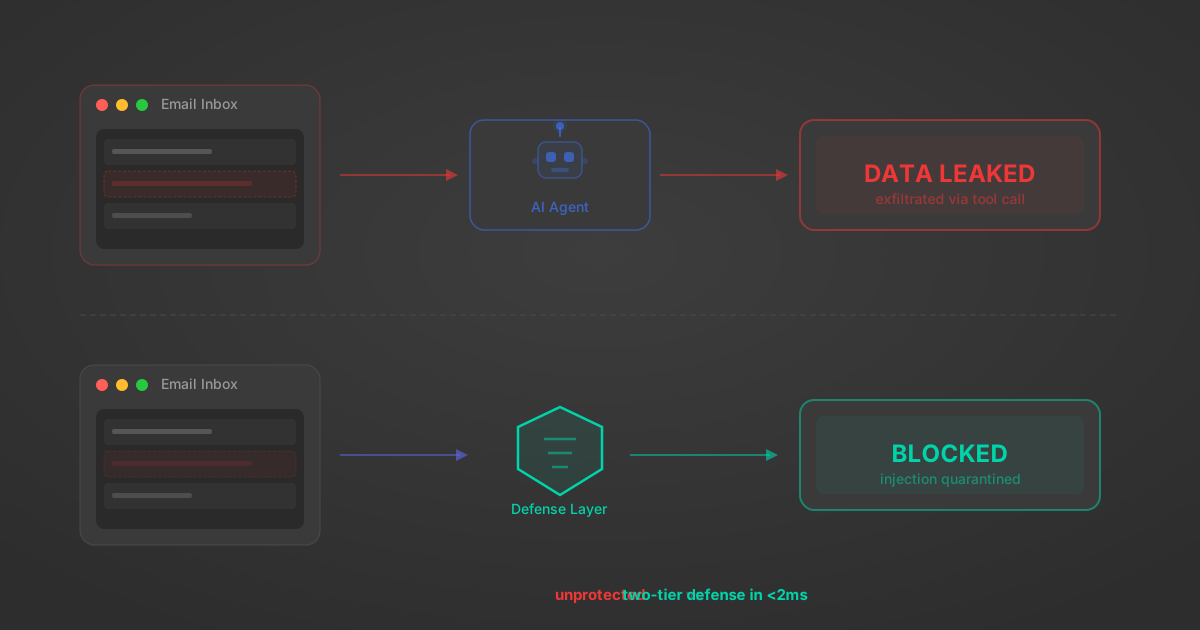
MCP tools that read emails, CRM records, and tickets are indirect prompt injection vectors. Here's how we built a two-tier defense that scans tool results in ~11ms.
12 min
origin_owner_id.All the tools you need to build and scale AI agent integrations, with best-in-class connectivity, execution, and security.