 Guillaume Lebedel · · 12 min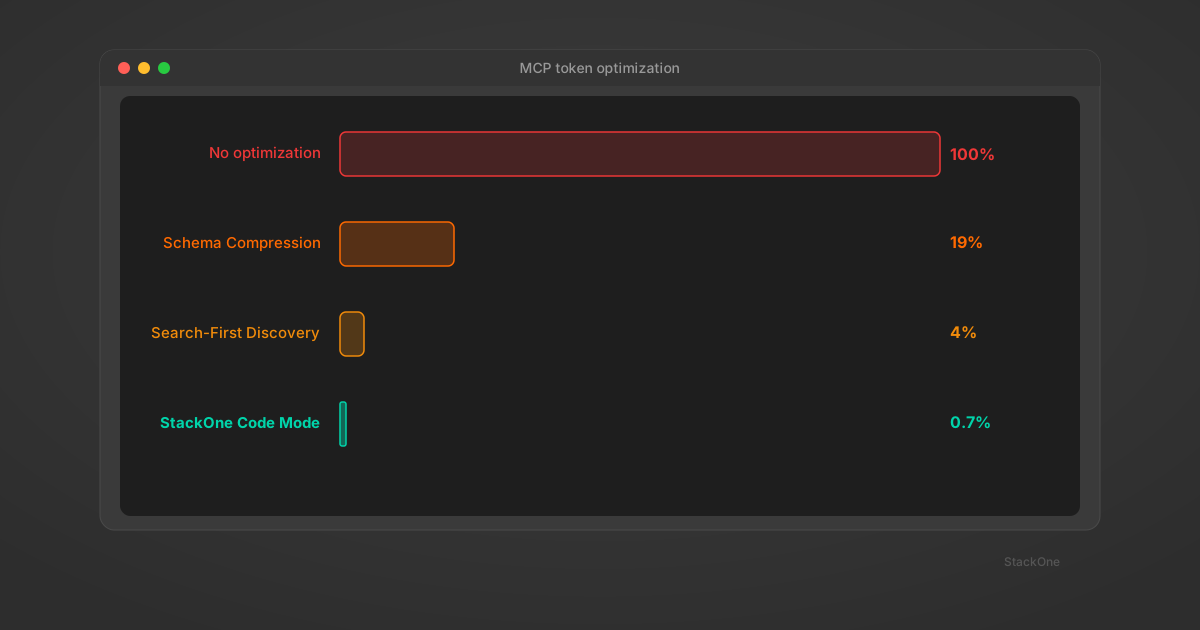
MCP Token Optimization: 4 Approaches to Fix Context Window Bloat
Table of Contents
MCP token optimization addresses two distinct costs that consume an AI agent’s context window: schema bloat and response bloat.
Schema bloat is the token cost of loading tool definitions into context. GitHub’s official MCP server consumes 17,600 tokens of tool definitions per request. Connect multiple servers and you reach 30,000+ tokens of metadata before the agent does any work.
Response bloat is the token cost of tool outputs flowing back through context. A single HRIS API call can return hundreds of thousands of characters of raw JSON. Response bloat often consumes more context than schema bloat but receives less attention.
Most optimization approaches address only one side. This post compares four approaches, what each solves, and the sourced benchmarks behind them.
MCP Schema Compression: Reduce Tool Definition Tokens
MCP schema compression reduces the token cost of tool definitions by stripping descriptions, enums, and nested type documentation while preserving the parameter structure agents need to call the tool.
Atlassian’s mcp-compressor is an open-source proxy that implements this approach. It sits between your MCP servers and the LLM, offering four compression levels that trade description richness for token savings.
GitHub MCP server (94 tools) at each level:
| Level | What’s kept | Tokens | Reduction |
|---|---|---|---|
| None | Full descriptions, enums, types | 17,600 | — |
| Low | Full descriptions preserved | ~3,900 | 78% |
| Medium (default) | First sentence of each description | ~3,300 | 81% |
| High | Tool names + parameter names only | ~2,200 | 88% |
| Max | Only a list_tools() function | ~500 | 97% |
Source: Atlassian, benchmarked on GitHub’s official MCP server.
The tradeoff is accuracy. At high compression, a tool called create_jira_issue has no description. Only parameter names remain. If another tool called create_confluence_page shares the same parameter names (title, description, project), the model has to guess which one creates a Jira task and which creates a Confluence wiki page.
| Solves | Doesn’t solve | |
|---|---|---|
| Schema compression | Schema bloat. Drop-in proxy, no changes to servers or agent logic. | Response bloat. And over-compression hurts tool selection accuracy. |
When to use schema compression: Teams running multiple MCP servers who need low-effort token reduction. Start at medium compression, benchmark tool selection accuracy on real tasks, then tighten where accuracy holds.
MCP Tool Search: On-Demand Schema Discovery
Search-first tool discovery replaces upfront schema loading with on-demand retrieval. The agent starts with 2-3 lightweight meta-tools (search and execute) instead of the full tool catalog. When it needs a capability, it searches by natural language, retrieves only the matching tool definitions, and executes. The full catalog never enters context.
Implementations vary, but the architecture is the same:
- Claude Code Tool Search — activates automatically when tool descriptions exceed 10% of context. Replaces the schema dump with a searchable registry. (Anthropic)
- Speakeasy Dynamic Toolsets — three meta-tools (
search_tools,describe_tools,execute_tool). The agent discovers capabilities conversationally. - StackOne Tool Search —
searchTools()uses semantic search (with local BM25+TF-IDF fallback) across 200+ connectors and 10,000+ actions. The agent sees exactly 2 tools (tool_search+tool_execute) regardless of catalog size.
The numbers from Speakeasy’s benchmarks:
| Scenario | Static toolset | Dynamic toolset | Reduction |
|---|---|---|---|
| Simple task (400 tools) | Over 400,000 tokens | ~6,000 tokens | 98.5% |
| Complex task (400 tools) | Over 400,000 tokens | ~35,000 tokens | 91.2% |
| 200 tools loaded statically | 261,700 tokens | — | Exceeds Claude’s 200K context window |
Source: Speakeasy published benchmarks.
Accuracy improves too. With fewer irrelevant tools in context, models pick the right tool more often:
| Model | Without Tool Search | With Tool Search | Gain | Source |
|---|---|---|---|---|
| Opus 4 | 49% | 74% | +25 percentage points | Anthropic |
| Opus 4.5 | 79.5% | 88.1% | +8.6 percentage points | Anthropic |
| Solves | Doesn’t solve | |
|---|---|---|
| Search-first discovery | Schema bloat. Context stays constant regardless of catalog size. Better tool selection accuracy. | Response bloat. Once a tool executes, the full output flows back. Also adds latency (~50% more round trips per tool call). |
When to use search-first discovery: Catalogs with 50+ tools where loading all definitions upfront is impractical. StackOne uses this pattern in production across 200+ connectors and 10,000+ actions.
MCP Response Filtering: Reduce Tool Output Tokens
MCP response filtering reduces the token cost of tool outputs by requesting only the fields the agent needs, rather than returning full API payloads. Where schema compression and search-first discovery address input tokens, response filtering addresses output tokens.
Consider an HRIS list_employees call that returns 50 fields per record — name, email, SSN, benefits, compensation history, emergency contacts, manager chain. The agent needs 5 fields. The other 45 consume context without contributing to the task.
Field selection trims the response before it hits the agent:
| Illustrative example | |
|---|---|
| Full API response (50 fields × 20 records) | Hundreds of thousands of characters |
| Filtered response (5 fields × 20 records) | ~8,000 characters |
| Reduction | ~95%+ per call |
Note: Exact sizes vary by provider and record count. The pattern is consistent — unfiltered HRIS/CRM responses are an order of magnitude larger than what the agent needs.
MCP servers that support field selection — like GraphQL-based implementations or servers built with response shaping in mind — can apply this filtering server-side before the response reaches the agent.
But filtering doesn’t solve accumulation. Even with 5 fields per call, tokens add up across a multi-step workflow:
- Step 1: ~2K tokens
- Step 2: ~2K tokens
- Step 3: ~3K tokens
- After 5 steps: 12-15K tokens of tool responses in context
This triggers what Stanford researchers call the “lost in the middle” problem — LLM performance degrades by over 20% when relevant information sits in the middle of long context rather than at the beginning or end. Responses from earlier steps may be effectively ignored by the time the agent reaches step 5.
| Solves | Doesn’t solve | |
|---|---|---|
| Response filtering | Response bloat on a per-call basis. Essential hygiene for any MCP server returning raw API payloads. | Accumulation across multi-step workflows. Also requires the MCP server to support field selection — many don’t. |
When to use response filtering: Any integration where tool responses contain more data than the agent needs. Particularly important for HRIS, CRM, and ATS integrations where API responses include dozens of fields per record.
MCP Code Execution: Eliminate Schema and Response Bloat
Code-based execution (also called Code Mode) replaces MCP tool schemas and raw API responses with a single execute_code tool. It is the only approach that addresses both schema bloat and response bloat in one architectural move.
How it works. Instead of loading tool schemas into the agent’s context, a gateway gives the agent a sandboxed code execution environment running in a V8 isolate (for example, on Cloudflare Workers). The agent discovers available APIs, writes code against them, and only the filtered result comes back into context.
The agent does not write code from nothing. The gateway exposes API definitions that the agent inspects before writing code.

At StackOne, Code Mode implements this as a gateway in front of any remote MCP server. The agent uses execute_code to run JavaScript in a V8 isolate, search_tools to discover available functions at runtime, and .__schema() to inspect input parameters before calling. Credentials are encrypted with AES-256-GCM and injected at the transport layer so the LLM never sees them. It works with any MCP-compatible client: Claude Code, Cursor, VS Code, Windsurf, Gemini CLI, and others.
Anthropic and Cloudflare have published similar patterns. Anthropic’s sandbox exposes TypeScript function signatures the agent reads before writing code. Cloudflare’s exposes a pre-resolved OpenAPI spec the agent navigates with a search() tool. The architectural principle is the same across all three.
// StackOne Code Mode — the agent writes this after discovering
// the HRIS API via search_tools and inspecting via .__schema().
// It runs in a V8 sandbox at the edge, not in the agent's context.
employees
  .filter({ dept: 'Engineering' })
  .sortBy('perf_score', 'desc')
  .pick(['name', 'perf_score', 'manager'])
  .take(10)
// 10 rows come back. ~312 characters. The full employee list never enters context.
Sourced benchmarks:
| Implementation | Before | After | Reduction | Source |
|---|---|---|---|---|
| StackOne Code Mode | 55,000+ chars schema | 416 chars | 99.3% | StackOne |
| Anthropic (spreadsheet filtering) | 150,000 tokens | 2,000 tokens | 98.7% | Anthropic engineering blog |
| Cloudflare (2,500 API endpoints → 2 tools) | 1,170,000 tokens | ~1,000 tokens | 99.9% | Cloudflare blog |
Accuracy impact. StackOne benchmarked Code Mode against the MCP Atlas evaluation suite. The results show Code Mode significantly improves agent tool-use accuracy:
| Model | Native MCP | + StackOne Code Mode | Source |
|---|---|---|---|
| Sonnet 4.6 | 42% | 80% | StackOne (MCP Atlas benchmark) |
| Opus 4.6 | 62% | — | StackOne (MCP Atlas benchmark) |
A cheaper model with Code Mode outperforms the flagship model without it. The improvement comes from freeing context for reasoning. When tool schemas and verbose responses no longer consume 90%+ of the context window, the model has more capacity to select the right tool and execute correctly.
What code execution requires:
- A sandboxed runtime. V8 isolates, Cloudflare Workers, or containerized environments with resource limits and monitoring.
- API discoverability. The agent needs to discover available functions and inspect their schemas within the sandbox before writing code.
- Credential injection. Credentials must be injected at the transport layer so the agent’s code can authenticate with APIs without the LLM ever seeing secrets.
| Solves | Doesn’t solve | |
|---|---|---|
| Code-based execution | Both schema bloat and response bloat. Fixed context footprint regardless of API surface. 96-99% token reduction. | Requires sandbox infrastructure. Higher setup complexity than the other three approaches. Agent must generate correct code. |
When to use code-based execution: Workflows where both schema and response bloat contribute to context pressure. Particularly effective for large API surfaces (hundreds of endpoints) and data-heavy connectors like BambooHR, Salesforce, and Workday.
MCP Token Optimization: All 4 Approaches Compared
| Approach | Schema reduction | Response reduction | Setup cost | Best for |
|---|---|---|---|---|
| Schema Compression | 70-97% | None | Low (drop-in proxy) | Quick wins on multi-server setups |
| Search-First Discovery | 91-97% | None | Low-Medium | Large catalogs (50+ tools) |
| Response Filtering | None | ~95% per call | Medium | Large API responses (HRIS, CRM) |
| Code-Based Execution | 98-99% | 97-99% | High | Both problems at scale |
How to Choose an MCP Token Optimization Strategy
When tool schemas consume too much context
- Start with search-first discovery. Claude Code enables this automatically. StackOne’s
getSearchTool()gives the agent 2 tools regardless of catalog size. - Add schema compression as a drop-in proxy for additional reduction.
When tool responses are too large
- Response filtering is essential. Build field selection into your MCP server or use one that supports it.
When both schemas and responses are the problem
- Code-based execution (Code Mode) addresses both in one architectural move. Higher setup cost, but fixed context footprint regardless of API surface.
When combining multiple approaches
- Search-first discovery + response filtering covers most use cases.
- Add Code Mode for the highest-volume workflows where both sides matter.
A common gap is optimizing schema bloat while leaving response bloat unaddressed. Measuring both input and output token costs before selecting an approach avoids solving the smaller problem.
At StackOne, we use search-first discovery across 200+ connectors and 10,000+ actions to keep schema costs constant regardless of catalog size. StackOne Code Mode goes further, eliminating both schema and response bloat through sandboxed code execution at the edge. For a deeper look at context window failure patterns, see six patterns that kill agent context windows.