


Native MCP Servers vs a Tool Gateway: Which Do You Need?
Table of Contents
MCP servers have made connecting AI assistants to business software straightforward and accessible. With software vendors regularly publishing official servers and public registries offering thousands of tools, connecting services like Claude or Cursor takes only a few minutes. As a result, teams naturally begin by adding official servers one by one as immediate needs arise.
Friction typically appears as the deployment grows. These familiar integration challenges re-emerge in a new context: each server requires its own authentication flow and token management, tool quality varies significantly across vendors, and every additional connection consumes more of the model’s context window. Furthermore, troubleshooting issues becomes harder without a centralized logging system. While these factors rarely block an initial pilot, their complexity compounds with every new integration.
At a small scale, direct connections work well, and a team managing just a few official servers rarely requires extra infrastructure. However, as connections accumulate over time, operational bottlenecks predictably surface. The following sections outline both scenarios: when native MCP servers are sufficient and the key indicators that signal it is time to consider a gateway solution.
What is a native MCP server?
A native MCP server is built and maintained by a specific software vendor to expose its application’s features via the Model Context Protocol. It handles authentication, permissions, and logging according to that vendor’s standard framework. Whether provided by an external vendor or built in-house for a proprietary tool, each native server operates identically: one application, one owner, and one dedicated connection per client.
Availability is rarely an issue today, as thousands of AI agent tools have been published in recent months. Furthermore, listing servers in the official MCP Registry has become a standard industry practice. As a result, much of the business software in a typical stack now offers a ready-to-use server. Coverage is broad but not universal, though: many systems, especially older or more specialized ones, still have no native server at all, and in those cases the options are building one in-house or using a layer that supplies the connector.
However, tool quality and capability vary significantly despite protocol standardization. For example, official servers from Notion and Slack expose restricted subsets of their underlying API capabilities. Similarly, Okta offers three distinct servers with varying feature sets, forcing teams to evaluate each option carefully, and Jamf’s server presents the same trade-offs for device management. Ultimately, while MCP standardizes the connection, it does not guarantee feature parity or quality.
When are native MCP servers sufficient?
Direct connections remain the simplest and most efficient approach for small-scale deployments. When a single team manages a few integrations focused primarily on read-only tasks without strict cross-system audit requirements, native servers are maintained by the vendor at no cost to adopt, which is why many teams begin there.
Specifically, direct native connections are suitable under the following conditions:
-
Small, technical teams: When a small team of engineers connects tools like GitHub, Linear, and Notion to an assistant, they can manage authentication and troubleshoot issues directly without requiring additional governance infrastructure.
-
Read-heavy workflows: If agents primarily search, summarize, or retrieve data, the risk of unwanted side effects is minimal. Human users easily spot inaccurate outputs, eliminating the need for complex write-approval workflows.
-
Well-aligned tool capabilities: If official servers fully satisfy your workflow requirements out of the box, you benefit directly from vendor maintenance and API updates without maintaining custom integrations.
-
No detailed audit trail requirements: If no compliance framework yet demands a detailed audit trail, and the team can tolerate retrieving logs from several separate vendor systems whenever something needs tracing, decentralized logging is workable. However, as regulations like the EU AI Act enforce six-month log obligations at the action layer, central auditability becomes essential.
For organizations meeting these criteria, direct connections are a reasonable starting point, and the architecture warrants re-evaluation as the integration footprint expands.
Where a stack of native servers breaks down
As deployments grow, relying solely on native servers introduces six major operational challenges: escalating administrative overhead, reduced tool selection accuracy, fragmented audit logs, inadequate governance for write actions, coverage gaps where no suitable native server exists, and raw query tools that shift reliability onto the model.
1. The administrative multiplication problem
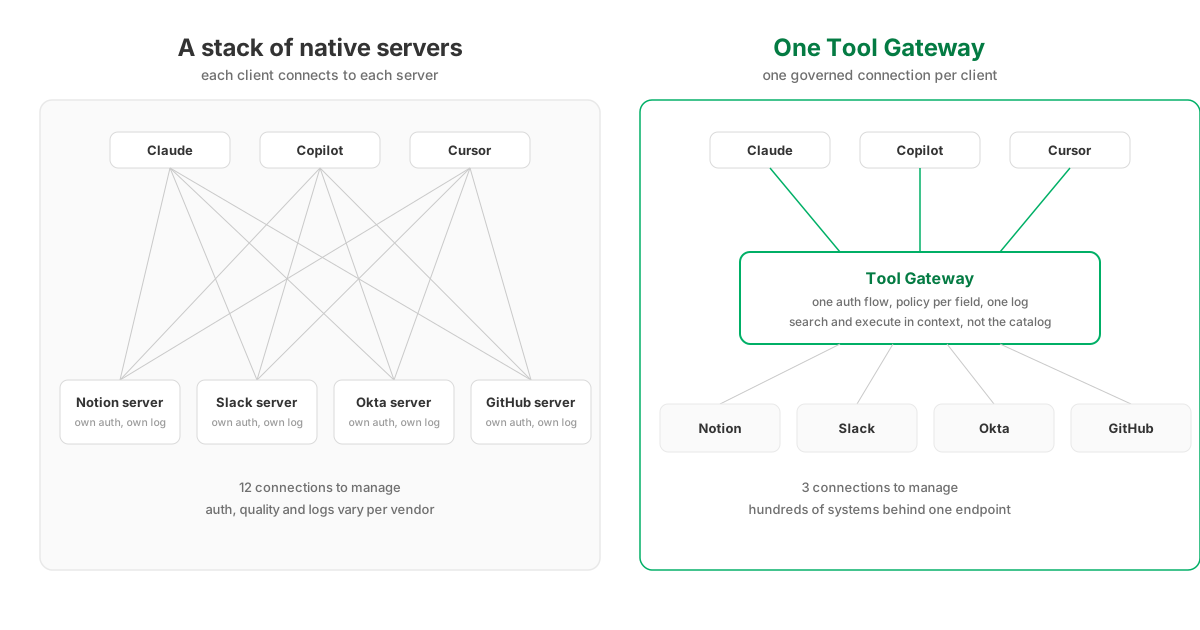
With native servers, every AI client must establish a distinct connection to each server. On Enterprise plans, adding an organization-wide connector requires admin approval, and each employee must authenticate individually. For an organization deploying 12 tools across 200 users, the illustrative arithmetic reaches up to 2,400 separate authentication flows, each renewed whenever tokens expire. Introducing additional clients like Cursor or GitHub Copilot further multiplies this burden. A gateway does not eliminate sign-in to the underlying systems, since each vendor still manages its own authentication; what it eliminates is the multiplication. Accounts are linked once and reused across every client, token refresh is handled in one place, and connector administration drops from one entry per system per client to one entry per client.
2. The tool-selection performance ceiling
Every connected server injects its entire tool definition list into the AI model’s context window on every turn. However, model accuracy degrades noticeably as the available tool count expands. In benchmark evaluations, model selection accuracy drops sharply when dozens of tools are active simultaneously. Connecting a dozen native servers can easily expose hundreds of tools, causing context saturation, higher token costs, and frequent tool-selection errors in previously stable workflows.
3. Fragmented and missing audit logs
Native architectures lack unified observability. Enterprise client logs frequently omit detailed MCP execution data, while vendor servers log activity independently, if at all. Consequently, tracking an agent run across multiple systems (e.g., retrieving data from Workday and updating Salesforce) back to a single user session is nearly impossible. While standard requirements for agent audit trails are well defined, a decentralized stack lacks a central location to record them. This missing audit record often becomes a critical blocker during security and compliance reviews.
4. Limited governance at server boundaries
While the MCP specification standardizes transport and authentication, it does not define execution policies, approval workflows, or logging standards. Even official registry listings do not constitute a full security audit of server endpoints, leaving security vetting to the deploying organization. Furthermore, the permission model on most native servers is the signed-in user’s own access and nothing else: Salesforce’s hosted MCP servers allow no service accounts and no machine-to-machine flows, so every call runs in user context, and narrowing what the agent may do means narrowing what the person may do. Snowflake’s managed MCP server is the notable counter-example, with per-tool grants separate from server access. The identity gap follows from the same design: a background agent on a native server runs on a person’s token, while a Tool Gateway can give the agent an identity of its own, with its own policies and a log entry that names the agent rather than the person whose token it borrowed. And granularity stops at the action: if an HR tool exposes a compensation update, the choice is the whole action or nothing, with no field-level control.
5. The missing or inflexible server
Native coverage ends where the vendor’s roadmap ends. Some systems offer no MCP server at all, while others ship servers with fixed tool sets that omit the fields or actions a workflow requires, leaving a feature request as the only recourse. At that point the options are building and maintaining a custom server in-house, which reintroduces every authentication, logging, and governance question above, or adopting a layer whose connectors can be extended on demand.
6. Raw query tools shift reliability onto the model
Many native servers expose their most capable tool as a raw query interface: the model writes a SOQL, SuiteQL, SQL, or JQL string and the server executes it. The design makes the tool list look small while moving the hard part into the prompt, because the model must produce valid, system-specific query syntax on every call. The failures are measurable and uneven: a malformed filter returns an error the agent may or may not recover from, and a subtly wrong one returns the wrong rows with no error at all. A curated action with typed parameters removes that class of failure.
What is a Tool Gateway?
A Tool Gateway is a managed layer between AI clients and business systems that owns and maintains the connectors itself. It provides a single governed endpoint per client and embeds security directly into the execution path: instead of managing dozens of direct connections, users authenticate once via OAuth, centralized policies govern action execution and field-level permissions, and every request generates a unified audit log identifying the user, assistant, and action performed.
Native MCP servers vs. a Tool Gateway: a direct comparison
| Stack of native servers | Tool Gateway | |
|---|---|---|
| Connections to manage | Clients × servers × users | One endpoint per client |
| Auth | Each vendor’s own flow, per user per server | One OAuth 2.1 flow; users link accounts once |
| What the model reads per turn | Every connected server’s full tool list | Four fixed meta-tools: search, execute, account listing, feedback |
| Governance | The signed-in user’s own permissions, per vendor | Tool Policies: action, field and value rules, per user, group or agent |
| Record of agent actions | Scattered across vendors, mostly absent | One log naming user, assistant, action and outcome |
| Maintenance | Vendor’s schedule, server by server | The gateway’s job across the catalog |
| Cost to start | Free | A vendor relationship |
Native servers require no initial business case, and adopting a Tool Gateway becomes clearly justified as soon as administrative overhead, tool inaccuracy, auditing gaps, or missing coverage become operational bottlenecks.
StackOne provides a practical implementation of this architecture. A single MCP endpoint grants access to 590+ connectors and 36,000+ actions without overwhelming the model’s context. Exposing a search and execute pair instead of the full catalog held 91.6% first-try accuracy on StackOne’s S1 Search Bench while cutting average tokens by 78%, measured on tool-heavy actions. Tool Policies govern the call itself: deny tools, mask fields, refuse writes to specific fields, constrain argument values, redact PII, and apply semantic rules, per user, group or agent, with a matching deny overriding any allow and a monitor mode to observe a rule’s effect for a week before enforcing it. Additionally, comprehensive request logging captures end-to-end trace details across all systems. If an official server is missing or incomplete, custom connectors can be built and deployed rapidly.
In short, native servers are where many teams begin because the vendor maintains them, while a Tool Gateway provides the controls that enterprise deployments come to need.
Is a Tool Gateway the same as an MCP gateway?
No. Clarifying these terms is important because they address different architectural layers. An MCP gateway primarily routes traffic to existing native servers and inherits their limitations. In contrast, a Tool Gateway manages the underlying API integrations directly, extending governance to the individual action and field levels. (AI gateways represent a separate category altogether, managing traffic between client applications and LLM providers.)
For a detailed breakdown, see our comparison of MCP gateways versus Tool Gateways and our analysis of why AI gateways operate at a different layer. If your primary challenges involve integration coverage, granular access control, or unified audit logs, a basic routing proxy will not solve the problem.
How to decide
The decision follows from the pressures above. These questions indicate whether they have arrived:
-
Have compliance or security teams requested centralized audit logs of AI agent actions?
-
Are AI agents executing write actions directly to critical systems of record?
-
Does the total number of connected tools exceed what models can evaluate reliably?
-
Has managing integration connections and authentication credentials become a recurring IT workload?
-
Do your core agent workflows routinely span multiple software systems in a single execution?
Recommendation: If you answered “yes” to one question or none, direct native connections remain appropriate; re-evaluate quarterly. If you answered “yes” to 2 questions, begin evaluating gateway options. If you answered “yes” to 3 or more questions, transitioning to a Tool Gateway will yield immediate operational and security benefits.
The greatest operational risk lies in unmanaged growth: dozens of uninventoried native connections operate without central visibility. With AI agent tools already widely present across enterprise PCs, establishing a deliberate integration strategy prevents security blind spots before they impact production.
Facts about vendor products and documentation verified on 12 October 2026. Benchmark figures link to their primary sources.