


 Alex Cox · · 6 min read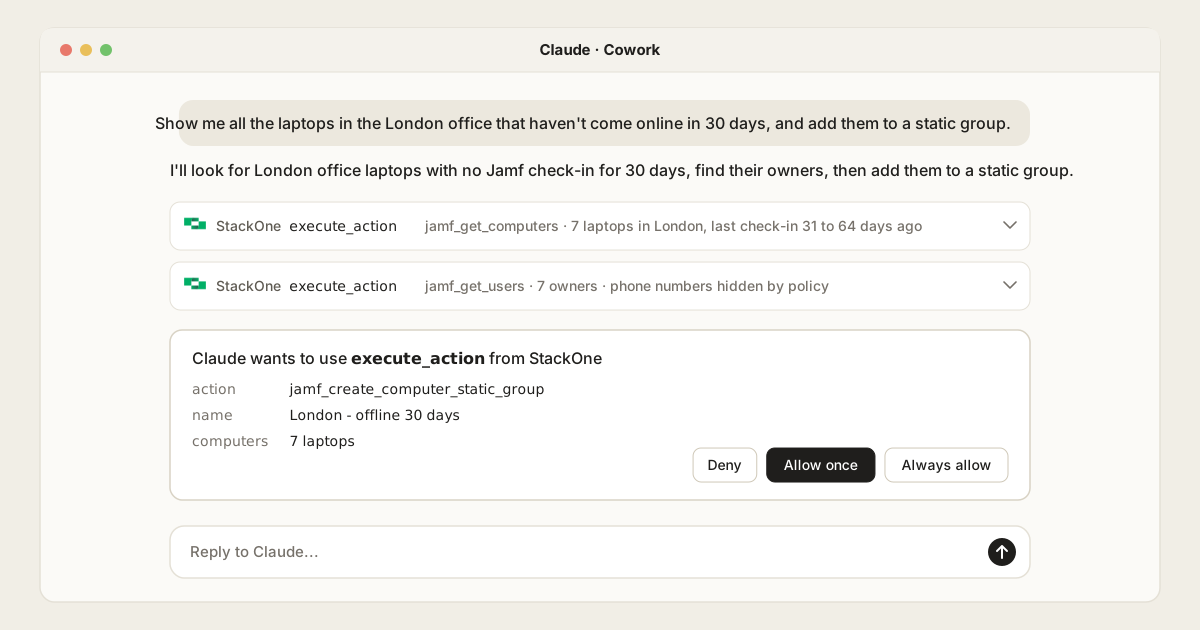
Connect Jamf to Claude Cowork and Claude Code: Governed Device Management and IT Workflows
Table of Contents
Claude has no Jamf connector, so you connect Jamf Pro to Claude through an MCP server, which gives Claude tools that call the Jamf API. Jamf’s own open-source servers run on each admin’s computer and only reach Jamf. To also check your identity provider and HR system, set rules for each person, keep device secrets out of Claude and log every call in one place, connect Claude to Jamf through a Tool Gateway such as StackOne.
This guide to the Jamf Claude integration is for IT teams who run Jamf Pro and want to manage it from Claude Cowork or Claude Code. It compares the four ways to connect them today.
In this post:
- Why connect Claude to Jamf: the ad hoc device work Claude suits
- How to connect Jamf to Claude: four options
- Jamf MCP options compared: what each covers and how each is controlled
- When you don’t need a Tool Gateway for Jamf: where Jamf’s own options are enough
- How it works with StackOne: setup in Cowork and Claude Code
Why connect Claude to Jamf
Jamf Pro can automate the routine work. Smart groups sort devices as their inventory changes, policies and compliance benchmarks enforce settings, and Jamf Routines respond to events on their own. Most teams aren’t there yet: in Automox’s 2026 State of Endpoint Management, only 6% said they’d reached full automation, and 43% spent 10 or more hours a week on manual device management tasks.
Even fully automated teams get requests no policy covers. Which London laptops haven’t checked in for a month, and do their owners still work here? Why did this profile not land on the finance team’s laptops? Which Macs are still on last year’s macOS? The answers sit across inventory, groups, policies and MDM command history, and sometimes beyond Jamf.
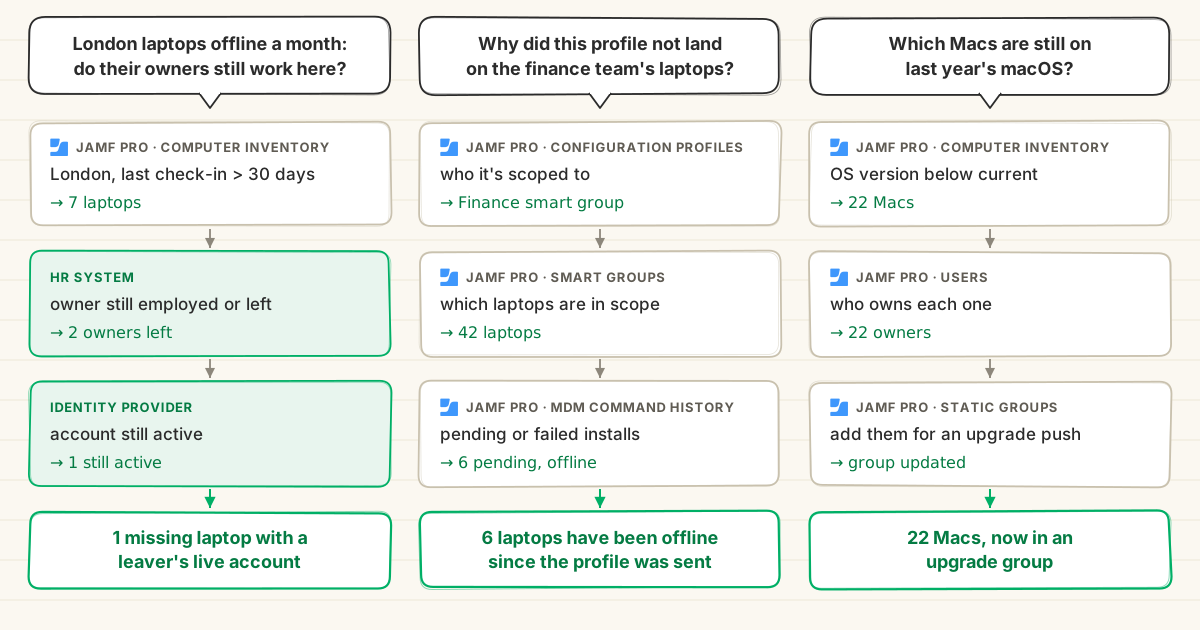
Claude Cowork and Claude Code handle these well. The admin describes what they need, Claude runs the lookups, and any change waits for the admin’s approval.
The first request is the one that matters for security. A Mac that hasn’t checked in for a month gets no patches, profiles or OS updates until it does, and Jamf can’t confirm it’s still encrypted. If its owner has left and their account still works, that’s a missing laptop with a live sign-in.
A smart group can list the stale Macs, but checking each owner means the HR system and the identity provider, by hand. So the check tends to wait for the next audit. With Claude, an admin asks the whole question and has the answer in minutes, so it can run every week. An agent can run it on a schedule and bring the admin only the leavers: see connecting Jamf to Claude Managed Agents.
That reach beyond Jamf is the deciding factor when you pick how to connect.
How to connect Jamf to Claude: four options
There’s no Jamf connector in Claude’s directory today. Jamf hosts an MCP server for its developer documentation, which helps with scripts and API calls. It includes a tool for sending API requests, but today it only accepts Jamf’s placeholder server address, so it can’t reach your own Jamf instance. To manage Jamf itself from Claude, you have four options.
Community Jamf MCP servers
Several Jamf admins have shared MCP servers on GitHub. They mean giving a Jamf API secret to code nobody is accountable for, with no vendor to fix it or issue a security advisory. For a system that can wipe devices, that’s hard to justify.
Jamf MCP Hub
Jamf’s MCP Hub is an open-source server, still in beta, published in Jamf’s Jamf Concepts organisation in February. It runs on an admin’s computer and covers Jamf Pro, Jamf Protect and Jamf Security Cloud through 50 tools.
It can read inventory, update device and user records, create groups and extension attributes, and set up App Installer deployments. Responses over 100 KB are replaced with a note asking Claude to narrow the query. It can’t lock, wipe or unmanage a device, or send MDM commands.
Its gaps show once more than one admin uses it:
- One API client for everyone. Every call runs with the privileges of the Jamf API client in its config, whoever is asking.
- No confirmation step. Writes run as soon as Claude calls them, unless Claude itself asks first.
- A broad set of privileges. Its setup lists 43 Jamf privileges, including creating new API roles and clients.
- Secrets on laptops. The API client secret sits in plain text in the Claude config file.
- Every copy needs patching. It’s a 0.1 beta with no releases, each admin runs their own copy, and Claude’s admin controls don’t apply to it.
The Jamf CLI MCP server
Jamf CLI, maintained by Jamf engineers, added an MCP server in June. It also runs locally, keeps its credentials in the macOS Keychain, and covers Jamf Pro, Protect, School and the Jamf Platform API.
It’s the only Jamf option that can lock, wipe and unmanage devices. It exposes three tools, one of which runs any of its 1,200 or more commands. That shapes what you can control:
- No rules per command. Every command runs with the CLI profile’s full privileges, so the only way to stop a wipe is to deny it by hand when Claude asks.
- Claude confirms its own wipes. Destructive commands need a
--yesflag, which the model adds itself. - Secrets reach Claude. Its docs say device secrets such as the local admin password and FileVault recovery key are shown.
A Tool Gateway
A Tool Gateway is one MCP server for all your systems, with the same rules on every call. StackOne’s Jamf connector has 62 actions across computers, mobile devices, groups, policies, scripts, MDM commands and Jamf Pro accounts.
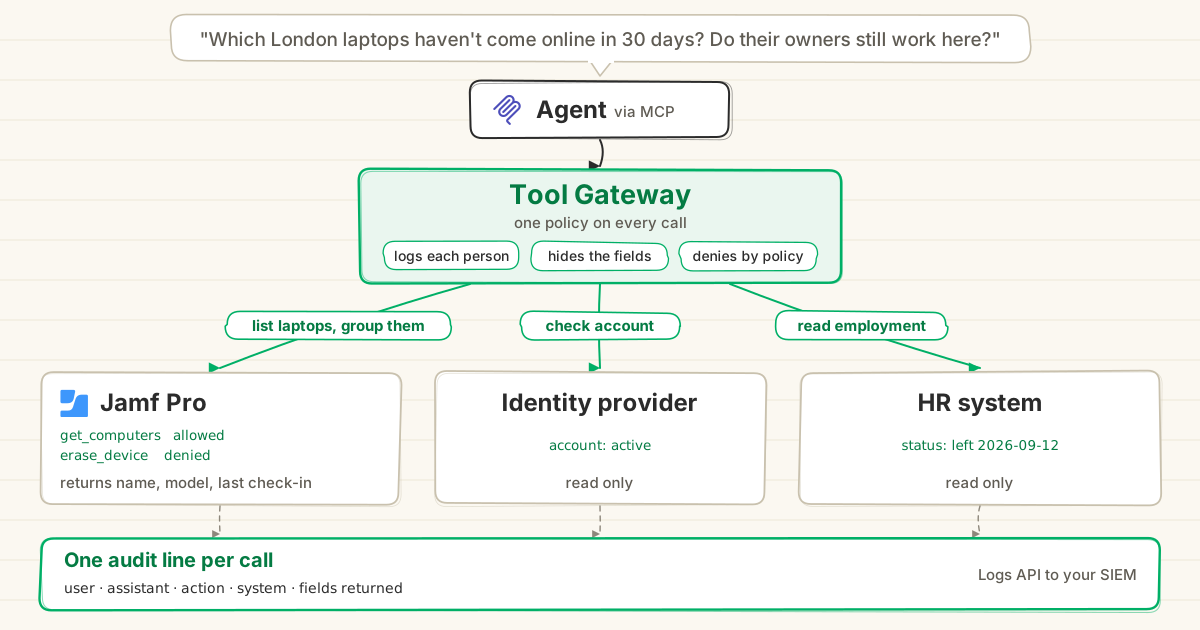
- A Jamf admin creates one Jamf Pro API client, and people never see its secret. Every call is still logged against the person who asked.
- Tool Policies set what Claude can do in Jamf for each user, group or Jamf instance, down to single fields. A blocked action never reaches Jamf.
- Prompt Injection Guard screens Jamf responses before Claude reads them, because device names, script notes and extension attributes are free text.
- Every call lands in one action log that names the person who asked, where Jamf’s own logs only show the API client. You can send it to your SIEM.
Here’s what Tool Policies look like for a Jamf team:
| Rule | How it’s set in StackOne |
|---|---|
| Contractors can’t delete anything | Every Delete action and Erase Mobile Device blocked for the Contractors group, synced from your identity provider |
| Only the service desk wipes devices | Erase Mobile Device blocked for everyone outside the service desk group |
| Production Jamf is read-only | Create, update and delete actions blocked on the production instance, but not on your test instance |
| No credentials from scripts reach Claude | A semantic rule asks “Does this field contain a password, API key or token?” and masks it in Get Script responses |
| FileVault details stay hidden | A field rule masks FileVault fields in Get Computer FileVault responses |
Each rule can run in Monitor first, so the log shows what it would have blocked before it’s enforced.
StackOne’s connector doesn’t cover Jamf Protect, local admin passwords or OS update plans yet. Jamf’s API does, so the AI Connector Builder can add them.
Jamf CLI vs StackOne, request by request
Jamf CLI is the most capable of Jamf’s servers, so the comparison below uses it.
| Request | Jamf CLI MCP server | StackOne Tool Gateway |
|---|---|---|
| “Show me the London laptops that haven’t come online in 30 days” | Supported | Supported |
| Wipe a lost iPhone | Supported | Supported |
| Only the service desk can wipe devices | Same privileges for everyone using it | A policy blocks everyone else |
| Also check whether the owner still works here | Jamf only | Same endpoint, same policies |
| “Show me every change Claude made last week” | Jamf logs show the API client | One log naming each person |
| Manage Jamf School or Jamf Protect | Supported | Can be added with the AI Connector Builder |
| Set up once for the whole team | Each admin installs it locally | One URL in Claude |
Jamf MCP options compared
What each option can do in Jamf, from the Jamf MCP Hub tool list, the Jamf CLI README and StackOne’s connector page. Community servers are left out because each one differs. All three read computer and mobile inventory, update device and user records, and manage smart and static groups.
| Jamf area | MCP Hub (beta) | Jamf CLI | StackOne |
|---|---|---|---|
| Policies, scripts and profiles | Read only | Yes | Yes, profile writes via Connector Builder |
| Lock, wipe and unmanage | No | Yes | Mobile wipe, MDM commands |
| FileVault status | Inventory and smart groups | Yes | Yes |
| Local admin passwords | No | Yes | Via Connector Builder |
| OS update plans | No | Yes | Via Connector Builder |
| Accounts and API roles | Creates API roles and clients | Yes | Read, writes via Connector Builder |
| Jamf Protect | Read only | Yes | Via Connector Builder |
| Jamf School | No | Yes | Via Connector Builder |
“Via Connector Builder” means Jamf’s APIs support it but StackOne’s Jamf connector doesn’t include it today. You can add it with the AI Connector Builder, which builds connectors for any API or extends existing ones with new actions.
And how each one is run and governed:
| Community | MCP Hub (beta) | Jamf CLI | StackOne | |
|---|---|---|---|---|
| Hosting | You | Admin’s computer | Admin’s computer | StackOne |
| Runs as | Your secret | One API client | One CLI profile | One API client, logged per person |
| Rules per person | Varies | No | No | Yes |
| Destructive actions | Varies | Not available | Model adds --yes | Blocked by policy |
| Device secrets | Varies | Not documented | Shows admin passwords | Hidden by policy |
| Injection screening | Varies | Not documented | Not documented | Yes |
| Systems covered | Jamf | Jamf Pro, Protect, Security Cloud | Jamf Pro, Protect, School | Jamf plus identity, HR, CRM and more |
| Audit | Depends on the server | Jamf logs, by API client | Jamf logs, by API client | One log across every system |
When you don’t need a Tool Gateway for Jamf
A Tool Gateway pays off when several people use Claude on Jamf, or when requests reach other systems. Without either, Jamf’s own options can be enough:
- One admin, Jamf only, in Claude Code. Jamf CLI covers more Jamf commands than StackOne today, including Jamf School, Jamf Protect and local admin passwords, and the admin approves each call.
- Questions about the Jamf API. Jamf’s documentation MCP server helps write scripts and API calls without touching your fleet.
- Responses that never vary. Smart groups, policies and Jamf Routines handle them without Claude.
How it works with StackOne
StackOne connects to Claude through one URL, https://mcp.stackone.com/mcp, and to Jamf through one API client.
-
Add StackOne to Claude. For Claude Cowork, an Owner goes to Organization settings, then Connectors, clicks Add, then Custom, then Web, and enters the StackOne URL. Each person then connects it from Customize, then Connectors (guide).
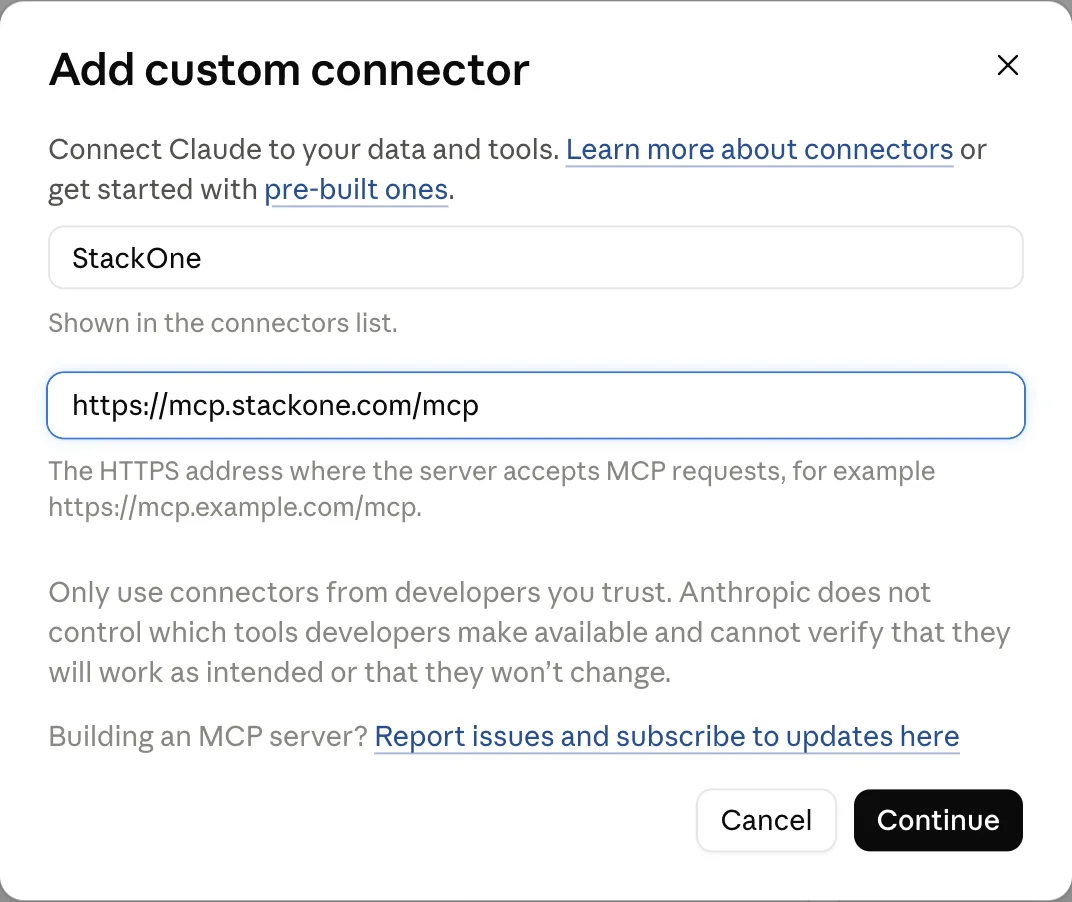
For Claude Code, each admin adds it from the terminal, then signs in by running
/mcpin Claude Code and choosing stackone (guide):claude mcp add --transport http --scope user stackone https://mcp.stackone.com/mcp # Added HTTP MCP server stackone with URL: https://mcp.stackone.com/mcp to user config -
Connect Jamf. A Jamf admin creates a Jamf Pro API client with the privileges the team needs and adds it to StackOne once (guide). Each person then signs in to StackOne and picks which Jamf actions Claude can use.
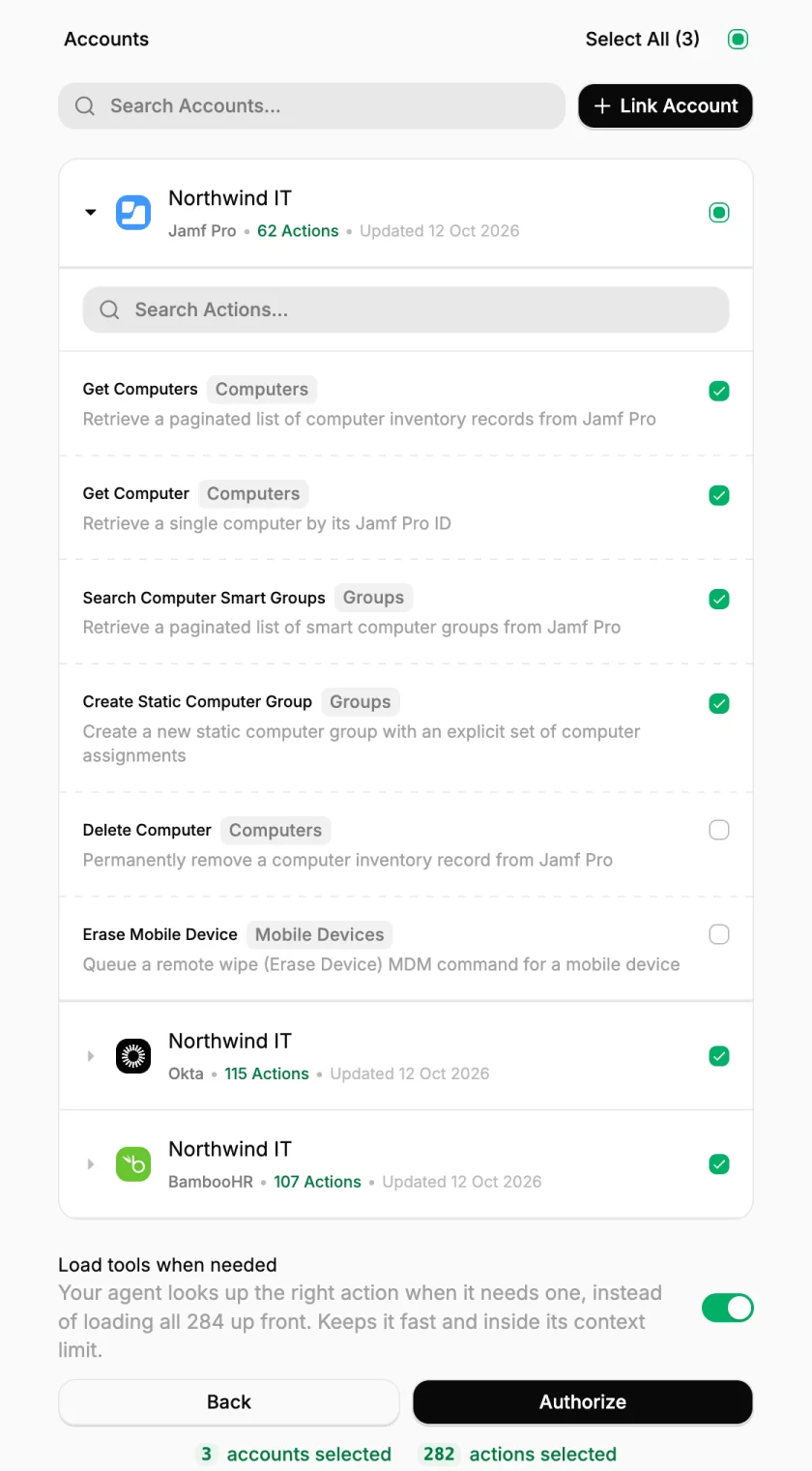
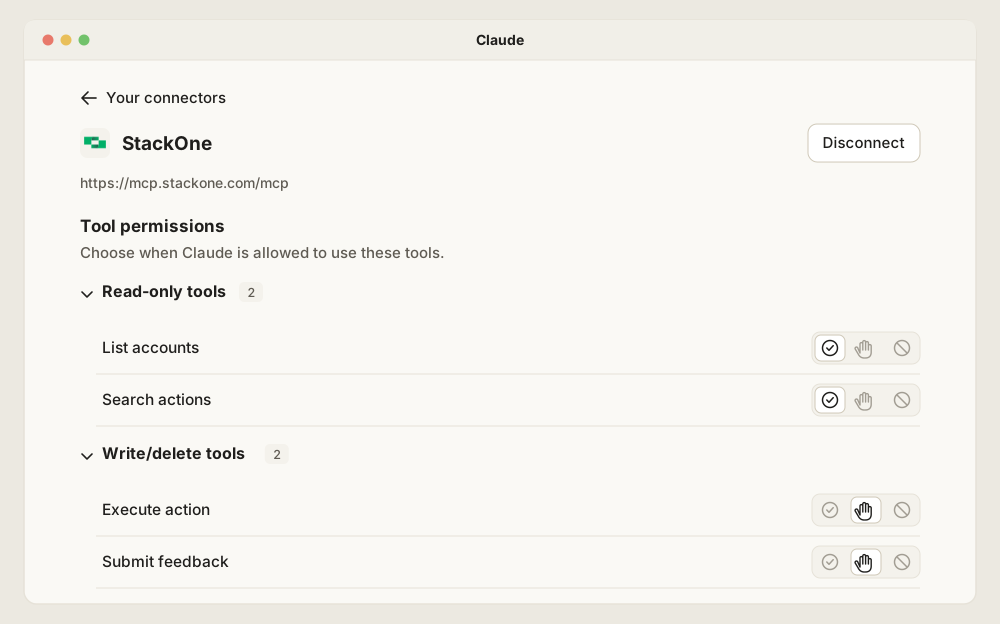
Claude then sees StackOne as four tools, with every Jamf action running through Execute action. So the per-action rules live in StackOne: the actions picked here, and Tool Policies per user or group.
-
Set Tool Policies in StackOne. Decide which actions each user or group can use and which fields stay hidden, and run new rules in Monitor before enforcing them.
Now that request runs under the admin’s own StackOne account. Claude finds the seven laptops and their owners with phone numbers hidden, proposes the new group for approval, and logs every call against the admin. If it also needs to know whether those owners still work here, the same connection reaches the HR system and the identity provider.
To see how a Tool Gateway differs from an MCP gateway that routes to existing servers, read MCP Gateway vs Tool Gateway.
Frequently Asked Questions
How can an organisation connect Jamf to Claude for governed device-management and IT workflows?
Does Claude have a native Jamf connector?
Doesn't Jamf's AI Assistant already do this?
How do I connect Jamf to Claude Cowork and Claude Code?
https://mcp.stackone.com/mcp, as a custom connector in Cowork, or each admin adds it to Claude Code with claude mcp add, and each person picks the Jamf actions Claude may use. StackOne's guides cover Claude Cowork and Claude Code.