


 Romain Sestier · · 13 min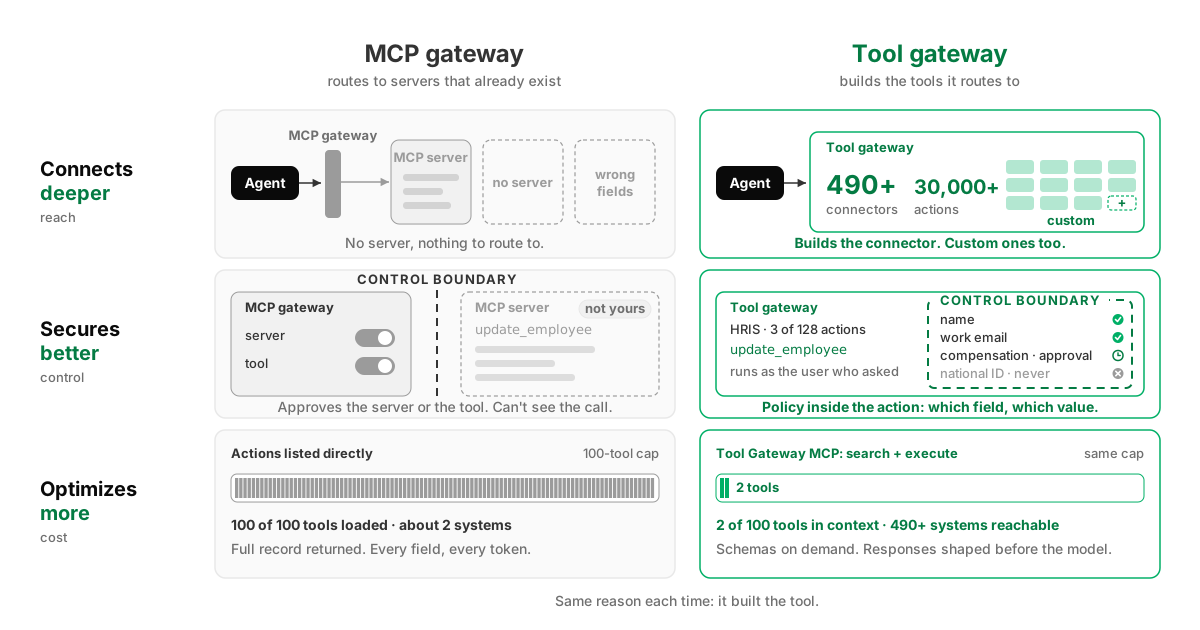
MCP Gateway vs Tool Gateway: Which One Is Best to Connect AI to Business Systems Securely and Efficiently?
Table of Contents
Every IT leader running an AI rollout hits the same wall.
The pilot worked. Two hundred people have Claude or Copilot. Someone connects the CRM, someone else connects the ticketing system, and colleagues start asking for the same access. Then the first request comes in that isn’t a question. Onboard this employee. Close this ticket. Update this record in Workday.
That is the moment the rollout stops being a chat deployment and becomes a systems deployment. You don’t want an agent that reads your access policy and tells you how to onboard someone. You want it to provision the access, in every system, before you’re back from coffee. That is where the value is, and where the risk and the bill are.
Three things decide whether a pilot becomes a company-wide rollout: what the agent can reach, what IT can control, and what each task costs. A pilot puts none of them under pressure. Everyone connecting at once does.
“Connecting” hides two different jobs. Plugging an assistant into a gateway is the easy one: one URL, an OAuth screen, done. That is the part everyone sells, and the part the MCP gateway category is named after. Reaching a system of record is the other job, and an MCP gateway never claimed it. It routes to MCP servers that already exist. If the server for your system doesn’t exist, or exists and returns the wrong thing, there is nothing to route to, and you are back to building and maintaining an MCP server yourself, per system, forever.
A tool gateway builds the tools. That is the whole difference, and it is why a tool gateway connects deeper, secures better, and optimizes more than an MCP gateway.
What is an MCP gateway?
An MCP gateway is a proxy layer between AI agents and the MCP servers they call. It gives every client one endpoint, authenticates the agent, routes each tool call to the right server, allows or blocks servers and tools, and logs what passes through. The servers behind it were built by someone else.
It is middleware you plug your MCP servers into: one place to sign in, one policy, one ledger. Every MCP server has an API behind it doing the work, which is why MCP doesn’t replace APIs. An MCP gateway is a wrapper around the wrappers.
What does an MCP gateway actually control?
An MCP gateway controls access, not behavior. It decides which agents reach which servers and which tools are exposed, and it records that a call happened. What the tool does with a request, what data comes back, and how much of it reaches the model’s context are decided upstream, by a server the gateway doesn’t own.
The controls a pass-through gateway gives you: server on or off, tool on or off, a rate limit, a credential vault. Every one of them lives at the boundary of the server, and that was fine when agents mostly read. Agents write now. The request is “update the compensation field,” so the question IT has to answer is whether this agent may write this value into this field for this person. A pass-through gateway cannot ask that, because the action was designed by someone else and the gateway only watches it go by. Same on the way back: if the server returns the full employee record when the agent asked for a department, you pay for every token of it. And the audit trail records traffic, not decisions. You will know a call went through at 14:02, not which field it touched, because the gateway never knew either.
What is a tool gateway?
A tool gateway is integration middleware between AI agents and the business systems they act on. It builds and maintains each connector itself, authenticates every user to the system behind it, governs what an action may touch down to the individual field, and shapes what comes back before it reaches the model.
The category is new. We named it, and we ship it as the Tool Gateway. Everything an MCP gateway can’t do traces back to one fact: it didn’t write the tool. A tool gateway did. That is why it connects deeper, secures better, and optimizes more than an MCP gateway.
Connects deeper. A router needs a server to route to. A tool gateway builds the server, so a system with no connector, or a connector that returns the wrong fields, is a build or a fix rather than a dead end.
Secures better. Policy lives inside the action, because the tool gateway wrote the action: which agent, for which user, may run which action on which fields with which values, with every call logged against the person and the assistant they used.
Optimizes more. The tool list never reaches the model and the response is shaped before it does, because the connector decides both.
The two are not rivals. Every tool gateway does the MCP gateway job: one endpoint, auth and policy on every call, a log of everything that passed. Not every MCP gateway is a tool gateway. The doorway is in there either way, and the doorway was never the hard part.
MCP gateway vs tool gateway: head to head
| Responsibility | MCP gateway | Tool gateway |
|---|---|---|
| What it controls | The connection: which agents reach which MCP servers | The action: what an agent may do, see and write inside a system |
| Connector ownership | No. Fronts MCP servers that already exist, yours or a vendor’s | Yes. Builds and maintains every connector, custom ones included, on one engine |
| Depth of governance | Server and tool on/off, credentials, rate limits | Action, field and value, per agent, per team, per linked account |
| Token control | Curates which tools are approved; every one of them still loads into the window | Two tools in context, schemas fetched on demand, responses shaped before the model |
| Audit trail | Traffic log: which call, when, to which server | Per-call record naming user and assistant: requested, allowed, returned |
Tool gateway versus iPaaS, and tool gateway versus AI gateway, each get their own comparison; this post stays on the two that get confused for each other.
MCP gateway vs tool gateway: which is best for connectivity?
A tool gateway. An MCP gateway routes to MCP servers that already exist, so its reach ends where the market’s servers end. A tool gateway builds and maintains the connectors itself, so a system with no server, or a server that returns the wrong fields, is a build or a fix rather than a dead end.
A healthcare company with about 200 employees gave every one of them a Claude license, and within weeks colleagues were seeing each other’s connectors and asking for the same access. Then they found that most of the MCP servers they needed didn’t exist, and the ones that did didn’t do what they wanted. Their Jamf server, for device management, didn’t return the data their workflow needed. The Jamf API did.
No MCP gateway closes that gap at any price, because building the tool is not in the category’s job. A tool gateway builds it. They changed the Jamf connector themselves, and it ran on the same engine as the 490+ connectors and 30,000+ actions StackOne maintains as the underlying APIs change. Custom connectors go down to which fields they may return, and the same tools fire outside a chat session through Agent Webhooks, so an agent can act on an event with nobody typing.
MCP gateway vs tool gateway: which is best for governance and security?
A tool gateway. An MCP gateway can approve a server or a tool, and its control stops at the server’s boundary. A tool gateway wrote the action, so it decides which agent, acting for which user, may run which action on which fields with which values, holds writes for sign-off, scans responses for prompt injection, and logs every decision.
Inheriting the user’s permissions stopped being sufficient for two reasons. The user doesn’t type the instructions the agent follows; content does, and a ticket body or a PDF in a shared drive can carry instructions an agent with write access will follow unless something in between checks. And those permissions were designed for a person clicking through a UI one record at a time. An agent with the same permissions can update a thousand records in the time it takes to read this paragraph.
So the controls live inside the call. Take an HR system with 128 actions. Enable three of them for the onboarding agent. Then decide field by field what a write may touch: names and work email allowed, compensation and manager gated behind a human approval, national ID never written. Every action carries an MCP annotation saying whether it reads or modifies data, so reads auto-approve and writes and deletes are held for sign-off. Every call runs as the person who asked, and the log names the verified user and the assistant they asked from. An agent is given strictly less than the employee behind it.
Two more layers sit around that. Tool responses are scanned for injected instructions before they reach the model, by a purpose-built open-source model that runs on CPU in under 10ms. And each user links their own account through OAuth, so 500 users means 500 isolated credential sets, not one service account with everyone’s reach. StackOne holds and refreshes the token; the client never sees a provider credential. Groups and profiles give different teams different tool sets, and SCIM keeps entitlements in step with your directory.
SOC 2 Type II, and support for GDPR, HIPAA and CCPA obligations including field filtering and PII anonymization before data reaches the model, are the entry ticket for a regulated buyer. They certify the vendor. The controls above certify the rollout.
A prospect put it as parenting. You want the kid free to operate, experiment, and fail a bit, and you don’t want it able to hurt itself.
MCP gateway vs tool gateway: which is best for observability?
A tool gateway. An MCP gateway logs traffic: which call, when, to which server. A tool gateway runs the call, so its record names the verified user, the originating assistant, the action, what was allowed, what came back and what it cost. Without that you cannot pass an audit or tell whether the rollout is working.
The healthcare company above said it flatly: handing 200 people raw MCP access to clinical and device systems with no logging was unthinkable, a posture they could not defend if anything went wrong. When an auditor asks what touched a patient record, “a call went to the Jamf server at 14:02” is not an answer. “j.okafor, via Claude, ran an employee update, compensation field held for approval” is. The record names the person and the origin, at the action level, and exports to wherever your SIEM lives.
The enablement team wants adoption. We don’t do prompt analytics. We do tool-call analytics, and tool calls show which teams are completing workflows in the CRM, the ERP, the clinical software, and which are burning tokens on nothing. That is what you target training with, and what proves the rollout to the CFO.
A forwarded call leaves a receipt. An owned call leaves a record.
MCP gateway vs tool gateway: which is best for token cost optimization?
A tool gateway. An MCP gateway curates which tools are approved, every approved tool still loads into the context window, and it forwards whatever the server returns. A tool gateway keeps the catalog out of context with a search tool and an execute tool, fetches schemas on demand, and shapes each response before the model reads it.
Cost is the blocker that arrives last and stays longest. Routing a lead: call it $5. Resolving a ticket: call it $8. Those are illustrative numbers, not a benchmark. Somewhere between $8 a ticket and 80 cents a ticket the automation flips from an experiment into something you run at scale, and most teams have no levers to pull to get there. The healthcare company wasn’t feeling it at 200 users. They wanted the levers in place before usage went up ten times.
We’re at the stone age of AI. Most agents are built the naive way: load every tool, return every field, let the model sort it out. That’s fine. It’s how you get fire. Nobody has optimized the fire yet.
The first lever is the tool list. Most assistants cap one MCP server at around 100 tools. List your actions directly and that budget buys about two systems; the HR platform above spends 128 on its own. An MCP gateway can curate which tools are approved, but every one it approves still loads into the window, so the cap stays a cap. StackOne spends two of the hundred on a search-and-execute pair and fetches a schema only when the agent has picked an action, which leaves 490+ systems reachable through one server. Search picks the right action first try 91.6% of the time on S1 Search Bench, and reasoning holds as you add connectors because the tool list never reaches the model.
The second lever is the response. Because the connector is ours, it can search, filter, sort and aggregate before anything reaches the model. Deep Query does that work outside the prompt, so “every invoice more than 60 days past due” returns as the 23 matching rows, not the ledger. Plain shaping does the rest: drop the fields, cap the list, return what the action was designed to return. That is the difference between a connector built for an agent and a wrapper around an endpoint, and it is the same reason unified APIs break for agents.
So cost tracks the task rather than the size of your catalog. The cheapest token is the one that never reaches the context window.
Do I need an MCP gateway or a tool gateway?
If one developer is connecting a handful of MCP servers to their own agent, neither. You need a gateway the first time security reviews an agent’s actions, someone asks which tools the finance team’s agent can see, or a user asks IT to link an account. If the agent writes to a system of record, you need a tool gateway.
If you want deterministic API automations, when a form is submitted create a row and send an email, buy an iPaaS. We’re a really bad tool for that. And they’re a really bad tool for agent governance and AI rollout. Pretending one category covers the other is how you end up buying twice.
If you run self-built MCP servers and your users are engineers, an open-source pass-through gateway may be enough for now.
If you are the IT or AI lead rolling agents out to a workforce, and those agents will act on Workday, Salesforce, ServiceNow, or the ERP, a tool gateway is the category you are buying, whatever the vendor calls it. We compared twelve gateways, ours included, on exactly these lines.
How do you choose an MCP gateway for a regulated industry?
Ask what the gateway can enforce inside a call, not just at the door. For healthcare, financial services, or the public sector: SOC 2 Type II as the baseline, with HIPAA, GDPR and CCPA obligations covered; per-user credentials with tenant isolation; action- and field-level scoping; an audit trail that names the user and the assistant, exportable to your SIEM; data residency you choose; a self-hosted option if policy requires it.
Buy it the way you buy any enterprise middleware: on what it enforces and where the record lives. Six questions for the RFP:
- Who owns the connector, and can we change what it returns?
- Can we block a single field, or a single value, for a single team?
- Where does the audit log live, and does it record decisions or just traffic?
- Does each user link their own account, and are tenants isolated in the data model?
- What scans tool responses for injected instructions before the model reads them?
- How many tools reach the model’s context when we connect 50 systems, and who controls that?
A vendor that answers yes to the first two owns the connector. A vendor that can’t is a proxy, however it is positioned. Nothing wrong with a proxy. Just know which one you are buying.
Everyone in this market will tell you they connect to everything. Plugging in was the easy part. Reaching the system was the product.
That is what a tool gateway is for. It connects deeper, secures better, and optimizes more than an MCP gateway, and the reason is the same each time: it built the tool. The connector that doesn’t exist yet gets built, and the one that returns the wrong fields gets fixed. Policy sits inside an action we wrote, and the log names who asked and from where. The model sees two tools, not the catalog, and a response shaped for it. One platform does all three and the routing job too, from one URL. “MCP gateway” was never going to be enough of a name for it.