
 Guillaume Lebedel · · 8 min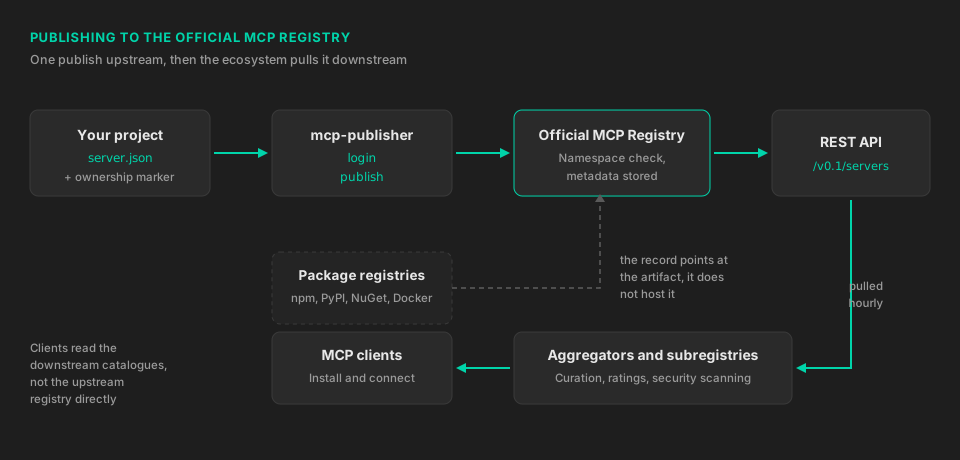
The MCP Registry: What It Is and How to Get Listed
Table of Contents
Publishing an MCP server used to end at a README. There was a protocol for talking to the server and no agreed way for anyone to find it, so discovery happened through a scattering of community directories, each with its own submission form and its own metadata quirks. The official MCP Registry closes that gap, and it now holds just over 23,700 servers at their latest published version, counted by paging through its own public API on 20 August 2026.
If you run an MCP server as a product surface, this is the one place worth publishing to, because most other catalogues read from it.
What the MCP Registry actually stores
The registry at registry.modelcontextprotocol.io is a metadata catalogue, not a host. It keeps one record per server, described by a server.json file: the server’s name, a short description, a version, and either the package it ships as or the URL it runs at.
The code lives where it always did. npm, PyPI, NuGet, Docker Hub and GitHub Releases host the artifacts, and the registry record points at them. For a remote server there is no artifact at all, just an HTTPS endpoint the client connects to.
It is backed by Anthropic, GitHub, Microsoft and PulseMCP, and both the service and its OpenAPI specification are open source.
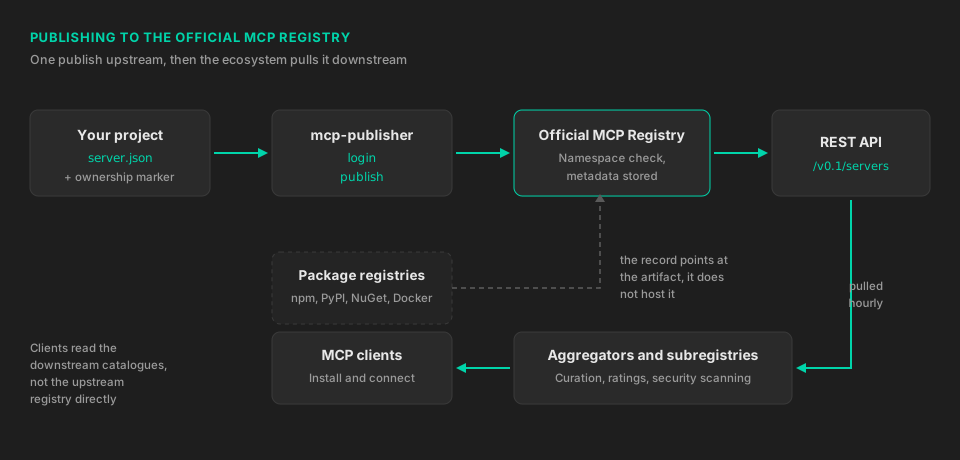
Two things follow from the design that catch people out.
The first is that the registry is not intended to be read by MCP clients directly. The maintainers describe it as an upstream source for downstream aggregators: marketplaces, subregistries and catalogues that pull the data on a regular cadence, roughly hourly, and add their own curation, ratings and security scanning on top. The GitHub MCP Registry is one of these downstream consumers, not the same thing. So publishing upstream is what makes your server eligible to appear in those surfaces, and each of them still decides independently whether to show it.
The second is that private servers are out of scope. If your server sits on an internal network or in a private package registry, the official registry will not take it, and the maintainers point you at running your own registry instead.
Namespaces decide everything else
Server names use reverse DNS, and the prefix you choose determines which authentication method you must use for the rest of the server’s life. Decide this before you write anything.
io.github.username/server-name ties the server to a GitHub account or organisation, verified through GitHub OAuth or, in CI, through GitHub OIDC. It is the fastest path and the right one for an open-source project whose identity is its repository.
com.yourcompany/server-name ties the server to a domain, verified with a DNS TXT record or a file at https://yourcompany.com/.well-known/mcp-registry-auth. It costs a few more minutes of setup and it is what you want for anything commercial, because the name carries the company rather than whichever engineer happened to run the publish command. Domain namespaces also constrain remote URLs: a com.yourcompany/* server must serve from yourcompany.com or a subdomain of it.
Getting this wrong is the most common publishing failure. The error reads “You do not have permission to publish this server”, and it almost always means the namespace in server.json does not match the login method used.
Prove you own the thing you are pointing at
Before it will accept a record, the registry checks that whoever controls the namespace also controls the package. Each package type has its own proof, and every one of them is a one-line change that has to be live in the published artifact, not just in your working copy.
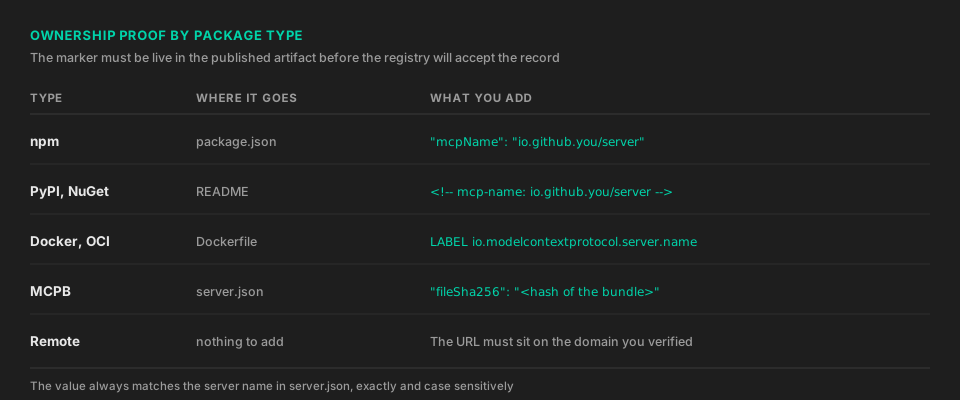
For npm, add an mcpName property to package.json whose value is the server name:
{
  "name": "@yourcompany/email-integration-mcp",
  "version": "1.0.0",
  "mcpName": "io.github.username/email-integration-mcp"
}
For PyPI and NuGet, put an mcp-name: line in the README that becomes the package description. An HTML comment is fine, so it does not have to show up in the rendered page:
<!-- mcp-name: io.github.username/database-query-mcp -->For Docker and OCI images, add a label in the Dockerfile:
LABEL io.modelcontextprotocol.server.name="io.github.username/kubernetes-manager-mcp"MCPB bundles are the exception: they are verified by a fileSha256 in the record instead of a marker in the artifact, they have to be hosted on GitHub or GitLab releases, and the URL must contain the string “mcp”. The registry stores that hash without checking it. Clients validate it at install time.
Remote servers need no marker at all. The URL requirement described above is the proof.
The publish itself
The registry ships a CLI, mcp-publisher, with six commands: init, login, logout, validate, publish and status. Install it with brew install mcp-publisher or grab the binary for your platform from the registry releases, then run mcp-publisher init in your project to generate a template. It detects your package manager, pre-fills what it can and leaves TODO: placeholders for the rest.
A minimal record for an npm-packaged server looks like this:
{
  "$schema": "https://static.modelcontextprotocol.io/schemas/2025-12-11/server.schema.json",
  "name": "io.github.username/weather",
  "title": "Weather",
  "description": "Current conditions and forecasts for any location.",
  "version": "1.0.1",
  "repository": {
    "url": "https://github.com/username/mcp-weather-server",
    "source": "github"
  },
  "packages": [
    {
      "registryType": "npm",
      "identifier": "@username/mcp-weather-server",
      "version": "1.0.1",
      "transport": { "type": "stdio" }
    }
  ]
}
Three constraints on that file are worth stating plainly. name must match the mcpName in package.json exactly, and it is case sensitive. description is capped at 100 characters, so it needs to say what the server does with no room for positioning copy. The package version must already exist in the package registry, because publishing the record does not publish the package.
Check the record before you touch the network. mcp-publisher validate runs the same JSON, schema and semantic checks the server will run, reports every issue at once rather than stopping at the first, and tells you the JSON path that failed. Then authenticate and push:
mcp-publisher validate
mcp-publisher login github
mcp-publisher publish
GitHub login runs a device flow: the CLI prints a code, you enter it at github.com/login/device, and the token is cached locally. Domain-based login uses a key pair instead, with the public half in a DNS TXT record and the private half passed to mcp-publisher login dns. Google Cloud KMS and Azure Key Vault are both supported as key backends if you would rather not have a raw private key on someone’s laptop.
Confirm the record is live by querying the API:
curl "https://registry.modelcontextprotocol.io/v0.1/servers?search=io.github.username/weather"Publishing a remote server
For a hosted server there are no packages, only a remotes array:
{
  "$schema": "https://static.modelcontextprotocol.io/schemas/2025-12-11/server.schema.json",
  "name": "com.yourcompany/analytics",
  "title": "ACME Analytics",
  "description": "Query reports, dashboards and metrics from ACME Analytics.",
  "version": "2.0.0",
  "remotes": [
    {
      "type": "streamable-http",
      "url": "https://analytics.yourcompany.com/mcp"
    }
  ]
}
Use streamable-http. The SSE transport is deprecated in the specification, so publish an sse entry only if you still need to reach older clients, and serve it from a separate URL alongside the current one. remotes and packages can coexist in the same record when you offer both a hosted endpoint and a local install, which lets each client pick the one it prefers.
The registry does not connect to your endpoint to check that it works, but downstream aggregators increasingly do. Two failure modes make a server look broken to them: requiring authentication on initialize or tools/list rather than only on tools/call, and answering a Streamable HTTP POST with a 405. Both are worth testing with a raw curl before you publish.
Automate it so the record never drifts
A registry record that lags the package it points at is worse than no record, because clients install the version you advertised. Move publishing into the release pipeline on day one. GitHub Actions can authenticate with OIDC and no stored secret:
name: Publish to MCP Registry

on:
  push:
    tags: ["v*"]

jobs:
  publish:
    runs-on: ubuntu-latest
    permissions:
      id-token: write
      contents: read
    steps:
      - uses: actions/checkout@fbc6f3992d24b796d5a048ff273f7fcc4a7b6c09 # v5

      # ... build and publish the underlying package first ...

      - name: Install mcp-publisher
        run: |
          curl -L "https://github.com/modelcontextprotocol/registry/releases/latest/download/mcp-publisher_$(uname -s | tr '[:upper:]' '[:lower:]')_$(uname -m | sed 's/x86_64/amd64/;s/aarch64/arm64/').tar.gz" | tar xz mcp-publisher

      - name: Authenticate
        run: ./mcp-publisher login github-oidc

      - name: Publish
        run: ./mcp-publisher publish
Two lines in there are load-bearing. id-token: write is what lets login github-oidc mint a token at all, and the checkout action is pinned to a commit SHA rather than a tag, because a tag can be repointed at code you never reviewed and this job holds publish rights to your namespace.
For a domain namespace, swap the login step for ./mcp-publisher login dns --domain yourcompany.com --private-key ${{ secrets.MCP_PRIVATE_KEY }}.
What a listing does not get you
Being in the registry is distribution, not endorsement. The moderation policy is deliberately permissive: the maintainers remove illegal content, malware, spam and servers that do not function, and they explicitly do not remove servers that are low quality, buggy, insecure or duplicative of something else. Removal sets a record’s status to deleted and leaves the metadata readable, so aggregators can drop it from their own index.
You can set that status yourself, which matters when you retire a version. mcp-publisher status --status deprecated --message "Please upgrade to 2.0.0" io.github.username/weather 1.0.1 keeps the entry visible with a warning attached, --status deleted hides it from default listings, and --all-versions applies either to the whole server.
Security scanning is pushed to the edges of the ecosystem, to the package registries upstream and the marketplaces downstream. The registry itself checks namespace ownership and nothing about the code.
There are also no uptime or data durability guarantees while the service remains in preview, a label it has carried since the September 2025 launch. Keep server.json in version control and treat the registry as a cache of it rather than as your record of truth.
What we did for the StackOne MCP server
We publish StackOne’s MCP server under com.stackone/mcp, a domain namespace verified against stackone.com, with a single streamable-http remote pointing at https://mcp.stackone.com/mcp. The domain route was worth the extra setup for two reasons. The name says StackOne rather than an individual’s GitHub handle, and the URL constraint that comes with it means nobody can publish a com.stackone/* server pointing somewhere we do not control.
The 100-character description limit is the part that takes longest, and it is a useful constraint. An agent picking between catalogue entries reads that line and little else, so it has to name the systems the server reaches rather than describe a category.
The short version
Choose the namespace first, because it fixes your authentication method. Add the ownership marker to the artifact and publish that artifact. Write server.json, keep the description under 100 characters, validate it, log in, publish, and check the API. Then wire the whole thing into your release tags so the record moves when the package does.
Three commands and a small JSON file is a low price for being visible to every catalogue that reads upstream.
Frequently Asked Questions
What is the MCP Registry?
server.json record per server (name, description, transport, package or remote URL) rather than the server code itself, and exposes that data through a public REST API that marketplaces and MCP clients read from.How do I publish my MCP server to the MCP Registry?
io.github.you/name for GitHub auth or com.yourdomain/name for domain auth), add ownership proof to your package (an mcpName field in package.json for npm, an mcp-name: line in the README for PyPI and NuGet, or an io.modelcontextprotocol.server.name label for Docker images), then run mcp-publisher init, mcp-publisher login and mcp-publisher publish.Does the MCP Registry cost anything to list on?
server.json in version control as the source of truth.