
Connect Okta to Claude Cowork and Claude Code: Cross-System Identity and Access Workflows
Table of Contents
Claude has no connector for managing Okta, so you connect them by adding an MCP server, which turns Claude’s requests into Okta API calls. Okta’s own open-source and managed servers cover Okta on its own. For identity work that also touches your HR system, device manager or CRM, with permissions set per person, personal data masked and one audit log, connect Claude to Okta through a Tool Gateway such as StackOne.
This guide to the Okta Claude integration is for the IT leads and identity teams who run Okta. It covers why to connect Claude Cowork and Claude Code to Okta, the four ways to do it, and how they compare.
In this post:
- Why connect Claude to Okta: the ad hoc access work Claude suits
- How to connect Okta to Claude: four options
- Okta MCP options compared: what each covers and how each is controlled
- How it works with StackOne: setup in Cowork and Claude Code
Why connect Claude to Okta
Okta Workflows and lifecycle rules can automate the standard joiner, mover and leaver steps, such as onboarding and offboarding. Most teams haven’t got that far: in a 2025 Ponemon Institute survey of 626 IT professionals, only 17% ran access reviews through an identity governance platform.
Even fully automated teams get one-off requests no workflow covers. A contractor needs two apps for a six-week project. A team lead moves into a hybrid role no group matches. Someone asks why Sam can’t open Salesforce, and the answer is spread across four screens of the Admin Console.
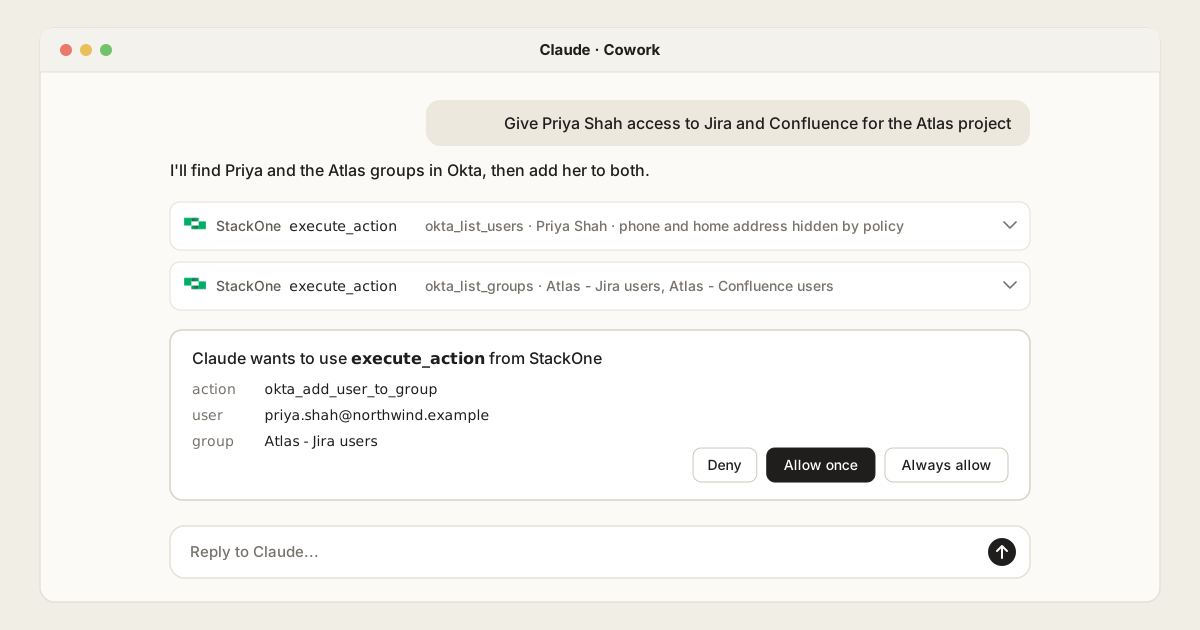
That’s where Claude Cowork and Claude Code help. An admin asks in plain language (“give Priya access to Jira and Confluence for the Atlas project”), Claude works out the changes, and the admin approves them before anything happens.
Few of these requests stay inside Okta. Start dates live in the HR system, laptop status in the device manager, and app access often in the CRM. That decides which way of connecting works best.
This guide covers Claude as an assistant. For agents that run on their own, see connecting Okta to Claude Managed Agents.
How to connect Okta to Claude: four options
Claude’s connector directory has no Okta connector for managing your directory as of October 2026, so you add a custom MCP server. There are four ways to get one.
Community Okta MCP servers
These are servers written by individual developers and shared on GitHub or in MCP registries. They mean giving an admin token to code nobody is accountable for, with no vendor to fix it or issue a security advisory. With an official server available, they’re hard to justify for a directory.
Okta’s open-source MCP server
Okta released its own MCP server in February, and because Okta maintains it, it’s where many teams begin. An admin registers it in the Okta Admin Console, picks its permissions, runs it and points Claude at it.
What Claude can do depends on the permissions you grant. With all of them it has 108 tools, 47 for identity work and the rest for branding and email templates. It asks before destructive actions such as deactivating a user.
That can be enough for one admin. The limits show up once a team relies on it:
- One identity for everyone. Everyone sharing a copy gets the same access as whoever set it up.
- No suspend. Okta’s API can suspend a user, which is reversible, but the server can’t, and its README maps “suspend the contractor account temporarily” to deactivating them.
- Full records come back. Asking who’s in a group returns every member’s full profile, phone and address included.
- Responses aren’t screened. Group descriptions and profile fields are free text, so an instruction hidden there reaches Claude unchecked.
- Admin credentials on laptops. Headless setup stores an admin-level private key in a config file and turns off DPoP, the setting that ties a token to one machine.
- Every copy needs patching. Each admin runs their own copy, so each one has to be kept up to date, and Claude’s admin controls don’t apply to it.
Okta Managed MCP Server
In August Okta opened a hosted version in early access. There’s nothing to run, it limits tools to each user’s permissions, and it trims responses so full records don’t come back.
It’s a paid add-on that needs Core Identity or Okta Identity Governance on top, and it isn’t offered in Okta for Government or US Military environments, including FedRAMP and HIPAA ones.
A Tool Gateway
A Tool Gateway sits between Claude and every system it uses, and applies one set of rules to every call. StackOne’s Okta connector has 115 actions across users, groups, apps, devices, policies, the system log and Okta Identity Governance, and works with any Okta org.
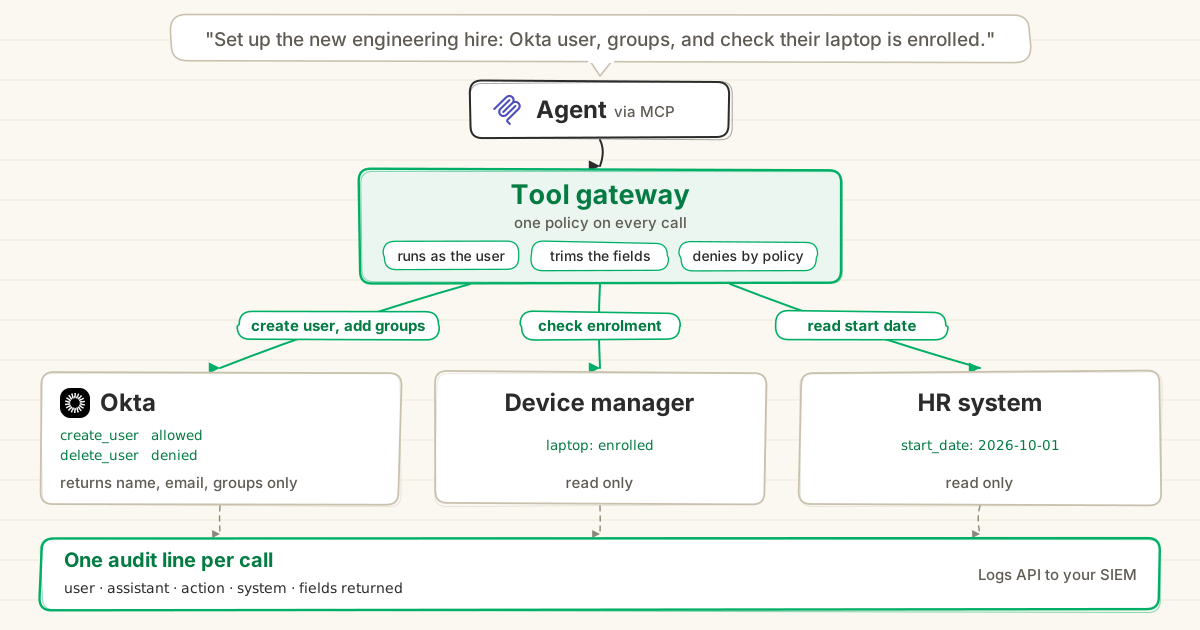
- Each person connects their own Okta account, so Claude never shares an admin token.
- Permission policies set what Claude can do for each user or group, such as blocking user deletion or hiding phone numbers. A blocked action never reaches Okta.
- Prompt Injection Guard checks every response before Claude reads it.
- Every call goes into one action log across all your systems, which you can send to your SIEM.
Okta Managed MCP Server vs StackOne, request by request
Okta’s Managed MCP Server is the closest alternative to a Tool Gateway. Both are hosted and both sign each person in with their own Okta account. Here’s how they differ on real requests:
| Request | Okta Managed MCP Server | StackOne Tool Gateway |
|---|---|---|
| ”Who’s in the finance group?”, without phone numbers | Okta decides which fields to drop | You choose, per user or group |
| Only IT ops can delete accounts | Set per app, so the same for everyone | A policy blocks everyone else |
| ”Suspend the contractor for two weeks.” | Not documented | Suspend now, unsuspend later |
| ”Priya’s laptop was stolen. Sign her out and suspend it.” | Not documented; device policies only | Revoke her sessions and suspend the device |
| Also check her HR start date and MDM status | Okta only, so you need more servers | Same endpoint, same policies |
| ”Show me every change Claude made last week” | Okta’s System Log only | One log across every system |
| Hidden instructions in a group description | Request checks only | Every response is screened |
| Configure governance entitlements and delegates | Supported, with Okta Identity Governance | Not yet: campaigns, reviews and access requests only |
| Try it on a free Okta developer org | Not available | Works on any Okta org |
Okta’s server also caps you at 100 requests per minute per org, which matters for bulk lookups.
Okta MCP options compared
What each option can do in Okta, from Okta’s server README, its Managed MCP Server feature list and StackOne’s connector page. Community servers vary too much to list.
| Okta area | Okta open-source server | Okta Managed MCP (early access) | StackOne Tool Gateway |
|---|---|---|---|
| Create, update, deactivate and delete users | Yes | Yes | Yes |
| Suspend and unsuspend users | No | Not documented | Yes |
| Revoke sessions, reset passwords, unlock users | No | Not documented | Yes |
| Groups and memberships | Yes | Yes | Yes, plus group rules |
| Assign users and groups to apps | No | Yes | Yes |
| Individual devices | Assurance policies only | Assurance policies only | Yes, plus assurance policies |
| Policies and rules | Yes | Yes | Yes |
| System Log | Yes | Yes | Yes |
| Create apps and install apps from the Okta catalogue | Yes | Not documented | No |
| Identity Governance: certifications and access requests | No | Yes, with Okta Identity Governance | Yes, with Okta Identity Governance |
| Identity Governance: entitlements and delegates | No | Yes, with Okta Identity Governance | No |
| Branding, email templates and custom domains | Yes | Branding | No |
How each one runs and what you can control:
| Community servers | Okta open-source server | Okta Managed MCP (early access) | StackOne Tool Gateway | |
|---|---|---|---|---|
| Hosting | You | You | Okta | StackOne |
| Okta plan needed | Any org | Any org | Paid add-on | Any org |
| Runs as | The token you give it | Whoever set it up | Each user’s permissions | Each person’s own account |
| Rules per user or group | Varies | No | By permission scope | Yes |
| Hide fields such as phone numbers | Varies | No | Not documented | Yes |
| Screens responses for injected instructions | Varies | Not documented | Not documented | Yes |
| Systems covered | Okta | Okta | Okta | Okta plus HR, device, CRM and more |
| Audit | Depends on the server | Okta System Log | Okta System Log | One log across every system |
How it works with StackOne
IT admins add StackOne to Claude with one URL: https://mcp.stackone.com/mcp.
-
Add the connector. In Claude Cowork, an Owner adds it once under Organization settings, then Connectors, as a custom connector with the StackOne URL (guide).
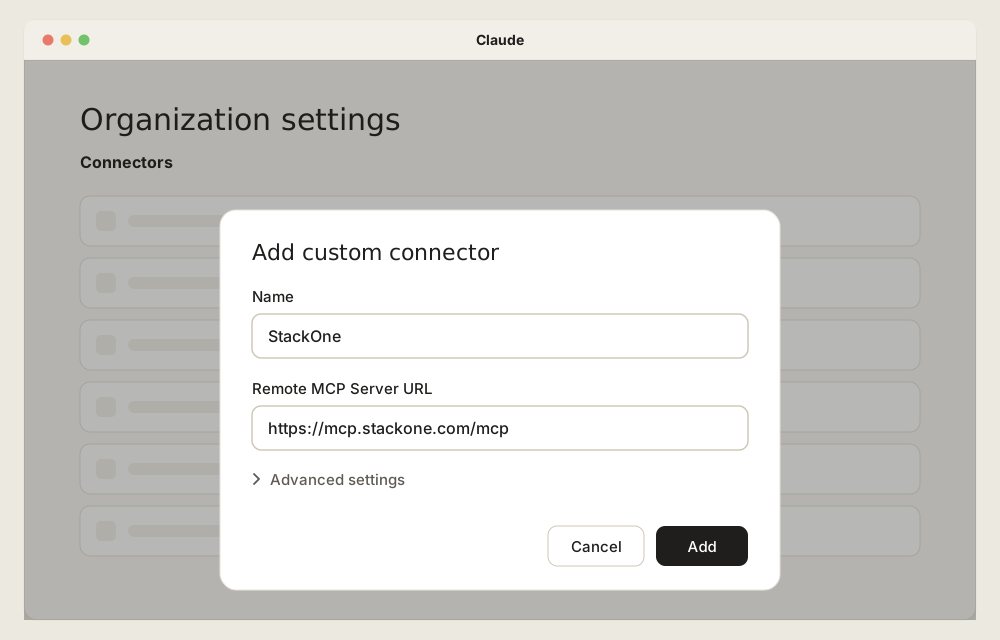
In Claude Code, each admin runs
claude mcp add --transport http --scope user stackone https://mcp.stackone.com/mcp, then signs in from/mcp(guide).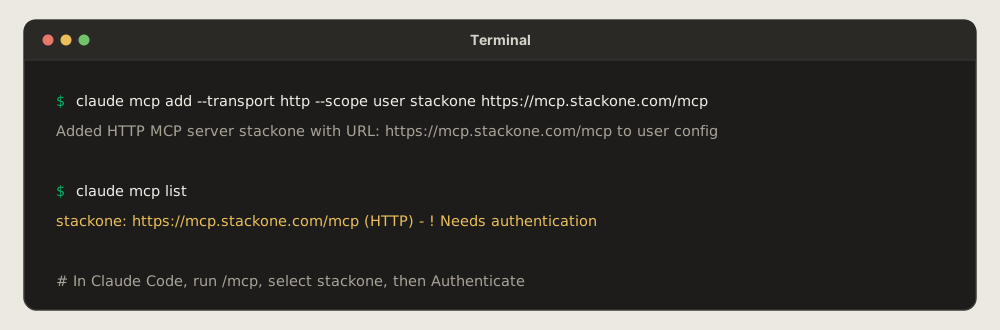
-
Connect Okta. Each person signs in to StackOne, links their own Okta account and picks which actions Claude can use.
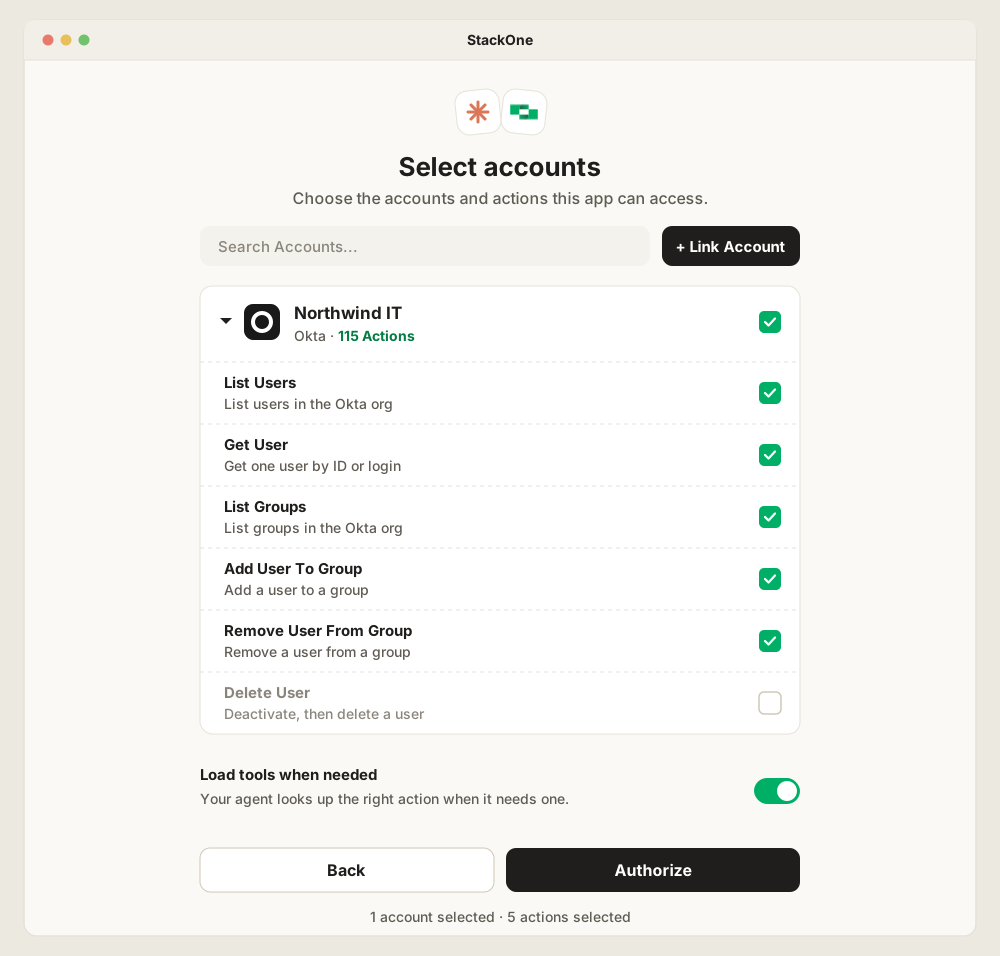
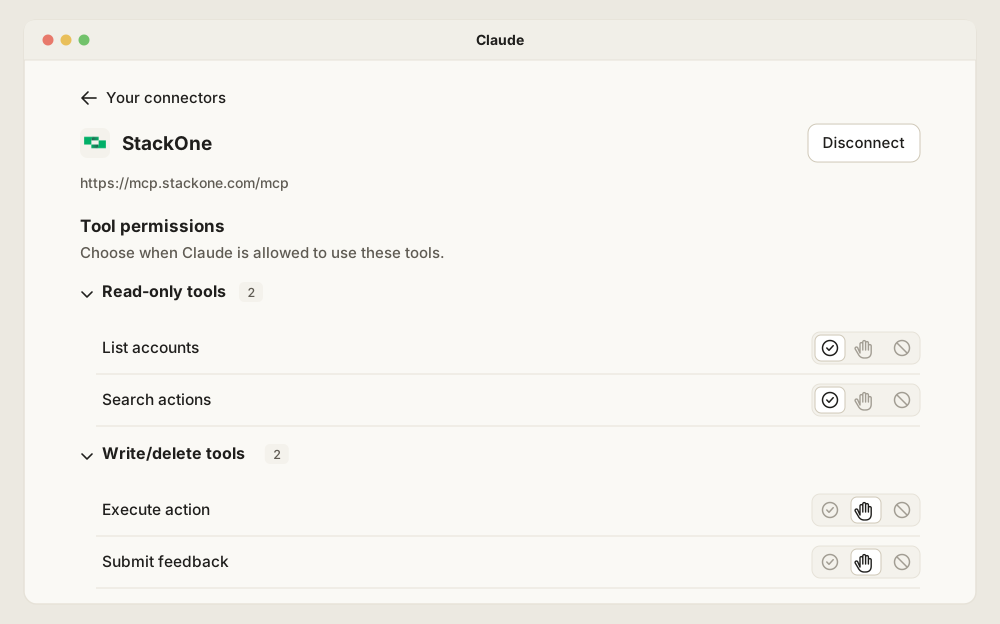
In Claude, StackOne then appears as four tools, because Okta actions are loaded when they’re needed. Every Okta action runs through Execute action, so which actions each person can use is decided in StackOne, on this screen and in permission policies.
-
Set policies. Decide what each user or group can do, and which fields stay hidden.
Now the Atlas request runs as the admin’s own account. Claude finds Priya and the two app groups with her phone and address hidden, proposes the changes for approval, and logs every call. If it also needs her start date or laptop status, the same connection reaches the HR system and device manager.
The same connection handles help-desk questions. Asked why Sam can’t open Salesforce, Claude checks his app assignment, group rules and sign-in blocks in Okta, then proposes the fix, such as unlocking his account, for the admin to approve.
For how a Tool Gateway compares with an MCP gateway that routes to existing servers, see MCP Gateway vs Tool Gateway.
Frequently Asked Questions
What's the best way to connect Okta to Claude for cross-system identity and access workflows?
Does Claude have a native Okta connector?
How do I connect Okta to Claude Cowork and Claude Code?
https://mcp.stackone.com/mcp; in Claude Code, each admin runs claude mcp add --transport http --scope user stackone https://mcp.stackone.com/mcp. Each person then connects their own Okta account and approves which actions Claude can use. See StackOne's guides for Claude Cowork and Claude Code.