 Guillaume Lebedel · · 12 min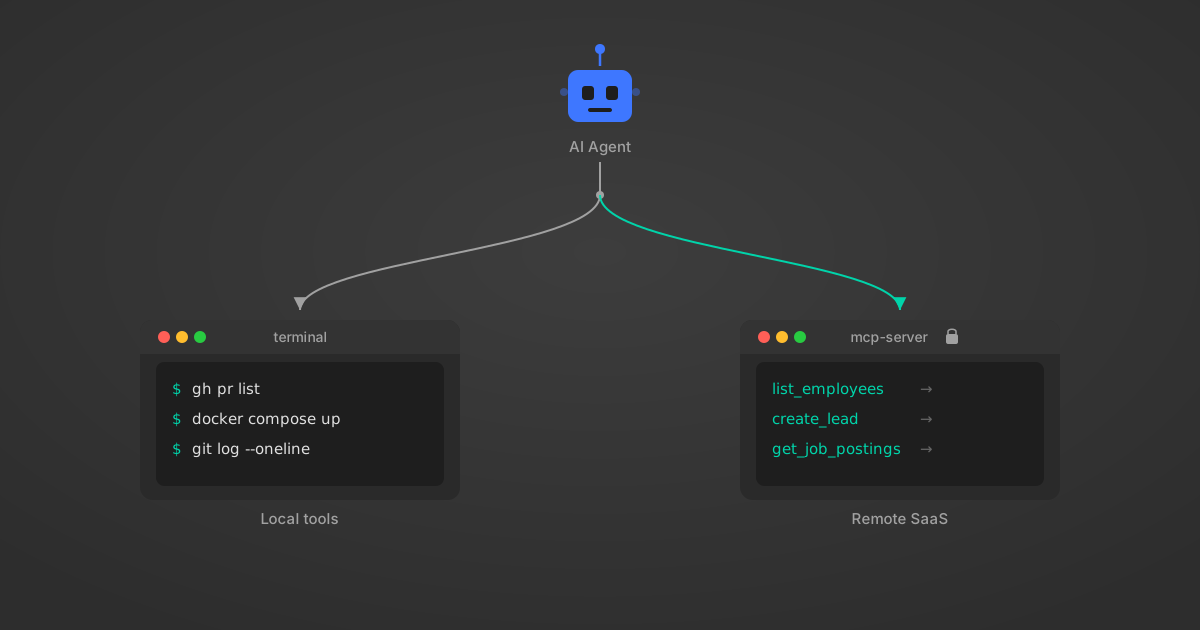
MCP vs CLI for AI Agents: When Each One Wins
Table of Contents
The benchmarks are in and they’re not flattering for MCP.
ScaleKit tested GitHub operations head-to-head: MCP vs the gh CLI. MCP used 4-32x more tokens per operation. It failed 28% of the time. The CLI version cost a fraction of the price and succeeded more reliably.
Jannik Reinhard found similar results with Microsoft Intune — a 35x token reduction with a CLI wrapper. The open-source mcp2cli project reports 96-99% savings.
If the question is MCP vs CLI for AI agents, CLI seems to win on every metric. But that conclusion has a blind spot the size of enterprise SaaS.
Where CLI Beats MCP for AI Agents
CLI wins for local developer tools, and it’s not close. Here’s why.
Tokens matter. ScaleKit’s MCP vs CLI benchmark quantified the gap across 75 runs. An MCP tool definition for “create a GitHub issue” includes the full JSON schema: the full parameter schema, type definitions, and description strings. That schema alone can run 800-1,400 tokens. The equivalent CLI flag documentation? gh issue create --title "Bug" --body "Details". The agent already knows gh from its training data. The schema cost is near zero.
Structured output is free. CLI tools pipe output through jq, grep, awk. The agent can request exactly the fields it needs. MCP returns whatever the server decides to return, often the full object.
# CLI: 47 tokens in, ~200 tokens out
gh issue list --state open --limit 5 --json number,title

# MCP: ~1,200 tokens in (schema + request), ~3,000 tokens out (full objects)
# tools/call: github_list_issues { state: "open", per_page: 5 }
Failure modes are simpler. A CLI command either succeeds with exit code 0 or fails with a stderr message. MCP failures cascade: transport errors, JSON-RPC framing issues, schema validation failures, server timeouts. Each layer adds a failure surface.
The model already knows CLIs. Claude, GPT, and Gemini have trained on millions of man pages, Stack Overflow answers, and shell scripts. When an agent writes git log --oneline -5, it’s using internalized knowledge. MCP schemas are new information that consumes context and competes with the task at hand.
This is real. Jannik Reinhard’s Intune benchmarks showed a 35x token reduction with CLI wrappers. The mcp2cli project converts MCP schemas to shell commands and reports 96-99% savings. For git, docker, kubectl, terraform, aws-cli, gh, and dozens of other developer tools, CLI is the better interface for AI agents. The numbers aren’t debatable.
MCP vs CLI Blind Spot: Where’s the Workday CLI?
Every MCP-vs-CLI benchmark uses the same example: GitHub. Sometimes Docker. Occasionally Kubernetes.
These tools share a trait that most enterprise software doesn’t: 40 years of Unix CLI culture baked in. They were built by developers, for developers, with structured output as a first-class concern.
Now try this exercise. You’re building an AI agent for an HR operations team. The agent needs to:
- Pull open job requisitions from Greenhouse
- Cross-reference headcount with Workday org data
- Check candidate pipeline status in Lever
- Update the hiring plan in BambooHR
Where’s the Greenhouse CLI? There isn’t one. Workday exposes a SOAP API that requires WS-Security headers and HCM-specific XML namespaces. Lever’s REST API needs OAuth 2.0 with refresh token rotation. BambooHR uses API key auth with custom subdomain routing.
You could wrap each of these in a shell script. That’s what mcp2cli does conceptually. But now you’re managing four auth flows, four pagination strategies, four rate-limiting schemes, and four different data models. In a shell script. For every customer tenant.
The CLI-vs-MCP debate ignores this because it’s benchmarking the easy case. Developer tools with polished CLIs are the 5% of integrations where the comparison even makes sense. The other 95% are SaaS systems where no CLI exists and never will.
MCP vs CLI System Boundary: Local Tools vs Remote SaaS
The useful framing isn’t “MCP vs CLI.” It’s a question about where your tool sits in the system architecture.
Local tools run on the same machine as the agent. They read files, run processes, interact with version control. Auth is implicit (you’re logged in). State is local. Output format is controllable. CLI is the natural interface.
Remote multi-tenant systems run on someone else’s infrastructure. They require delegated auth (OAuth, API keys per customer), handle data from multiple tenants, enforce rate limits, and return data in formats you don’t control. MCP (or an equivalent protocol layer) handles the complexity that a raw CLI invocation can’t.
| Dimension | Local tool (CLI) | Remote SaaS (MCP) |
|---|---|---|
| Auth | Implicit (logged-in user) | OAuth 2.0/PKCE per tenant |
| State | Filesystem, env vars | Server-managed sessions |
| Output control | Pipes, flags, jq | Server-defined schemas |
| Failure recovery | Exit codes, stderr | Transport + protocol + app errors |
| Multi-tenant | N/A (single user) | Credential isolation required |
| Discovery | Man pages, --help | Runtime schema advertisement |
| Token cost | Low (model knows CLIs) | Higher (schemas in context) |
This isn’t an opinion. It’s an architectural constraint. You can’t curl your way into Workday’s SOAP endpoint from an AI agent and handle token refresh, session management, and XML namespace resolution in a bash one-liner. The complexity has to live somewhere. CLI puts it in the agent’s prompt. MCP puts it in the server.
MCP Token Cost Problem: Real but Fixable
Acknowledging where CLI wins doesn’t mean accepting MCP’s current token costs as permanent.
The ScaleKit benchmarks measure MCP as it exists today: servers that dump full schemas up front, return verbose JSON responses, and provide no way to request partial data. That’s a server implementation problem, not a protocol problem.
Three approaches are fixing it:
Dynamic tool loading. Don’t load 500 tool schemas at startup. Load the 3-5 the agent needs for the current task. At StackOne, we built semantic search across 10,000+ actions specifically because frontloading tool definitions was killing agent context windows. Our agents load an average of 8 tools per session instead of the full catalog.
Response filtering. MCP servers can accept field-selection parameters so agents request only the data they need. Instead of returning a full employee object (17,000 tokens for Workday’s SOAP response), return the 3 fields the agent asked for. StackOne does this with field-level filtering on every connector.
Gateway compression. MCP gateways sit between the agent and multiple servers, handling schema caching, response truncation, and tool routing. The gateway sees all the schemas once and serves compressed versions to the agent. This is an emerging pattern but it directly addresses the token cost concern.
The mcp2cli approach (converting MCP schemas to CLI flags) is another valid optimization for single-tenant, developer-facing tools. It’s a smart hack. It just doesn’t extend to the multi-tenant enterprise case.
MCP vs CLI Decision Matrix for AI Agent Tools
Here’s how to decide what your agent should use for a specific integration.
Use CLI when:
- The tool has a mature, well-documented CLI (git, docker, gh, kubectl, aws-cli, terraform)
- Auth is local (logged-in user, environment variables, config files)
- The agent operates in a single-tenant context (one user, one machine)
- Output format is controllable via flags (
--json,--output, piping) - The model has strong training data on the tool (common developer tools)
Use MCP when:
- The system is a remote SaaS platform with OAuth or API key auth
- Multiple customer tenants need separate credential isolation
- The agent needs to discover available tools at runtime (not hardcoded)
- Cross-provider data normalization matters (comparing data across Greenhouse, Lever, and Workday)
- The tool doesn’t have a CLI and wrapping the API would recreate MCP’s problems
Use both when:
- The agent handles local dev tasks AND remote SaaS operations
- You want CLI for speed on local tools and MCP for enterprise reach
- The agent needs to context-switch between coding (CLI) and business operations (MCP)
Most production agents fall into the third category.
AI Agent Hybrid Architecture: CLI + MCP Together
A production AI agent doesn’t pick one protocol. It picks the right interface per integration.
┌─────────────────────────────────────┐
│           Agent Runtime             │
│                                     │
│  ┌───────────┐   ┌───────────────┐  │
│  │ CLI Tools │   │  MCP Client   │  │
│  │           │   │               │  │
│  │ git       │   │ StackOne MCP  │──┼──▶ Workday, Greenhouse,
│  │ docker    │   │   Server      │  │    BambooHR, Lever,
│  │ gh        │   │               │  │    Salesforce, etc.
│  │ kubectl   │   │ Sentry MCP   │──┼──▶ Error tracking
│  │ terraform │   │               │  │
│  │ jq        │   │ Slack MCP    │──┼──▶ Messaging
│  └───────────┘   └───────────────┘  │
│                                     │
│  Tool Router: CLI if available,     │
│  MCP for everything else            │
└─────────────────────────────────────┘
The tool router is the key piece. It checks whether a mature CLI exists for the requested operation. If yes, it routes through shell execution. If no, it routes through MCP. The agent doesn’t need to know the difference. It asks to “list open issues in GitHub” and the router picks gh issue list. It asks to “pull open requisitions from Greenhouse” and the router picks the MCP server.
Claude Code already works this way. It uses shell commands for git, file operations, and build tools. It uses MCP for external integrations. Cursor does the same. The hybrid pattern isn’t theoretical; it’s how the most capable coding agents operate today. We walk through the full AI agent tool architecture with CLI and MCP in a separate post, including config examples and token optimization.
Why “MCP vs CLI” Is the Wrong Framing
The debate frames MCP and CLI as competitors. They’re not. They’re interfaces optimized for different system boundaries.
Saying “CLI beats MCP” based on GitHub benchmarks is like saying “SQL beats REST” based on a local database query. Of course a local, direct interface is faster than a protocol layer for local operations. That’s not the comparison that matters.
The comparison that matters is: what happens when your agent needs to access 50 SaaS systems across 200 customer tenants, each with different auth flows, different data models, and different rate limits?
CLI has no answer for that. Not because CLI is bad, but because the problem is outside its design scope. CLI was built for local, single-user, developer tooling. It’s excellent at that. MCP was built for remote, multi-tenant, AI-agent tooling. The overlap is smaller than the benchmarks suggest.
At StackOne, we’ve built 200+ connectors for exactly the systems where CLI doesn’t exist. Workday, SAP SuccessFactors, Oracle HCM, ADP, Greenhouse, Salesforce. Each one required solving OAuth lifecycle management, field-level data filtering, rate-limit handling, and context-aware response sizing that keeps agent context windows alive.
None of that work goes away if you switch from MCP to CLI. You’d just be rebuilding the same complexity in shell scripts instead of a protocol server. The hard part was never the protocol. It was the integrations.
For a deeper look at how MCP compares to other protocols, see our breakdown of MCP vs A2A: when to use each protocol.