 Guillaume Lebedel · · 12 min read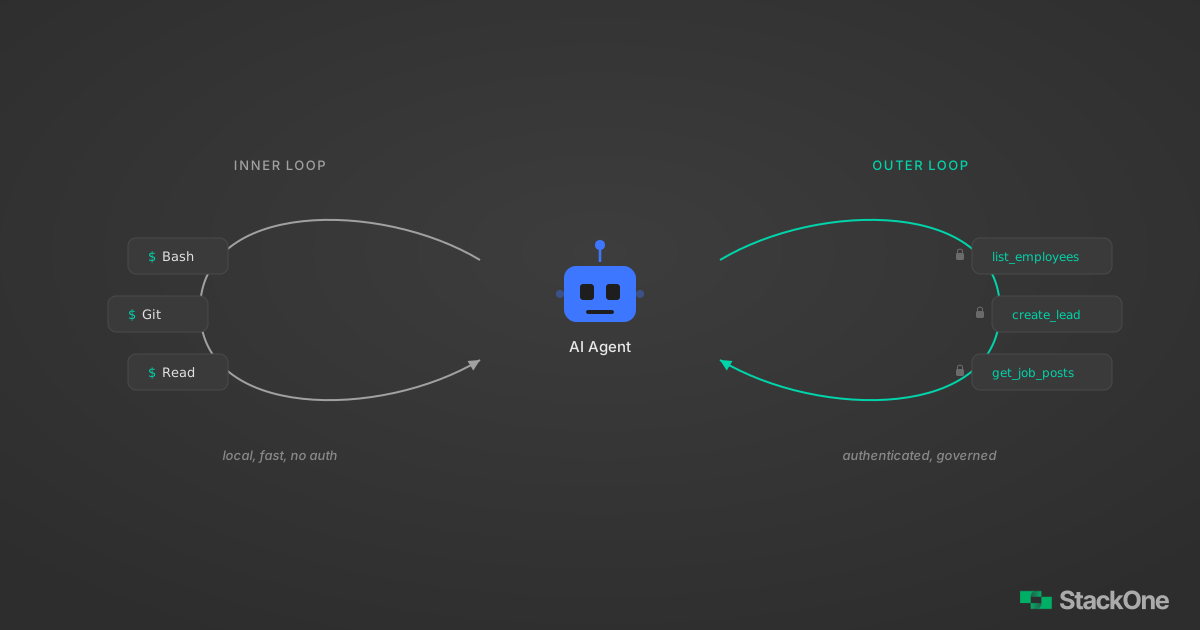
The Two-Loop Architecture: How AI Agents Use CLI and MCP Together
Table of Contents
Your agent can read files, run shell commands, and write code. It can also query your HRIS, pull hiring data from your ATS, and sync records across CRM systems. These two capabilities look similar from the outside. The architecture behind them is completely different.
Most agent frameworks treat tool selection as a flat list: here are 50 tools, pick the right one. That works for demos. The two-loop architecture — CLI for local tools, MCP for remote SaaS — is what holds up in production, where some tools hit local file systems and others make authenticated API calls with rate limits, pagination, and OAuth.
We covered MCP vs CLI for AI agents — when each interface wins and why the debate is a false binary. This post shows the architecture: how to wire both into a single agent that picks the right tool for each step.
AI Agent Tool Architecture: The Two-Loop Pattern
The pattern is two loops. Not because someone drew it on a whiteboard, but because it matches how system boundaries actually work.
Inner loop: CLI tools. The agent interacts with its local environment. File reads, shell commands, git operations, build tools, local databases. These are fast (milliseconds), free (no API costs), and the agent already knows how to use them from training data. No auth required beyond the process’s own permissions.
Outer loop: MCP tools. The agent interacts with remote systems. HR platforms, applicant tracking systems, CRMs, learning management systems. These require authentication, handle pagination, enforce rate limits, and normalize data across different vendor schemas. MCP provides the structured interface.
The distinction isn’t about protocol preferences. It maps to a real architectural boundary: local vs. remote, trusted vs. authenticated, fast vs. governed.
┌─────────────────────────────────────────────────┐
│                   AI Agent (LLM)                │
│                                                 │
│  ┌───────────────┐     ┌──────────────────────┐ │
│  │  Inner Loop    │     │    Outer Loop         │ │
│  │  (CLI Tools)   │     │    (MCP Tools)        │ │
│  │                │     │                       │ │
│  │  • Bash        │     │  • list_employees     │ │
│  │  • Read/Write  │     │  • list_applications  │ │
│  │  • Git         │     │  • create_record      │ │
│  │  • Grep        │     │  • update_status      │ │
│  └───────┬───────┘     └──────────┬───────────┘ │
│          │                        │              │
└──────────┼────────────────────────┼──────────────┘
           │                        │
    ┌──────▼──────┐    ┌────────────▼────────────┐
    │ Local FS,   │    │  MCP Server → OAuth →   │
    │ Git, Shell  │    │  BambooHR, Greenhouse,  │
    │             │    │  Salesforce, etc.        │
    └─────────────┘    └─────────────────────────┘
This isn’t a theoretical framework. It’s what Claude Code already does. Claude Code has built-in CLI tools (Bash, Read, Write, Edit, Grep, Glob) and connects to MCP servers you configure. The LLM sees both tool sets and routes naturally based on the task.
AI Agent CLI + MCP Example: HR Data Pipeline
Here’s a concrete workflow that uses both loops. An agent builds an HR analytics report by combining local data with remote system data.
Step 1: Read local data (CLI)
The agent starts by reading a CSV export from the local file system. This is an inner loop operation: fast, no auth, no API call.
# Agent uses the Bash tool
cat employees.csv | head -5
id,name,department,start_date,status
1001,Sarah Chen,Engineering,2024-03-15,active
1002,Marcus Johnson,Product,2023-11-01,active
1003,Priya Patel,Engineering,2024-07-22,active
1004,James Wilson,Sales,2024-01-10,activeThe agent now has a local employee roster. But this CSV is a point-in-time export. It doesn’t have current compensation data, reporting structure, or time-off balances.
Step 2: Enrich with HRIS data (MCP)
The agent calls the BambooHR MCP connector to get current employee records. This is an outer loop operation: authenticated, paginated, schema-normalized.
// Agent calls MCP tool: list_employees
{
  "tool": "bamboohr_list_employees",
  "input": {
    "status": "active",
    "fields": ["id", "displayName", "department", "jobTitle", "supervisor"]
  }
}
// MCP server handles: OAuth, pagination, field mapping
// Returns normalized data:
{
"data": [
{
"id": "1001",
"displayName": "Sarah Chen",
"department": "Engineering",
"jobTitle": "Senior Software Engineer",
"supervisor": "Lisa Park"
}
// ... 247 more employees
],
"next_cursor": null
}The agent didn’t manage OAuth tokens. It didn’t paginate through BambooHR’s API. It didn’t map BambooHR’s field names to a common schema. The MCP server handled all of that.
Step 3: Cross-reference with hiring data (MCP)
Now the agent calls the Greenhouse MCP connector to pull recent hiring pipeline data.
// Agent calls MCP tool: list_applications
{
  "tool": "greenhouse_list_applications",
  "input": {
    "status": "active",
    "created_after": "2026-01-01"
  }
}
{
"data": [
{
"id": "app_8821",
"candidate_name": "Alex Rivera",
"job_title": "Staff Engineer",
"stage": "Final Interview",
"department": "Engineering"
}
// ... 34 more active applications
]
}Two different SaaS systems, two different APIs, two different auth mechanisms. The agent treats them as two tool calls.
Step 4: Analyze and write results (CLI)
Back to the inner loop. The agent combines the data, runs analysis, and writes a report.
# Agent uses Write tool to create the report
cat > hr-pipeline-report.md << 'EOF'
# HR Pipeline Report — March 2026

## Headcount Summary
- Active employees: 248
- Engineering: 89 (36%)
- Product: 34 (14%)
- Sales: 67 (27%)

## Hiring Pipeline
- Active applications: 35
- Final interview stage: 8
- Engineering openings: 12

## Key Finding
Engineering headcount grew 23% YoY but still has 12 open positions.
Current interview pipeline covers 67% of open roles.
EOF
Step 5: Commit and push (CLI)
Still in the inner loop. The agent commits the report to version control.
git add hr-pipeline-report.md
git commit -m "Add Q1 2026 HR pipeline report"
git push origin main
Five steps. Three used CLI tools, two used MCP tools. The agent switched between them without ceremony because from the LLM’s perspective, they’re all just tools with different names.
How AI Agents Route Between CLI and MCP Tools
The agent doesn’t run a decision tree. The routing happens through tool descriptions in the system prompt.
CLI tools are implicitly available. Every Claude Code session starts with Bash, Read, Write, Edit, Grep, and Glob. The LLM knows from training data what these do: Bash runs shell commands, Read opens files, Grep searches text.
MCP tools are explicitly declared. When you connect an MCP server, it registers tools with names, descriptions, and input schemas. The LLM sees bamboohr_list_employees with a description like “Get all employees from BambooHR with comprehensive employee data” and knows when to use it.
The routing logic is the LLM itself. When the task says “read the CSV file,” the LLM picks Read. When the task says “get current employee data from BambooHR,” the LLM picks bamboohr_list_employees. No explicit router needed.
This works because the tool boundaries match the system boundaries. Local file? CLI. Remote SaaS API? MCP. The LLM doesn’t need a routing table when the tool names encode the destination.
// What the LLM sees in its system prompt (simplified):
{
  "tools": [
    // Built-in CLI tools — always available
    { "name": "Bash", "description": "Execute shell commands" },
    { "name": "Read", "description": "Read file contents" },
    { "name": "Write", "description": "Write file contents" },
    { "name": "Grep", "description": "Search file contents" },

    // MCP tools — loaded from configured servers
    { "name": "bamboohr_list_employees", "description": "Get employees from BambooHR..." },
    { "name": "greenhouse_list_applications", "description": "Retrieve applications..." },
    { "name": "salesforce_create_lead", "description": "Create a new lead in Salesforce..." }
  ]
}
The example above shows BambooHR, Greenhouse, and Salesforce tools loaded from StackOne MCP servers.
MCP Token Cost: Why It’s Expensive and 3 Fixes
Here’s where the two-loop model runs into a real constraint. CLI tools are cheap: a few hundred tokens for the tool definition, results come back as plain text. MCP tools are expensive: each tool definition includes a JSON schema for inputs and outputs.
ScaleKit’s MCP vs CLI token benchmark quantified the gap. For a simple task (“what language is this repo?”), the CLI agent used 1,365 tokens. The MCP agent used 44,026 tokens. The difference is almost entirely schema: 43 tool definitions injected into every conversation, most of them unused.
That’s a 32x cost multiplier for doing the same work.
Three fixes:
1. Lazy tool loading. Don’t dump all schemas upfront. Load them when the agent actually needs them. Claude Code’s Tool Search feature does this: tools are loaded on demand, not at conversation start. This alone can cut schema token usage by 85%+.
2. Tool filtering. Only expose tools relevant to the current conversation. If the agent is doing an HR workflow, it doesn’t need Salesforce tools. MCP servers can declare categories, and the agent harness can filter based on the task.
3. Response scoping. Request specific fields instead of full objects. The difference between list_employees returning 50 fields per record vs. 5 relevant fields is enormous at scale. Most MCP servers support field selection if you pass the right parameters.
// BAD: Load all 43 tool schemas at conversation start
// Cost: ~44K tokens before the agent does anything

// GOOD: Load tool schemas on demand
// Step 1: Agent sees task "get employee data from BambooHR"
// Step 2: Tool Search finds bamboohr_list_employees
// Step 3: Schema loaded just for that tool
// Cost: ~3K tokens for the tools actually used
The pattern here is consistent: treat MCP tool schemas like database indexes. You don’t load every index into memory at startup. You load the ones the query needs.
CLI vs MCP Security Boundaries for AI Agents
The two-loop architecture isn’t just about performance. It enforces security boundaries that a flat tool list can’t.
CLI tools run in the agent’s local environment. They inherit the process’s permissions. Claude Code sandboxes Bash commands and requires approval for destructive operations, but the execution context is local. The blast radius is your machine.
MCP tools run through authenticated connections. Each MCP server has its own OAuth scope, API key, or token. The agent can’t access BambooHR data without valid BambooHR credentials flowing through the MCP server. Rate limits are enforced server-side. Audit logs capture every action.
Agent (local sandbox)
├── CLI tools
│   ├── Bash → runs in sandboxed shell
│   ├── Read → local file system only
│   └── Git  → local repo only
│
├── MCP: BambooHR
│   ├── Auth: OAuth 2.0, scoped to HR read
│   ├── Rate limit: 100 req/min
│   └── Audit: every call logged
│
└── MCP: Greenhouse
    ├── Auth: API key, scoped to recruiting
    ├── Rate limit: 50 req/min
    └── Audit: every call logged
This separation gives you least privilege by default. The agent can read local files without BambooHR credentials. It can query BambooHR without Greenhouse access. Each connection is scoped independently.
A flat tool list where everything runs in the same process with the same credentials? That’s how you get an agent that accidentally pushes employee salary data to a public git repo because it had both capabilities in the same security context.
Setting Up the Two Loops in Claude Code
Enough architecture. Here’s how to actually configure this.
The inner loop is already there. Claude Code ships with Bash, Read, Write, Edit, Grep, and Glob. Nothing to configure.
The outer loop needs MCP servers. Add them with claude mcp add or by editing your config directly.
Adding an MCP server via CLI
# Add a StackOne connector for BambooHR
claude mcp add --transport http stackone-bamboohr \
  https://api.stackone.com/mcp?x-account-id=YOUR_ACCOUNT_ID \
  --header "Authorization: Basic YOUR_BASE64_KEY"

# Add Notion
claude mcp add --transport http notion https://mcp.notion.com/mcp

# Verify your servers
claude mcp list
Adding via mcp.json
For repeatable setups, edit ~/.claude/mcp.json directly:
{
  "mcpServers": {
    "stackone-bamboohr": {
      "command": "npx",
      "args": [
        "-y",
        "mcp-remote@latest",
        "https://api.stackone.com/mcp?x-account-id=YOUR_ACCOUNT_ID",
        "--header",
        "Authorization: Basic YOUR_BASE64_KEY"
      ]
    },
    "stackone-greenhouse": {
      "command": "npx",
      "args": [
        "-y",
        "mcp-remote@latest",
        "https://api.stackone.com/mcp?x-account-id=YOUR_ACCOUNT_ID",
        "--header",
        "Authorization: Basic YOUR_BASE64_KEY"
      ]
    }
  }
}
Once configured, start a new Claude Code session. The agent now has CLI tools built in and MCP tools loaded from your servers. Ask it to do something that requires both:
“Read the employee CSV in this repo, compare it against current BambooHR data, flag any discrepancies, and commit a report.”
The agent will use Read for the CSV, MCP for BambooHR, Bash for the comparison logic, Write for the report, and Git for the commit. Five tools across two loops, one prompt.
What StackOne adds
StackOne provides MCP connectors for 200+ SaaS platforms: BambooHR, Greenhouse, Salesforce, Workday, and others. Each connector exposes the platform’s full API surface as MCP tools with authentication, pagination, and error handling built in.
We learned this building StackOne’s first 50 connectors. Every provider has its own OAuth flow, its own pagination style, its own rate limit semantics. Building one connector is a weekend project. Maintaining 200 across provider API changes, token expiry edge cases, and schema drift is a full-time infrastructure problem. That’s the plumbing StackOne handles so your agent can focus on the actual task.
What the CLI + MCP Architecture Doesn’t Solve
Worth being honest about the gaps.
Tool selection accuracy. LLMs pick the wrong tool sometimes. When you have 20+ MCP tools loaded, the model might call list_employees when it should call get_employee with a specific ID. Better tool descriptions help. Fewer tools loaded at once helps more.
Error recovery across loops. If the MCP call fails (auth expired, rate limited, API down), the agent needs to handle it gracefully. Most agents today retry once and give up. Better agents would fall back, notify the user, or try an alternative data source.
State coordination. The inner loop and outer loop don’t share state automatically. If the agent reads a file, then queries an API, then needs to correlate the results, all of that correlation happens in the LLM’s context window. For large datasets, that’s a problem. The context engineering patterns we’ve written about before apply directly here.
Latency. CLI tools respond in milliseconds. MCP tools respond in seconds (network round-trip plus API processing). An agent workflow that alternates between CLI and MCP calls will feel slower than pure CLI work. Parallelizing independent MCP calls helps, but not every framework supports it.
AI Agent CLI + MCP Architecture: The Pattern
- Local work → CLI tools. Files, git, shell commands, build tools. Fast, free, no auth.
- Remote systems → MCP tools. SaaS APIs, databases, third-party services. Authenticated, governed, schema-defined.
- The LLM routes naturally. Tool names and descriptions encode the destination. No explicit router needed.
- Keep tool schemas lean. Lazy loading, filtering, and response scoping prevent token bloat.
- Security boundaries follow system boundaries. CLI inherits local permissions. MCP enforces per-service auth and audit.
The MCP vs CLI debate was always a false binary. Production agents need both because production work crosses system boundaries. The architecture that handles this isn’t complicated. Two loops, clear boundaries, tools that match where the data lives.
Start with your agent’s built-in CLI tools. Add MCP servers for the remote systems your workflow actually touches. Let the LLM route. Optimize token costs as you scale.
That’s the whole pattern.
Frequently Asked Questions
How does Claude Code use both CLI and MCP tools?
claude mcp add. The LLM sees both tool sets in the same conversation and routes between them based on the task. Local file operations use CLI tools. Remote SaaS queries use MCP tools. No explicit routing logic is needed. See the Claude Code MCP documentation for setup.How do I add an MCP server to Claude Code?
claude mcp add --transport http <name> <url> for remote HTTP servers, or claude mcp add --transport stdio <name> -- <command> for local servers. For example: claude mcp add --transport http notion https://mcp.notion.com/mcp. You can also add servers by editing ~/.claude/mcp.json directly. Run claude mcp list to verify your servers are connected.