
Intercom Integration for AI Agents
Connect your AI agent to 113 QA'd Intercom actions via MCP, A2A, or SDK, with agent authentication, tool-calling execution, and security built-in, plus 117 events to subscribe to.








Intercom AI Agent Actions
113 production-ready actions for your agent to do more on Intercom.
Intercom Webhook Events
117 real-time Intercom events your AI agent can subscribe to.
- Ping Responds to Intercom's ping to verify the webhook endpoint is active.
- Company Created A new company record was created in Intercom.
- Company Deleted A company record was removed from Intercom.
- Company Updated An existing company record was modified in Intercom.
- Company Contact Attached A contact was associated with a company in Intercom.
- Company Contact Detached A contact was disassociated from a company in Intercom.
- Contact Archived A contact was archived and is no longer active in Intercom.
- Contact Deleted A contact was permanently removed from Intercom.
- Contact Email Updated A contact's email address was changed in Intercom.
- Lead Added Email An email address was added to a lead contact in Intercom.
- Lead Created A new lead contact was created in Intercom.
- Lead Signed Up A lead contact converted to a registered user in Intercom.
- Lead Tag Created A tag was applied to a lead contact in Intercom.
- Lead Tag Deleted A tag was removed from a lead contact in Intercom.
- Lead Updated A lead contact's details were modified in Intercom.
- Contact Merged Two contact records were merged into one in Intercom.
- Contact Subscribed A contact opted in to receive communications in Intercom.
- Contact Unarchived A previously archived contact was restored to active status in Intercom.
- Contact Unsubscribed A contact opted out of receiving communications in Intercom.
- User Created A new user contact was created in Intercom.
- User Tag Created A tag was applied to a user contact in Intercom.
- User Tag Deleted A tag was removed from a user contact in Intercom.
- User Updated A user contact's details were modified in Intercom.
- Conversation Admin Assigned A conversation was assigned to an admin or team member in Intercom.
- Conversation Admin Closed An admin closed a conversation in Intercom.
- Conversation Admin Noted An admin added an internal note to a conversation in Intercom.
- Conversation Admin Opened An admin opened a conversation in Intercom.
- Conversation Admin Replied An admin sent a reply in a conversation in Intercom.
- Conversation Admin Single Created An admin initiated a new one-to-one conversation with a contact in Intercom.
- Conversation Admin Snoozed An admin snoozed a conversation to revisit it later in Intercom.
- Conversation Admin Unsnoozed A previously snoozed conversation was reactivated by an admin in Intercom.
- Conversation Contact Attached A contact was added as a participant to a conversation in Intercom.
- Conversation Contact Detached A contact was removed as a participant from a conversation in Intercom.
- Conversation Deleted A conversation was permanently removed from Intercom.
- Conversation Priority Updated The priority level of a conversation was changed in Intercom.
- Conversation Rating Added A contact submitted a satisfaction rating for a conversation in Intercom.
- Conversation Read A contact read a conversation in Intercom.
- Conversation User Created A contact started a new conversation in Intercom.
- Conversation User Replied A contact sent a reply in a conversation in Intercom.
- Ticket Created A new support ticket was created in Intercom.
- Ticket State Updated The state of a support ticket was changed in Intercom.
- Ticket Note Created An internal note was added to a support ticket in Intercom.
- Ticket Admin Assigned A support ticket was assigned to an admin in Intercom.
- Ticket Team Assigned A support ticket was assigned to a team in Intercom.
- Ticket Contact Attached A contact was added as a participant to a support ticket in Intercom.
- Ticket Contact Detached A contact was removed as a participant from a support ticket in Intercom.
- Ticket Attribute Updated An attribute on a support ticket was modified in Intercom.
- Ticket Admin Replied An admin sent a reply on a support ticket in Intercom.
- Ticket Contact Replied A contact sent a reply on a support ticket in Intercom.
- Ticket Closed A support ticket was closed in Intercom.
- Ticket Rating Provided A contact submitted a satisfaction rating for a support ticket in Intercom.
- Ticket Resolved A support ticket was marked as resolved in Intercom.
- Article Created A new help center article was created in Intercom.
- Article Updated An existing help center article was modified in Intercom.
- Article Published A help center article was published and made visible to customers in Intercom.
- Article Unpublished A help center article was unpublished and hidden from customers in Intercom.
- Article Deleted A help center article was permanently removed from Intercom.
- Visitor Signed Up An anonymous visitor registered and became a known contact in Intercom.
- Admin Activity Log Event Created An admin activity log event was created in Intercom.
- Admin Added to Workspace An admin was added to the workspace in Intercom.
- Admin Away Mode Updated An admin's away mode status was updated in Intercom.
- Admin Logged In An admin logged in to Intercom.
- Admin Logged Out An admin logged out of Intercom.
- Admin Removed from Workspace An admin was removed from the workspace in Intercom.
- API Request Completed An API request was completed in Intercom.
- Audience Created A new audience was created in Intercom.
- Audience Deleted An audience was deleted from Intercom.
- Audience Member Added A member was added to an audience in Intercom.
- Audience Member Removed A member was removed from an audience in Intercom.
- Audience Updated An audience was updated in Intercom.
- Call Started A call was started in Intercom.
- Call Ended A call was ended in Intercom.
- Call Recording Available A call recording became available in Intercom.
- Call Transcription Available A call transcription became available in Intercom.
- Contact Unsubscribed from SMS A contact unsubscribed from SMS communications in Intercom.
- Content Import Source Created A content import source was created in Intercom.
- Content Import Source Deleted A content import source was deleted from Intercom.
- Content Import Source Updated A content import source was updated in Intercom.
- Content Snippet Created A content snippet was created in Intercom.
- Content Snippet Deleted A content snippet was deleted from Intercom.
- Content Snippet Updated A content snippet was updated in Intercom.
- Content Stat Banner A new banner content stat was recorded in Intercom.
- Content Stat Carousel A new carousel content stat was recorded in Intercom.
- Content Stat Chat A new chat content stat was recorded in Intercom.
- Content Stat Checklist A new checklist content stat was recorded in Intercom.
- Content Stat Custom Bot A new custom bot content stat was recorded in Intercom.
- Content Stat Email A new email content stat was recorded in Intercom.
- Content Stat News Item A new news item content stat was recorded in Intercom.
- Content Stat Post A new post content stat was recorded in Intercom.
- Content Stat Push A new push content stat was recorded in Intercom.
- Content Stat Series A new series content stat was recorded in Intercom.
- Content Stat Series Webhook A new outbound webhook content stat was recorded in Intercom.
- Content Stat SMS A new SMS content stat was recorded in Intercom.
- Content Stat Survey A new survey content stat was recorded in Intercom.
- Content Stat Tooltip Group A new tooltip group content stat was recorded in Intercom.
- Content Stat Tour A new tour content stat was recorded in Intercom.
- Conversation Part Redacted A conversation part was deleted in Intercom.
- Conversation Tagged A conversation was tagged in Intercom.
- Open Conversation Assigned to Teammate An open conversation was assigned to a teammate in Intercom.
- Conversation Company Updated The company associated with a conversation was updated in Intercom.
- Conversation Operator Replied The Operator sent a reply in a conversation in Intercom.
- Data Connector Execution Completed A data connector execution was completed in Intercom.
- Event Created A new event was created in Intercom.
- External Page Created An external page was created in Intercom.
- External Page Deleted An external page was deleted from Intercom.
- External Page Updated An external page was updated in Intercom.
- Granular Subscribe A user subscribed to a message subscription type in Intercom.
- Granular Unsubscribe A user unsubscribed from a message subscription type in Intercom.
- Help Center Created A help center was created in Intercom.
- Help Center Deleted A help center was deleted from Intercom.
- Help Center Domain Changed A help center's domain was changed in Intercom.
- Help Center Updated A help center was updated in Intercom.
- Internal Article Created An internal article was created in Intercom.
- Internal Article Deleted An internal article was deleted from Intercom.
- Internal Article Updated An internal article was updated in Intercom.
- Job Completed A job was completed in Intercom.
- Messenger Deployment Completed A messenger deployment was completed in Intercom.
Intercom AI Agent Use Cases
Connect your AI agent to Intercom and help your team scale the support operations they run by hand today.
Use StackOne to connect your AI agent to your helpdesk, CRM, and messaging tools to automate ticket triage and priority routing.
ViewUse StackOne to connect your AI agent to your telephony, CRM, and messaging tools to automate voice call summarization and CRM logging.
ViewUse StackOne to connect your AI agent to your marketing automation, CRM, and email tools to automate lead nurture email sequences.
ViewDo More, Build Less
Integration Infrastructure for Intercom AI Agents






"What impressed us most about StackOne is its ambition and clarity. They're creating infrastructure that modern software and the entire AI agent ecosystem can rely on. The depth of secure integrations, the pace of delivery, and the team's foresight into AI's future uniquely position StackOne to redefine this category."


Luna Schmid, Partner at GV
"We've been impressed by how quickly and deeply StackOne integrates with complex enterprise systems -- and now, with their focus on agent-to-agent interoperability, they're unlocking even more powerful use cases for customers. StackOne delivers all of the above in a universal layer -- without compromise."


Barbry McGann, SVP at Workday Ventures





Product Teams Love Building Agent Integrations With StackOne
A US medical research organisation



Scroll to explore
More Customer Support Integrations Like Intercom
115+ actions
101+ actions
77+ actions
73+ actions
72+ actions
69+ actions
67+ actions
Intercom AI agent integration resources

Webhooks for AI agents: why agentic workflows need them purpose-built
AI agents can act the moment a system changes, using webhooks. But webhooks built for software hit three limits in agentic workflows. Here is how to fix each.
7 min read
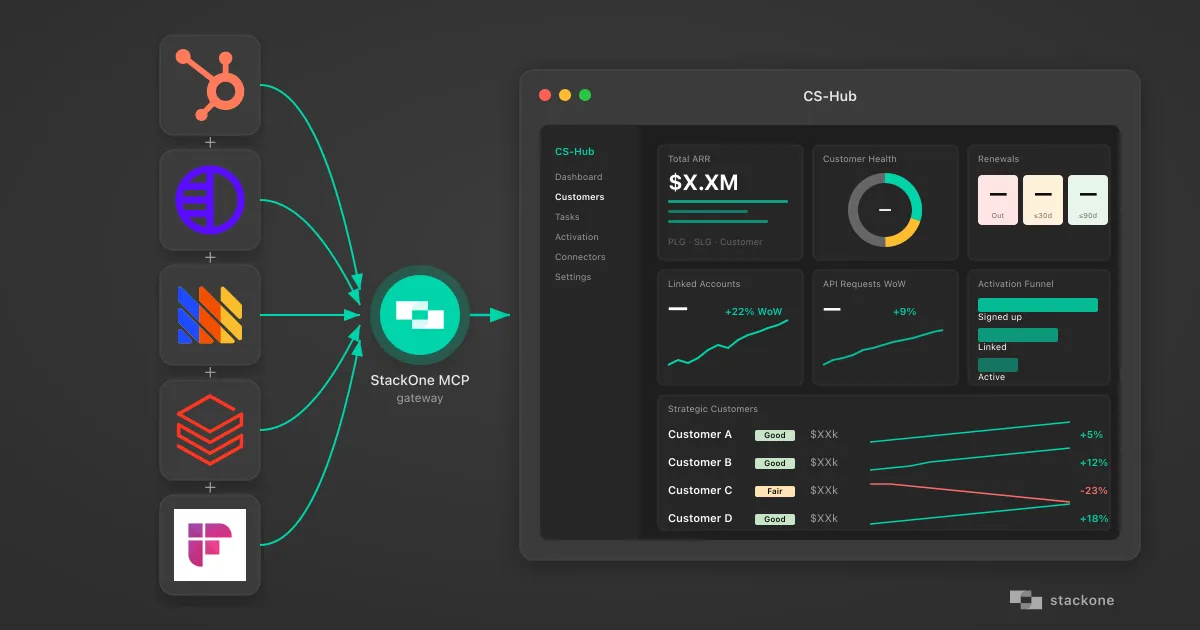
How I Vibe-Coded a Customer Success Hub Using StackOne's AI Native Integration Platform
How a non-developer vibe-coded a customer success dashboard pulling HubSpot, Pylon, PostHog, Databricks, and Fireflies through StackOne's MCP gateway.
7 min read
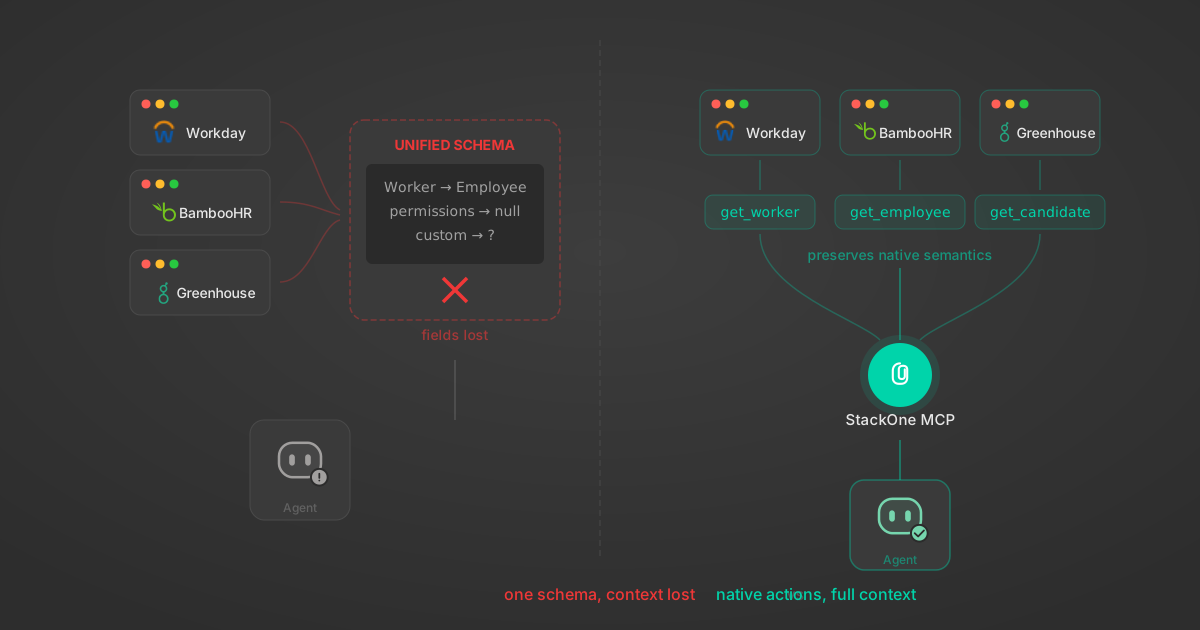
Unified API Limitations for AI Agent Integration: 7 Ways They Break
Unified APIs work for traditional software but fail AI agents in specific, measurable ways. Here are 7 problems we found after building both approaches, with examples from Workday, Greenhouse, Jira, and Salesforce.
14 min

Agentic Context Engineering: Why AI Agents Kill Their Own Context Windows
AI agents exceed their context windows without knowing it. Six failure patterns and seven survival architectures for agentic context engineering.
15 min

MCP Code Mode: Keeping Tool Responses Out of Agent Context
Anthropic's code_execution processes data already in context. Custom MCP code mode keeps raw tool responses in a sandbox. 14K tokens vs 500.
11 min

Comparing BM25, TF-IDF, and Hybrid Search for MCP Tool Discovery
Benchmarking BM25, TF-IDF, and hybrid search for MCP tool discovery across 916 tools. The 80/20 TF-IDF/BM25 hybrid hits 21% Top-1 accuracy in under 1ms.
10 min
Intercom integration FAQ
Do I need to create my own auth app to connect Intercom to StackOne?
Put your AI agents to work
All the tools you need to build and scale AI agent integrations, with best-in-class connectivity, execution, and security.