
 Guillaume Lebedel · · 14 min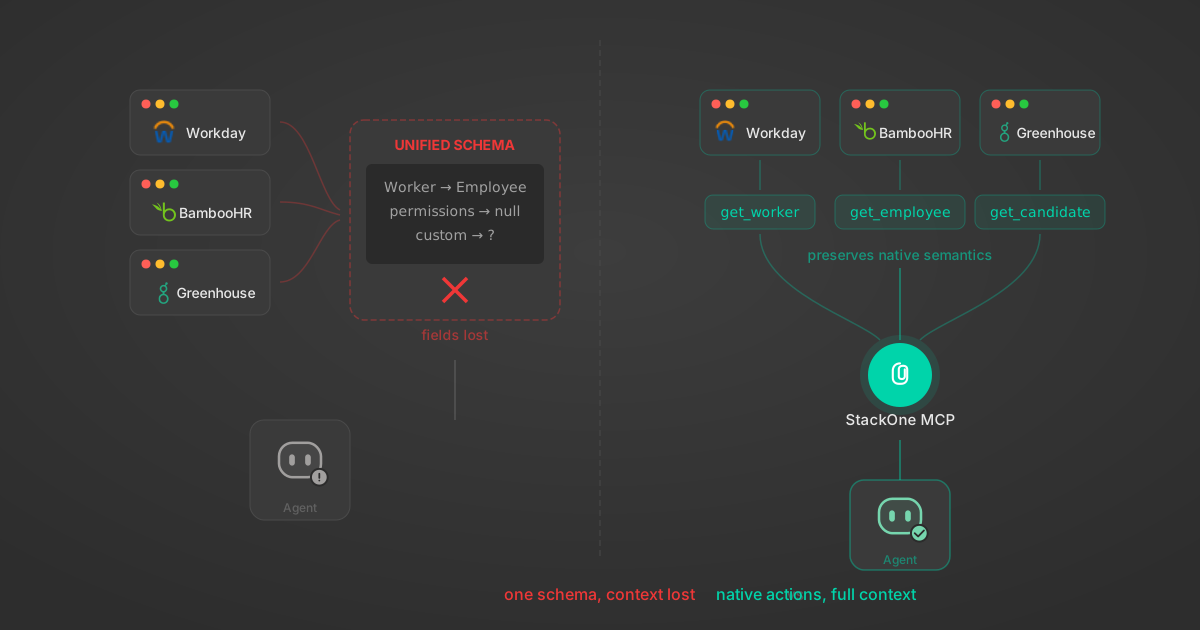
Unified API Limitations for AI Agent Integration: 7 Ways They Break
Table of Contents
Unified APIs normalize data across SaaS providers into one schema. For traditional software, this works. For AI agent integration, it breaks in specific, measurable ways.
When the consumer is an LLM instead of application code, a unified API introduces more problems than it solves. The model has to translate twice — from the user’s intent to the unified schema, then from the unified response back to the user’s mental model. Every field rename, status mapping, and schema flattening increases the gap between what the user said, what the LLM knows, and what the API returns.
We built a unified API at StackOne for years. We saw exactly where it stopped working when AI agents became the consumer. This post covers the 7 specific ways unified APIs fail for AI agent integration, what still works from the unified approach, and what to build instead.
Today StackOne takes a different approach. It’s the infrastructure layer that lets AI agents take action on enterprise applications. StackOne gives an agent a connector to any app, with the tools it needs to get tasks done there the same way a person would through the UI. Each action is optimizable, extensible, and governable. A unified API flattens every app’s API into one shared schema. A StackOne connector does the opposite: it exposes each application’s own capabilities as actions, so the agent works with the real, specific functionality of each app, not a watered-down version.
For the operator’s view of what unified-API-style abstractions cost across the integration lifecycle, see The True Cost of Building SaaS Integrations at Scale.
What Is a Unified API?
A unified API is a single API endpoint that normalizes data from multiple SaaS providers into one schema. Instead of building separate integrations for each provider, developers write one integration that works with all of them.
Take 200 HR systems, each with different endpoints, authentication flows, field names, and pagination styles. Instead of building 200 integrations, you build one. A list_employees call returns the same shape whether the underlying system is Workday’s SOAP API or BambooHR’s REST API.
For traditional software, this works. Your application code doesn’t care that Workday calls it Worker and BambooHR calls it Employee. You need a consistent first_name, last_name, department to populate a dashboard or run a sync job.
The unified API handles the translation. Developers ship faster. Customers connect their tools. But the assumptions behind this model stop holding when the consumer is an LLM.
7 Unified API Limitations for AI Agent Integration
1. Unified Schemas Contradict LLM Training Data
LLMs are trained on vast amounts of API documentation. Claude, GPT, Gemini: they’ve all seen Greenhouse’s API docs, Workday’s developer guides, Salesforce’s reference. They know what a Requisition is in Greenhouse. They know Workday’s Worker object structure.
When you route these models through a unified API that renames Worker to Employee, changes field names, restructures nested objects, and maps statuses to different enums, you’re fighting the model’s training data. The agent knows that Workday calls it Worker. Your unified API insists it’s Employee.
We watched agents consistently fail on nested query parameters. Connectors with query params under HTTP in: query created query: { query: "..." } schemas that LLMs misinterpreted, causing invalid_type errors. The fix was schema flattening: making tool schemas match what the model expects, not what the API designer thought was clean.
2. The Lowest Common Denominator Strips What Agents Need
A unified API can only expose fields that exist (or have reasonable equivalents) across all providers it supports. Each new provider with fewer capabilities shrinks the unified model further. By the time you support 50 systems, you’re down to the intersection of what they all share.
The pattern is well-documented: the more apps supported within a unified API, the more limiting it becomes.
For agents, depth matters. An HR agent needs to understand that Workday tracks compensation_grade differently from BambooHR’s pay_rate. A recruiting agent needs Greenhouse’s scorecard structure, not a flattened evaluation_score field. Stripping provider-specific fields to maintain a unified model strips the agent’s ability to do useful work.
3. Provider-Specific Query Languages Get Destroyed
Greenhouse has structured keyword search. Workday uses XPath-based queries. Jira has JQL, a full query language with operators, functions, and nesting. Salesforce has SOQL, which is basically SQL for objects.
How do you unify JQL and free-text search? You can’t, not without destroying what makes JQL useful. A unified search endpoint that accepts a string query works for BambooHR but removes Jira’s ability to run project = BACKEND AND status changed FROM "In Progress" TO "Done" AFTER -7d.
Some capabilities are fundamentally incompatible. A unified API picks a lowest common denominator, and that denominator is usually “simple text search” when the user wanted a structured query.
4. Unified APIs Invent Query Languages LLMs Have Never Seen
Unified APIs compensate for their own abstraction with expand parameters, nested include paths, and complex filter syntax. “Yes, we normalized the model, but you can use expand=manager.department.cost_center to get the data you actually needed.”
An agent calling a unified API now needs to understand a query language that isn’t the underlying system’s language and isn’t the user’s language. The LLM wasn’t trained on it. There’s no Stack Overflow post explaining the nuances. The agent guesses, and often guesses wrong.
5. Agents Lose Field-Level Control Over Context
A single employee record from Workday’s native SOAP API runs approximately 17,000 tokens. A unified employee object compresses this to about 600 tokens. That 28x reduction helps traditional API consumers, and it’s one of the clear wins of the unified approach.
But agents have a harder constraint: reasoning quality degrades well before you hit the context window limit. Research on context utilization found that model performance becomes increasingly unreliable as input length grows.
A unified API returns all normalized fields whether the agent needs them or not. An agent asking “what department is Alice in?” gets back her full compensation history, emergency contacts, and employment timeline. Multiply this by a list call returning 100 records, and you’ve burned 60,000 tokens on data the agent will never reference.
The lesson: standardizing and compressing data is valuable. But agents need field-level control — filtering, field selection, and token-aware responses — so they receive only what matters for the specific task.
6. Document Systems Can’t Be Flattened into One Schema
Google Drive organizes files in folders with sharing permissions at the file level. SharePoint uses sites, document libraries, and item-level permission inheritance. Confluence stores pages in spaces with a parent-child hierarchy. Notion has databases, pages, and blocks.
A unified list_documents endpoint can return file names and IDs. But an agent that needs to “find the Q4 revenue report in the finance team’s SharePoint site” needs to understand SharePoint’s site/library/folder hierarchy. Flattening that into a generic folder model loses the context the agent needs to navigate.
The same applies to file metadata. Google Drive tracks owners, shared_with, last_modifying_user. Confluence tracks space_key, version, ancestors. A unified schema picks a handful of common fields and discards the rest.
For agents building RAG pipelines or searching knowledge bases, the distinction between “same schema” and “same behavior” is the difference between finding the right document and returning garbage.
StackOne’s Documents API takes this approach. Consistent behavior across providers while preserving native document structures.
7. Permission Models Require Native Precision
IAM data is where the stakes of getting the model wrong are highest.
Every SaaS application models permissions differently. Okta has users, groups, and application assignments. Azure AD has users, groups, roles, and directory roles. Google Workspace has organizational units, groups, and per-service admin roles. Salesforce has profiles, permission sets, and permission set groups.
A unified list_users endpoint can return names and email addresses. But an agent doing a user access review needs to answer: “Does this user have admin access to Salesforce?” That requires understanding Salesforce’s specific permission model, not a flattened role: admin field that means something different in every provider.
A bad employee record is an inconvenience. A bad permissions audit can mean compliance failures, unauthorized access, or missed security risks.
StackOne’s Permissions API preserves each provider’s native permission model across 80+ SaaS applications.
What Unified APIs Got Right for System Integration
We built a unified API for years. Some of what we built carries directly into agent-first architecture.
Authentication. Managing OAuth flows, token refreshes, API key rotation, and SAML handshakes across 200+ platforms is hard. Abstracting authentication behind a single credential removes an entire category of agent infrastructure work. Every agent builder who tries to connect directly to enterprise SaaS immediately hits this wall.
Deep system knowledge. Years of building integrations teach you things that aren’t in the docs. Rate limit quirks, undocumented pagination behaviors, field-level gotchas that only surface at scale. This institutional knowledge is valuable regardless of how you expose the data.
Compound actions. “Transfer an employee from BambooHR to Workday” involves reading from one system, transforming data, writing to another, and handling edge cases. Multi-step actions that handle orchestration, error recovery, and data transformation in a single tool call save agents real context window budget.
Standardized behavior. Pagination, field selection, response size limits, payload truncation. Standardizing how tools behave without standardizing what data they return is the distinction that matters. This isn’t data model unification. It’s behavior standardization.
What to Build Instead of Unified APIs for AI Agents
The answer is not “abandon everything unified APIs built.” It’s to separate what should be unified (behavior) from what should stay native (data models and system semantics).
StackOne exposes each app’s capabilities through actions, not a generic API schema. A Greenhouse action returns Greenhouse objects with Greenhouse field names; a Workday action uses Workday’s terminology. Anthropic’s research on tool design confirms this: tools that match the model’s training distribution perform better than tools that introduce novel abstractions.
It also lets an agent take only the data it needs. Before running a call, the agent can see how many records and tokens it will return, then select specific fields so unused data never enters the context window. None of this requires a unified data model. It requires tool design that treats context as a scarce resource.
Each action targets one specific task. get_employee_compensation_summary is more useful to an agent than get_employee with an expand parameter: the name says what it does, and the response carries only what’s relevant. This is the opposite of the unified API philosophy, which tries to serve every use case through one endpoint.
And agents can discover tools as they go. With 33,000+ actions across 540+ connectors, an agent searches for the action it needs instead of loading every definition into the context window. A search layer that lets agents discover relevant actions based on what they’re trying to do is closer to how a developer explores an API than how a unified API client works. For the search algorithms behind this, see our comparison of BM25, TF-IDF, and hybrid search and how we added semantic search with enhanced embeddings.
Test at the action level. Each action generates deterministic RPC/REST and AI tool interfaces from the same spec and goes through behavioral testing. Testing AI agent tools at scale surfaces failure modes that are invisible in manual QA. A focused greenhouse_list_open_jobs action is easier to test than a generic list_jobs endpoint that behaves differently depending on which provider is connected.
For a full map of where these integration approaches fit in the broader stack, see our agentic AI tools landscape.
How to Evaluate API Integration for AI Agents
If you’re building agents that need to interact with enterprise SaaS, evaluate these five criteria:
Server-side filtering. Instead of returning 500 employee records, let the agent filter at the source. Select specific fields. Apply conditions. Filtering happens before data enters the context window.
Token-aware responses. Include total_count, returned_count, truncated, and estimated_tokens_per_item in response metadata. The agent knows exactly what it got and what it’s missing.
None of these require a unified data model. They require tool design that treats context as a scarce resource.
Focused AI tools for specific tasks
An agent planning a compensation review doesn’t need a complete employee record. It needs name, current salary, last review date, manager, performance rating. Five fields, not fifty.
get_employee_compensation_summary is more useful than get_employee with an expand parameter. The tool name tells the agent what it’s getting. The response contains only what’s relevant.
This is the opposite of the unified API philosophy, which tries to serve every use case through one endpoint. Agent-first design builds many focused actions, each returning exactly what a specific task needs.
Dynamic AI tool discovery
With 33,000+ actions across 540+ connectors, you can’t load every tool definition into the context window. We built meta-tools: a search layer that lets agents discover relevant actions based on what they’re trying to do. For the search algorithms behind this, see our comparison of BM25, TF-IDF, and hybrid search and how we added semantic search with enhanced embeddings.
The agent asks “what can I do with Greenhouse?” and gets back a filtered list of applicable actions, scoped to what the connected account has permissions for. This is closer to how a developer explores an API than how a unified API client works.
Testing AI actions at scale
Building AI-native actions doesn’t mean abandoning quality. Each action in our engine is defined in YAML, generates deterministic RPC/REST and AI tool interfaces from the same spec, and goes through behavioral testing.
We benchmark how accurately models select and call tools across thousands of task scenarios. A focused greenhouse_list_open_jobs action is easier to test than a generic list_jobs endpoint that behaves differently depending on which provider is connected.
- Does the tool preserve the underlying system’s semantics? Or does it introduce a new vocabulary the model has to learn?
- Can the agent control how much data it receives? Filtering, field selection, dry-run modes, token estimates.
- Are actions scoped to specific intents? Or is it one big CRUD endpoint with complex parameters?
- Can the agent discover available tools dynamically? Without loading thousands of schemas into context?
- Does the integration preserve provider-specific capabilities? Especially for documents and permissions, where precision matters most.
Unified APIs will continue to work for traditional integration use cases. For agents, the architecture needs to be different. At StackOne we learned the difference firsthand. We built a unified API for years, then moved to agent-first integration infrastructure, where each application’s capabilities stay intact and available for an agent to act on.