
ServiceNow webhooks for AI agents: turn IT service events into cross-app agentic workflows
Table of Contents
When a major incident is logged in ServiceNow, the response needs to start in seconds: alert the engineer on call, open a ticket for the team that owns the service, and get the right people into a channel to work it. How fast any of that happens comes down to how quickly your AI agent finds out the incident was raised.
TL;DR
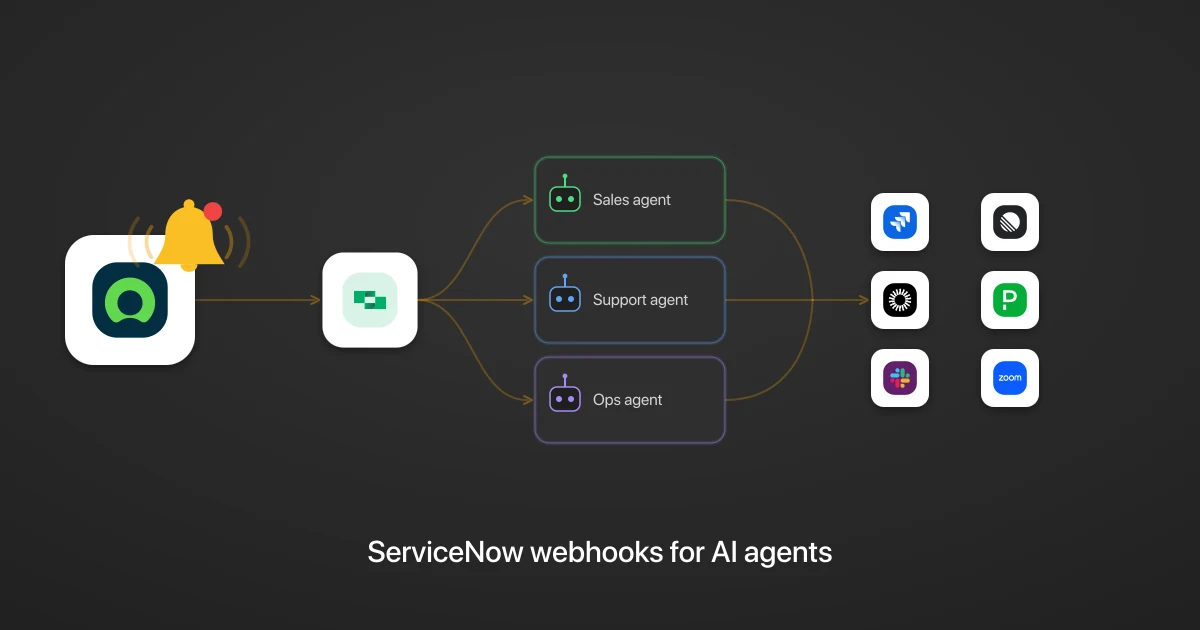
When a record changes in ServiceNow, StackOne delivers the event to every AI agent subscribed to it, in real time and with no polling. ServiceNow has no native webhooks, so StackOne installs a Business Rule (ServiceNow’s built-in server-side automation) that emits the event, and one change can fan out to any number of agents, each acting across your whole stack, from PagerDuty to Jira to Okta. This is the ServiceNow take on the general webhooks for AI agents pattern.
Why should a ServiceNow AI agent use webhooks?
A ServiceNow AI agent should use webhooks because polling is slow and expensive. Without event notifications, the agent has no way to know a record changed except to poll the Table API on a timer, comparing each result against the last. That works for a demo, but it is not an acceptable production solution.
Polling costs you three ways:
- Wasted spend. Most polls of the Table API come back unchanged, but each still costs an API call and a model call to confirm nothing happened.
- Lag. The agent only sees a change on its next run. A critical incident raised at 12:00:10 waits until the next poll to be noticed, and shortening the interval to cut that lag only adds more empty checks.
- Maintenance. You build and run the comparison yourself: fetch the table, compare each row, decide what changed.
ServiceNow has no native webhook feature, which is why teams reach for polling in the first place. StackOne closes that gap: its Create Webhook action installs a Business Rule in your instance that posts an event the moment a record changes, so the agent stays idle until notified.
What ServiceNow events can an AI agent subscribe to?
An AI agent can subscribe to 19 ServiceNow webhook events through StackOne, across six record types. Each one emits Created, Updated, and Deleted events, delivered by a StackOne-installed Business Rule scoped to that one operation:
- Incident (
incident): where outages and requests land, the core of IT service management (ITSM). - Problem (
problem): the root-cause records behind recurring incidents. - Change Request (
change_request): planned changes moving through approval. - Knowledge Article (
kb_knowledge): the knowledge base your agents read and keep current. - User (
sys_user): when someone joins, changes role, or leaves. - Group (
sys_user_group): the group memberships that grant and revoke access.
A separate Active Check event lets you send a test ping and confirm the receiver is reachable at any time.
What a ServiceNow agentic workflow looks like: three examples
A ServiceNow agentic workflow looks like this: the agent reads the event, works out what to do, and acts across your stack through the StackOne connectors. Because StackOne delivers one event to every agent subscribed to it, a single change can set several agents running at once. Here are three of them.
A critical incident is raised and agents alert the right people
When a critical incident is raised, StackOne delivers that one Incident Created event to several agents at once, filtered to priority becoming 1 so a routine ticket never wakes them:
- A triage agent works out which system is affected and alerts the team that owns it in PagerDuty.
- An engineering agent opens a ticket in Jira with the incident’s description and the affected system.
- A comms agent starts a Slack channel and posts the summary the responders need.
Each agent reasons about its own domain and adapts to the incident in front of it.
A new employee is added and an agent sets up their access
When a new employee is added (a new row in sys_user), the agent reads the new hire’s role and department and handles their employee onboarding, setting up access in Okta to match:
- For a contractor, the agent grants access with an expiry date.
- For a full-time hire, the agent grants the standard access set for their role.
The agent posts the new account to the IT channel in Slack, so everything is ready before their first day.
A change request is filed and an agent gets it approved and scheduled
When a change request is filed, the agent reads the change, opens a rollout task in Linear, and books the maintenance window in Zoom. How it handles approval depends on the risk:
- For a standard change, the agent moves straight to scheduling.
- For a high-risk change, the agent posts to Slack and waits for a human approver.
It all happens the moment the change is filed, while there is still time to catch a conflict.
How do you turn a raw ServiceNow webhook into a payload an AI agent can act on?
You turn a raw ServiceNow webhook into a payload an AI agent can act on by shaping it in the StackOne connector before delivery. The event names the changed record only by its sys_id and fires on every edit, so the agent cannot act as-is. You close the gap with three steps: filter the changes that matter, enrich the sys_id into a record, and reshape it to what the agent needs.
Filter the noise
The Incident Updated event fires on every field edit (a worknote, a reassignment, a status change), so without a filter the agent wakes for all of them and burns a model call deciding it does not care. You add a filter step that passes through only the changes that matter, such as priority becoming 1 or state moving to resolved, and drops the rest.
Enrich the pointer into a record
The event identifies the changed record by its sys_id, unlike Jira webhooks, which send the full issue; it is enough to know what changed but not enough to act on. You add an enrich step that calls Get Incident (or Get Table Record for the other events) with that id, so the agent gets the fields it needs:
// What your agent receives after enrich (illustrative values)
{
  "sys_id": "a1b2c3d4e5f6",
  "number": "INC0012345",
  "short_description": "Checkout API returning 500s",
  "priority": "1 - Critical",
  "state": "In Progress",
  "assignment_group": "Payments On-Call"
}
Reshape the record down to what the agent needs
A ServiceNow incident carries dozens of fields the agent never looks at. You add a reshape step that trims the record to the fields the prompt expects, which keeps the agent’s context tight and its cost down.
How do you know when a ServiceNow webhook delivery fails?
You know a ServiceNow webhook delivery failed because StackOne logs every delivery, retry, and failure per connected account, and ServiceNow’s Active Check event lets you send the receiver a test event on demand to confirm it is reachable. When an incident is raised and the agent never runs, the log tells you which of three things happened:
- the Business Rule never fired,
- a filter dropped the event, or
- the agent errored on receipt.
Retries are handled by the runtime, and the log shows every attempt. Without that record, a missed critical incident is invisible until someone asks why no one was alerted.
Related
StackOne makes ServiceNow webhooks useful to AI agents
StackOne makes ServiceNow webhooks useful to an AI agent by delivering a clean, complete record the agent can act on immediately. ServiceNow has no native webhooks, so StackOne installs a Business Rule to emit each change, then you filter the noise, enrich the sys_id into the record, and reshape it to the fields the agent needs.
Underneath, StackOne runs the delivery: it fans each event out to every subscribed agent, retries failures, and logs every attempt.
From there, StackOne gives the agent access to 540+ pre-built integrations and 33,000+ actions, and any integration you build.
See the webhooks for AI agents platform page and the StackOne developer docs for capabilities and setup.