
Jira webhooks for AI agents: turn issue and sprint events into cross-app agentic workflows
Table of Contents
When a critical bug is filed in Jira, the response should start in seconds: alert the engineer on call, open an incident, and pull the right people into a channel. How fast any of that happens depends on how quickly your AI agent finds out the issue was created.
TL;DR
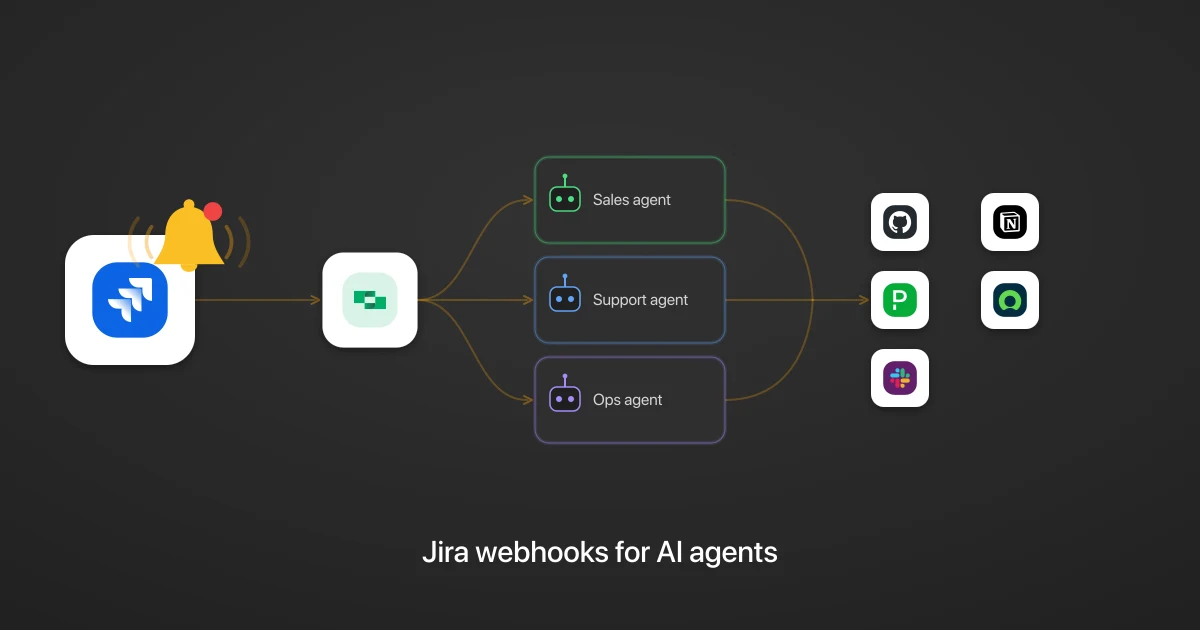
When an issue, sprint, or comment changes in Jira, StackOne delivers the event to every AI agent subscribed to it, in real time and with no polling. Any of the 47 Jira webhook events can fan out to any number of agents, each acting across your whole stack, from PagerDuty to Slack to GitHub. Jira sends the full issue in the event, unlike ServiceNow webhooks, which send only a sys_id pointer, so you filter the noisy updates and reshape the payload in the connector to the fields the agent reads. This is the Jira take on the general webhooks for AI agents pattern.
Why should a Jira AI agent use webhooks?
A Jira AI agent should use webhooks because polling is slow and expensive. Without them, the agent has to poll: ask Jira on a timer whether anything changed, and compare each answer against its last copy. That works for a demo, but it is not an acceptable production solution.
Polling costs you three ways:
- Wasted quota. Poll every few seconds to stay current and most calls return nothing new, spending your Jira request quota on empty checks.
- Lag. Poll less often to save quota and the agent reacts minutes after a production bug is filed, the window where speed matters most.
- Maintenance. Jira reports the current state of an issue but says nothing about what changed since last time, so the agent keeps its own copy of every issue and compares each poll against the last. That bookkeeping grows with every project it watches.
A webhook removes the polling loop: Jira sends the change as it happens, and the agent starts on the event itself.
What Jira events can an AI agent subscribe to?
An AI agent can subscribe to 47 Jira webhook events through StackOne, grouped by the kind of record they describe. The ones that make good workflow triggers are tied to work moving forward:
- Issues: Issue Created, Issue Updated, Issue Deleted, plus Attachment Created and Issue Link Created.
- Comments: Comment Created, Comment Updated, Comment Deleted.
- Worklogs (time-tracking entries logged against an issue): Worklog Created, Worklog Updated, Worklog Deleted.
- Sprints (a fixed block of work a team commits to): Sprint Started and Sprint Closed are the useful bookends, alongside Sprint Created, Updated, and Deleted.
- Projects, versions, and boards: Project Created, Version Released, Board Configuration Changed, and their neighbors.
- Users: User Created, User Updated, User Deleted.
The remaining events cover administrative settings, such as Time Tracking Option Changed or Issue Links Option Changed. Those are worth logging for an audit trail, but they are not the changes an agent acts on, so keep them out of your workflow triggers.
What a Jira agentic workflow looks like: three examples
A Jira agentic workflow looks like this: the agent reads a specific event, works out what to do, and acts across your other connected tools. The trigger lives in Jira; the actions do not. Here are three of them.
A production bug is filed, and the agent decides how loud to be
Every new issue arrives through the Issue Created event, so when one is created the agent reads it, reasons about severity, and acts on what it finds:
- For a production-severity bug, the agent opens a PagerDuty incident (
Create Incident) to alert the engineer on call, and files a matching record for the change-management team in ServiceNow (Create Table Record). - For a low-priority issue, the agent does nothing and lets the issue sit in the backlog.
One event type feeds many different runs, and the agent chooses the response per issue.
A sprint closes, and the agent writes the retro before the meeting
When a sprint closes, the agent reads the closed sprint through the Sprint Closed event, sees which issues shipped and which carried over, and drafts a short retrospective. Then it files that retro in two places:
- It posts the summary to the team’s channel in Slack (
Send Message). - It creates a page in the team’s Notion space (
Create Page), where the team keeps its history.
Because the agent reads the real sprint contents, the summary names the actual carryover work, and every team’s retro reads differently depending on how the sprint went.
An issue moves to Done, and the agent closes the loop on the code
When an issue moves to Done, the agent acts on the Issue Updated event, filtered to the case where the status becomes Done. Issue Updated fires on any edit, so the agent reads the changelog (the field-level changes Jira attaches) and acts only when the status is what moved:
- When the status moves to Done, the agent finds the linked pull request, comments on it in GitHub (
Create Issue Comment) that the tracking issue is closed, and messages the reviewer in Slack so the merge is not left waiting. - When only a label or description changed, the agent does nothing, which is the correct response.
How do you turn a raw Jira webhook into a payload an AI agent can act on?
You turn a raw Jira webhook into a payload an AI agent can act on by shaping it in the StackOne connector, which runs the steps on every delivery. A Jira event carries the full issue, every field it holds plus a changelog on updates, far more than an agent needs. You bring it down to what the agent uses with two steps: a filter to cut the noise, and a reshape to trim the payload.
Filter the noisy updates
Issue Updated fires on every edit, including ones no workflow acts on, like a description tweak or a new label. A filter step reads the changelog and forwards the event only when a field the workflow cares about changes, such as the status moving to Done. The agent then wakes only for that status change, and ignores the rest.
Reshape the bloated object
The payload arrives with dozens of issue fields the agent will never read, from custom fields to render metadata. A reshape step trims the object down to the few the workflow needs: the issue key, summary, status, priority, and assignee. Here is a status-change event before and after:
// What Jira sends
{
  "webhookEvent": "jira:issue_updated",
  "timestamp": 1751884800000,
  "user": { "accountId": "5b10a...", "displayName": "Priya Shah" },
  "issue": {
    "id": "10842",
    "key": "PLAT-318",
    "fields": {
      "summary": "Checkout returns 500 on retry",
      "status": { "name": "Done", "statusCategory": { "key": "done" } },
      "priority": { "name": "Highest" },
      "assignee": { "displayName": "Priya Shah" },
      "labels": ["checkout", "regression"],
      "customfield_10021": null,
      "description": { "type": "doc", "content": [] },
      "comment": { "comments": [], "total": 0 }
    }
  },
  "changelog": {
    "items": [
      { "field": "status", "fromString": "In Review", "toString": "Done" }
    ]
  }
}
// What your agent receives
{
"event": "issue.done",
"key": "PLAT-318",
"summary": "Checkout returns 500 on retry",
"status": "Done",
"priority": "Highest",
"assignee": "Priya Shah",
"changed_from": "In Review"
}How do you know when a Jira webhook delivery fails?
You know a Jira webhook delivery failed because StackOne logs every delivery against the connected account it came from, in one place, with no need to check each customer’s Jira instance. For every event, the log shows:
- whether it arrived from Jira,
- whether it reached your agent,
- whether it failed, and
- whether it was retried.
When a customer’s endpoint is down, the log shows the retry attempts and the outcome, so a missed event stays visible to you. That delivery record is StackOne’s, and Jira does not expose it on its own.
Related
StackOne makes Jira webhooks useful to AI agents
StackOne makes Jira webhooks useful to an AI agent by delivering a filtered, trimmed-down payload the agent can act on immediately. You filter the noisy events and reshape each issue to the fields that matter, in the connector, before it reaches the agent.
Underneath, StackOne runs the delivery: it registers the webhook subscription with Jira, fans each event out to every subscribed agent, retries failed deliveries, and logs every attempt.
See the full list of Jira actions and events, read how StackOne delivers webhooks for AI agents, or explore the delivery and shaping model in the StackOne documentation.