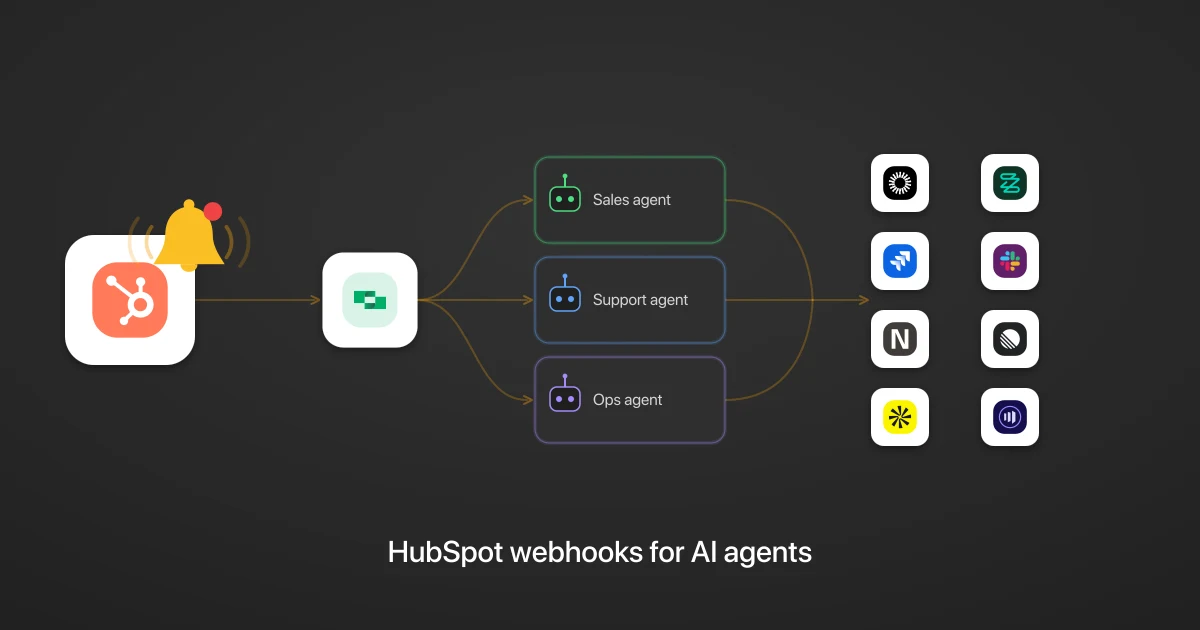
HubSpot webhooks for AI agents: turn CRM events into cross-app agentic workflows
Table of Contents
When a deal closes in HubSpot, a chain of work should follow across your stack: bill the customer, provision their access, start onboarding, tell the team. How quickly that chain fires depends on how your agent finds out the deal closed.
TL;DR
When a record changes in HubSpot, StackOne delivers the event to every AI agent subscribed to it, in real time and with no polling. One HubSpot event can fan out to any number of agents, each acting on the change across your whole stack, from billing to identity to messaging. However, a HubSpot webhook is lean and sends only an object ID, the opposite of Salesforce webhooks, which arrive as a bulky SOAP envelope. StackOne’s connectors let you enrich that into a full record on the way in, so the agent has what it needs to act right away. This is the HubSpot take on the general webhooks for AI agents pattern.
Why should a HubSpot AI agent use webhooks?
A HubSpot AI agent should use webhooks because polling is slow and expensive. Without event notifications, the agent has no way to know a record changed except to poll: call List Deals on a timer, compare each result against the last, and act on what changed. That works for a demo, but it is not an acceptable production solution.
Polling costs you three ways:
- Wasted spend. Most checks find nothing changed, yet each still spends an API call and, usually, a model call and its tokens.
- Lag. The agent only sees a change on its next run. A deal that closes at 12:00:10 waits until 12:01:00, and shortening the interval to cut that lag only adds more empty checks.
- Maintenance. You build and run the comparison yourself: fetch, compare, decide what changed.
With a webhook, HubSpot sends the event the instant a record changes. The agent then:
- stays idle until notified
- spends tokens only when something happens
- has what it needs to act as soon as the event lands
What HubSpot events can an AI agent subscribe to?
An AI agent can subscribe to 25 HubSpot webhook events through the StackOne connector, across four CRM objects: contacts, companies, deals, and tickets. Each object emits the same lifecycle set:
- Created: a new record appears (
contact.creation,deal.creation). - Deleted: a record is removed (
ticket.deletion). - Property Changed: a field on the record is updated. The payload names the
propertyNameand the new value. - Association Changed: a link between the record and another CRM object is added or removed.
- Merged: two records are combined.
- Restored: a previously deleted record is brought back.
Contacts add one more, Privacy Deleted, fired when a contact is permanently removed under a GDPR or similar request. That event matters for agents that keep a downstream copy of contact data and need to honour deletions.
What a HubSpot agentic workflow looks like: three examples
A HubSpot agentic workflow looks like this: the agent reads the event, works out what to do, and acts across your stack through the StackOne connectors. Because StackOne delivers one event to every agent subscribed to it, a single change can set several agents running at once. Here are three of them.
A deal closes and several agents pick up their part
When a deal moves to closed-won, StackOne delivers that one Deal Property Changed event to several agents at once, filtered so a routine field edit never wakes them:
- A customer onboarding agent works out what the customer bought and provisions the right seats and modules in Okta.
- A billing agent creates the matching subscription in Zuora against the deal’s terms.
- A revops agent opens the onboarding project in Jira and posts the win to Slack with the context the team needs.
Each agent reasons about its own domain and adapts to the deal in front of it.
A ticket comes in and an agent decides how to handle it
When a ticket comes in, the agent works out what the customer is asking from the ticket in the event and checks the account’s plan in NetSuite to weigh how much it matters, then acts on what it finds:
- For a stalled enterprise account, the agent escalates in Slack and opens a linked issue in Linear for engineering.
- For a routine question, the agent drafts a reply for a human to approve.
The judgment happens while the customer is still in the tab.
A contact is created and an agent qualifies and routes it
When a contact is created, the agent looks up the contact’s firmographics in Apollo to qualify the lead against your ICP:
- For a qualified lead, the agent writes it back with
Update Contact, notifies the owner in Slack, and adds it to a Marketo sequence. - For a poor fit, the agent tags it and leaves it for nurture.
The routing happens in seconds, before the lead goes cold.
How do you turn a raw HubSpot webhook into a payload an AI agent can act on?
You turn a raw HubSpot webhook into a payload an AI agent can act on by shaping it in the StackOne connector before delivery. A HubSpot webhook is thin: it carries only the object ID and the field that changed, not the record itself. You close the gap with two steps: filter the noise, and enrich the ID into the full record.
// What HubSpot sends: a change notification
{
  "objectId": 4207,
  "subscriptionType": "deal.propertyChange",
  "propertyName": "dealstage",
  "propertyValue": "closedwon"
}
In the connector, you shape it into the record the agent needs, and StackOne runs that before delivery:
// What your agent receives after the connector's pipeline
{
  "dealName": "Acme Corp Enterprise",
  "amount": 48000,
  "stage": "closedwon",
  "ownerEmail": "jordan@acme.com"
}
Filter the noisy propertyChange stream
Most of those property edits are not the transition you care about. You add a filter step that inspects propertyName and propertyValue and passes through only dealstage becoming closedwon, dropping the rest. The agent then wakes only when the stage actually changes.
Enrich the identifier into a full record
The agent needs the full record to act. You add an enrich step that calls Get Deal with the objectId and pulls the amount, stage, owner, and associated contact and company, which is what every cross-app action downstream depends on. The same step uses Get Contact and Get Ticket for their events.
Some providers do the opposite and over-send. For a bloated payload, you add a reshape step that trims it to the fields the agent needs, which keeps the agent’s context tight. HubSpot’s notification is thin, so this example does not need it.
How do you know when a HubSpot webhook delivery fails?
You know a HubSpot webhook delivery failed because StackOne logs every delivery, retry, and failure per connected account. When a deal closes and the agent never runs, the log tells you which of three things happened:
- HubSpot never sent the event,
- a filter dropped it, or
- the agent errored on receipt.
Retries are handled by the runtime, and the log shows every attempt. Without that record, a missed closed-won deal is invisible until someone asks where the follow-up went.
Related
StackOne makes HubSpot webhooks useful to AI agents
StackOne makes HubSpot webhooks useful to an AI agent by delivering a full, ready-to-use record the agent can act on immediately. You filter the noisy events and enrich the thin webhook into the full record, in the connector, before it reaches the agent.
Underneath, StackOne runs the delivery: it registers the webhook subscription with HubSpot, fans each event out to every subscribed agent, retries failed deliveries, and logs every attempt.
From there, StackOne gives the agent access to 400+ pre-built integrations and 25,000+ actions, and any integration you build.
See the webhooks for AI agents platform page and the StackOne developer docs for capabilities and setup.