
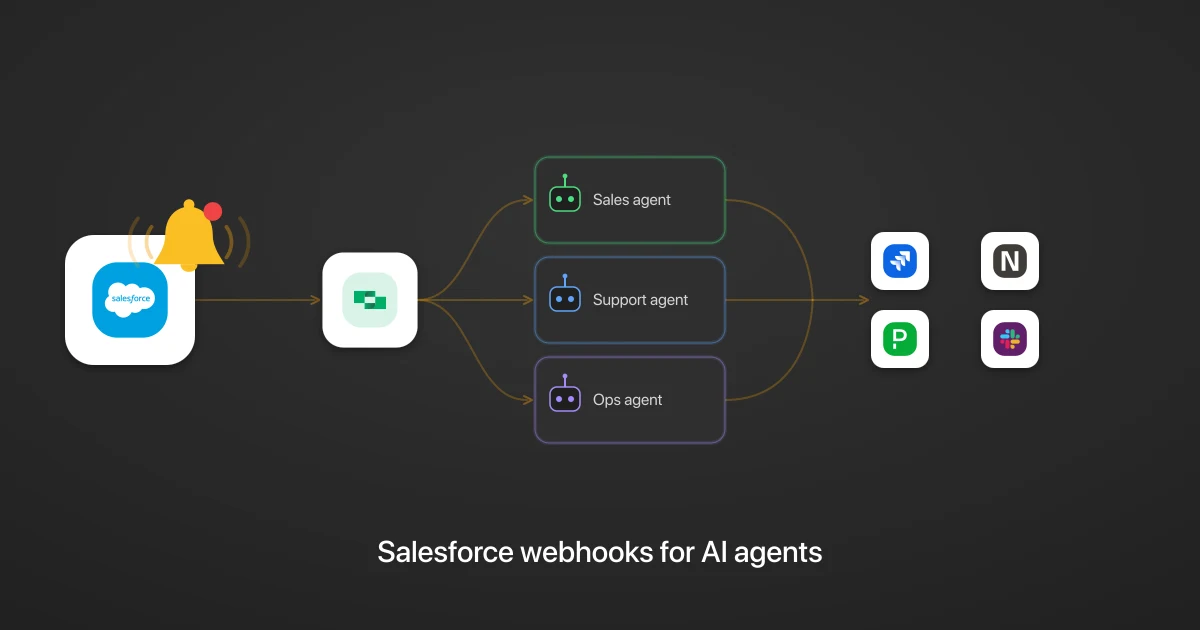
Salesforce webhooks for AI agents: turn CRM events into cross-app agentic workflows
Table of Contents
An Opportunity in Salesforce flips to Closed Won late on a Friday. Finance needs to bill the account, IT needs to grant access, and the delivery team needs a project to start Monday. Every hour those steps wait is an hour of onboarding lost, and how fast they happen depends on how quickly your AI agent finds out the stage changed.
TL;DR
Salesforce webhooks are SOAP Outbound Messages: XML notifications Salesforce sends to an endpoint the moment a record changes. Through StackOne, one Salesforce event reaches every AI agent subscribed to it, in real time with no polling, and each agent acts across your whole stack. Because Salesforce wraps each record in a bulky SOAP envelope, the StackOne connector lets you strip it down to the fields the agent needs and deliver them as clean JSON. This is the Salesforce take on the general webhooks for AI agents pattern.
Why should a Salesforce AI agent use webhooks?
A Salesforce AI agent should use webhooks because polling is slow and expensive. Without event notifications, the agent has no way to know a record changed except to poll: call List Opportunities on a timer, compare each result against the last, and act on what moved. That works for a demo, but it is not an acceptable production solution.
Polling costs you three ways:
- Wasted spend. Most
List Opportunitiescalls come back unchanged, yet each still burns an API call and the tokens to confirm nothing happened. - Lag. The agent only sees a change on its next run. An opportunity that flips to Closed Won at 4:55 on a Friday sits untouched until the next poll, and tightening the schedule only multiplies the empty calls.
- Maintenance. You run the comparison yourself: pull each record, check it against your last copy, and work out what changed.
With a webhook, Salesforce sends the event the instant a record changes. The agent then:
- stays idle until notified
- spends tokens only when a record actually changes
- gets what it needs to act, straight from the event
What Salesforce events can an AI agent subscribe to?
An AI agent can subscribe to 15 Salesforce webhook events through the StackOne connector, across the core CRM records. Fourteen of them are the Created and Updated pair on seven objects, and the fifteenth is a connectivity check:
- Account: Created and Updated, for new companies and changes to existing ones.
- Contact: Created and Updated, for the people attached to those accounts.
- Lead: Created and Updated, for inbound prospects before they convert.
- Opportunity: Created and Updated, for deals moving through the pipeline.
- Case: Created and Updated, for support and service issues.
- Task: Created and Updated, for follow-ups and to-dos logged against records.
- User: Created and Updated, for people joining or changing inside the org.
- Active Check: a manual connectivity test. When the webhook is invoked with
?event=ping, it returns a SOAP acknowledgement so an admin can confirm the receiver endpoint is reachable.
What a Salesforce agentic workflow looks like: three examples
A Salesforce agentic workflow looks like this: the agent reads the event, works out what to do, and acts across your stack through the StackOne connectors. Because StackOne delivers one event to every agent subscribed to it, a single change can set several agents running at once. Here are three of them.
An opportunity closes and several agents pick up their part
When an opportunity moves to Closed Won, StackOne delivers that one Opportunity Updated event to several agents at once, filtered so a routine field edit never wakes them:
- A billing agent creates the customer in NetSuite with
Create Customer, then books the deal withCreate Sales Orderagainst the closed amount. - A customer onboarding agent opens the onboarding project in Jira with
Create Projectso implementation can start. - A revops agent posts the win to the deal team in Slack with
Send Message, carrying the account name, amount, and owner.
Each agent owns its own step and adapts to the size and terms of the deal that closed.
A case comes in and an agent decides how urgent it is
When a new case is created, the agent reads the subject, priority, and account from the event, weighs how much it matters, and acts on what it finds:
- For a production-impacting case on a key account, the agent raises a
Create Incidentin PagerDuty to alert the engineer on call, then posts the context to the response channel in Slack withSend Message. - For a routine question, it does nothing beyond logging, and the case stays in the standard support queue.
The judgment happens while the customer is still waiting on a reply.
A lead comes in and an agent qualifies and routes it
When a lead is created, the agent reads its company and source to qualify the lead against your ideal customer profile (ICP):
- For a qualified enterprise lead, the agent notifies the owning account executive in Slack with
Send Messageand opens a prep task in Jira withCreate Issue, so research is ready before the first call. - A poor fit stays in the standard nurture queue with no action.
All of it happens within seconds of the lead landing, while it is still warm.
How do you turn a raw Salesforce webhook into a payload an AI agent can act on?
You turn a raw Salesforce webhook into a payload an AI agent can act on by shaping it in the StackOne connector before delivery. Salesforce sends a SOAP Outbound Message: a verbose XML envelope that buries the record’s fields under transport metadata and costs tokens the agent should not spend. You close the gap with three steps: filter the changes worth forwarding, reshape that XML into compact JSON keyed to the fields the agent needs, and enrich any it left out.
Filter to the changes worth forwarding
Not every update deserves an agent run, and there is no point reshaping an event you are going to drop. A Salesforce Outbound Message is fired by a workflow rule, so you can scope it to the transition that matters, sending only when StageName becomes Closed Won, or apply the same filter in the connector. Either way, the events you don’t care about never reach the reshape step, and the same filter trims the Account, Contact, and Case Updated streams.
Reshape the SOAP XML into clean JSON
For the events that pass, the SOAP envelope still has to come apart. A reshape step parses it, pulls the record fields out of the Notification and sObject elements, and drops the metadata, leaving compact JSON keyed to the fields the agent uses. Here is an Opportunity event before and after:
<!-- What Salesforce sends: a SOAP Outbound Message envelope (illustrative) -->
<soapenv:Envelope xmlns:soapenv="http://schemas.xmlsoap.org/soap/envelope/">
  <soapenv:Body>
    <notifications xmlns="http://soap.sforce.com/2005/09/outbound">
      <OrganizationId>00D...</OrganizationId>
      <ActionId>04k...</ActionId>
      <Notification>
        <Id>04l...</Id>
        <sObject xsi:type="sf:Opportunity">
          <sf:Id>006...</sf:Id>
          <sf:Name>Acme Corp Enterprise</sf:Name>
          <sf:Amount>48000</sf:Amount>
          <sf:StageName>Closed Won</sf:StageName>
          <sf:OwnerId>005...</sf:OwnerId>
        </sObject>
      </Notification>
    </notifications>
  </soapenv:Body>
</soapenv:Envelope>
// What your agent receives
{
"opportunityId": "006...",
"name": "Acme Corp Enterprise",
"amount": 48000,
"stage": "Closed Won",
"ownerId": "005..."
}Enrich the record when the message carries too few fields
An Outbound Message includes only the fields the admin picked, so a message built to be lean may omit the account or owner the agent needs. You add an enrich step that calls Get Opportunity with the record ID and pulls the full record, and the same step uses Get Account, Get Contact, and Get Lead for their events. Widening the Outbound Message in Salesforce is the alternative, but an enrich step gives the agent the whole record without an admin touching the org’s config.
How do you know when a Salesforce webhook delivery fails?
You know a Salesforce webhook delivery failed because StackOne logs every delivery, retry, and failure per connected account. When an opportunity closes and the agent never runs, the log tells you which of three things happened:
- Salesforce never sent the Outbound Message,
- a filter dropped it, or
- the agent errored on receipt.
Salesforce itself retries an Outbound Message with exponential back-off for up to 24 hours until the endpoint acknowledges it, and StackOne records each attempt on its side. Without that record, a missed Closed Won deal is invisible until someone asks where the follow-up went.
Related
StackOne makes Salesforce webhooks useful to AI agents
StackOne makes Salesforce webhooks useful to an AI agent by delivering clean, trimmed-down JSON the agent can act on immediately. You filter the changes worth forwarding, reshape the SOAP XML into JSON, and enrich any missing fields, in the connector, before the event reaches the agent.
Underneath, StackOne runs the delivery: it sets up the Outbound Message subscription in Salesforce, fans each event out to every subscribed agent, retries failed deliveries, and logs every attempt.
From there, StackOne gives the agent access to 540+ pre-built integrations and 33,000+ actions, and any integration you build.
See the webhooks for AI agents platform page and the StackOne developer docs for capabilities and setup.