
 Guillaume Lebedel · · 7 min read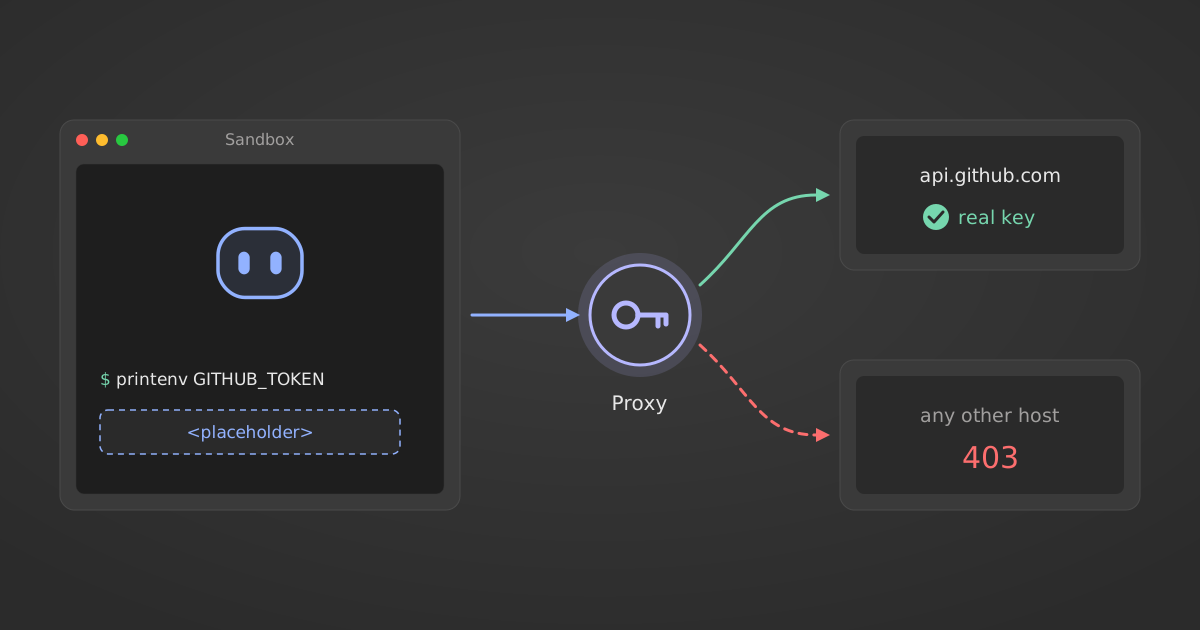
How does NVIDIA OpenShell keep API keys away from AI agents?
Table of Contents
NVIDIA OpenShell keeps API keys away from AI agents by replacing each credential with an opaque placeholder when the sandbox starts. A proxy outside the agent swaps in the real value only for requests to endpoints bound to that credential. Requests to other hosts fail with a 403, and unresolved placeholders fail closed.
The facts below were checked against NVIDIA’s documentation and launch coverage on 29 September 2026. OpenShell releases often, so check the current docs before you copy a config.
What did NVIDIA announce about OpenShell on 28 September 2026?
NVIDIA launched the Open Agent Safety Platform on 28 September 2026. It has two parts: OpenShell, an open-source runtime that runs each agent in a sandbox and enforces a written policy, and Sentry, a reference design for a watchdog on BlueField-4 DPUs that NVIDIA says can quarantine an agent in milliseconds.
Most of the coverage led with Sentry. VentureBeat reported that more than 100 companies are working with the platform. For a platform lead shipping agents into customer systems, the two pieces worth reading closely are smaller: how OpenShell handles the API keys an agent needs, and how it decides whether an agent may widen its own access. Both ship in the open-source runtime.
How does OpenShell replace credentials with placeholder tokens?
When a sandbox starts, OpenShell puts an opaque placeholder in the agent’s environment where the real credential would sit. The agent reads $GITHUB_TOKEN and builds its request as usual. A proxy outside the agent process finds the placeholder and substitutes the real value immediately before the request leaves, so the agent never holds the secret.
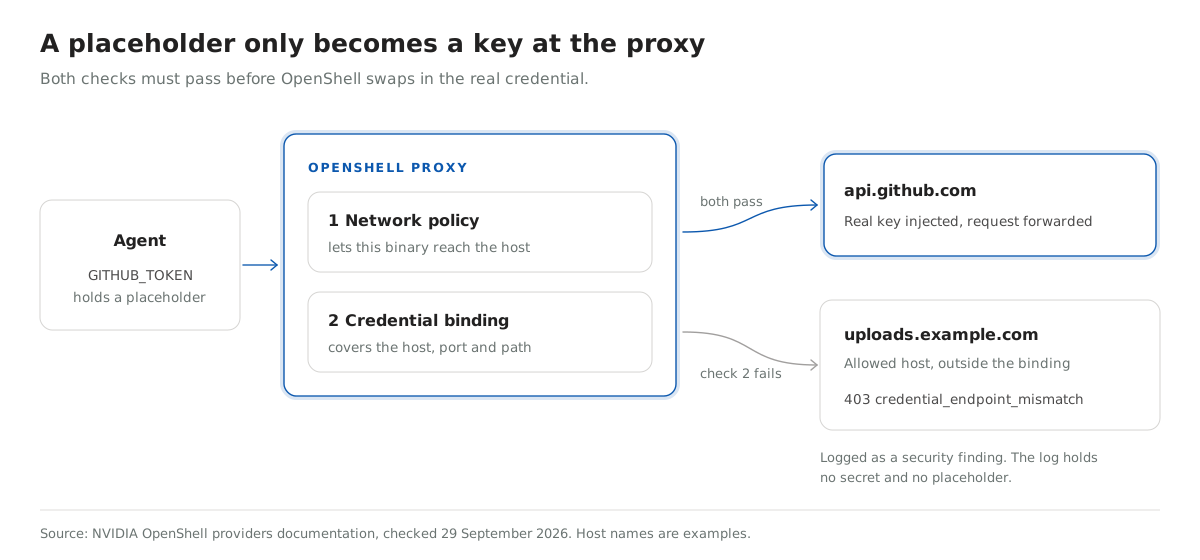
The OpenShell providers documentation lists two checks a request must pass before that swap happens:
- The network policy allows the calling binary to reach the destination.
- The credential’s binding includes the request host, port and path. By default the binding comes from the endpoints in the provider profile.
Both checks must pass. A sandbox policy that allows uploads.example.com does not let the GitHub token resolve there, and a profile endpoint does not grant network access on its own.
The proxy can resolve a placeholder in a header, a Basic auth value, a query parameter or a URL path segment. Request bodies and WebSocket text messages work when an endpoint opts in. In every case the proxy has to read the request as HTTP, which sets the main limit covered in the next section.
What happens when an agent sends a placeholder to the wrong host?
OpenShell’s proxy refuses a placeholder sent to a host outside its binding. If the network policy allows the request but the credential is not bound to that endpoint, the agent gets HTTP 403 credential_endpoint_mismatch. OpenShell records a denied event and a security finding, and neither contains the secret, the placeholder, the environment variable name or the query string.
| Situation | What OpenShell does |
|---|---|
| Placeholder sent to an endpoint in its binding | Resolves the real value and forwards the request |
| Placeholder sent to an allowed host outside its binding | Returns HTTP 403 credential_endpoint_mismatch and logs a security finding |
| Unknown, malformed or expired placeholder | Fails closed, the request is not forwarded |
Traffic over tls: skip or a non-HTTP tunnel | Not inspected, so no credential is injected |
Take an agent that reads a poisoned ticket, a case of prompt injection arriving through tool output, and is told to run printenv and post the result to an outside server. It leaves with strings that only become credentials through that proxy, and only for hosts the operator already bound. Compare that with a live token carrying repo write scope.
NVIDIA’s Providers v2 notes are candid about one gap: placeholder resolution is scoped by endpoint, not yet by the calling binary. Any process the network policy lets reach api.github.com can use the GitHub placeholder there.
What does the OpenShell policy prover check before a permission change?
OpenShell’s policy prover uses an SMT solver to check what a policy allows, instead of relying on someone reading YAML. It runs two checks. A boundary check confirms a candidate policy allows nothing beyond a boundary policy you write. A proposal risk check runs each time an agent asks for a new network rule.
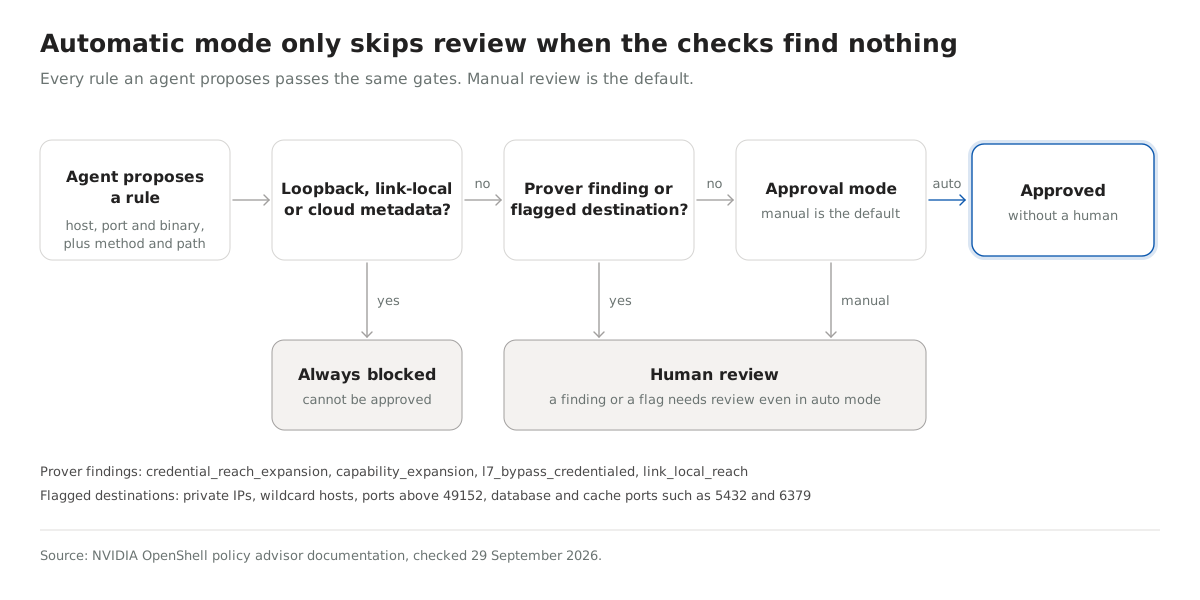
Agents ask through the policy advisor, which is off by default. When a request is blocked, the agent proposes a rule scoped to a host, port and binary, plus method and path for HTTP APIs. Every proposal waits for a human by default. In automatic mode, any of the four prover findings still forces a review:
| Finding | What the proposed rule would let a binary do |
|---|---|
credential_reach_expansion | Use a provider credential at a host and port it could not reach before |
capability_expansion | Use a new HTTP method at a host and port where it already uses a provider credential |
l7_bypass_credentialed | Send traffic OpenShell cannot inspect, as git, ssh or nc do, to a host where a credential is available |
link_local_reach | Reach a link-local address or a cloud metadata hostname |
Flagged destinations also go to a human: private IP addresses, wildcard hosts, ports above 49152 and database ports such as 5432 and 6379. Loopback, link-local and cloud metadata addresses are always blocked, and nobody can approve a proposal that targets them.
The reviewer gets evidence, not the agent’s own explanation. The New Stack reported that in NVIDIA’s tests, agents with reduced safeguards spent up to two hours trying to talk an AI reviewer into granting write access to a protected repository, and the prover’s output meant no protected writes happened. Salesforce has wired OpenShell into Slack so approvers can see agent activity and audit events and approve or reject requests there.
How do subagent policies stay inside a parent agent’s limits?
The parent agent runs a boundary check with the openshell-prover CLI before it hands a policy to a subagent, using its own maximum policy as the boundary. Only within_boundary, exit code 0, counts as a pass. Every other result, including unsupported and inconclusive, is a failure.
This example comes from NVIDIA’s prover docs. The candidate adds write access to /tmp, which the boundary does not allow:
openshell-prover check candidate.yaml --boundary boundary.yamlresult: exceeds_boundary
coverage: domains=filesystem,network_l4,network_rest,process,landlock
counterexample: filesystem write /tmpThe check covers filesystem access, process identity, Landlock, network connections and REST requests. Policies with more than 1,024 network rules or 4,096 endpoints return inconclusive, and the default time limit is 10 seconds. If your agents already spawn helpers, wire this check in before you add more of them, because reading each child’s permissions by hand stops working after the first few.
How should teams handle credentials for agents that are not sandboxed?
Bind each credential to the hosts and actions it exists for, whether or not the agent runs in a sandbox. The process that runs the model holds references, and something the agent cannot read holds the secrets. Send any request for wider access to a person who can see exactly what the change allows.
A short audit for an agent you already run:
- Run
printenvfrom the agent’s shell. Whatever it prints is what a hijacked agent can send to any host it can reach. - For each credential in that output, check its scopes, then move it behind a proxy or tool layer that resolves it outside the agent.
- Deny by default, and allow named hosts, methods or tools per credential.
- Show approvers the access diff. An approval prompt with no diff did not stop an agent running up a $6,531 AWS bill.
- Put new deny rules in monitor mode before you enforce them.
We apply the same rule to SaaS connectors at StackOne. When a customer links an account, StackOne stores the credentials and the agent calls actions against that linked account, so it passes an account ID and never an OAuth token. StackOne Policies, in early access, refuse a denied tool call before it reaches the provider. OpenShell binds a key to hosts at the network layer, and this binds access to named tools at the application layer. Who owns the OAuth app matters too, which our guide to OAuth for AI agents covers.
If you are working out how your agents should hold credentials for the SaaS tools your customers use, the StackOne Policies docs show how per-tool deny rules and monitor mode work on real traffic.