
Connect Okta to Claude Managed Agents: Unattended Identity and Access Workflows
Table of Contents
Claude Managed Agents connect to Okta through a remote MCP server, which turns the agent’s tool calls into Okta API calls and is added to the agent by URL. Okta’s Managed MCP Server can be added directly, and Okta’s open-source server only works if you host it yourself. For agents that run unattended, use Okta alongside other apps and need limits on what they can change, connect them through a Tool Gateway such as StackOne.
This guide is for IT and identity teams who want Claude to work in Okta on its own, on a schedule or in response to events. For Claude Cowork and Claude Code as assistants, see connecting Okta to Claude.
In this post:
- What a managed agent does in Okta: the jobs that suit an agent
- How to connect Okta to Claude Managed Agents: the options
- Controlling what the agent can change in Okta: approvals, field rules and custom actions
- Okta options for managed agents compared: one table
- How it works with StackOne: setup for a managed agent
What a managed agent does in Okta
Claude Managed Agents is Anthropic’s hosted agent service. It runs on a schedule or a trigger with no one at the keyboard, which suits identity jobs that repeat but need judgement each time:
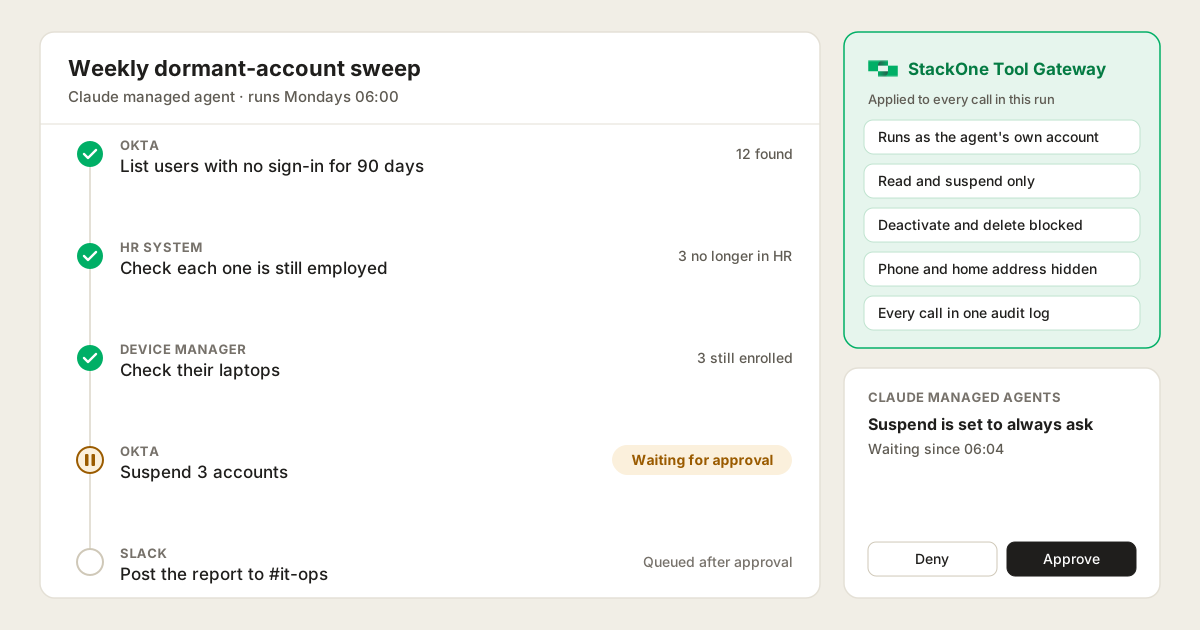
- A weekly dormant-account sweep. Find users who haven’t signed in for 90 days, check whether HR still lists them, and report the ones that look orphaned. Finding inactive users is the most popular Okta Workflows template, according to Okta’s 2024 Businesses at Work report.
- An offboarding check across systems. After HR marks someone as leaving, check their Okta account, apps, groups and devices, then propose signing them out of every session and suspending the account. If HR got it wrong, unsuspending is one click.
- Access review preparation. Pull group memberships, HR role changes and last sign-ins into one summary, then launch the certification campaign in Okta Identity Governance once a person approves.
In each case the agent reads widely and reports, and a person approves any change that grants or removes access. Where a process never varies, Okta Workflows is still the better tool.
How to connect Okta to Claude Managed Agents
Managed Agents only connect to remote MCP servers. You add each server to the agent by URL, and its credential lives in a Managed Agents vault.
Okta’s open-source MCP server
Okta’s open-source server runs on a local machine, so a managed agent can’t reach it directly. You’d have to host it yourself behind a public URL, and then own its uptime, its patching and the admin-level credential it needs.
Okta Managed MCP Server
Okta’s hosted server has a remote URL, so a managed agent can use it directly. It trims its responses and covers Okta Identity Governance as well as user and group management.
It’s a paid add-on in early access, it isn’t offered in Okta for Government or US Military environments, and it’s capped at 100 requests per minute per org, which a sweep across a large directory can hit. It also covers Okta alone, so the HR and device checks need more servers, each with its own credential.
A Tool Gateway
A Tool Gateway puts Okta and your other apps behind one MCP server, so the agent uses one URL and one credential. StackOne’s Okta connector has 115 actions, including suspend, individual devices and Okta Identity Governance, and works with any Okta org.
- Prompt Injection Guard checks every response before the agent reads it, which matters more when no one is watching.
- Every call goes into one action log across all your systems, which you can send to your SIEM.
- Permission policies on the agent’s own account limit what it can do, as set out below.
Controlling what the agent can change in Okta
Claude can pause any tool call for a person’s approval, but only tool by tool. So your control depends on how finely the Okta connection splits its actions.
- Okta’s Managed MCP Server is limited by broad permission scopes. One scope covers creating, updating and deactivating users together, and Okta doesn’t publish the tool list.
- Okta’s open-source server has no suspend tool. Its README maps “suspend the contractor account temporarily” to deactivating them, so an agent asked to pause someone’s access cuts it off instead.
- Approval is all or nothing per tool. A sweep proposing 40 changes means 40 approvals, and people stop reading them.
A Tool Gateway adds three things:
- One tool per action. Set the agents project to load every action up front, and each Okta action becomes its own tool, so reads run unattended while suspends wait for a person.
- Rules for fields, not just tools. StackOne permission policies can hide fields such as phone and home address, and block actions such as deactivate and delete for the agent’s account alone. With those rules in place, low-risk changes can run on their own, because the rules block the risky ones, while anything that grants or removes access still waits for a person.
- Actions shaped for the job. StackOne’s Okta connector has separate suspend, deactivate and delete actions, so the sweep agent can suspend a likely orphaned account, which a person can undo in one click, while deactivation stays off its list. If a job needs an Okta action the connector lacks, the AI Connector Builder can add it.
Okta options for managed agents compared
| Okta open-source server | Okta Managed MCP Server | StackOne Tool Gateway | |
|---|---|---|---|
| Works with a managed agent | Only if you host it | Yes | Yes |
| Okta plan needed | Any org | Paid add-on | Any org |
| Systems covered | Okta | Okta | Okta plus HR, device, CRM and more |
| Suspend a user (reversible) | No | Not documented | Yes |
| Hide fields such as phone numbers | No | Not documented | Yes |
| Sign someone out of every session | No | Not documented | Yes |
| Individual devices | No | Not documented | Yes |
| Certification campaigns and access requests | No | Yes, with Identity Governance | Yes, with Identity Governance |
| Screens responses for injected instructions | Not documented | Not documented | Yes |
| Audit | Okta System Log | Okta System Log | One log across every system |
How it works with StackOne
The StackOne admin and the Anthropic workspace admin each do part of the setup:
-
Create a StackOne project for agents. It keeps the agent’s Okta access separate from the one people use in Cowork and Claude Code. Set it to load every action up front, so each Okta action is its own tool.
-
Link Okta in that project with only the access the job needs, such as read access for a sweep. Link the HR system and device manager the same way.
-
Create an account for the agent with access to that project only. If your StackOne users come from SCIM or SSO, create it in your identity provider as a non-human user. If that isn’t possible, use a separate StackOne organisation for agents.
-
Set policies on the agent’s account, such as read-only actions, hidden phone and address fields, and no deactivation.
-
Sign in once as the agent’s account at
https://mcp.stackone.com/mcp. The token refreshes automatically, so this is a one-time setup.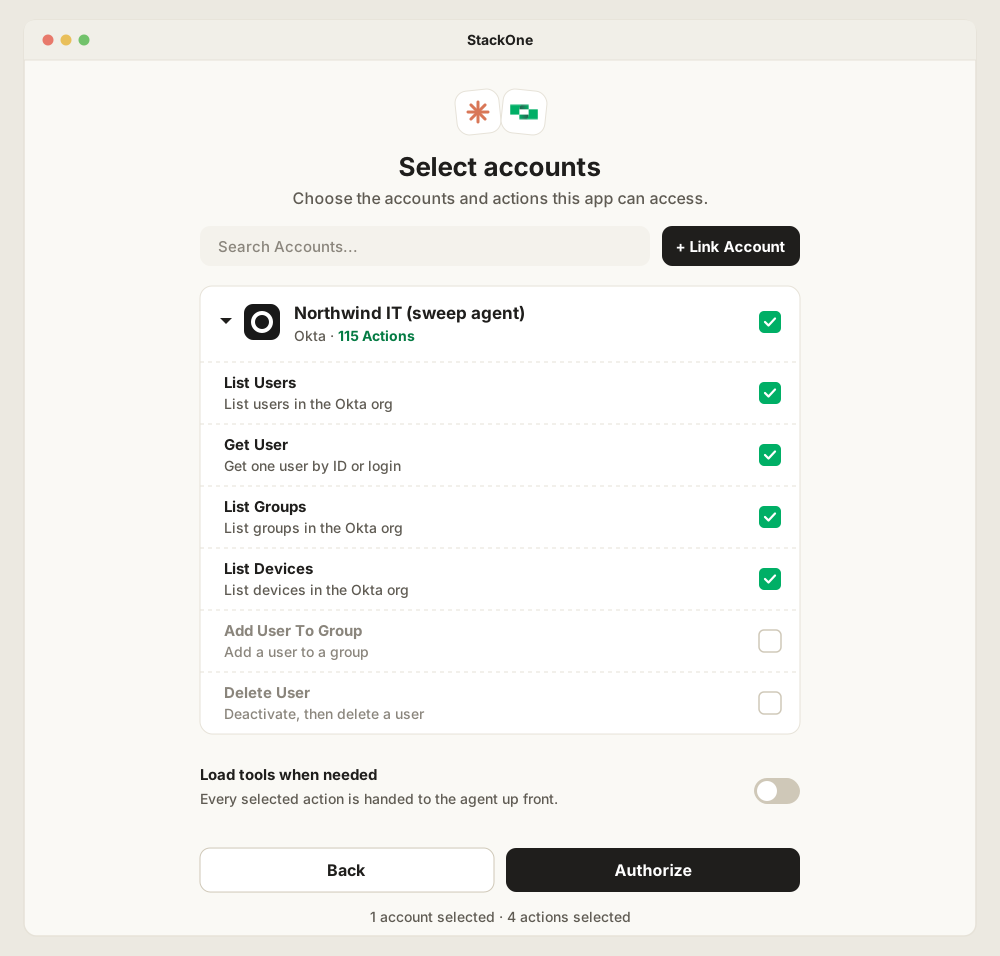
-
Store the sign-in in the agent’s vault and add the StackOne server to the agent. Let the read tools run on their own and leave everything else to ask first.
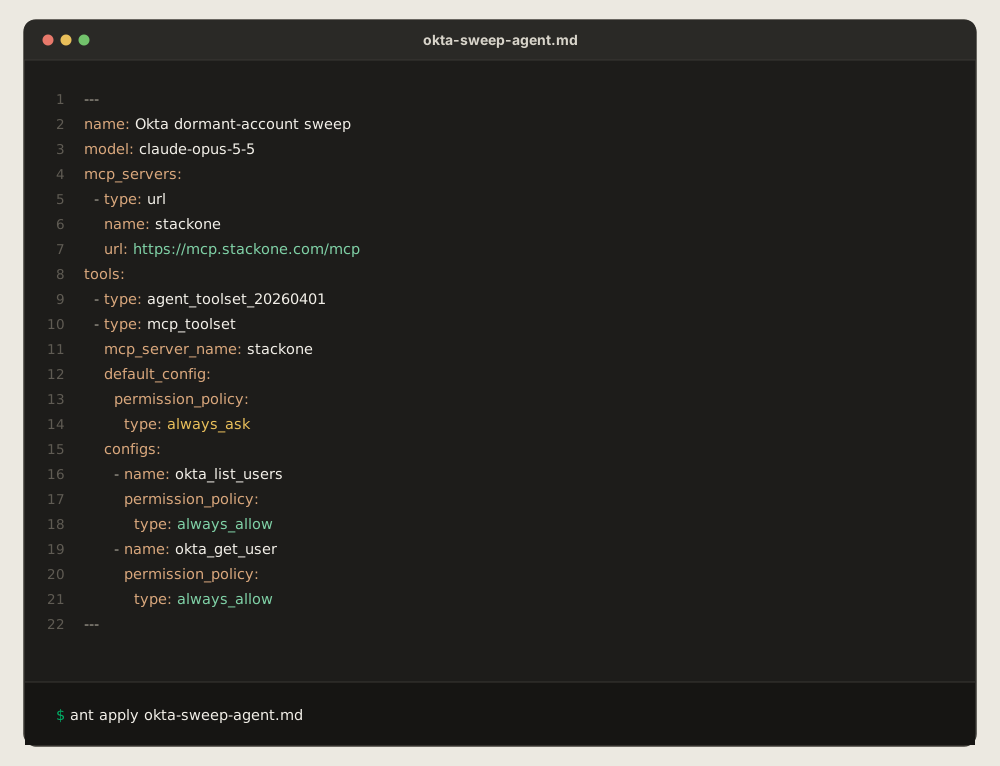
Every call is then logged as the agent’s account, not whoever set it up. The weekly sweep checks Okta, the HR system and the device manager through one connection, posts its report, and leaves any deactivation waiting for a person to approve.
Frequently Asked Questions
Can Claude Managed Agents connect to Okta?
Can I use Okta's open-source MCP server with Claude Managed Agents?
How do I stop a Claude managed agent from changing Okta without approval?
always_ask permission policy, which pauses the session until a person approves each call, or disable them on the agent entirely. Avoid auto for access changes, since Anthropic notes it isn't a human checkpoint. With StackOne, a permission policy can also block deactivate and delete for the agent's account.