
Skip to main content The #1 agentic semantic tool search: 91.6% first-try accuracy on S1 Search Bench Explore Tool Discovery
Connectors Paychex
Live 41 Actions 13 Events

Paychex Integration for AI Agents

Connect your AI agent to 41 Paychex actions via MCP, A2A, or SDK, with agent authentication, tool-calling execution, and security built-in, plus 13 events to subscribe to.


StackOne
DrataGPLocalyzeFlipMindtoolsScreenloop

Paychex AI Agent Actions

41 production-ready actions for your agent to do more on Paychex.

41 Actions
Companies - Array of companies that your application has been granted with some level of access. Your Application (API Key) can be granted access to one or more companies (clients) accounts that are associated with one or more product lines within Paychex.
A Company - Information about a single company that your application has access to.
Company Locations - Array of locations set at the company level.
Company Location - Information about a single Location.
Company Workers - Lists workers (employees and contractors) for a company your application has been granted access to.
Worker - Information about a unique worker (employee and contractor) that your application has been granted access to. Currently workers that exist within Paychex Flex payroll will be available, future enhancements will make workers from other Paychex systems available.
In Progress Workers - Add one or more workers to a specific company that your application has access to. Workers will be added with an IN_PROGRESS status assigned to them and will need to be completed in Flex. Required fields are givenName, familyName, & workerType (when adding multiple workers at a time you will need to also include a "workerCorrelationId" data element on each worker, that will be used as an identifier in our responses). For more information on IN_PROGRESS workers, including how to send an invite for the worker to add their information in Flex, [see the Worker page](https://developer.paychex.com/resources/worker) in Developer Resources. A worker's federal tax elections will be generated and defaulted automatically to withheld with 0 deductions/income and a filing status of single/married filing separately. Upon successfully posting a new in-progress worker, the response will generate a new workerId. This ID can then be used in subsequent calls to update existing worker properties like federal taxes, or add more details to the worker's communications, direct deposit, compensation, and state taxes.
Worker - Update a unique worker (employee and contractor) that your application has been granted access to modify.
Worker - Delete in progress Worker
Worker Communications - Information about "Active" or "In-progress" workers communications.
Worker Communication - A "Active" or "In-progress" workers single communication item.
Worker Communication - Add a single communication to the "Active" or "In-progress" worker.
Worker Communication - Update a "Active" or "In-progress" workers specific communication item.
Worker Communication - Remove a communication item from an "Active" or "In-Progress" worker. A communication type of "STREET_ADDRESS" or "PO_BOX_ADDRESS" cannot be removed from the worker.
Worker Contacts - Get all contacts for the specified worker.
Worker Contact - Get a worker contact by contactId.
Worker Contacts - Add one or more contacts to a worker. A contact may represent a person or entity (organization) but not both. A contact must have at least one communication (telecom, postal, or email). Person contacts can have multiple communications for each communication type (telecom, postal, or email) to support BUSINESS and PERSONAL. Exactly one contact must be marked as primary for each contact type. If one or more contacts are posted for the same contact type, and there are currently no contacts of that type for the worker, the first contact in the list will be made primary unless another in the list is expressly marked as primary. When a new contact is made primary the previous primary contact will be marked as not primary. Use the GET /companies/{companyId}/contacttypes endpoint to get a full list of available contact types and relationship types (used for person contacts).
Worker Contacts - Update a worker contact. A contact may represent a person or entity (organization) but not both. A contact must have at least one communication (telecom, postal, or email). Person contacts can have multiple communications for each communication type (telecom, postal, or email) to support BUSINESS and PERSONAL. Exactly one contact must be marked as primary for each contact type. When a new contact is made primary the previous primary contact will be marked as not primary. A postal contact can be switched from a street address to a PO box and vice versa. This is done by setting either streetLineOne or postOfficeBox (a postal communication may not have both). Use the GET /companies/{companyId}/contacttypes endpoint to get a full list of available contact types and relationship types (used for person contacts).
Worker Contact - Delete a worker contact by contactId.
Worker Custom Fields - Get the worker's customFields
Worker Custom Field - Get the worker's customFields by workerCustomFieldId
Worker Custom Field - Create CustomField at the worker level
Worker CustomField - Update CustomField at the worker level
Worker Custom Field - Delete CustomField at the worker level
Worker Direct Deposits - Array of direct deposits for an "Active" or "In-Progress" worker.
Worker Direct Deposit - Single direct deposit for an "Active" or "In-Progress" worker.
Worker Direct Deposit - Add a direct deposit to an "Active" or "In-Progress" worker.
Worker Direct Deposit - Update a single direct deposit for an "Active" or "In-Progress" worker. "In-Progress" workers cannot be PATCHED using Content Type "application/json-patch+json"
Worker Direct Deposits - Update multiple direct deposits for an "Active" or "In-Progress" worker at a time. "In-Progress" workers cannot be PATCHED using Content Type "application/json-patch+json"
Worker Direct Deposit - Remove a single direct deposit for an "Active" or "In-Progress" worker.
Worker Pay Rates - Information about a workers compensation rates. A worker can have up to 25 different rates.It’s not required for a worker to have a rate in the system.
Worker Pay Rate - A workers single compensation rate.
Worker Pay Rate - Add a single compensation rate to the "Active" or "In-progress" worker.
Worker Pay Rate - Update a workers specific compensation rate.
Worker Pay Rate - Remove a compensation rate from a worker.
Worker Compensation - Information about a workers compensation.
Worker Federal Tax - Federal tax setup for an "Active" or "In-progress" worker.
Worker Federal Tax - WARNING: This endpoint will be deprecated on 1/30/2026. Until this date, POST federal tax will behave both as a POST and PATCH call accordingly, depending on if the worker already has a federal tax setup. NOTE: In-progress workers are created with a federal tax setup automatically. See POST In-progress worker. If a worker does not have a federal tax set up, this endpoint will create one with the values given in the request.
Worker Federal Tax - Update the federal tax setup for an "Active" or "In-progress" worker. The patching will allow you to change the combination that you have with the extra and overrides.
Worker State Tax - Information about worker's state tax allocation.
Worker State Tax - <h3>Add and Replace existing state tax data for a given worker</h3>

Paychex Webhook Events

13 real-time Paychex events your AI agent can subscribe to.

13 Events
  • Worker Employment Changed Emitted when a worker's employment record changes (added, changed, or deleted). Maps to Paychex domain WRKR_EMPL.
  • Worker Tax Changed Emitted when a worker's tax setup changes (federal/state). Maps to Paychex domain WRKR_TAX.
  • Worker Compensation Changed Emitted when a worker's compensation or pay rate changes. Maps to Paychex domain WRKR_CMP.
  • Worker Assignment Changed Emitted when a worker's organizational assignment or labor allocation changes. Maps to Paychex domain WRKR_ASGN.
  • Worker Demographics Changed Emitted when a worker's demographic or personal information changes. Maps to Paychex domain WRKR_DEM.
  • Worker Address Changed Emitted when a worker's address changes. Maps to Paychex domain WRKR_ADD.
  • Company Demographics Changed Emitted when company-level demographic information changes. Maps to Paychex domain CLT_DEM.
  • Company Organization Changed Emitted when a company's organizational structure changes. Maps to Paychex domain CLT_ORG.
  • Company Payroll Changed Emitted when company payroll configuration changes. Maps to Paychex domain CLT_PYRN.
  • Company Pay Component Changed Emitted when a company-level pay component (earning/deduction) definition changes. Maps to Paychex domain CLT_PAY_COMP.
  • Client Access Changed Emitted when application client-access grants change. Maps to Paychex domain CLT_ACCESS.
  • Pay Period Changed Emitted when a pay period is added or changed. Maps to Paychex domain PAY_PERIOD.
  • Paychex Alert Emitted when Paychex raises a system alert for the company. Maps to Paychex domain PAYX_ALERT.

Paychex AI Agent Use Cases

Connect your AI agent to Paychex and help your team scale the HR operations they run by hand today.

Employee Onboarding

Use StackOne to connect your AI agent to your HRIS, identity management, and LMS to automate employee onboarding.

View
WorkdayBambooHRPersonioHiBobGustoRipplingOkta360Learning
HR Policy Q&A Chatbot

Use StackOne to connect your AI agent to your HRIS, knowledge base, and messaging tools to automate HR policy Q&A.

View
WorkdayBambooHRPersonioHiBobGustoRipplingSharePointConfluence
Employee Offboarding

Use StackOne to connect your AI agent to your HRIS, identity management, and ITSM to automate employee offboarding and deprovisioning.

View
WorkdayBambooHRPersonioOktaServiceNowRipplingGustoJira

Do More, Build Less

Integration Infrastructure for Paychex AI Agents

Multiple Interfaces

Access integrations via API, AI SDKs, MCP & A2A.

Paychex MCP server
Managed Authentication

Pre-built authentication UI.

Agent auth
Falcon Engine

Every Paychex action runs on Falcon.

Agent Execution Engine
StackOne Defender
StackOne Defender Meta PG v1 Meta PG v2 DeBERTa 88.7% 67.5% 63.1% 56.9% Detection accuracy

88.7% prompt injection detection.

Prompt injection defense

"What impressed us most about StackOne is its ambition and clarity. They're creating infrastructure that modern software and the entire AI agent ecosystem can rely on. The depth of secure integrations, the pace of delivery, and the team's foresight into AI's future uniquely position StackOne to redefine this category."

Luna Schmid, Partner at GV

"We've been impressed by how quickly and deeply StackOne integrates with complex enterprise systems -- and now, with their focus on agent-to-agent interoperability, they're unlocking even more powerful use cases for customers. StackOne delivers all of the above in a universal layer -- without compromise."

Barbry McGann, SVP at Workday Ventures

G2 - High Performer G2 - Easiest To Do Business With G2 - Users Love Us G2 - Users Most Likely To Recommend G2 - Easiest Admin

Product Teams Love Building Agent Integrations With StackOne

G2

More HRIS / HCM Integrations Like Paychex

Paychex AI agent integration resources

Webhooks for AI agents: why agentic workflows need them purpose-built

AI agents can act the moment a system changes, using webhooks. But webhooks built for software hit three limits in agentic workflows. Here is how to fix each.

7 min read
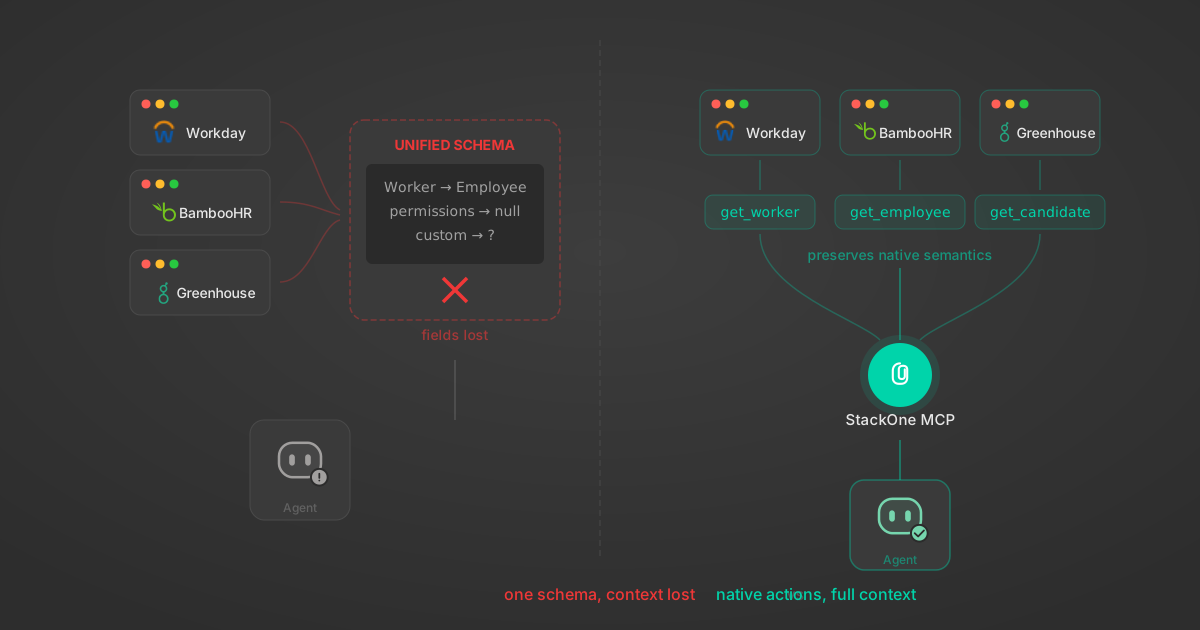
Unified API Limitations for AI Agent Integration: 7 Ways They Break

Unified APIs work for traditional software but fail AI agents in specific, measurable ways. Here are 7 problems we found after building both approaches, with examples from Workday, Greenhouse, Jira, and Salesforce.

14 min

Agentic Context Engineering: Why AI Agents Kill Their Own Context Windows

AI agents exceed their context windows without knowing it. Six failure patterns and seven survival architectures for agentic context engineering.

15 min

MCP Code Mode: Keeping Tool Responses Out of Agent Context

Anthropic's code_execution processes data already in context. Custom MCP code mode keeps raw tool responses in a sandbox. 14K tokens vs 500.

11 min

Comparing BM25, TF-IDF, and Hybrid Search for MCP Tool Discovery

Benchmarking BM25, TF-IDF, and hybrid search for MCP tool discovery across 916 tools. The 80/20 TF-IDF/BM25 hybrid hits 21% Top-1 accuracy in under 1ms.

10 min

Put your AI agents to work

All the tools you need to build and scale AI agent integrations, with best-in-class connectivity, execution, and security.














