
Oyster HR Integration for AI Agents
Connect your AI agent to 59 QA'd Oyster HR actions via MCP, A2A, or SDK, with agent authentication, tool-calling execution, and security built-in, plus 45 events to subscribe to.








Oyster HR AI Agent Actions
59 production-ready actions for your agent to do more on Oyster HR.
Oyster HR Webhook Events
45 real-time Oyster HR events your AI agent can subscribe to.
- Hiring Agreement Accepted Emitted when a team member accepts their employment or contractor agreement. Maps to OysterHR event `hiring.agreement_accepted`.
- Hiring Agreement Drafted Emitted when a new employment or contractor agreement draft is created for review. Maps to OysterHR event `hiring.agreement_drafted`.
- Hiring Agreement Signed Emitted when an employment or contractor agreement is fully signed by all parties. Maps to OysterHR event `hiring.agreement_signed`.
- Hiring Agreement Updated Emitted when an existing employment or contractor agreement is modified with new terms or details. Maps to OysterHR event `hiring.agreement_updated`.
- Hiring Agreement Verified Emitted when an employment or contractor agreement passes verification checks. Maps to OysterHR event `hiring.agreement_verified`.
- Hiring Contractor Engaged Emitted when a contractor engagement becomes active and the contractor is ready to begin work. Maps to OysterHR event `hiring.contractor_engaged`.
- Hiring Contractor Submitted Emitted when a new contractor hiring request is submitted for processing. Maps to OysterHR event `hiring.contractor_submitted`.
- Hiring Employment Engaged Emitted when an employee engagement becomes active and the employee officially starts their role. Maps to OysterHR event `hiring.employment_engaged`.
- Hiring Employment Onboarding Completed Emitted when a new employee completes all onboarding steps and requirements. Maps to OysterHR event `hiring.employment_onboarding_completed`.
- Hiring Employment Submitted Emitted when a new employee hiring request is submitted for processing. Maps to OysterHR event `hiring.employment_submitted`.
- Hiring Oyster Invitation Accepted Emitted when a team member accepts their invitation to join the Oyster platform. Maps to OysterHR event `hiring.oyster_invitation_accepted`.
- Hiring Payroll Team Member Engaged Emitted when a payroll team member engagement becomes active and payroll processing begins. Maps to OysterHR event `hiring.payroll_team_member_engaged`.
- Hiring Payroll Team Member Submitted Emitted when a new payroll team member hiring request is submitted for processing. Maps to OysterHR event `hiring.payroll_team_member_submitted`.
- Hiring Task Updated Emitted when a hiring-related task is updated, such as a background check or document submission status change. Maps to OysterHR event `hiring.task_updated`.
- Offboarding Approved Emitted when an offboarding request is approved and the termination process can proceed. Maps to OysterHR event `offboarding.approved`.
- Offboarding Cancelled Emitted when a previously initiated offboarding process is cancelled and the engagement continues. Maps to OysterHR event `offboarding.cancelled`.
- Offboarding Engagement Terminated Emitted when an engagement is fully terminated and the team member is offboarded from the company. Maps to OysterHR event `offboarding.engagement_terminated`.
- Offboarding Initiated Emitted when an offboarding process is started for a team member, beginning the termination workflow. Maps to OysterHR event `offboarding.initiated`.
- Time Off Request Created Emitted when a team member submits a new time off request for approval. Maps to OysterHR event `time_off.request_created`.
- Time Off Request Modified Emitted when an existing time off request is modified, such as date or duration changes. Maps to OysterHR event `time_off.request_modified`.
- Time Off Request Status Changed Emitted when a time off request status changes, such as being approved, declined, or cancelled. Maps to OysterHR event `time_off.request_status_changed`.
- Time Tracking Time Sheet Approved Emitted when a submitted time sheet is approved by a manager or administrator. Maps to OysterHR event `time_tracking.time_sheet_approved`.
- Time Tracking Time Sheet Created Emitted when a new time sheet is created for a team member's work period. Maps to OysterHR event `time_tracking.time_sheet_created`.
- Time Tracking Time Sheet Deleted Emitted when a time sheet is deleted from the system. Maps to OysterHR event `time_tracking.time_sheet_deleted`.
- Time Tracking Time Sheet Entries Modified Emitted when individual time entries within a time sheet are added, updated, or removed. Maps to OysterHR event `time_tracking.time_sheet_entries_modified`.
- Time Tracking Time Sheet Pending Approval Emitted when a time sheet is submitted and awaiting manager or administrator approval. Maps to OysterHR event `time_tracking.time_sheet_pending_approval`.
- Time Tracking Time Sheet Submitted Emitted when a team member submits their completed time sheet for the work period. Maps to OysterHR event `time_tracking.time_sheet_submitted`.
- Engagements Document Uploaded Emitted when a new document is uploaded to a team member's engagement record. Maps to OysterHR event `engagements.document_uploaded`.
- Engagements Document Updated Emitted when an existing document on a team member's engagement record is modified. Maps to OysterHR event `engagements.document_updated`.
- Engagements Document Deleted Emitted when a document is removed from a team member's engagement record. Maps to OysterHR event `engagements.document_deleted`.
- Engagements Payslip Uploaded Emitted when a new payslip is uploaded and made available for a team member. Maps to OysterHR event `engagements.payslip_uploaded`.
- Engagements Payslip Updated Emitted when an existing payslip record is modified or corrected. Maps to OysterHR event `engagements.payslip_updated`.
- Engagements Payslip Deleted Emitted when a payslip record is removed from a team member's engagement. Maps to OysterHR event `engagements.payslip_deleted`.
- Expenses Expense Approved Emitted when a submitted expense claim is approved for reimbursement. Maps to OysterHR event `expenses.expense_approved`.
- Expenses Expense Created Emitted when a team member submits a new expense claim for approval. Maps to OysterHR event `expenses.expense_created`.
- Expenses Expense Declined Emitted when a submitted expense claim is declined and will not be reimbursed. Maps to OysterHR event `expenses.expense_declined`.
- Contract Change Applied Emitted when an approved contract change takes effect on the engagement terms. Maps to OysterHR event `contract.change_applied`.
- Contract Change Approved Emitted when a requested contract change is approved and ready to be applied. Maps to OysterHR event `contract.change_approved`.
- Contract Change Cancelled Emitted when a pending contract change request is cancelled before being applied. Maps to OysterHR event `contract.change_cancelled`.
- Contract Change Requested Emitted when a change to an existing contract is requested, such as salary adjustment or role change. Maps to OysterHR event `contract.change_requested`.
- Contract Change Submitted Emitted when a contract change request is formally submitted for review and approval. Maps to OysterHR event `contract.change_submitted`.
- Contract Change Updated Emitted when the details of a pending contract change request are modified before approval. Maps to OysterHR event `contract.change_updated`.
- Payments Charge Paid Emitted when a payment charge is successfully processed and funds are transferred. Maps to OysterHR event `payments.charge_paid`.
- Payments Charge Failed Emitted when a payment charge fails to process due to insufficient funds or other payment issues. Maps to OysterHR event `payments.charge_failed`.
- Payments Charge Group Paid Emitted when a group of payment charges is successfully processed as a batch. Maps to OysterHR event `payments.charge_group_paid`.
Oyster HR AI Agent Use Cases
Connect your AI agent to Oyster HR and help your team scale the HR operations they run by hand today.
Use StackOne to connect your AI agent to your HRIS, identity management, and LMS to automate employee onboarding.
ViewUse StackOne to connect your AI agent to your HRIS, knowledge base, and messaging tools to automate HR policy Q&A.
ViewUse StackOne to connect your AI agent to your ATS and job boards to automate job posting distribution.
ViewDo More, Build Less
Integration Infrastructure for Oyster HR AI Agents






"What impressed us most about StackOne is its ambition and clarity. They're creating infrastructure that modern software and the entire AI agent ecosystem can rely on. The depth of secure integrations, the pace of delivery, and the team's foresight into AI's future uniquely position StackOne to redefine this category."


Luna Schmid, Partner at GV
"We've been impressed by how quickly and deeply StackOne integrates with complex enterprise systems -- and now, with their focus on agent-to-agent interoperability, they're unlocking even more powerful use cases for customers. StackOne delivers all of the above in a universal layer -- without compromise."


Barbry McGann, SVP at Workday Ventures





Product Teams Love Building Agent Integrations With StackOne
A US medical research organisation



Scroll to explore
More HRIS / HCM Integrations Like Oyster HR
163+ actions
162+ actions
129+ actions
127+ actions
120+ actions
120+ actions
117+ actions
Oyster HR AI agent integration resources

Webhooks for AI agents: why agentic workflows need them purpose-built
AI agents can act the moment a system changes, using webhooks. But webhooks built for software hit three limits in agentic workflows. Here is how to fix each.
7 min read
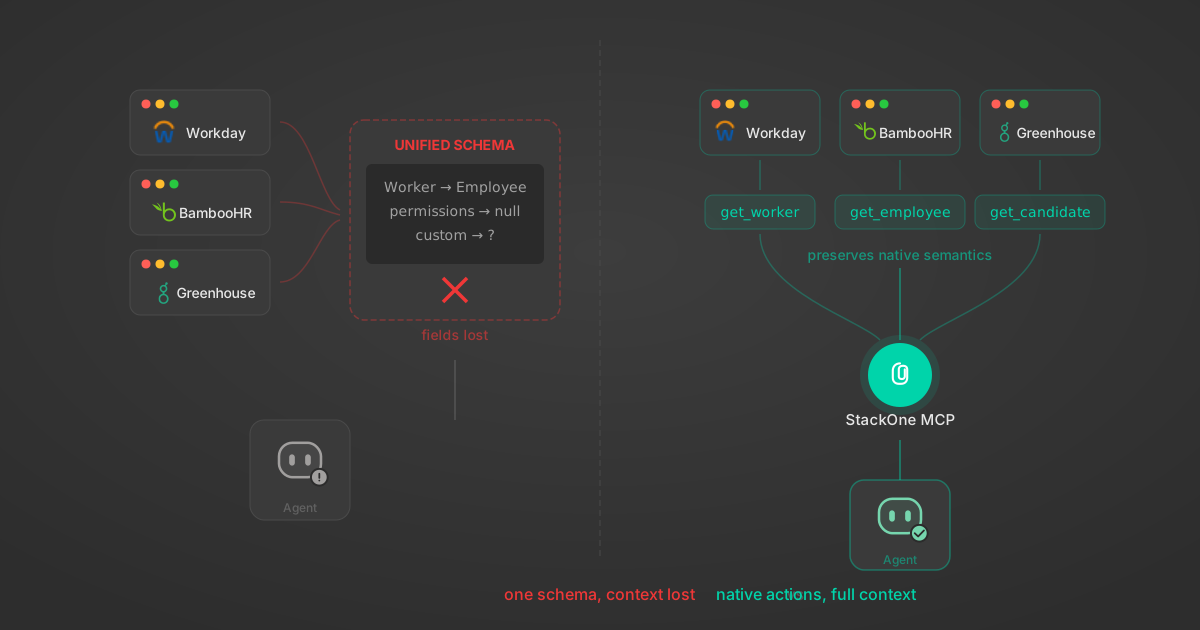
Unified API Limitations for AI Agent Integration: 7 Ways They Break
Unified APIs work for traditional software but fail AI agents in specific, measurable ways. Here are 7 problems we found after building both approaches, with examples from Workday, Greenhouse, Jira, and Salesforce.
14 min

Agentic Context Engineering: Why AI Agents Kill Their Own Context Windows
AI agents exceed their context windows without knowing it. Six failure patterns and seven survival architectures for agentic context engineering.
15 min

MCP Code Mode: Keeping Tool Responses Out of Agent Context
Anthropic's code_execution processes data already in context. Custom MCP code mode keeps raw tool responses in a sandbox. 14K tokens vs 500.
11 min

Comparing BM25, TF-IDF, and Hybrid Search for MCP Tool Discovery
Benchmarking BM25, TF-IDF, and hybrid search for MCP tool discovery across 916 tools. The 80/20 TF-IDF/BM25 hybrid hits 21% Top-1 accuracy in under 1ms.
10 min
Put your AI agents to work
All the tools you need to build and scale AI agent integrations, with best-in-class connectivity, execution, and security.