
Aircall Integration for AI Agents
Connect your AI agent to 82 Aircall actions via MCP, A2A, or SDK, with agent authentication, tool-calling execution, and security built-in, plus 8 events to subscribe to.








Aircall AI Agent Actions
82 production-ready actions for your agent to do more on Aircall.
Aircall Webhook Events
8 real-time Aircall events your AI agent can subscribe to.
- Reject Untokened Webhook Rejects inbound Aircall webhook requests whose payload carries no token field.
- Call Event Processes Aircall call webhook events across the call lifecycle.
- Conversation Intelligence Event Processes Aircall Conversation Intelligence webhook events for AI-generated call artefacts.
- Real-Time Transcription Event Processes Aircall real-time transcription webhook events emitted during an active call.
- User Event Processes Aircall user webhook events for account changes and availability.
- User Event (v2) Processes Aircall v2 user webhook events for account changes and availability.
- Contact Event Processes Aircall contact webhook events (created, updated, deleted).
- Number Event Processes Aircall number webhook events (created, deleted).
Aircall AI Agent Use Cases
Connect your AI agent to Aircall and help your team scale the sales operations they run by hand today.
Use StackOne to connect your AI agent to your CRM, email, and calendar tools to automate post-demo follow-up.
ViewUse StackOne to connect your AI agent to your CRM, email, and calendar tools to automate deal risk scoring and pipeline alerts.
ViewUse StackOne to connect your AI agent to your CRM, sales engagement, and messaging tools to automate outbound prospecting.
ViewDo More, Build Less
Integration Infrastructure for Aircall AI Agents






"What impressed us most about StackOne is its ambition and clarity. They're creating infrastructure that modern software and the entire AI agent ecosystem can rely on. The depth of secure integrations, the pace of delivery, and the team's foresight into AI's future uniquely position StackOne to redefine this category."


Luna Schmid, Partner at GV
"We've been impressed by how quickly and deeply StackOne integrates with complex enterprise systems -- and now, with their focus on agent-to-agent interoperability, they're unlocking even more powerful use cases for customers. StackOne delivers all of the above in a universal layer -- without compromise."


Barbry McGann, SVP at Workday Ventures





Product Teams Love Building Agent Integrations With StackOne
A US medical research organisation



Scroll to explore
Aircall AI agent integration resources

Webhooks for AI agents: why agentic workflows need them purpose-built
AI agents can act the moment a system changes, using webhooks. But webhooks built for software hit three limits in agentic workflows. Here is how to fix each.
7 min read
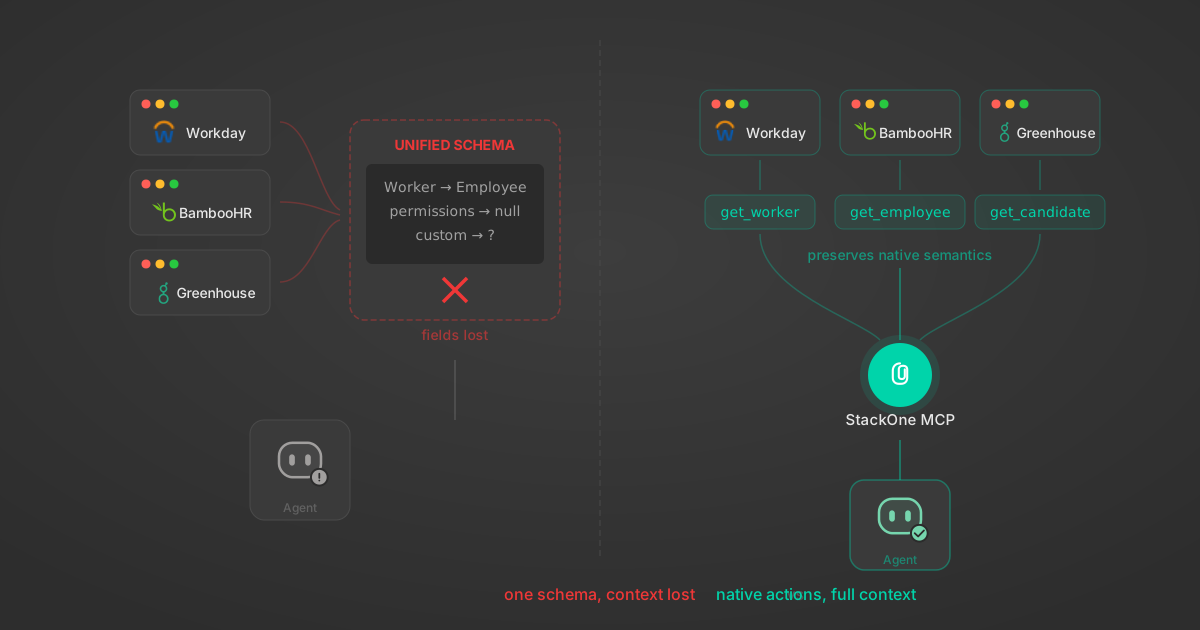
Unified API Limitations for AI Agent Integration: 7 Ways They Break
Unified APIs work for traditional software but fail AI agents in specific, measurable ways. Here are 7 problems we found after building both approaches, with examples from Workday, Greenhouse, Jira, and Salesforce.
14 min

Agentic Context Engineering: Why AI Agents Kill Their Own Context Windows
AI agents exceed their context windows without knowing it. Six failure patterns and seven survival architectures for agentic context engineering.
15 min

MCP Code Mode: Keeping Tool Responses Out of Agent Context
Anthropic's code_execution processes data already in context. Custom MCP code mode keeps raw tool responses in a sandbox. 14K tokens vs 500.
11 min

Comparing BM25, TF-IDF, and Hybrid Search for MCP Tool Discovery
Benchmarking BM25, TF-IDF, and hybrid search for MCP tool discovery across 916 tools. The 80/20 TF-IDF/BM25 hybrid hits 21% Top-1 accuracy in under 1ms.
10 min
Put your AI agents to work
All the tools you need to build and scale AI agent integrations, with best-in-class connectivity, execution, and security.