
 Guillaume Lebedel · · 6 min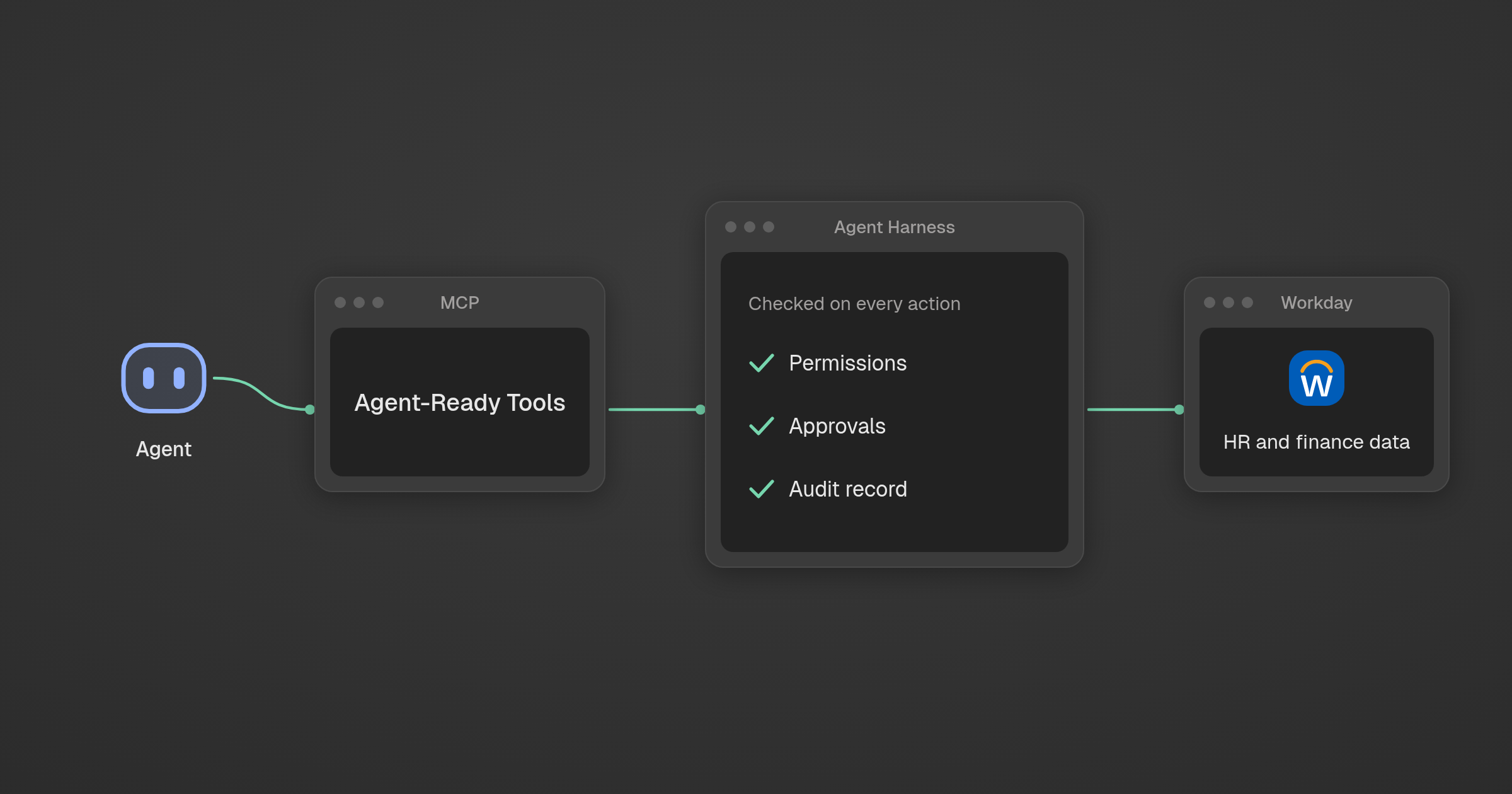
What is Workday Agent Harness?
Table of Contents
Workday Agent Harness is the runtime that every agent on Workday’s Trusted Agent Platform runs on, whether Workday, a customer or a partner built it. Announced as generally available at Workday Rising on October 13, 2026, it applies existing Workday permissions, approvals and audit trails to each agent action, and routes each task to a model.
Facts in this post were verified on October 13, 2026 against Workday’s announcement of headless access to the Trusted Agent Platform and Workday’s product pages.
More than 11,500 organizations, including more than 65% of the Fortune 500, run on Workday, per the same release. If you run IT at one of them, this decides how agents reach your HR and finance data.
What did Workday announce about Agent Harness at Rising 2026, and what is generally available now?
Workday made its Trusted Agent Platform headless, so any agent, including one built outside Workday, can read HR and finance data and act on it without anyone logging in. Agent Harness and four other parts are generally available now, and two more reach early access later.
| Component | What it does | Status (October 13, 2026) |
|---|---|---|
| Agent Harness | Gives each agent context, governs each action, routes each task to a model | Generally available |
| Agent-Ready Tools | Workday’s MCP tools for reading data and taking actions | Generally available in Workday Extend AI |
| Data Cloud (Live Data Query, Agent Lake) | SQL over live Workday data | Generally available |
| Developer Agent | Turns plain-language requests into custom agents and apps | Generally available in Workday Extend AI |
| Custom Agents | Customer-built agents deployed on Agent Harness; LangChain is GA, Google ADK takes design partners | Generally available in Workday Extend AI |
| Agent Context Service | Finds the Workday context an agent needs and supplies it before the agent starts reasoning | Early access, late 2026 |
| Grounded Reasoning | Checks requests against company policies, business processes and tenant data before an agent acts | Early access, early calendar 2027 |
As Workday CTO Gabe Monroy put it: “Headless can’t mean lawless.”
How do Workday Agent-Ready Tools use MCP to give agents access to Workday data?
Agent-Ready Tools are Workday’s MCP tools. Any agent that speaks MCP gets an approved way to read Workday data and take action, and every request carries Workday’s rules with it: who is asking, what they can see and do, which approvals apply, and how the action is recorded.
Many teams today connect an agent through one integration user, the setup we described in how AI agents log in to Salesforce and Workday. The agent sees whatever that account sees, and the person it acts for is missing from the record. Agent-Ready Tools put that person back into every call.
Live Data Query in Data Cloud does the same for analytics: SQL over live Workday data instead of an exported copy, with access rules applied at query time.
Does Agent Harness govern agents built outside Workday, by customers or partners?
Yes. Workday says every agent, “whether it’s built by Workday, a customer, or partner, works under the same Workday permissions, approvals, and audit trails.” A LangChain agent your team builds gets the same checks inside Workday as Workday’s own agents do.
Agent Harness does three jobs for each agent:
- Context. Who the person is, their role and reporting line, what they can see and do, and which policies apply.
- Governance. Each action is checked against Workday permissions and approvals, then recorded.
- Routing. Each task goes to the right model for cost and performance.
Agent Harness governs what an agent does inside Workday. It has no say over the same agent’s calls to your identity provider, your CRM or your ticketing system.
What risks does Workday say headless access creates for HR and finance data?
Workday names two failure paths in its own release. An agent pointed at “an ungoverned copy of HR data in a data lake” can read compensation it should never see. An agent connected “through a system-level account” can act without approval. In both cases, Workday says, “no one can prove what it did or why.”
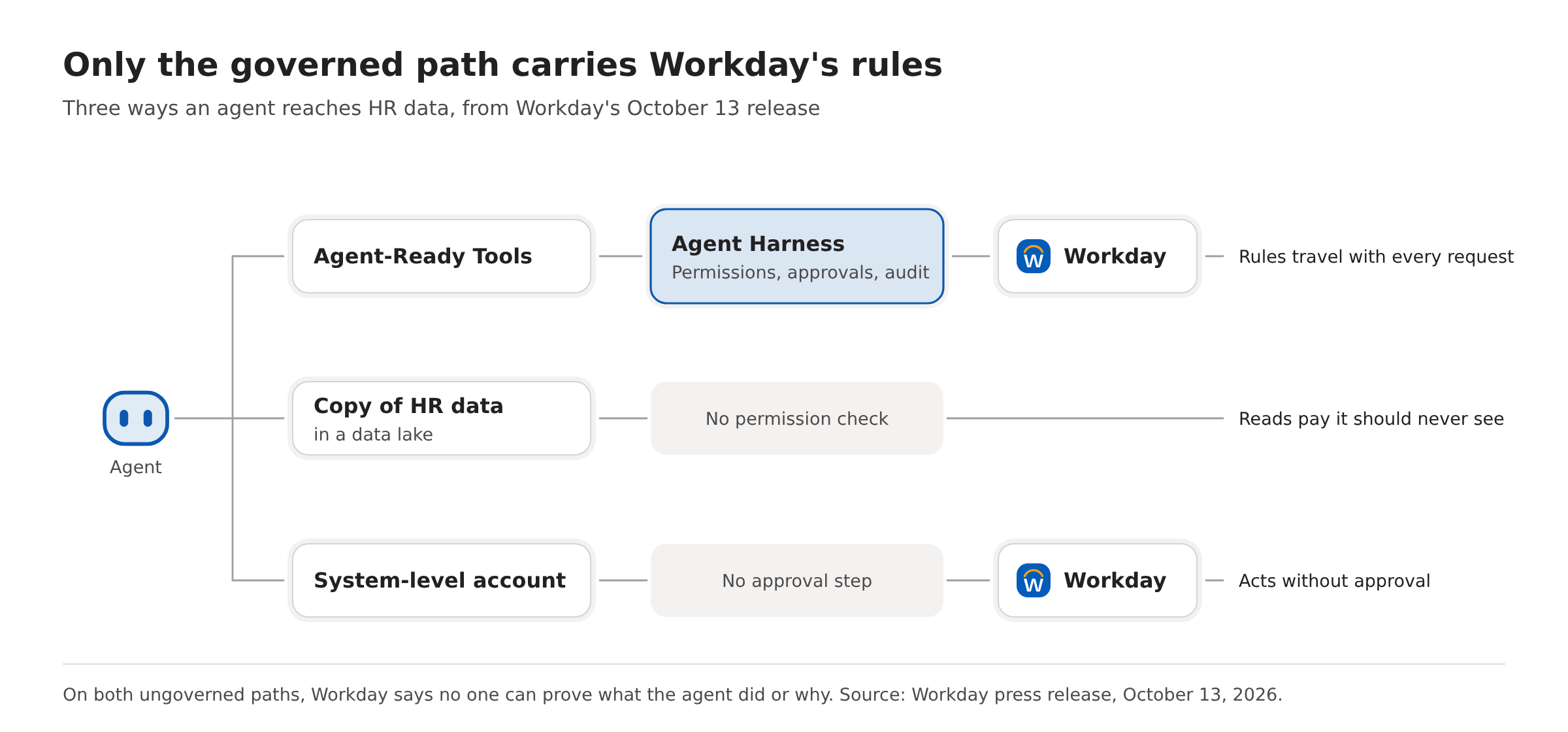
Workday also cites its own research showing that language models can misapply HR policies even with the correct policy in front of them. So the check belongs in the runtime, not the prompt, the argument we made for a kill switch that sits outside the model.
A compliance team asking why an agent changed a salary needs the person, the policy and the decision on record, which is what an AI agent’s audit record should contain. A system account records none of that.
What changes when Agent Context Service and Grounded Reasoning reach early access?
Grounded Reasoning will check each request against company policies, business processes and tenant data before the agent acts. In Workday’s example, a manager asks an agent to fill a role the manager has no authority over, and the agent stops and explains why. Early access is due in early calendar 2027.
Agent Context Service will supply the Workday context an agent needs before it starts reasoning, so agents handle less sensitive data. The release body puts both features in early 2027, but its Availability section gives late 2026 for Agent Context Service, which we follow here. Until either ships, pilots rely on the per-action permission and approval check.
How do you keep the same permissions and audit trail when one agent works across Workday, Okta and Salesforce?
You need a policy check that runs on every call the agent makes, in every system, evaluated for the person the agent acts for, with one log of the decisions. Workday’s rules travel with Workday calls only, and most enterprise agents do not stay inside one system.
Take an illustrative onboarding agent. It creates the worker in Workday, provisions an Okta account, adds the new hire to Slack channels and assigns a Salesforce territory. Agent Harness covers the first call. The other three run under whatever credentials the agent holds there.
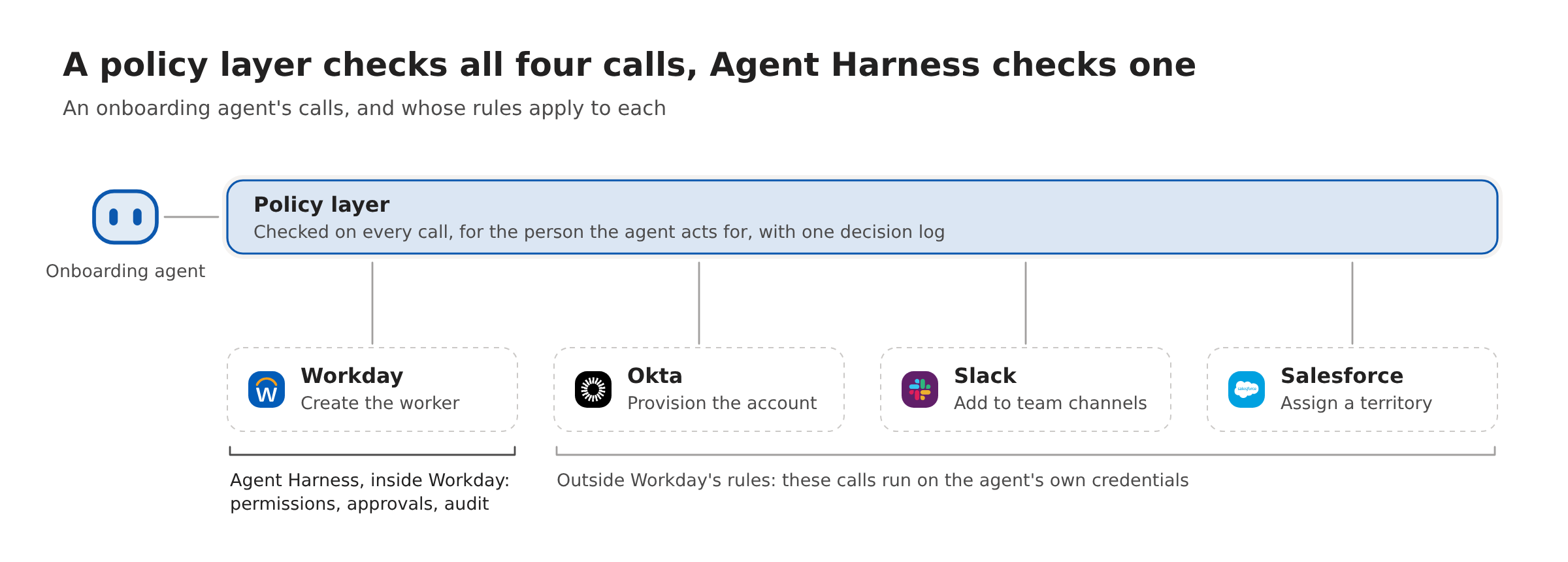
StackOne Tool Policies cover that gap. A policy is evaluated for the member the agent acts for. A denied tool or input stops the request before the business system is called, denied fields are masked on the way back, and every decision is recorded, including what monitor-only mode would have done. The same rules apply across the 550+ apps StackOne connects to (stackone.com, October 14, 2026), where every action is permission-scoped, audit-logged and screened for prompt injection.
Before an agent writes to more than one system, check these six things:
- List every system the agent writes to, not only the system of record.
- Name the identity each call runs as: the end user’s, or a shared integration account.
- Confirm that a denied action stops before the target system is called, not after.
- Mask sensitive fields on reads, such as salary and bank details, as covered in field-level access for HR copilots.
- Send every allow and deny decision to one log you can query by person and agent.
- Run new rules in monitor mode first, then enforce, as described in rolling out agent permission policies.
Inside Workday, Agent Harness now covers the identity, the check before the call and the record (steps 2, 3 and 5). For every other system the agent touches, those steps are still yours.
If your agents already reach past Workday, see how Tool Policies apply one set of rules to every app an agent touches.