
 Guillaume Lebedel · · 6 min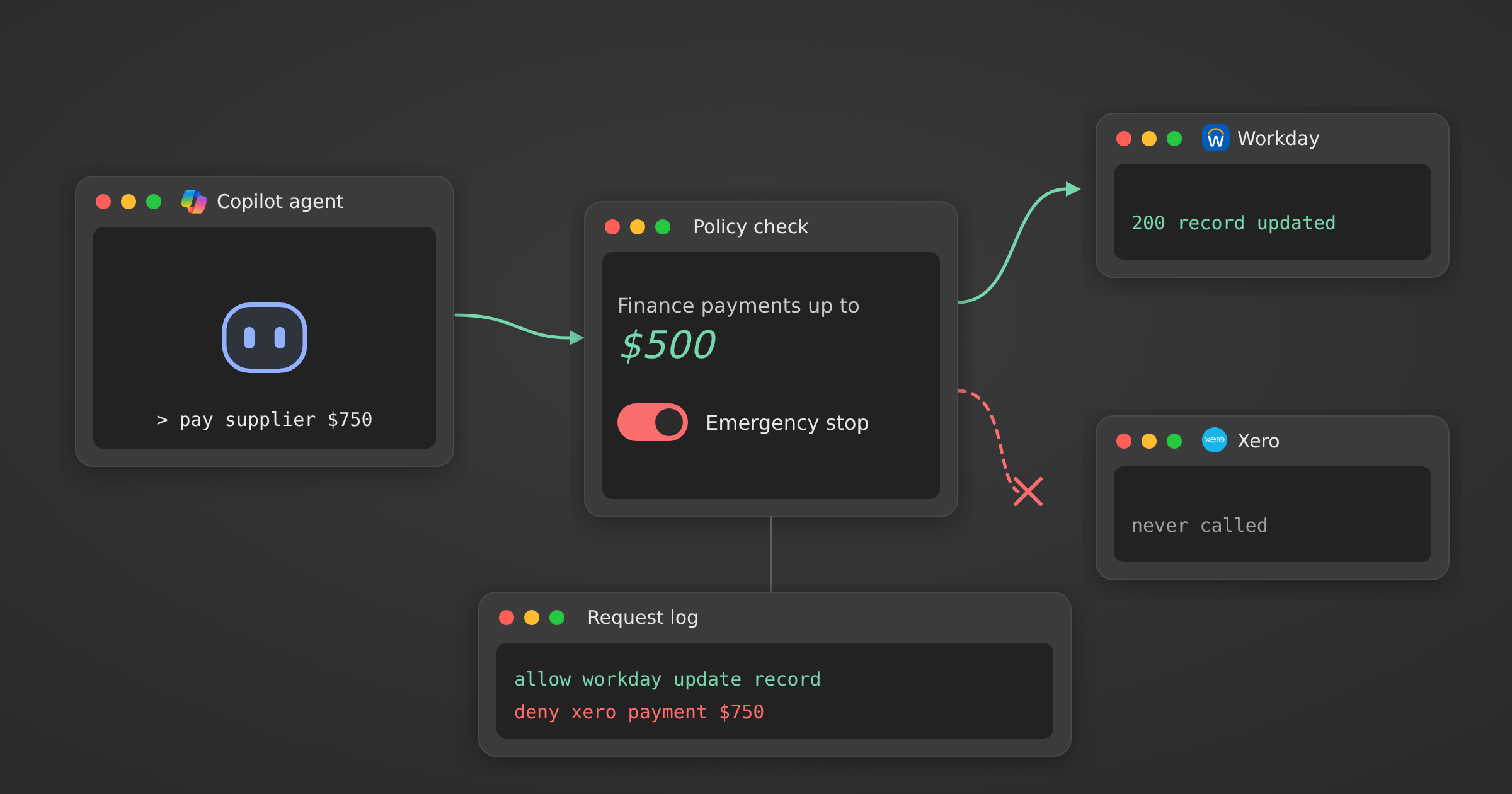
AI agent kill switch: how to stop a run mid-task
Table of Contents
An AI agent kill switch is a control outside the model that can refuse or halt an agent’s actions while it runs. It checks each tool call against policy before the business system is touched, records the decision where the model cannot edit it, and lets an authorised person pause the run without waiting for the agent to cooperate.
Satya Nadella made the case for one on 10 October 2026, in a post on X titled Models as Insider Risks in the Super Intelligence Era. This guide is for the CIO or Head of IT connecting Copilot, Gemini or an internal agent to Workday, Salesforce or ServiceNow, who will be asked what stops it. Facts in this post were checked on 12 October 2026.
What did Satya Nadella propose in “Models as Insider Risks”?
Nadella proposed that companies treat AI models like insiders with privileged access: assume a model can be compromised and design the system around that. His post lists seven controls, and its central rule is that the controls governing what a model can access and do must sit outside the model.
| Control | Nadella’s wording, shortened | What it means for an agent writing to a system like Workday |
|---|---|---|
| Model diversity | No model verifies its own work | The agent never approves its own payroll change |
| Observe everything | Tamper-proof, human-readable evidence for every meaningful action | Every write is logged outside the agent |
| Verifiability | Test failures, attacks and edge cases, not only successful tasks | Test a refused write, not only a good one |
| Independent controls | The organisation decides what a model can access and do | Permissions live in a rule, not in the prompt |
| Independent auditability | Validation is independent of the intelligence being validated | Auditors read logs, not the agent’s summary |
| Containment | An authorised person can pause or shut down a model mid-task | A named person can stop the agent’s writes now |
| Incident disclosure | Tell those affected quickly, and share what failed and how to stop it recurring | Employees whose records a bad write touched are told promptly, with which control failed and the fix |
Containment is the control TechCrunch’s report on the post led with: “Think of it like an emergency brake.” He also puts the duty on the deployer: “A model provider’s assurances do not relieve us of that responsibility.” His model is how companies already treat privileged staff: “establish identity, limit privileges, log activity.”
Why should controls on an AI agent sit outside the model?
A control inside the model is an instruction, and the model decides whether to follow it. A system prompt that says “never change salaries” holds until a prompt injection or a model swap changes the outcome. A check outside the model gives the same answer whatever the model concludes, and the model has no way to switch it off.
Nadella’s description of the alternative is “an opaque model inside an opaque orchestration layer, watched by another opaque model. Essentially nested black boxes.” He still wants models testing each other, which is sound practice. A reviewer model is a second opinion, though, and a second opinion can be wrong. When the action moves money or changes an employment record, the decision to let the call through should be deterministic and readable by the person who owns the rule.
This is the gap behind most AI agent unauthorized actions: the agent had a tool, and nothing outside it checked how the tool was used.
What is a reference monitor, and why does a 1972 idea apply to agents?
A reference monitor is the component that checks every access request against what each user or program is allowed to do. The idea comes from an October 1972 study by James P. Anderson & Co. for the US Air Force Electronic Systems Division, which required the checking mechanism to be tamper proof, always invoked and small enough to test completely.
Nadella cites “an information security principle dating back to the 1970s that a program must not be able to bypass or tamper with the mechanisms that enforce its permissions.” He does not name the report, but the principle matches the Anderson requirements quoted in the Orange Book’s reference monitor rationale. The report is 54 years old, and its requirements still describe what an agent control needs:
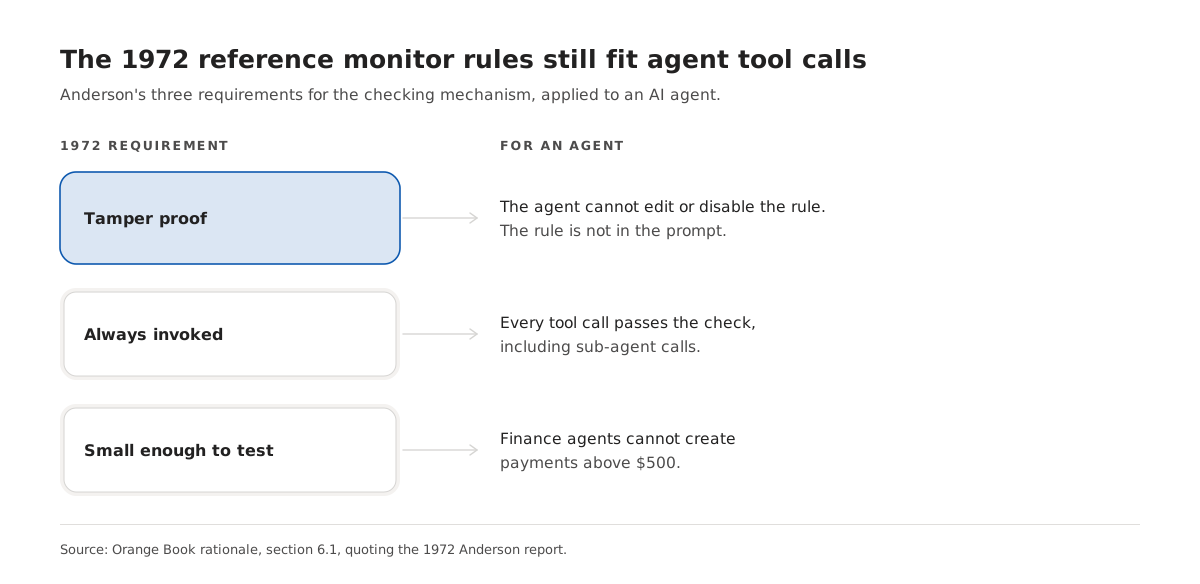
- Tamper proof. The agent cannot edit, disable or argue its way past the rule, so the rule cannot live in a prompt or a tool description.
- Always invoked. Every tool call passes the check, including calls a sub-agent makes. One raw API key on the side defeats it.
- Small enough to test. “Finance agents cannot create payments above $500” can be read by the finance lead and covered by a test. A paragraph of guidance to a model cannot.
How do you stop an AI agent mid-task without revoking every credential?
Put a deny rule on the agent’s call path and switch it on. The agent’s next call is refused before it reaches the business system, while other people and agents using the same connection keep working. Revoking the OAuth token also stops the agent, but it stops everything that token serves, and someone has to reconnect the account afterwards.
| Way to stop the agent | What stops | Who else is affected | Evidence left |
|---|---|---|---|
| Tell the agent to stop | Whatever the model decides to stop | Nobody | The chat transcript |
| A second model reviews actions | Calls the reviewer flags | Nobody | A judgement that can be wrong |
| Revoke the credential | Every call on that credential | Everyone sharing it | The provider’s auth log |
| Deny rule on the call path | The agent’s next tool call for that person or group | Only the people the rule covers | A logged decision per call |
We built StackOne Tool Policies to sit on that path. Policies are evaluated for the member the agent acts for, and an active policy is consulted from the project’s next call. A deny on running any tool refuses every call the agent makes for that member: it gets back an HTTP 403 with POLICY_DENIED_ERROR as its tool result, and nothing reaches Workday or Xero. Two limits apply. A policy stops actions, not the model’s reasoning, and it only governs calls that carry a member’s identity. A call made with a project API key names no member, so the Policies docs point that traffic to Connector Profile scoping instead.
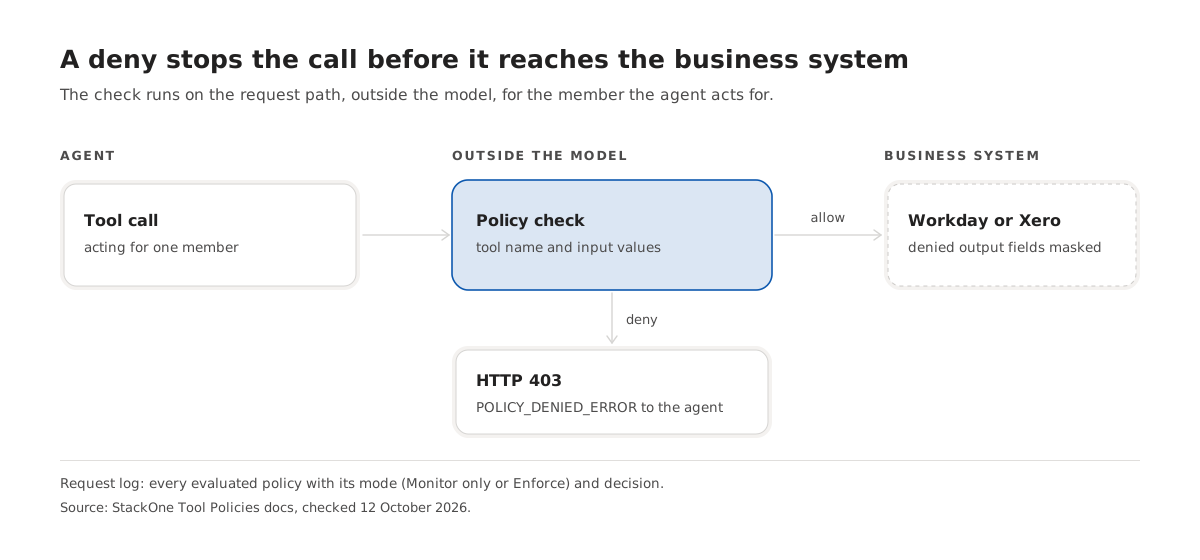
The rule follows a person, so the agent has to carry one. If your agents still log in as a shared service account, start with how AI agents log in to Salesforce and Workday.
What evidence should every agent action leave for an audit?
Every action should leave a record the model cannot edit: who the agent acted for, which tool it called with which inputs, which rules were evaluated, what each decided and what the business system returned. Nadella’s test is that you can reproduce how an outcome was reached “without relying on the model to attest to it.”
A refused call needs a record too. If a $750 payment is refused by a $500 limit, the log should show the limit, the input value and the decision, not only a failed request. Our breakdown of what an AI agent’s audit record should contain goes through the fields one by one, including the policy text as it read at run time.
How do you roll out agent permission rules without breaking workflows?
Run each new rule in an observe-only mode first, read what it would have blocked, then enforce it for a small group before everyone. That order shows whether the rule catches the calls you meant and spares the ones you didn’t, before an agent halfway through a payroll run gets refused.
- List the writes that would hurt most: payments, compensation changes, deletes and public sharing. Start with those, not with reads.
- Write each as one short rule with a named audience, such as “Finance agents cannot create payments above $500.”
- Run it in observe-only mode for at least one full business cycle, such as a payroll run, and read the recorded decisions.
- Fix rules that matched the wrong calls. Tool name patterns are the usual cause: in StackOne,
*delete*does not match a tool namedokta_remove_user_from_group. - Enforce for a test group, then for everyone.
- Name who can switch on the emergency deny, and test it once before you need it.
In StackOne the two modes are Monitor only and Enforce, and the request log shows every evaluated policy with its mode and decision, including what a Monitor only rule would have denied.
Nadella wrote his seven controls for the companies deploying models, and containment and independent controls fall on whoever connects the agent to the business systems. If you want to see how a per-call deny works across HR, CRM and finance systems, read how StackOne Tool Policies work.