


 Guillaume Lebedel · · 9 min
How do we govern which AI agents and MCP servers employees can use across the company?
Table of Contents
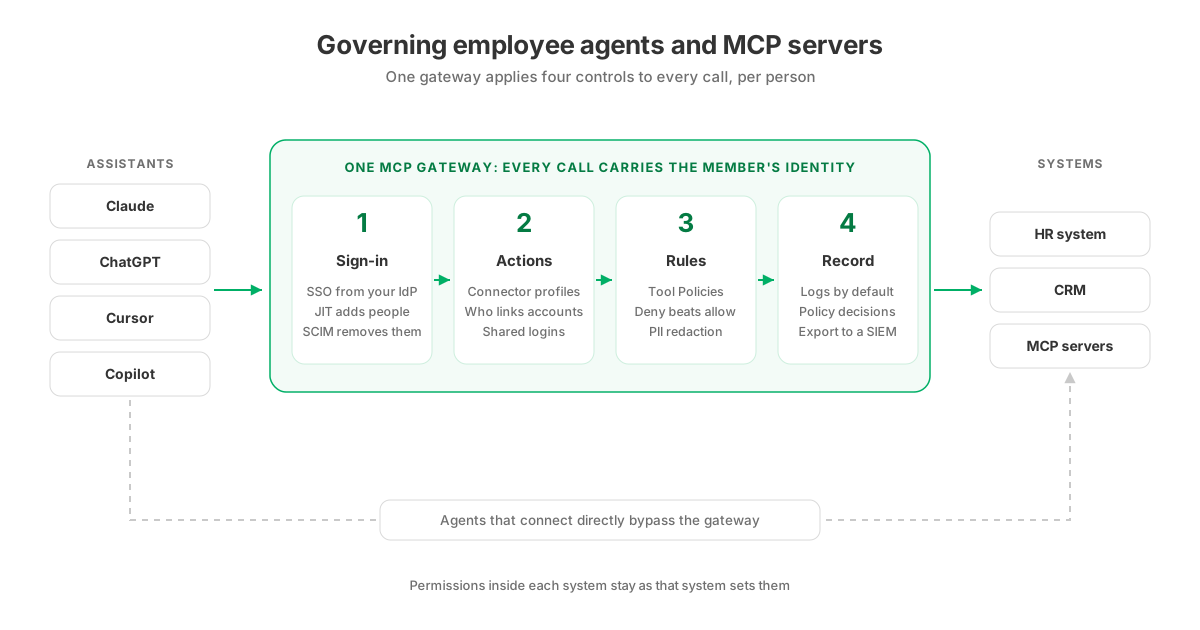
As of November 2026, the workable way to govern which AI agents and MCP servers employees use is to route every assistant through one MCP gateway and apply four controls per person: sign-in and removal from your identity provider, a fixed set of actions and accounts for each business system, rules on individual calls, and a log of every call that you can export. Approve MCP servers once, in the gateway, instead of on each laptop. A gateway governs only the agents that use it, so it will not find unmanaged AI tools.
Governance cannot come from the protocol itself: the MCP authorization specification says “Authorization is OPTIONAL for MCP implementations,” so a server can ship with none. Much of the published guidance stops at a framework: keep a registry of approved tools, write a policy and set up a review board. That is necessary, but it does not tell a security team what has to be configured before the first employee connects Claude or ChatGPT to the HR system. This post covers the configuration, how to prove a forbidden action is refused, and where the controls stop. Product details describe StackOne’s Tool Gateway and were checked on 2 November 2026.
What needs to be in place before employees connect their assistants?
Eight decisions come before the rollout, and system owners make several of them.
| Before rollout | Why it matters | What to check |
|---|---|---|
| An identity provider that speaks SAML 2.0 | Sign-in, and the rule that nobody uses a password instead | One SSO connection per organization, bound to one verified email domain |
| Directory sync for leavers | Just-in-time provisioning adds people but never removes them | SCIM 2.0 from Okta or Microsoft Entra. Google Workspace does not support SCIM provisioning |
| A list of business systems, each with an owner | The owner decides who may connect the system and whether to share a login | Every system an assistant will reach has a named owner |
| Read, write and delete decided per system | The connector profile fixes which actions exist, and later rules can only narrow them | Destructive actions switched off where nobody needs them |
| Shared logins | A team can work through one service account without anyone seeing its credentials | Which accounts are shared, and with which groups |
| A log destination | Auditors and the SOC will ask for the record | SIEM or data platform, a Logs API key, and the collector’s IP if you allowlist |
| Hosting and region | Data residency | Shared cloud, dedicated account or self-hosted. Managed-cloud regions are Ireland, Belgium and Northern Virginia |
| Assistant admin settings | Some assistants need an admin to allow custom MCP servers | In ChatGPT Business, Enterprise or Edu an admin may need to allow them. In Claude Team or Enterprise an Owner adds the connector for everyone |
Control 1: who can sign in, and who is removed when they leave
Connect your identity provider over SAML 2.0 and turn on an Enforcement Policy so that SSO is the only way in. With just-in-time (JIT) provisioning, anyone assigned to the StackOne app in Okta, Microsoft Entra or Google Workspace joins at their first SSO sign-in with the projects and roles you set, and nobody sends invitations.
JIT is not an offboarding control. A user you delete in StackOne rejoins at their next sign-in if the identity provider still assigns them. Removal comes from Directory Sync, which connects Okta or Microsoft Entra over SCIM 2.0. When you deactivate someone in the directory, StackOne suspends their access and ends their sessions. Because every call their assistant makes carries their identity, the next call after deactivation is refused. Directory Sync also pushes groups, so you grant access per team instead of per person. The identity page covers sign-in in more detail.
Control 2: which systems and actions an agent can reach
A connector profile sets what an agent can do in one system: which actions it can call, which events it receives and which credentials it connects with. Filter the actions by effect and you can switch off every Delete action in one step. Third-party MCP servers go through the same path: add a remote MCP server as a connector and its tools become actions governed like any other connector. Your list of approved MCP servers then lives in the gateway configuration.
Two settings decide who gets in:
- Connector profile sharing decides who may link an account through a profile. A Restricted profile allows only the users and groups granted on it, and restricting a profile later stops new links without disconnecting accounts already linked.
- Account sharing decides who may use an account someone has already linked. Finance can connect a NetSuite service account once and share it with a group, and the group works through that login without handling its credentials.
Grants to groups are additive. When several grants match the same person, the most permissive one wins, so a broad group added for convenience can widen access that a narrower group was meant to limit. Review overlapping grants before you sync large groups.
Control 3: rules on each call, applied per person
Tool Policies restrict what an agent may do for a given member, from a whole connector category down to the fields and values in a request or response. StackOne checks the policies for that member before the call reaches the provider and refuses the call when an enforced policy denies it. Policies only add restrictions: they cannot grant a tool outside the member’s access or bring back an action the connector profile has switched off. A matching deny takes precedence over an allow. PII Redaction sits in the same engine and redacts or blocks email addresses, phone numbers, social security numbers and card numbers in what agents send and read.
Policies and account permissions apply when the call carries a member’s identity, which is the case when an employee connects through OAuth with their own StackOne login. API-key calls skip those member checks. For keys, limit the actions through the connector profile and protect the key. A session-token URL for unattended use deserves the same care, because anyone holding it gets that access. The policies page shows the rule types.
Control 4: a record you can hand to an auditor
StackOne records action logs for every tool call by default, with no setup. Platform logs cover operations on StackOne itself, such as creating an account or deleting an integration, and sign-in logs record every login attempt, successful or not. Advanced Logs, which stores request and response bodies, is off by default.
To get all of this into Splunk, Datadog or another SIEM, run a small collector that pulls from the Logs API and forwards the entries. For a single refused call, GET /logs/actions/{actionRunId}/policy returns the rules that decided it. What an AI agent’s audit record should contain covers the fields worth keeping, and the observability page shows the log views.
How do you test that a prohibited action is actually denied?
Run the test with a real member identity, because a test through an API key skips the member checks you are trying to prove.
- Pick one action that must never run for a given group, for example deleting an employee record in the HR system, and one test member in a small test group.
- Write a deny rule for that action, scoped to the test group, in Monitor mode. Monitor evaluates the rule without applying its restriction.
- Have the test member run the workflow from their own assistant, signed in through SSO. The policy log should show the call as “Would deny” and nothing else under that rule.
- Switch the rule to Enforce for the test group and repeat the workflow. The call should be refused before it reaches the HR system.
- Pull the decision for that call from
GET /logs/actions/{actionRunId}/policyand keep it with your test record as evidence.
Then repeat step 4 with the action switched off in the connector profile instead. That confirms the second layer, which also covers API-key calls.
How do you introduce access policies without breaking existing workflows?
Stage the rollout by group and keep each change reversible:
- Start with a pilot group from your directory, connected to the systems that group already uses.
- Put every new rule in Monitor across everyone first, and read the “Would deny” entries for a week. They show which legitimate workflows a rule would have broken.
- Enforce on a test group, then on everyone, once the monitored matches are the ones you meant to stop.
- Widen access by adding groups to profiles and shared accounts, not individuals, so a later change happens in one place.
Tightening who may link accounts is safe for people already connected, because restricting a profile does not disconnect existing accounts. Monitor first, then enforce goes through the staging in more detail, and governed access from Claude to enterprise tools walks through one assistant end to end.
What does an MCP gateway not govern?
A gateway leaves two areas to other controls:
- Agents that bypass it. The OWASP MCP Top 10 lists Shadow MCP Servers, “unapproved or unsupervised deployments of Model Context Protocol instances that operate outside the organization’s formal security governance,” as a risk of its own. StackOne governs the calls agents make through StackOne. It does not scan devices for unmanaged AI tools or inspect an agent that connects directly to a business system. Those stay with the controls you already run, such as OAuth app consent settings in your identity provider and in each SaaS admin console.
- Permissions inside each system. Each connected system sets its own permissions. Deactivating someone through SCIM removes their route through StackOne, not their account in Salesforce or Workday.
What should you ask any vendor about SSO, SCIM and role-based access for agents?
Ask these five questions of any platform on your shortlist. The table gives StackOne’s answers as of November 2026.
| Question for the vendor | StackOne |
|---|---|
| Can SSO be enforced so nobody signs in with a password? | Yes. An Enforcement Policy limits the organization to the sign-in methods you choose |
| Does deactivation in the directory end access, or only stop new sign-ins? | Directory Sync over SCIM 2.0 suspends access and ends sessions. JIT alone does not remove anyone |
| Are roles granted per group, per system and per shared account? | Yes. Groups take roles on projects, connector profiles and linked accounts |
| Do per-person rules apply to every call, including API keys? | No. Tool Policies need a member identity. API-key calls are limited by the connector profile |
| Can the log show which rule refused a call? | Yes. The Logs API returns the policy decision for each action run |
The governance page shows the four controls deciding the same request for three different people.