


 Guillaume Lebedel · · 9 min
How do I keep API connectors for AI agents working when vendor APIs change?
Table of Contents
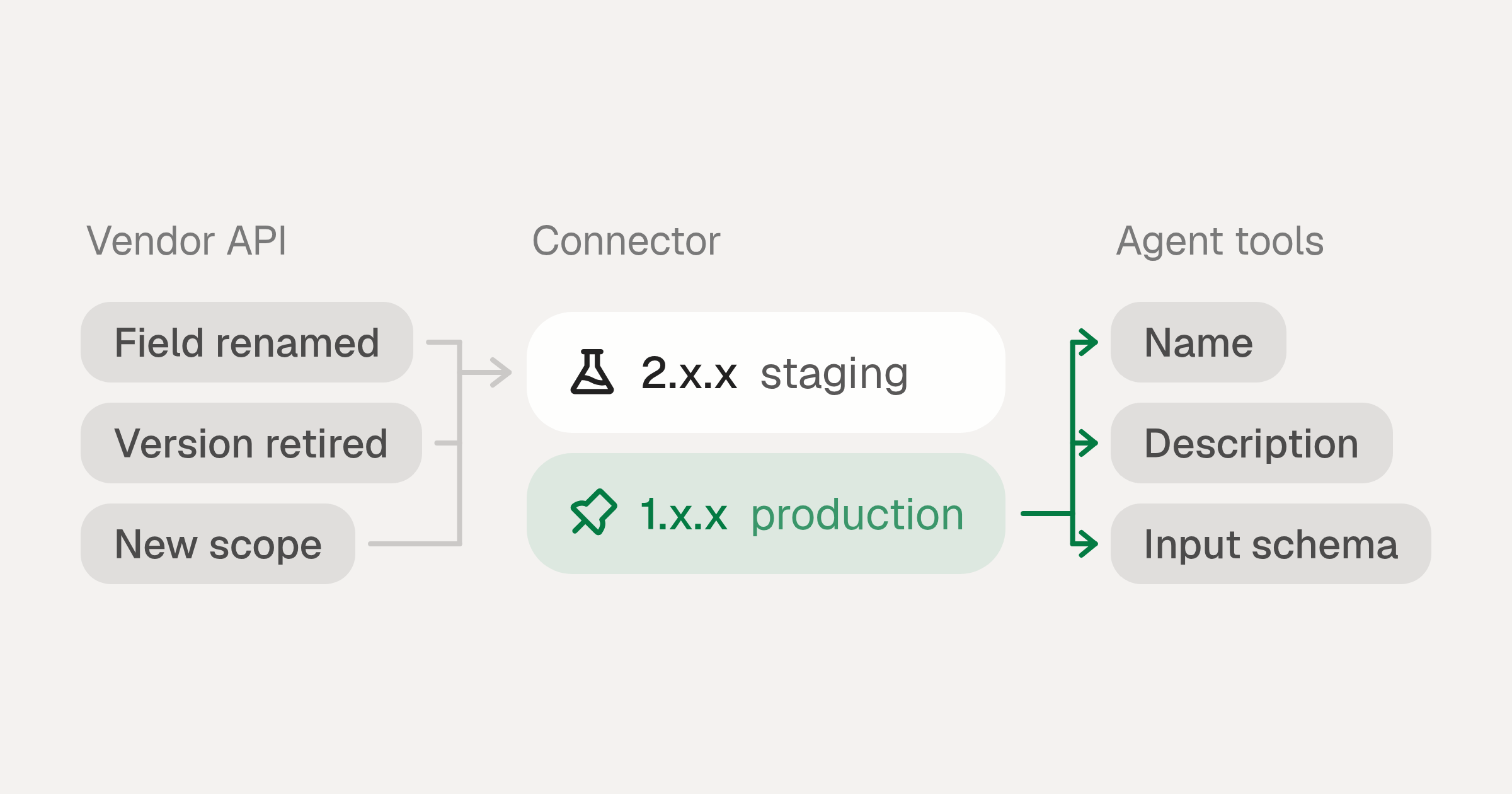
As of November 2026, the way to keep API connectors working when vendor APIs change is to put a versioned connector layer between each vendor and your agent. Pin every production connector to a major version so a breaking connector version waits until you move the pin, and subscribe to the vendor’s deprecation notices and the connector’s changelog. Test each new major version on a staging profile before you move production to it, and alert on failed action runs per action. Authentication and scope changes need a migration of their own, because every user has to sign in again. Plan for frequent change: between 11 August and 8 November 2026, StackOne published 1,925 connector releases, and 178 of them were breaking major versions.
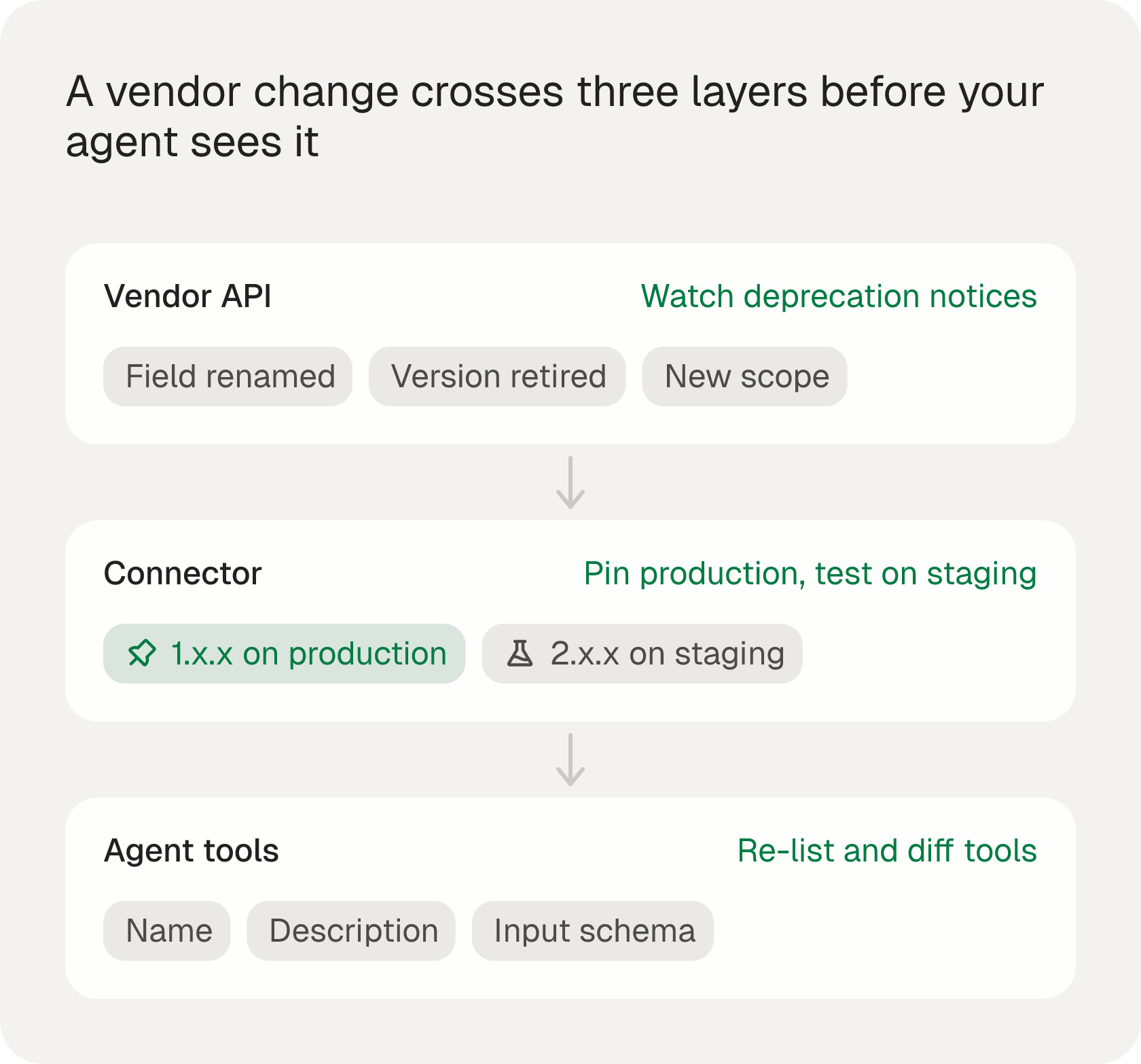
The top-ranking guides on API breaking changes mostly cover one integration owned by one team. An AI agent adds two problems. It depends on many vendors at once, so some connector is always mid-change. And it chooses tools by reading their names, descriptions and input schemas, so a change the vendor would call minor can still change what the agent does. This post covers what to set up at each of the three layers in the figure below, with the notice periods four large vendors publish and 90 days of release data from StackOne’s connector changelogs. Product details describe StackOne connector versioning and were checked on 9 November 2026.
What changes when a vendor changes its API?
Five kinds of change reach an agent, and each fails in its own way.
| Vendor change | What the agent gets | Typical symptom |
|---|---|---|
| Field renamed, removed or retyped | A response with missing or reshaped data | Wrong answers, not errors, because the call still succeeds |
| Parameter renamed or made required | A request the vendor rejects | 400 or 422 errors on one action |
| API version retired | Every call to that version fails | Salesforce returns 410:GONE for a retired version |
| New auth type or required scope | Tokens that no longer grant access | 401 or 403 errors for every user of the connection until they sign in again |
| Pagination, filtering or defaults changed | Fewer or different records | Partial results that look complete |
Schema changes in the first row and behaviour changes in the last cause the most damage, because nothing fails loudly. An agent that gets an empty list where a field used to be can answer from what it got without flagging that anything is missing.
How often do connector APIs change?
Often enough that it needs a plan. We counted the releases in the public changelog of every StackOne connector between 11 August and 8 November 2026, and the chart below shows how many were breaking:
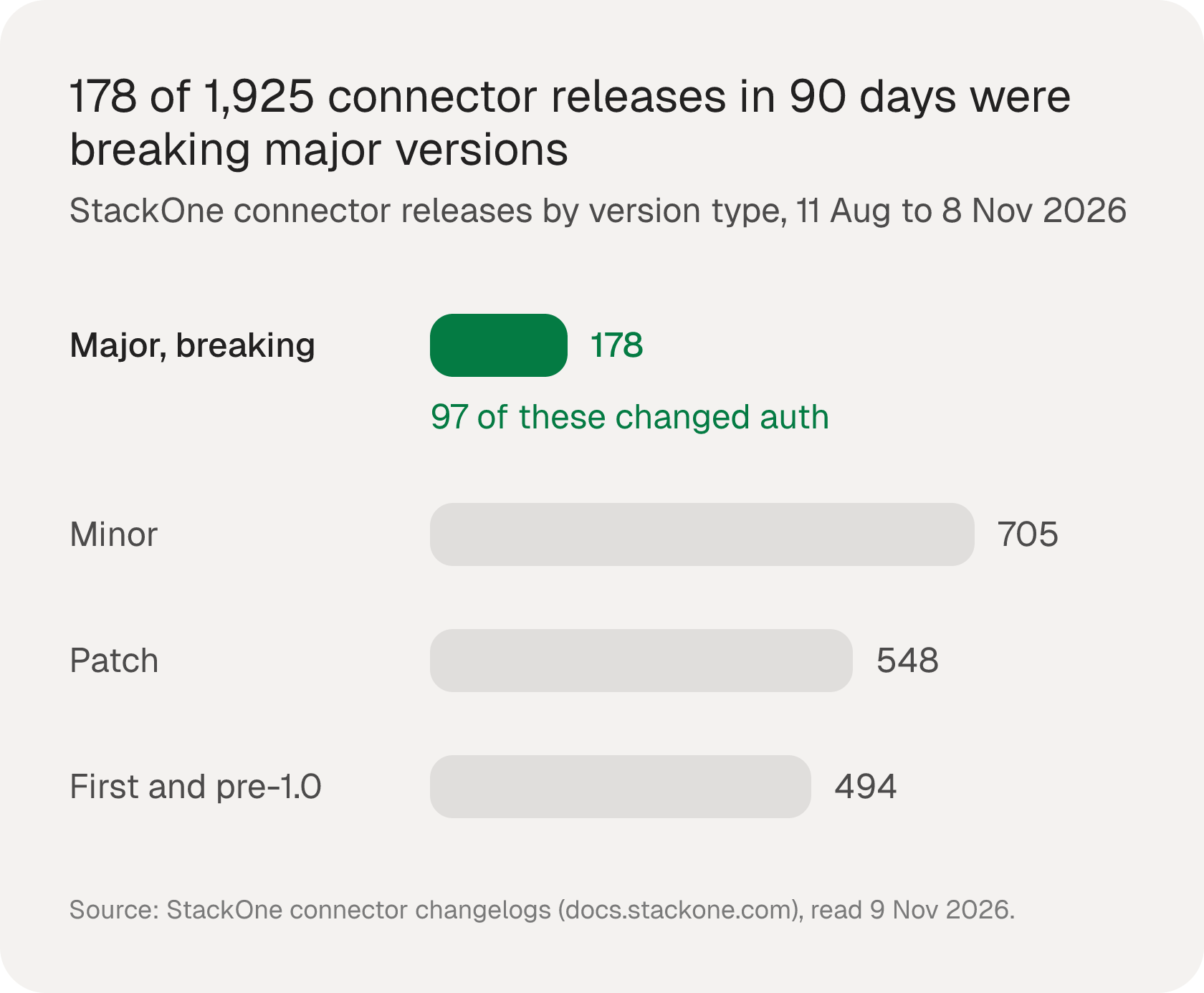
Classified by version number, the releases break down like this:
| Release type | What it means | Releases | Share |
|---|---|---|---|
Major (2.0.0, 3.0.0, …) | Breaking: auth, request or response shape, removed actions, behaviour | 178 | 9% |
Minor (1.4.0) | New actions or optional fields | 705 | 37% |
Patch (1.4.1) | Fixes and description updates | 548 | 28% |
| First releases and pre-1.0 versions | New connectors and early versions | 494 | 26% |
| All releases | 1,925 | 100% |
Four more counts from the same changelogs matter for an agent. 97 of the 178 major versions were tagged as auth changes, meaning a new auth type, a new required scope or new credential fields. 1,095 releases changed the definition of at least one existing action, and 34 removed an action outright. 124 releases were tagged as description fixes, which never break the API contract but do change the text a model reads when it picks a tool.
Not every release reacts to a vendor change. Many add actions or fix bugs in the connector itself. The count shows how often the layer under an agent moves, whatever the cause. One example is the Workday connector changelog: v1.4.0 on 14 September 2026 “migrated Absence Management to v5 and Staffing to v8”, two of Workday’s own web service versions, and shipped as a minor version because it was classed as non-breaking for existing actions, so profiles pinned to 1.x.x picked it up on their next request. A pin protects the connector contract, not every change behind it, so read minor release notes for the flows you depend on.
Method: one row per release entry in each connector’s changelog.mdx in the StackOne docs repository, read at commit 8e86481 on 9 November 2026. A major version is X.0.0 with X of 2 or more, and the tags are the ones written on each entry.
How much notice do vendors give before a breaking change?
Large vendors publish their deprecation windows, and they differ by a lot.
| Vendor | Published policy |
|---|---|
| Salesforce | Committed to “supporting each API version for a minimum of 3 years from the date of first release”, with notice “at least 1 year before support for the version ends”. Retired versions return 410:GONE (source) |
| Microsoft Graph | Declares a version “deprecated at least 24 months in advance of retiring it”. Preview APIs on the beta endpoint can get “breaking changes … without notice” (source) |
| HubSpot | Announced 30 March 2026: “breaking changes only happen twice a year (March and September)”, with “18 months of support for each version” (source) |
| Workday Web Services | New versions “will only be introduced when changes to our existing interfaces are not backwards-compatible” (source) |
A long window only helps if someone reads the notice and acts on it before the date. Beta and preview endpoints carry no window at all. When a vendor publishes no deprecation policy, treat every one of its releases as possibly breaking.
Pin each production connector to a major version
Semantic versioning gives the rule that makes pinning work: increment the “MAJOR version when you make incompatible API changes” (semver.org). StackOne releases every change that is not backwards compatible as a new major version of the connector, and each connector profile resolves to one version, which you choose with a pin:
| Pin | Resolves to | Moves automatically |
|---|---|---|
| No pin set | Newest version (your custom version if one exists) | Yes |
latest | Newest version | Yes |
1.x.x | Latest minor and patch within major 1 | Yes, within major 1 |
1.2.x | Latest patch within 1.2 | Patches only |
1.2.0 | Exactly 1.2.0 | No |
For production, pin to a major wildcard. You pick up fixes and new optional fields without doing anything, and a new major version, which can change authentication or scopes, waits until you move the pin. Set the pin in the dashboard, or through the API:
curl -X PUT https://api.stackone.com/connector_profiles/{connector_profile_id}/pinned_version \
  -H "Authorization: Basic <base64(api_key:)>" \
  -H "Content-Type: application/json" \
  -d '{
    "pinned_version": "1.x.x"
  }'
To see every published version and which one is serving requests:
curl https://api.stackone.com/connector_profiles/{connector_profile_id}/versions \
  -H "Authorization: Basic <base64(api_key:)>"
Publishing a new version never invalidates linked accounts, and since May 2026 the accounts API returns resolvedVersion and isPinned, so you can check which version each account is on. Immutable versioning is on by default, which means a published version number cannot be overwritten with different content. The Connector Versioning docs cover custom versions and how they take precedence.
Which deprecation signals should you watch?
Watch three sources, because none of them covers everything:
- Deprecation and Sunset headers. RFC 9745 defines a
Deprecationresponse header and RFC 8594 aSunsetheader with the date a resource may stop responding. Not every vendor sends them, and RFC 8594 says clients should treat the date as a hint, so log them where they appear without relying on them. - Vendor changelogs and developer notices. These are where the windows in the table above get announced. Assign each vendor your agents depend on to a named owner who reads them.
- Connector changelogs. StackOne connector changelogs are public and each one has an RSS feed, for example the Workday feed. Subscribe to the feeds for the connectors you use in Slack or a feed reader, and read each new major version before you move a pin.
A quick check for the headers on any endpoint you call:
curl -sI https://api.example.com/v1/orders \
  | grep -iE '^(deprecation|sunset|link):'
Test new major versions on a staging profile
Each connector profile pins on its own, so staging and production never share a version by accident. When a connector publishes a new major version:
- Create a staging connector profile pinned to the new major, for example
2.x.x, and link a test account to it. - Run the tasks your agent actually performs against that account, and compare the fields it reads with the same tasks on the production profile.
- Read the changelog entry for removed actions, renamed fields and new required scopes, and update prompts or code that reference them.
- Move the production pin once the staging run matches.
If you build your own connectors, run the same loop in CI. The StackOne CLI has stackone validate to check a connector definition and stackone run to execute an action locally, and the GitHub workflow validates every pull request and pushes only on merge. Contract tests belong in the same pipeline: record the response fields each agent task depends on and fail the build when one disappears or changes type. The AI Integration Builder covers building custom connectors.
How do you detect a broken connector in production?
Alert on failed action runs per action, not only on overall error rate. In StackOne, every action run is logged, including MCP tool calls, and POST /logs filters them:
curl -X POST "https://api.stackone.com/logs" \
  -H "Authorization: Basic <base64(api_key:)>" \
  -H "Content-Type: application/json" \
  -d '{
    "filters": {
      "log_type": ["action"],
      "action_id": ["bamboohr_list_employees"],
      "success": false
    }
  }'
Group by connector_key and status_code. The observability docs suggest alerting when any connector goes above 10% errors. Check success as well as the status code, because a run that fails before the vendor responds has no status code. A spike in 401 and 403 errors on one connector usually means a scope or auth change, while 400 errors on one action point to a request shape change. For list actions your agents depend on, also track how many records come back, since a changed filter can return an empty list with a 200. The observability page shows the log views.
Treat auth and scope changes as a migration
A new OAuth flow or required scope cannot reach existing accounts silently, because every user has to authorize again. StackOne handles it as a planned rollout:
- Create a new connector profile pinned to the new major version. The old profile and its accounts keep working.
- Pass the new
connector_profile_idwhen you create connect sessions, or make the new profile the project default. - Prompt users to reconnect through the Integration Hub, by email, in-app notification or a modal.
- Each account moves to the new profile when its user completes the new sign-in. Accounts still on the old profile are the ones left to chase.
Plan this work before you need it: 97 of the 178 major versions in our 90-day count changed authentication.
Keep the agent’s tool layer stable
An agent sees a connector through its tool definitions, so the last layer to protect is the tool list itself. The MCP specification lets the list change over time: servers that declare the listChanged capability “SHOULD send a notification” to subscribed clients when it does. That is a recommendation, and clients can cache tools/list, so an agent may keep calling a tool that has changed underneath it.
Three habits help:
- Re-list tools when a session starts instead of relying on a cached list.
- Treat a description change as a behaviour change. The model reads the description to choose a tool, so a reworded description can change which tool it picks, even when the API contract is identical. On a
1.x.xpin, a description update in a patch release reaches production on its next request, so for flows where tool choice matters, pin the exact version and move it once the snapshot diff below passes. - Snapshot each tool’s name, description and input schema in CI and review the diff before a release, the same way you review code. MCP vs API covers how tool definitions differ from raw API calls.
Checklist to keep API connectors working when vendor APIs change
- Pin every production connector profile to a major version wildcard, never
latestand never unpinned. - Give each vendor an owner who reads its deprecation notices, and subscribe to each connector’s changelog feed.
- Log
DeprecationandSunsetheaders wherever a vendor sends them. - Test every new major version on a staging profile with your agent’s real tasks before moving the production pin.
- Alert on failed action runs per action and per connector, and track empty results on list actions.
- Plan auth and scope changes as a reconnect migration with a new connector profile.
- Re-list MCP tools at session start and diff tool descriptions and schemas in CI.
Should you build this maintenance yourself?
Everything above is ongoing work: someone reads the notices, ships the major versions and runs the migrations for every vendor an agent depends on. The true cost of building SaaS integrations puts numbers on that work, and why integration APIs built for apps break for agents covers what agents need from the layer underneath.
Read the Connector Versioning docs to set pins on your production connector profiles.