


 Alex Cox · · 7 min read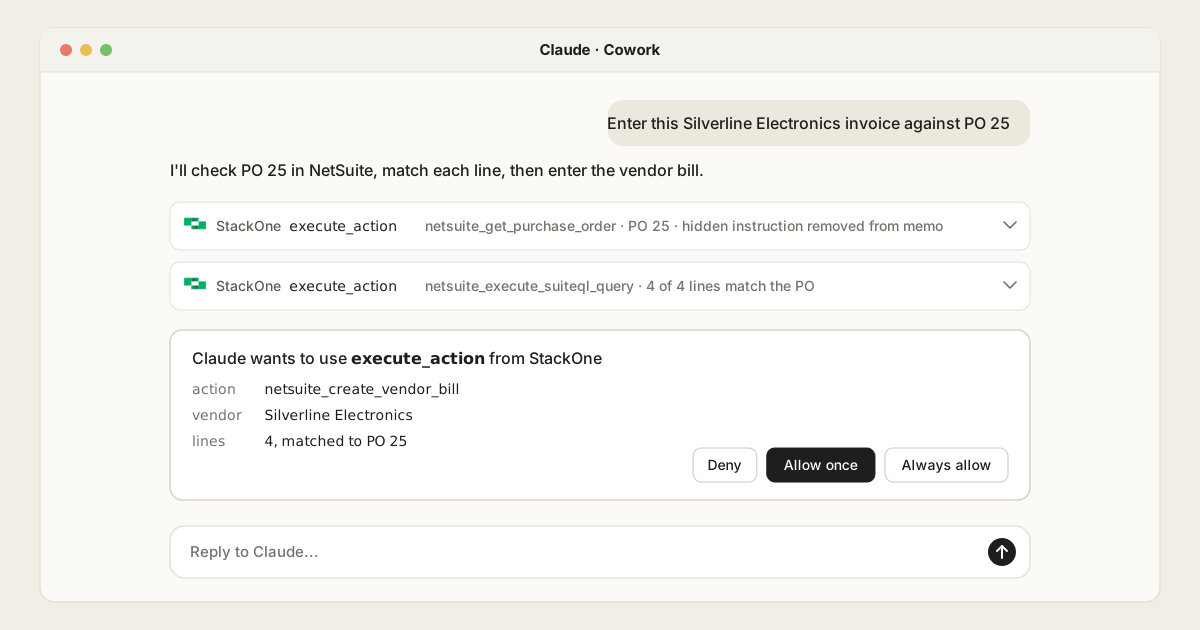
Connect NetSuite to Claude Chat and Claude Cowork: Cross-System Finance and Operations Workflows
Table of Contents
Claude has an Oracle-built NetSuite connector, NetSuite’s AI Connector Service: an MCP server that turns Claude’s requests into NetSuite actions, as each person’s NetSuite role. For finance work that also touches the Accounts Payable (AP) inbox, Slack or the CRM, with rules on amounts, fields and bank details and one audit log, connect Claude to NetSuite through a Tool Gateway such as StackOne.
This guide is for the finance systems owners, controllers and IT teams who run NetSuite. It compares the ways to connect Claude Chat and Claude Cowork to NetSuite.
In this post:
- Why connect Claude to NetSuite: the one-off finance work Claude suits, with a demo
- How to connect NetSuite to Claude: three options
- Controlling what Claude can do in NetSuite
- How sign-in shapes NetSuite permissions: API vs MCP sign-in methods
- Tool Policies for NetSuite, with examples: six rules for a finance team
- NetSuite MCP options compared: what each covers and how each is controlled
- How it works with StackOne: setup in Claude Chat and Claude Cowork
Why connect Claude to NetSuite
Saved searches, SuiteFlow and scheduled scripts can automate the routine parts of the close. AI extends automation to the complex, unstructured workflows that traditional scripts cannot reach: in Gartner’s 2025 AI in Finance survey, finance teams already using AI most often used it for accounts payable automation (37%) and error and anomaly detection (34%), after knowledge management.
Even well-automated teams get requests no workflow covers. Enter this invoice against its Purchase Order (PO). Is that Maple Printing bill a duplicate? Accrue for the two contractors who haven’t billed for September. Which bills fall due in the next two weeks?
That’s where Claude Chat and Claude Cowork help. Someone asks in plain language, Claude finds the records and does the matching, and the person approves before anything is written. It also saves a trip through several saved searches and record screens to find one answer. It is particularly useful for seatless users—such as sales reps or support specialists without expensive Enterprise Resource Planning (ERP) licenses—who can query order or invoice statuses via Claude through StackOne under strict, read-only proxy governance.
The demo below runs four of these requests in one Claude conversation, then shows the controls behind them.
Few of these requests stay inside NetSuite. Invoices arrive in an inbox, approvals happen in Slack, and customer context lives in the Customer Relationship Management (CRM) system. That decides which way of connecting works best.
How to connect NetSuite to Claude: three options
Claude’s connector directory has had an Oracle-built NetSuite connector since November 2025. You can use it, build your own wrapper, or use a Tool Gateway. (Community-built NetSuite MCP servers exist as a middle ground between DIY and first-party, but they carry the core risk of running someone else’s code with your credentials, have no maintainer-of-record, and present tool descriptions that act as an unvetted instruction surface).
NetSuite AI Connector Service
Oracle’s AI Connector Service is NetSuite’s own MCP server, and because Oracle maintains it, it’s where many teams begin. It’s free, and the Claude connector needs a Pro plan or higher.
Oracle blocks the Administrator role and other full-access roles, and no one has access until an admin grants it.
Oracle’s free MCP Standard Tools SuiteApp gives Claude about 25 tools, as of October 2026. They’re general-purpose: one tool creates a record of any type, one updates any record, and one runs any record action, such as an approval. Others run saved searches, reports and read-only SuiteQL queries. There’s no delete tool, and admins can write their own tools in SuiteScript.
That covers a lot for one person in NetSuite. The limits show up once a team relies on it:
- One tool for every record type. The same Create record tool makes vendor bills, journal entries and customers, so allowing it in Claude allows all of them. The NetSuite role has to do all the narrowing.
- Lookups before every write. Create record first fetches the record type’s fields, and Oracle says to check a record action is available before running it. Claude works out the right fields each time, with an extra call each time.
- NetSuite only. Tools can’t make outside calls, so the inbox, Slack and the CRM need separate servers with their own access and logs.
- Responses aren’t screened. Oracle’s security guidance calls prompt injection “out of NetSuite control”. Memo fields and vendor notes are free text.
- A short audit window. The integration’s execution log keeps MCP calls for 21 days in production and seven in a sandbox.
A Tool Gateway
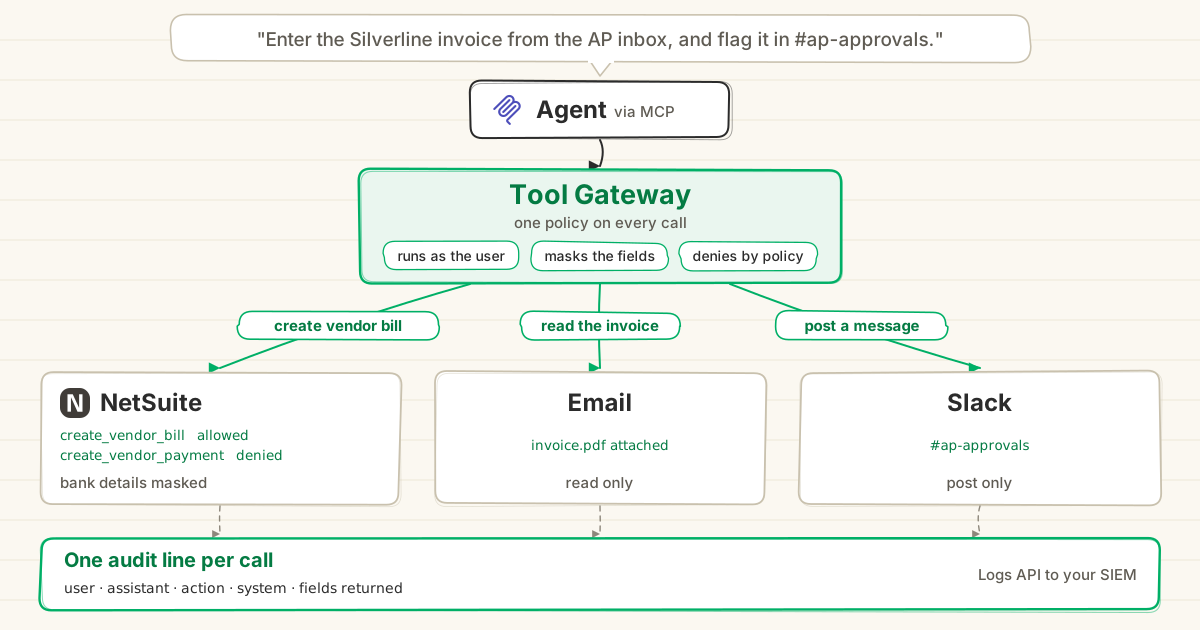
A Tool Gateway sits between Claude and every system it uses, and applies one set of rules to every call. StackOne’s NetSuite connector has 80 actions across vendor bills, payments, invoices, journal entries, purchase and sales orders, customers, vendors and SuiteQL.
-
Each action does one job, such as Create Vendor Bill, with its fields set out up front, so Claude doesn’t look up the record type first. Each also declares whether it reads, writes or deletes, which Claude uses to sort tools for approval.
-
Each person connects their own NetSuite account, so calls run with their NetSuite access.
-
Tool Policies set what Claude can do for each user or group on top of the role, down to amounts and fields. A denied call never reaches NetSuite.
-
StackOne Defender checks every response before Claude reads it, and removes hidden instructions such as one hidden in a purchase order memo.
-
Every call goes into one action log across all your systems, which you can send to your SIEM.
-
Dual REST and SOAP support. NetSuite environments rely heavily on legacy SuiteTalk SOAP Web Services alongside modern SuiteTalk REST Web Services. While unmapped SOAP actions exist in bespoke NetSuite environments, StackOne’s integration engine natively ingests, parses, and normalizes XML/SOAP alongside REST, enabling rapid action mapping via the AI Connector Builder.
NetSuite AI Connector Service vs StackOne, request by request
Both are hosted, and both run each call with the person’s own NetSuite access. The difference is the shape of the tools:
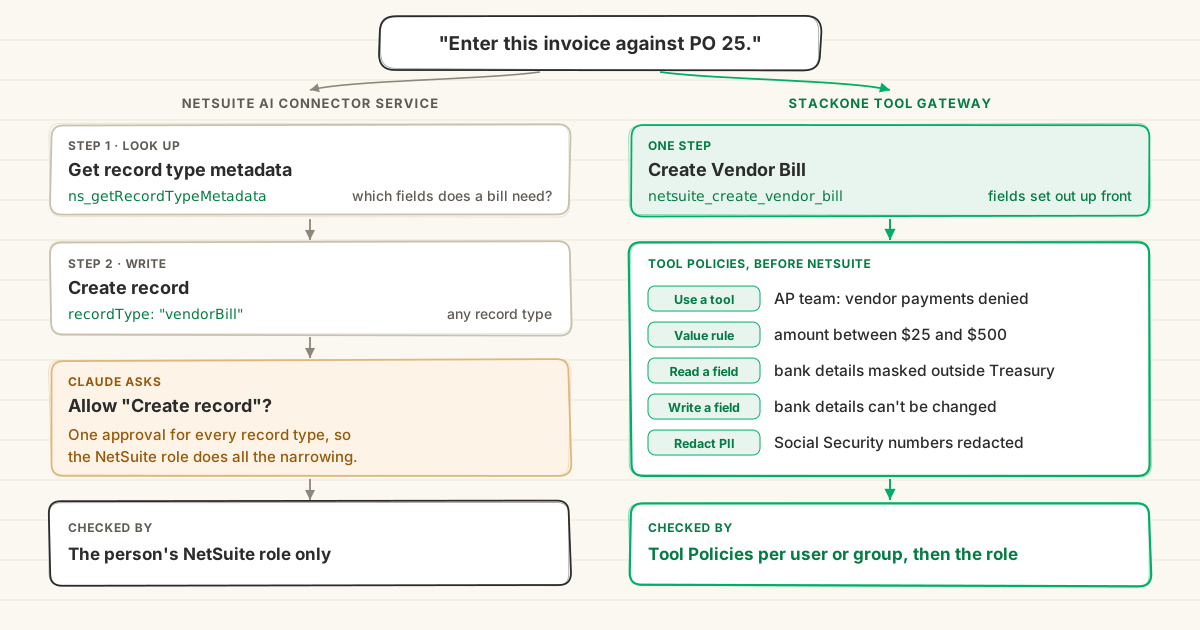
How they differ on real requests:
| Request | NetSuite AI Connector Service | StackOne Tool Gateway |
|---|---|---|
| “Enter this invoice against PO 25.” | Look up bill fields, then Create record | Create Vendor Bill, in one call |
| AP can create bills but not journal entries | A separate NetSuite role | Pick actions per person, or one policy |
| “Approve this bill.” | Execute record action, any record | Not available today |
| “Delete the duplicate bill.” | No delete tool | Delete Vendor Bill, or blocked by policy |
| Run a saved search or standard report | Yes | Not yet: SuiteQL queries instead |
| “Show every change Claude made last month.” | Execution log, 21 days | One log across every system |
Controlling what Claude can do in NetSuite
How sign-in shapes NetSuite permissions
NetSuite’s API accepts three ways to sign in: token-based authentication, OAuth 2.0 with a person signing in, and OAuth 2.0 client credentials, where a certificate is mapped to a user and role for machine-to-machine access.
The AI Connector Service accepts one: a person signing in with OAuth 2.0, with a role that isn’t an administrator. So:
- Claude gets the whole role. Whatever the person can do in NetSuite’s own screens, Claude can do too.
- Narrowing means another role. Oracle’s advice is to “create separate roles for different MCP tools”, and each person picks one when they sign in.
- No machine sign-in. An agent that runs with nobody watching has to borrow a person’s sign-in and role.
StackOne’s NetSuite connector runs on that same API, so it isn’t limited to one sign-in method. Today each person links their own account with OAuth 2.0, and the API’s other methods, such as client credentials for an agent with its own integration role, can be added to the connector. Either way, StackOne then narrows each call by user or group with Tool Policies, so the NetSuite role stays as it is.
Tool Policies for NetSuite, with examples
Tool Policies check every call before it reaches NetSuite. A deny always wins, and each rule can run in Monitor first, so you see who it would affect before you enforce it. Six rules a finance team might set:
| Rule | Who | What Claude sees |
|---|---|---|
| Block vendor payments and deletes | AP team, except controllers | The call is refused before NetSuite |
| Allow payments only between $25 and $500 | AP leads | A $2,000 payment is refused |
| Mask vendor bank details | Everyone outside Treasury | Bank fields come back masked |
| Refuse changes to vendor bank details | Everyone | An “update our remittance details” email can’t change them |
| Redact Personally Identifiable Information (PII) such as Social Security numbers | Everyone | Employee and expense records come back redacted |
| Stop unreleased results leaving in Slack | Everyone | A Slack post that answers yes to “Does this contain unreleased financial results?” is refused |
A NetSuite role can do the first rule for everyone with that role. The other five check amounts, fields and message content, which a role can’t. Rules can also be limited to calls from Claude, so the same people keep their usual access everywhere else.
NetSuite MCP options compared
How each one runs and what you can control, from Oracle’s Standard Tools list and StackOne’s connector page, as of October 2026:
| Community servers | NetSuite AI Connector Service | StackOne Tool Gateway | |
|---|---|---|---|
| Hosting | You | Oracle | StackOne |
| Sign-in | The credential you give it | A person, OAuth 2.0 only | Any method NetSuite’s API supports |
| Tools | Varies | General-purpose, one per operation | One action per job, 80 in all |
| Rules per user or group | Varies | By NetSuite role | Tool Policies, down to amounts and fields |
| Saved searches and reports | Varies | Yes | Not yet: SuiteQL instead |
| Screens responses for injected instructions | Varies | Left to the AI client | Yes |
| Systems covered | NetSuite | NetSuite | NetSuite plus email, Slack, CRM and more |
| Audit | Depends on the server | Execution log, 21 days | One log across every system |
How it works with StackOne
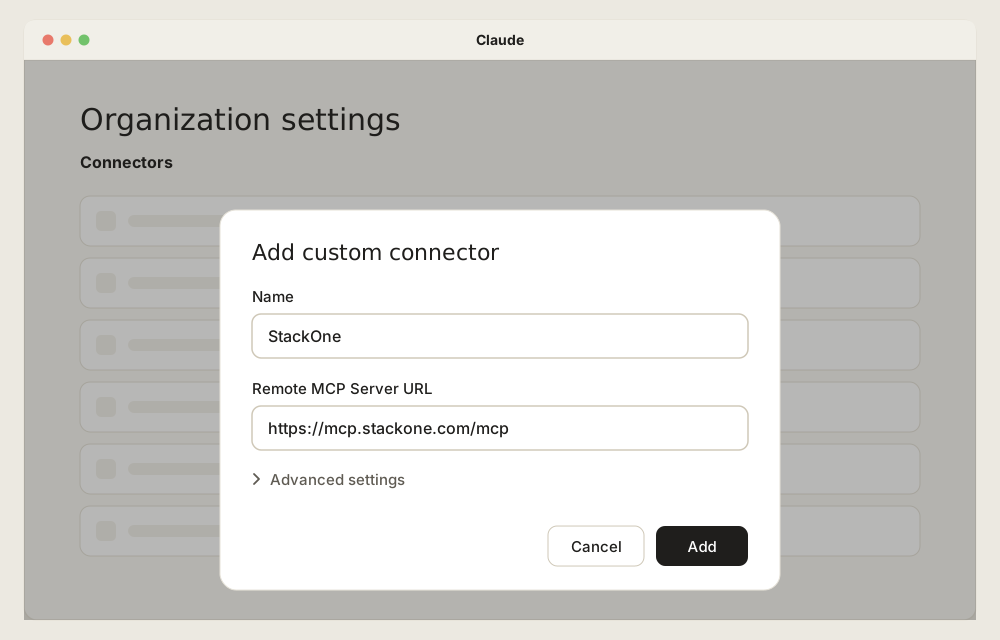
IT admins add StackOne to Claude with one URL: https://mcp.stackone.com/mcp.
-
Add the connector. In Claude Cowork, an Owner adds it once under Organization settings, then Connectors, as a custom connector with the StackOne URL (guide).
-
Connect NetSuite. Each person signs in to StackOne, links their own NetSuite account and picks which actions Claude can use.
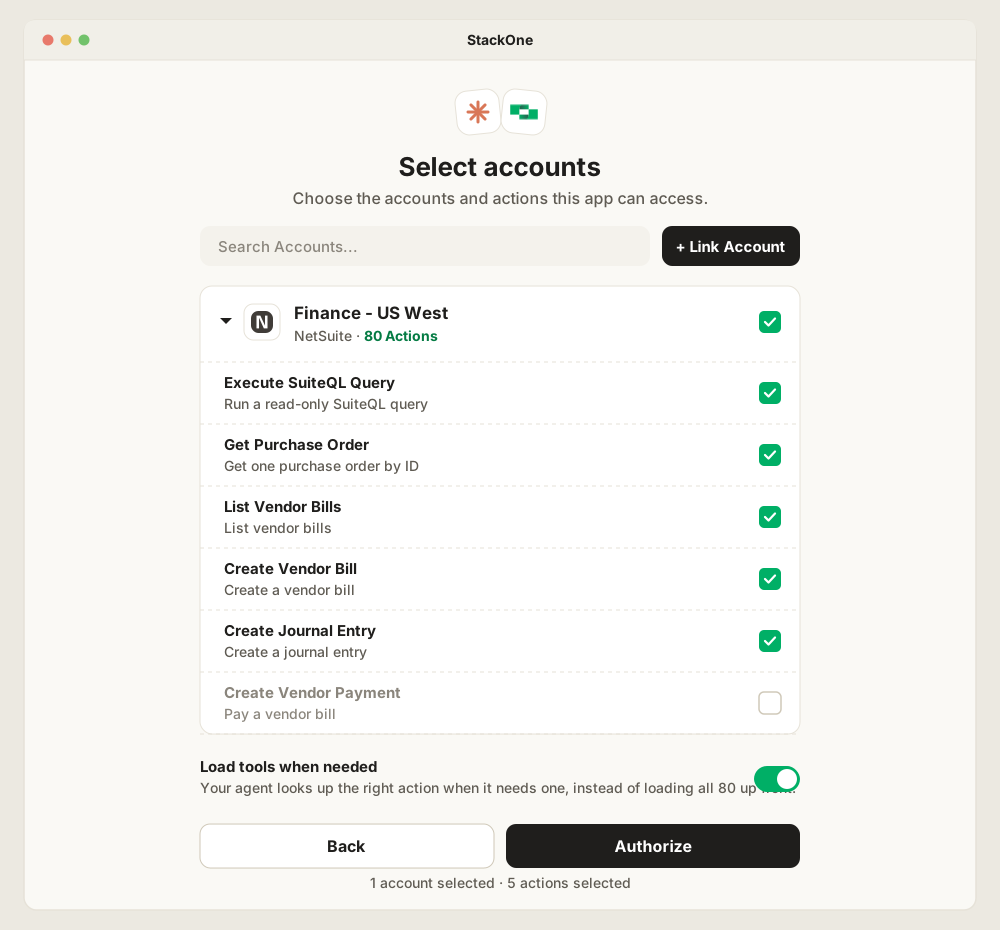
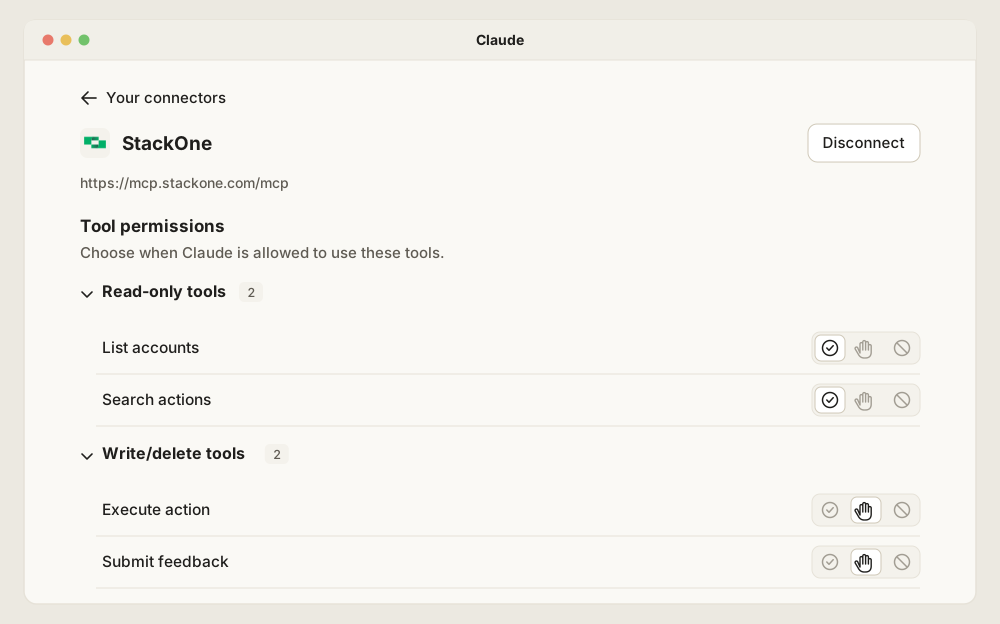
Claude then sees StackOne as four tools, with every NetSuite action running through Execute action. So the per-action rules live in StackOne: the actions picked here, and Tool Policies.
-
Set Tool Policies. Start from the six rules above, run them in Monitor, then enforce them.
Now the invoice request runs as the AP specialist’s own account. Claude reads the purchase order with a hidden instruction in its memo removed, matches all four lines and asks before it creates the vendor bill. Asked to pay the bills due next week, it can’t: payments were never in its scope.
The same rules apply when a request proven in chat becomes an agent that runs on a schedule.
For how a Tool Gateway compares with an MCP gateway that routes to existing servers, see MCP Gateway vs Tool Gateway.
Frequently Asked Questions
What's the best way to connect NetSuite to Claude for governed cross-system finance and operations workflows?
Does Claude have a native NetSuite connector?
How do I connect NetSuite to Claude Chat and Claude Cowork?
https://mcp.stackone.com/mcp. Each person then links their own NetSuite account and picks which actions Claude can use. See StackOne's guide for Claude Cowork.