


Tabs MCP Server
for AI Agents
Connect your AI agent to StackOne's Tabs MCP server and give it 63 MCP tools out of the box. Auth, tool execution, and security all managed.
 StackOne


Coverage
63 Agent Actions
Agents can read, write, delete and run operations in Tabs. Extend your agent's capabilities with custom actions.

Authentication
Agent Tool Authentication
Per-user OAuth in one call. Your Tabs MCP server gets session-scoped tokens with zero credentials stored on your infra.
Agent Auth →
Security
Agent Protection
Every Tabs tool response scanned for prompt injection in milliseconds, with 88.7% accuracy, all running on CPU.
Prompt Injection Defense →
Performance
Max Agent Context. Min Cost.
Free up to 96% of your agent's context window to enhance reasoning and reduce cost, on every Tabs call.
Tools Discovery →What is the Tabs MCP Server?
A Tabs MCP server lets AI agents read and write Tabs data through the Model Context Protocol, Anthropic's open standard for connecting LLMs to external tools. StackOne's Tabs MCP server ships with 63 pre-built actions, fully extensible via the Connector Builder, plus managed authentication, prompt injection defense, observability, and agent execution runtime. Connect it from MCP clients like Claude Desktop, Claude Code, Cursor, Goose, and VS Code, or from agent frameworks like OpenAI Agents SDK, LangChain, and Vercel AI SDK.
All Tabs MCP Tools
Every StackOne action for Tabs, ready for your agent. Read, write, delete and run operations, scoped to exactly what you need.
Customer Contacts
- Create Customer Contacts
Create customer contacts in Tabs
- List Customer Contacts
Retrieve a paginated list of customer contacts from Tabs
- Update Customer Contact
Update customer contact in Tabs
Contracts
- Create Contract
Create a new contract for an existing Tabs customer, with an optional close date and external CRM ID
- List Contracts
Retrieve a paginated list of contracts from Tabs
- Update Contract
Update a contract's name, close date, external ID or external source type
Contract Files
- Upload Contract File
Upload contract file in Tabs
- Download Contract File
Download contract file from Tabs
- Delete Contract File
Delete contract file from Tabs
Contract Billing Terms
- Create Contract Billing Term
Create contract billing term in Tabs
- List Contract Billing Terms
Retrieve a paginated list of contract billing terms from Tabs
- Update Contract Billing Term
Update contract billing term in Tabs
- Delete Contract Billing Term
Returns 202 once the change is saved
Contract Obligations
- Create Contract Obligation
Returns 202 once the change is saved
- Update Contract Obligation
Returns 202 once the change is saved
- Delete Contract Obligation
Returns 202 once the change is saved
Contract Metadatas
- Get Contract Metadata
Get contract metadata from Tabs
- Update Contract Metadata
Updates a contract's metadata by merging the provided top-level keys with the existing metadata
- Delete Contract Metadata
Delete contract metadata from Tabs
Credit Memos
- Create Credit Memo
Create credit memo in Tabs
- List Credit Memos
Retrieve a paginated list of credit memos from Tabs
Customers
- Create Customer
Create a new customer in Tabs with billing contact, addresses, default currency, custom fields and tax details
- List Customers
Retrieve a paginated list of customers from Tabs
- Delete Customer
Delete customer from Tabs
Event Types
- Create Event Type
Create an event type in Tabs
- List Event Types
Retrieve a paginated list of event types from Tabs
An Events
- Create An Event
Creates a new usage event
- Delete An Event
Deletes a usage event by creating a new deletion event that links back to the original event
Other (35)
- Create Commitments For A Contract
Create commitments for a contract in Tabs
- Create Contract From File
Uploads a contract PDF and creates a new contract for it in one call
- Create Invoice Payment
Create invoice payment in Tabs
- Create A New Product
Create a new product in Tabs
- Create A Renewal For A Contract
Creates a `DRAFT` renewal for a processed contract. All terms are optional. A contract can have at most one renewal
- List Billing Terms
Retrieve a paginated list of billing terms from Tabs
- List Deleted Contracts
Retrieve a paginated list of deleted contracts from Tabs
- Get Contract By ID
Get contract by ID from Tabs
- Get Contract Obligation By ID
Get contract obligation by ID from Tabs
- Get Credit Memo By ID
Get credit memo by ID from Tabs
- Get Customer By ID
Get customer by ID from Tabs
- Get All Events
Fetches all usage events, and can be filtered as needed
- Get Customer Invoice By ID
Get customer invoice by ID from Tabs
- Get Invoice Generation Status
Check whether invoices are still generating for a customer
- Download Invoice PDF
Download invoice PDF from Tabs
- Get Invoice Payment By ID
Get invoice payment by ID from Tabs
- List Invoices
Retrieve a paginated list of invoices from Tabs
- Get Job By ID
Check the status of an asynchronous Tabs job, such as an invoice send or void started by perform_invoice_action
- Get Merchant Info
Retrieve the Tabs merchant (entity) that the API key is scoped to
- List Obligations
Retrieve a paginated list of obligations from Tabs
- List Payments
Retrieve a paginated list of payments from Tabs
- Get A Product By ID
Get a product by ID from Tabs
- List All Products For Merchant
Retrieve a paginated list of all products for merchant from Tabs
- List Renewals
Retrieve a paginated list of renewals from Tabs
- Get A Renewal
Retrieve a single contract renewal with its terms, notice period, length and price increase settings
- Get ARR Report
Retrieve the annual recurring revenue (ARR) report, paginated and filterable by customer and period
- List Revenue
Cursor-paginated customer × month revenue rows
- Update Customer Names
Update customer names in Tabs
- Update A Product
Update a product's name, display name, status, ARR default, description or linked ERP item and class
- Perform Contract Action
Perform contract action in Tabs
- Upsert Obligation Custom Revenue
Upsert obligation custom revenue in Tabs
- Terminate Billing Term
Terminates a billing term as of the given end date
- Apply Credit Memo
Apply credit memo in Tabs
- Perform Invoice Action
Performs an action on an invoice
- Execute A Renewal
Starts executing the renewal asynchronously: the excluded billing terms are removed from the draft renewal contract, the draft is marked processed, and the renewal becomes `APPROVED`
Tabs AI Agent Use Cases
Connect your AI agent to Tabs and help your team scale the finance operations they run by hand today.
Automate invoice processing with AI agents connected to your ERP, accounting software, and AP tools through StackOne.
ViewUse StackOne to connect your AI agent to your accounting, CRM, and messaging systems to automate Accounts Receivable dunning and payment follow-up.
ViewUse StackOne to connect your AI agent to your accounting, email, and document management systems to automate invoice processing and purchase order matching.
ViewSet Up Your Tabs MCP Server in Minutes
One endpoint. Any framework. Your agent is talking to Tabs in under 10 lines of code.
Agent Frameworks


 JSON
{
  "mcpServers": {
    "stackone": {
      "command": "npx",
      "args": [
        "-y",
        "mcp-remote@latest",
        "https://api.stackone.com/mcp?x-account-id=<account_id>",
        "--header",
        "Authorization: Basic <YOUR_BASE64_TOKEN>"
      ]
    }
  }
}
Check More finance-payments MCP Servers
104+ actions
83+ actions
79+ actions
75+ actions
70+ actions
67+ actions
60+ actions
Platform Resources
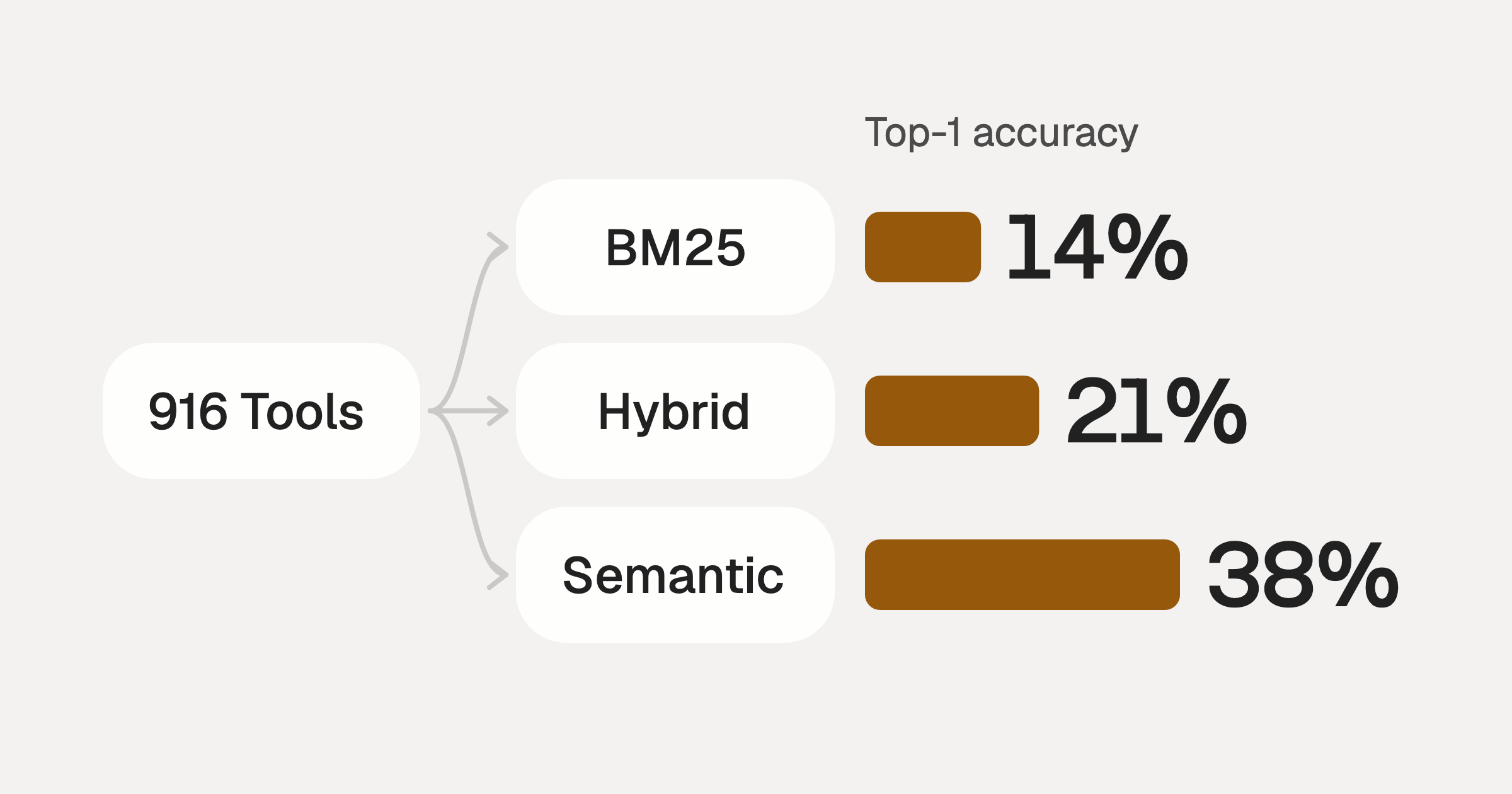
Comparing BM25, TF-IDF, and Hybrid Search for MCP Tool Discovery
Benchmarking BM25, TF-IDF, and hybrid search for MCP tool discovery across 916 tools. The 80/20 TF-IDF/BM25 hybrid hits 21% Top-1 accuracy in under 1ms.
10 min
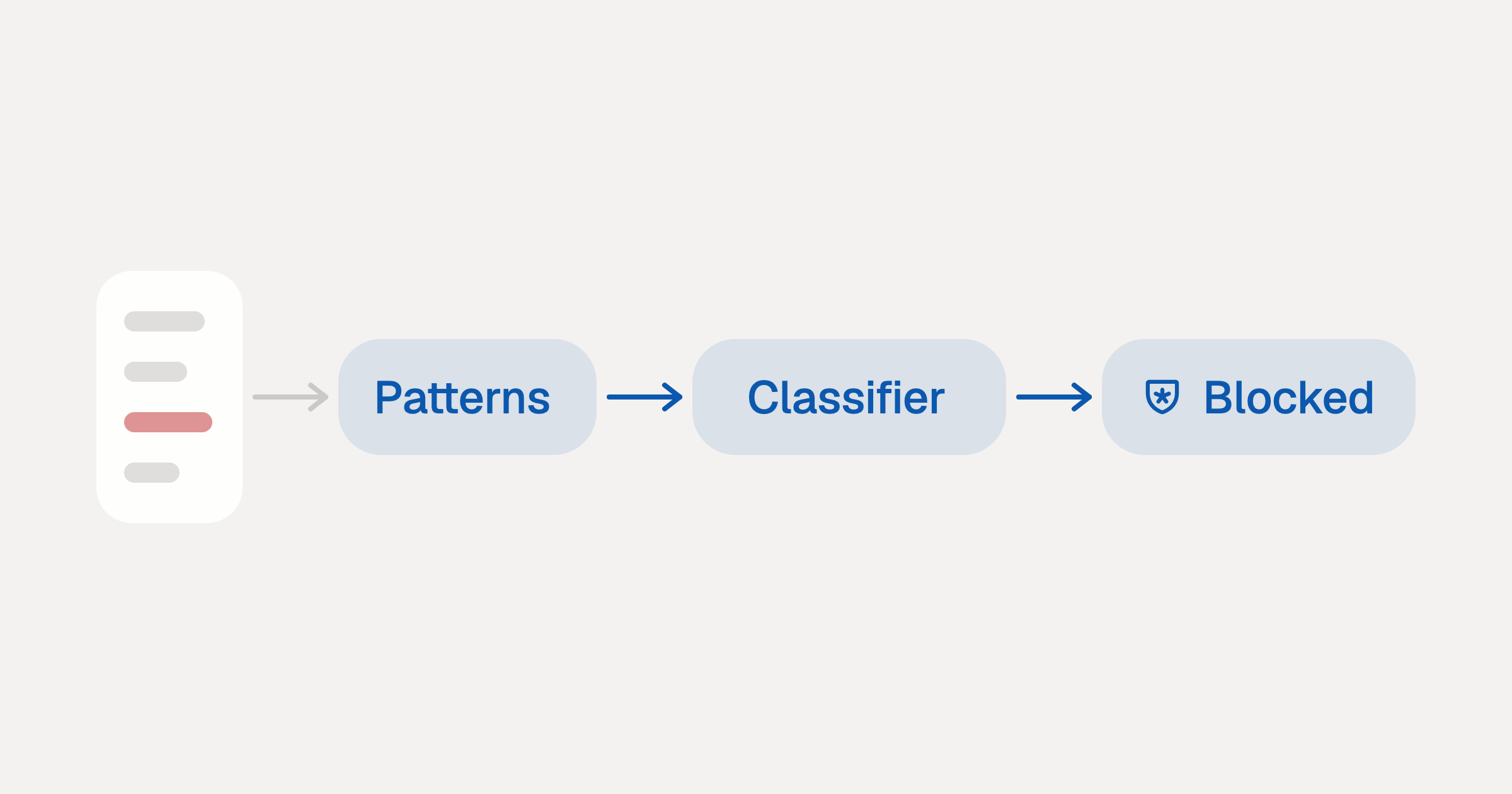
Indirect Prompt Injection Defense for MCP Tools: A Technical Guide
MCP tools that read emails, CRM records, and tickets are indirect prompt injection vectors. Here's how we built a two-tier defense that scans tool results in ~11ms.
12 min
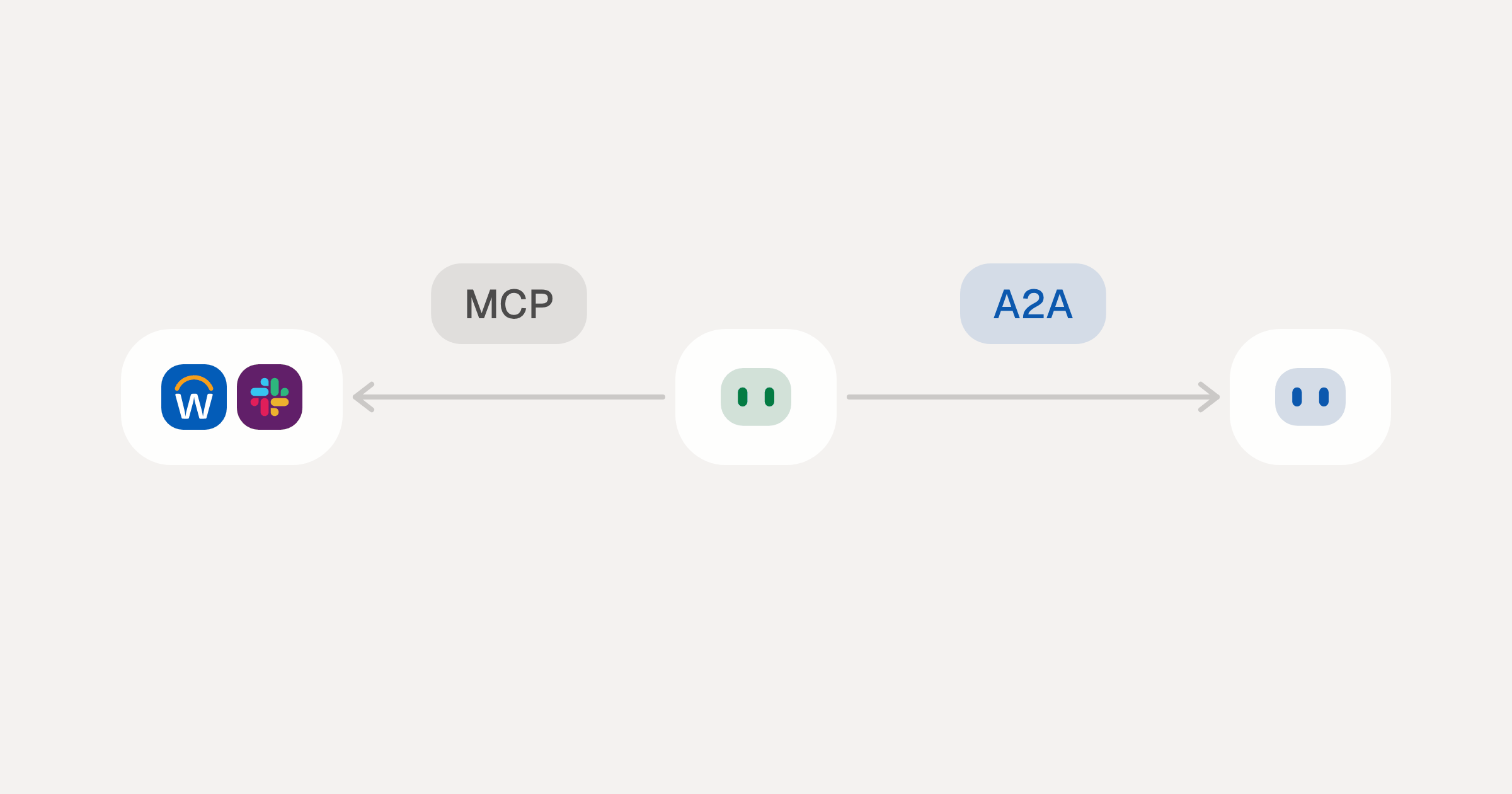
MCP vs A2A: Architecture, Security, and When to Use Each
MCP vs A2A: what each protocol standardizes, how they differ, the security risks they share, and when to use one, both or a hybrid.
12 min
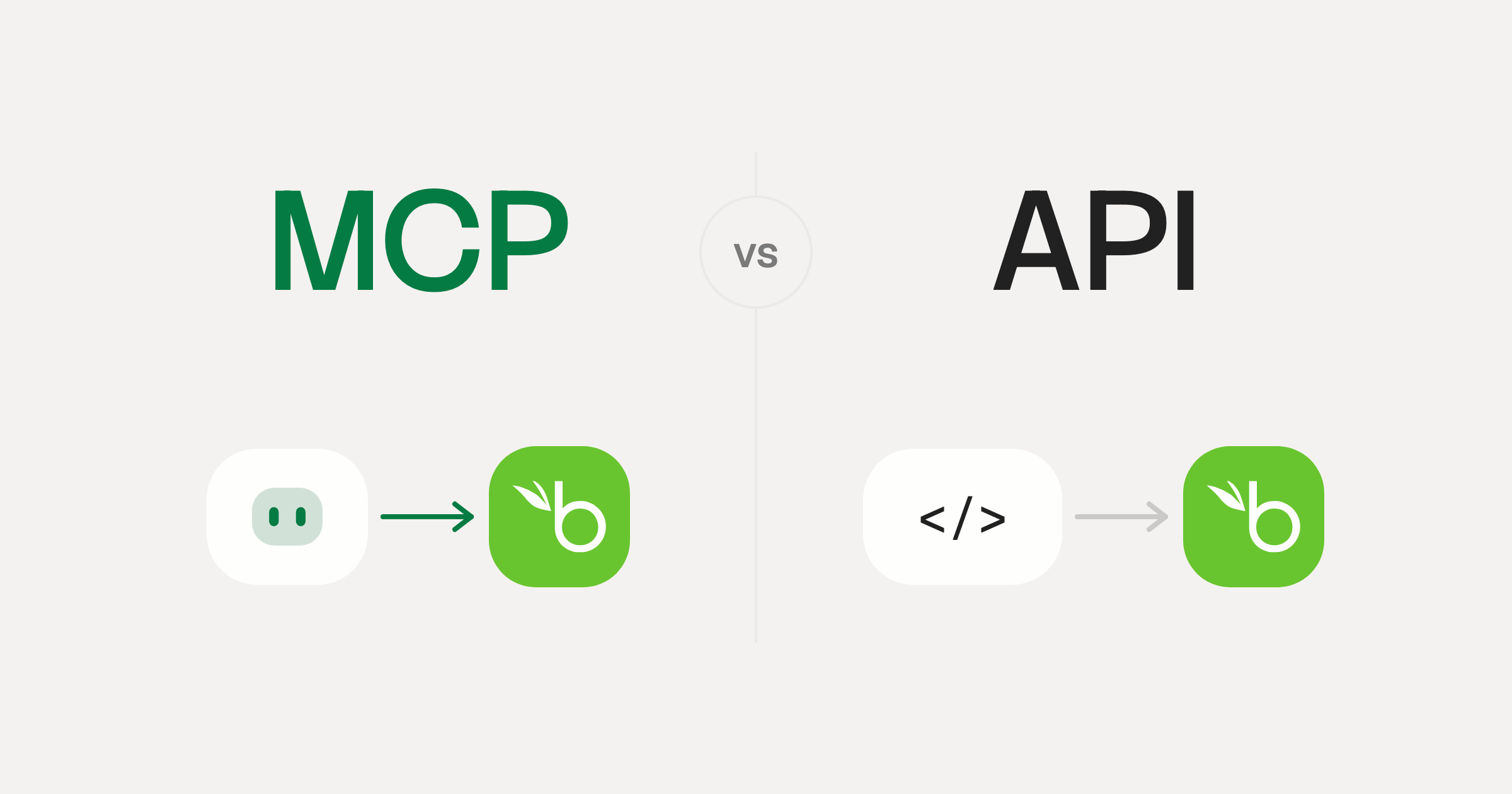
MCP vs API: What Hundreds of Connector Builds Taught Us
MCP wraps APIs, it doesn't replace them. After building hundreds of connectors that serve both, here's when each approach wins.
14 min read
Tabs MCP Server FAQ
Does StackOne have a Tabs MCP server?
Tabs MCP server vs direct API integration: what's the difference?
How does Tabs authentication work for AI agents?
origin_owner_id.Are Tabs MCP tools vulnerable to prompt injection?
What is the context bloat of a Tabs agent and how do I avoid it?
Can I limit which actions my Tabs agent can access?
Can I create custom agent actions for my Tabs MCP server?
When should I NOT use a Tabs MCP server?
What AI frameworks and AI clients does the StackOne Tabs MCP server support?
Put your AI agents to work
Connect AI to every company system and control what it can do in each one, down to the field.