
 Guillaume Lebedel · · 6 min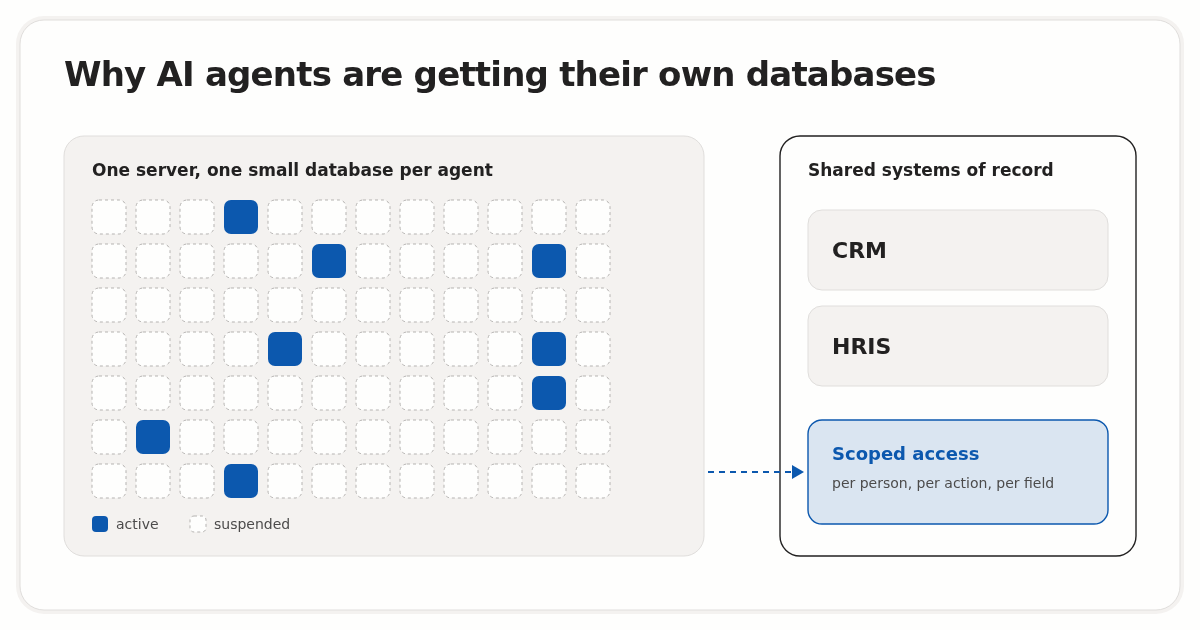
Why AI agents are getting their own databases
Table of Contents
AI agents are getting their own databases because giving each agent one is now cheap. On 2 October 2026, Supabase announced $150M in new funding and its acquisition of Turso, saying agents and AI-driven tools create 70% of its new databases. Turso rebuilt SQLite in Rust so a single server can manage millions of small databases.
This post covers what was announced, how a database per agent works, and where the pattern stops helping, which is at the shared company data agents read and change every day. Facts in this post were checked on 5 October 2026.
What did Supabase announce on 2 October 2026?
Supabase announced a $150M funding round led by GIC, with CapitalG, IronArc and SquarePeg participating, and an agreement to acquire Turso. In the Supabase funding and Turso acquisition release, the company said it adds more than 1M users and 4M databases a month, and that agents or AI-driven tools create 70% of new databases.

The other details from the two announcements, all dated 2 October 2026:
| Detail | Figure or fact | Source |
|---|---|---|
| New funding | $150M, led by GIC | PR Newswire release |
| Previous round | $500M Series F, four months earlier | PR Newswire release |
| New databases | More than 4M a month, over one million a week | PR Newswire release, Supabase blog |
| Created by agents or AI tools | 70% of new databases | PR Newswire release |
| Turso customers named | Superhuman, Sauna.ai, CTO.new, Mastra | PR Newswire release |
| Turso founder’s new role | Glauber Costa, Head of Agentic Services | PR Newswire release |
| Existing Turso users | Nothing changes, Turso keeps operating | Supabase blog |
Paul Copplestone, Supabase’s CEO, gave the reason in Supabase’s post on acquiring Turso: “As agents build more software, we believe database demand will outpace the world’s current capacity to support them.” Costa says his goal is to serve upwards of a billion databases.
Why are AI agents creating most new databases?
AI agents create databases because most of what they build needs somewhere to keep state, and they build many short-lived things. Supabase describes agents “spinning up millions of databases to power the prototypes, explorations, dashboards, and apps they’re building.” A coding agent asked for an internal dashboard can create the backend along with the page.
A developer typically creates a few databases per project and keeps them for a long time. An agent can create one per task, per attempt at a problem, or per user session, and drop it when the work is done. The resulting load is very large numbers of small databases, most of them idle, with a few busy at any moment.
How does Turso fit millions of databases on one server?
Turso fits millions of databases on one server by only spending resources on a database while it is being queried. According to Supabase, Turso “rebuilt SQLite in Rust” and runs a cloud platform where “a single server can manage millions of databases, loading them when needed and suspending them when they’re not.”
SQLite suits this because, in the SQLite project’s description of its design, a complete database “is contained in a single disk file” and there is no separate server process to keep running. A suspended database is close to a file at rest, so keeping an idle one around is mostly a storage question.

What does a database per agent give teams running agents in production?
A database per agent gives each agent a boundary. Its writes, schema changes and mistakes stay inside one database that you can inspect, restore or delete without touching any other agent’s data. For developers shipping internal agents, cleanup and attribution become routine operations instead of investigations across shared tables.
| Situation | One shared database | One database per agent |
|---|---|---|
| A run writes bad data | Find and repair rows across shared tables | Restore or delete that agent’s database |
| A migration fails | Every agent on the schema is affected | One agent’s database is affected |
| Which agent wrote this row? | Needs an agent ID column or audit log on every table | The database name answers it |
| Scratch state after a task | Stays until someone cleans it up | Suspended while idle, deleted with the task |
| Reporting across all agents | One SQL query | A fan-out query or a copy into a shared store |
The last row is the price of the pattern: cross-agent reporting needs extra work. Attribution also stops at the database name. It tells you which agent wrote a row, but the person who delegated the run and the limits they set belong in a separate record, the subject of our post on what an AI agent’s audit record should contain.
Where does the database-per-agent pattern stop working?
The database-per-agent pattern stops working at data the agent did not create. It suits scratch state, prototypes and per-task working memory. It does not fit systems of record such as the CRM, the HRIS or the ERP, which hold data that existed before the agent, belong to people and teams, and have to stay in one place.
You can’t give each agent its own copy of Salesforce or Workday. A copy would be out of date as soon as a recruiter or account executive changed a record, and every write the agent made would need merging back. For shared data, isolation has to come from what each agent is allowed to read and write, and on whose behalf it acts.
How should agents get isolated access to shared company data like the CRM or HRIS?
Agents should reach shared systems such as the CRM or HRIS through access scoped to the person they act for, with each call checked before it reaches the provider. For Heads of IT and the developers building internal agents, that comes down to four controls, applied in order:
- Act for a named person, not a shared key. Each call should carry the member the agent acts for. Our comparison of how Amazon treated agent access for Muse and Claude covers why an approved grant works better than replaying a user’s login.
- Scope the actions each connector exposes. Enable only the actions the agent needs, starting with reads.
- Deny sensitive fields by group, for example personal email for an onboarding group or compensation fields for everyone outside HR.
- Log every call together with the access decision, so a refused call is as easy to find as a successful one.
StackOne Policies cover the second and third controls. A policy says who it applies to (everyone, specific users or groups), whether it allows or denies, and which capability it covers: using a tool, reading a field, writing a field or redacting PII. StackOne checks the policies for the member an agent acts for before the tool call reaches the provider, and a matching deny always wins. Policies are in early access: as of 5 October 2026, the Policies documentation says write-a-field rules can be saved but are not applied yet, so a field-write denial does not refuse calls in this phase. Our post on field-level agent policies for HR data walks through a complete rule, including the compensation-write denial that applies once field-write enforcement is live.
Per-agent databases and per-member policies solve different halves of the same job. The first isolates the state an agent creates, and the second limits what it can do to records other people own.
If you are planning agent access to a CRM or HRIS, the StackOne Policies documentation lists each capability and what is live today.