
AI for partnerships: I am a team of one and I gave my assistant the keys
Table of Contents
Read anything written about partnerships this year and the same phrase keeps coming back: doing more with less. TSIA’s 2026 channel research describes vendors growing their partner programmes while keeping “headcount relatively flat”. ChannelScaler makes the sharper version of the point, that channel teams usually run out of operating capacity well before they run out of partners.
I run partnerships at StackOne. I am a team of one, with help from colleagues when I need it, and in a normal week I am in product conversations about the features partners are asking for, in sales conversations about which accounts a partner can help us reach, in legal about referral and reseller terms, in marketing about co-branded content, and in finance about how a revenue share gets counted. Every one of those lives in a different system, owned by a different team, with its own idea of what progress looks like.
So when partnership leaders spend this year talking about AI, it is not just enthusiasm for the technology. It is the first thing in a while that adds capacity without adding headcount. Not using it has become a choice with a cost, and the cost is the work you keep dropping.
Why a chat window stopped being enough
A year ago I would have done this with a chat window. Paste in the transcript, get a summary back, then go and do the work myself: write the email, open the CRM, message the colleague. That is useful, and plenty of good people are still working that way.
Being at StackOne has moved me along faster than I would have managed on my own. I sit next to people who build this for a living, so I see what is possible earlier than most partnership leaders get to. That is the reason I think this is worth writing down. The gap is exposure, not ability.
The first task I automated: partner meeting follow-up
At a StackOne hackathon I sat down with Cameron Carlin, one of our Solution Engineers, and we picked one task. Plenty of the week could be handed over in some form: partner research, account overlap checks, first drafts of outreach, the quarterly update nobody has time to write. We took the hour after every partner meeting, because it is the one I repeat most, not because it is the most valuable.
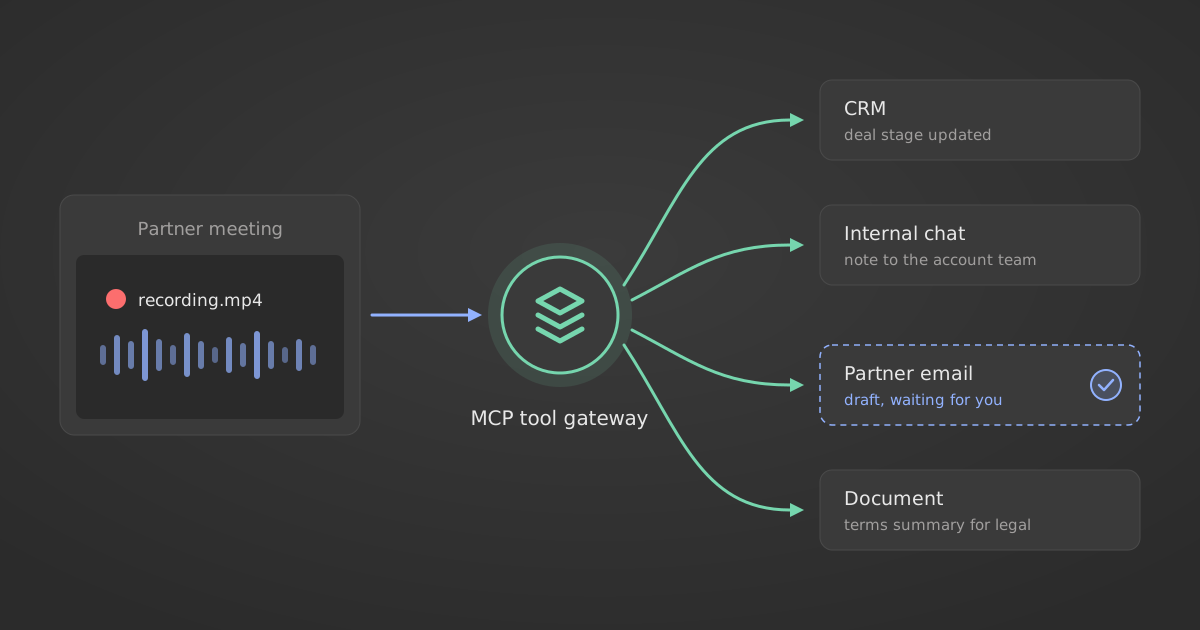
That hour is a follow-up email covering what we each agreed, a note to whichever colleague needs to know, a CRM update, and a written summary for legal when contract terms came up. We built an assistant that reads the recording, works out what kind of meeting it was, and drafts all of it, with me in the loop to approve anything before it goes anywhere.
Getting that to work needed five connections, not one clever prompt: the meeting recorder that holds the transcript, the CRM that holds the partner and the deal, email for the external follow-up, internal chat for the colleagues who need to know, and a document tool for anything long.
None of those five is a product choice. I use Fireflies, and the same flow runs on Gong, Fathom, Otter, Granola, tl;dv, Grain, Read.ai, Circleback, or the notes that Google Meet and Microsoft Teams now write themselves. I use HubSpot, and the shape does not change for Salesforce, Pipedrive, Attio, Close, Zoho or Dynamics. The same goes for email, whether that is Gmail or Outlook, for internal chat on Slack, Teams or Google Chat, and for documents in Google Docs, Notion, Confluence or Word. If you track account overlap in Crossbeam or Reveal, that is one more input. If agreements go out through PandaDoc, DocuSign or Dropbox Sign, that is one more output.
How it works: an MCP tool gateway
All of it reaches those apps through StackOne’s MCP tool gateway, which is what my company builds. We drink our own champagne here, so my assistant connects the same way a customer’s would.
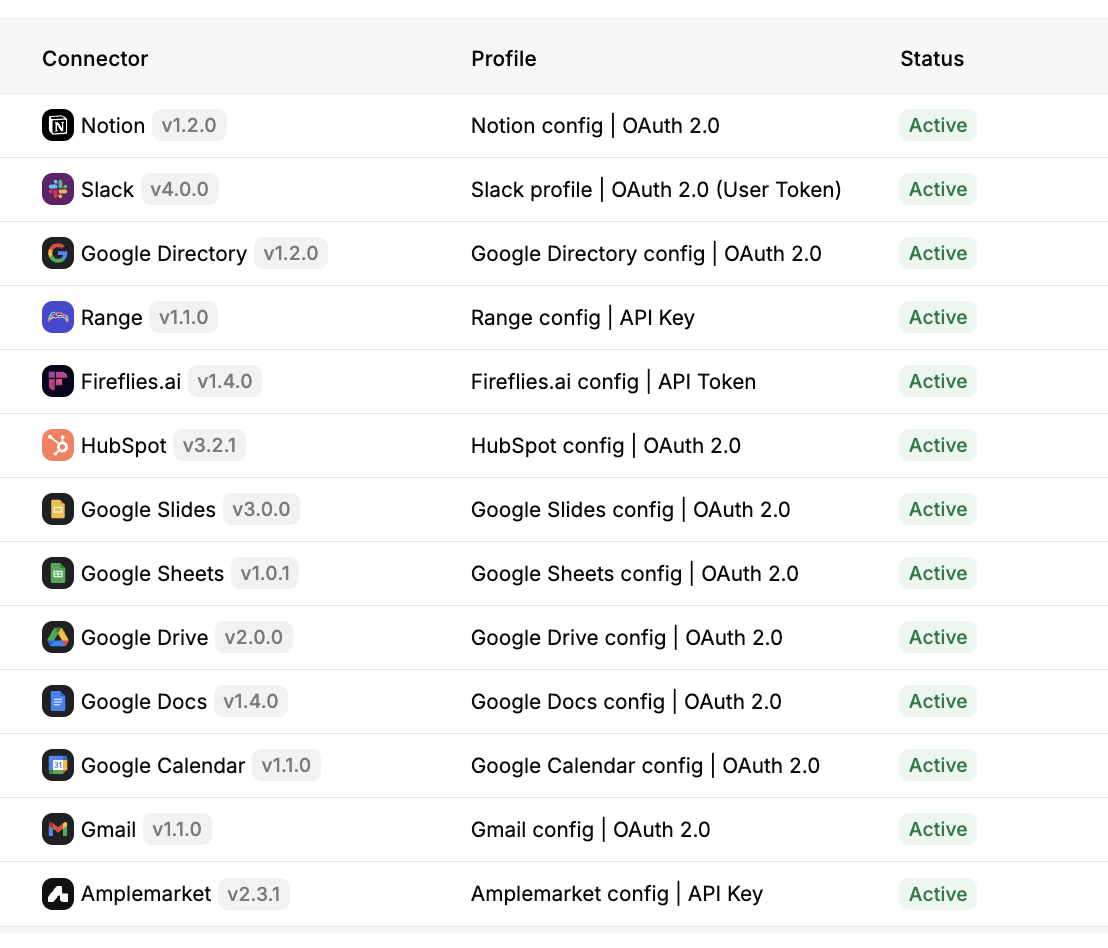
Thirteen connectors, authenticated once and active. The follow-up flow uses five of them: Fireflies for the recording, HubSpot for the deal, Gmail for the draft, Slack for the internal note, Google Docs for anything long. The rest were already connected for other work, and the assistant can reach those too when a task needs them.
What convinced me was the swap test. We built the flow with Claude, then pointed the same connections at Gemini Enterprise. Nothing about the assistant had to change, because the connectors did not change. The same holds moving to Copilot, Glean or Dust. The model changes, the context and the actions stay where they are.
That matters more than which model is best this quarter. They will keep overtaking each other, and you want to be able to move without rebuilding your context and your permissions every time you do.
Why context decides whether the assistant gets it right
Every call the assistant makes is only as good as what it can see. One example. An external email domain on a meeting invite tells you little on its own, because it could be a partner, a contractor, or our outside counsel. Get that wrong and the assistant drafts a warm thank-you note to my own lawyer.
Telling those apart takes the calendar, the CRM and the meeting history, not a cleverer prompt. The facts that decide it are not in the transcript. That is what the connections buy you: the same model, with enough context to be right.
Why the assistant has to act, not just summarise
Being told what to do still leaves you doing it. A summary that says “update the deal and message Jordan” saves the thinking, which was never the expensive part. What I wanted was an assistant that opens the CRM and changes the field, posts the Slack message in the right channel, writes the email into my drafts, and sends the signature link when we get that far.
Workday has a name for the part that was eating my hour: the copy-paste economy, the time that goes on shifting information between tools rather than doing anything with it. One in five employees lose more than seven hours a week to it. Their research also found that 60% of employees at companies where AI is deeply connected to core systems report meaningfully less time per task, against 24% where AI touches no core system at all. That gap is why I went after the connections instead of a better prompt.
Human in the loop, wherever you want the loop to sit. Mine approves everything that leaves the building: the assistant drafts the external email and stops, and I send it. It proposes CRM changes and waits. Someone else might let internal updates through on their own and pause only the external ones, which is a reasonable place to draw it. The instinct is to automate the send first, since that is where the minutes are, and it is the wrong place to take them back. A CRM field I can correct next week. An email to a partner I cannot.
How to start, if you want to try this
Pick the one task you repeat most. Connect the assistant to the tools that task already touches, rather than the tools you wish you used. Write your rules down as though a new joiner had to follow them with no context, because that is the actual exercise and it is harder than it sounds. Then run it over four past meetings where you already know what you did, and count the disagreements.
Two practical notes. StackOne is free to try, so you can wire up the connections and find out whether context is as much of a problem in your week as it was in mine. And once the flow works, save it as a skill in Claude instead of re-explaining it each time. Your rules become a file you can edit, and the next run starts from your last correction rather than from nothing.
The disagreements are the output. Mine surfaced several rules that were wrong and one commercial conversation I did not know had happened. For a function that has never had the people to do everything properly, that is worth more than the hour it saves.
Try it on your own week
StackOne is free to try. Connect the tools your most repeated task already touches, run the flow over a few past meetings, and count how often it disagrees with what you actually did. Start for free.