

Intercom's Fin AI Agent MCP Connectors
Turn Intercom's Fin AI Agent into an enterprise agent
Let your employees delegate real work to Intercom's Fin AI Agent across all their apps, under their own identity and permissions.






Get Intercom's Fin AI Agent to work.
Not just chat.
One connection to StackOne, and Intercom's Fin AI Agent gets scoped access to every app your employees use, to act on their behalf.

Connect
Make every system AI-ready
Give your AI access to 540+ managed MCP servers and 33,000+ tested tools. No auth code to write, no API maintenance.

Secure
Keep AI under control
Enforce identity-based access, screen every response for prompt injection, and audit every action.

Execute
Trust what AI delivers
Keep your agent sharp with lean tool loading and boost reliability with the Falcon execution engine. Pre-synced data for faster context is coming soon.
Roll out MCP tools to Fin.
Set up and onboard in minutes.
One-time setup for IT. Self-serve for everyone else.
IT Admin
One-time setup, no per-user wiring.
Fin holds the connector as a Draft until you set it live, so you can stage the change. The URL carries no access on its own, so it is safe to publish in an internal wiki.
MCP client setup guide Notion
Need Help
Notion
Need Help Version
Profile name
Authentication type
OAuth 2.0 Setup DocumentationClient ID
Client Secret
Member
Please select the member(s) from your organization you would like to add to your project.
Role
Please select the role you would like your new member(s) to have within the project.
 Fin Connectors
 Add MCP server
https://mcp.stackone.com/mcp Connected servers
Employee
Self-serve, no code.
Every action runs under that employee's own permissions. They only ever see the accounts they already have access to.
Sign In to StackOne
Password
Don't have an account? Sign up →
Select accounts
Choose the accounts and actions Fin can access.
Beam Notion • 35 Actions • Updated Jul 28, 2026  Beam Salesforce • 380 Actions • Updated Jul 28, 2026
 2 accounts selected 415 actions selected
Connected to Fin successfully. You can now close this window.
2 accounts connected 415 actions enabled
Fin Runs under the employee's own permissions, scoped to the accounts and actions they authorized.
Connect Fin to
any Enterprise MCP server
One MCP gateway, 540+ pre-built SaaS connectors Fin can act on right away.
- 380 Actions Live
- 266 Actions Live
- 253 Actions Live
- 247 Actions Live
- 231 Actions Live
- 203 Actions Live
- 185 Actions Live
- 172 Actions Live
- 172 Actions Live
- 169 Actions Live
- 163 Actions Live
- 162 Actions Live
- 158 Actions Live
- 150 Actions Live
- 147 Actions Live
- 145 Actions Live
- 142 Actions Live
- 139 Actions Live
- 138 Actions Live
- 138 Actions Live
- 138 Actions Live
- 138 Actions Live
- 137 Actions Live
- 136 Actions Live
- 136 Actions Live
- 135 Actions Live
- 135 Actions Live
- 133 Actions Live
- 133 Actions Live
- 132 Actions Live
- 132 Actions Live
- 130 Actions Live
- 129 Actions Live
- 128 Actions Live
- 127 Actions Live
- 126 Actions Live
- 126 Actions Live
- 125 Actions Live
- 125 Actions Live
- 125 Actions Live
- 124 Actions Live
- 122 Actions Live
- 122 Actions Live
- 121 Actions Live
- 120 Actions Live
- 120 Actions Live
- 119 Actions Live
- 119 Actions Live
- 117 Actions Live
- 117 Actions Live
- 116 Actions Live
- 115 Actions Live
- 115 Actions Live
- 115 Actions Live
- 113 Actions Live
- 112 Actions Live
- 111 Actions Live
- 111 Actions Live
- 110 Actions Live
- 110 Actions Live
- 107 Actions Live
- 106 Actions Live
- 105 Actions Live
- 105 Actions Live
- 104 Actions Live
- 104 Actions Live
- 103 Actions Live
- 102 Actions Live
- 102 Actions Live
- 102 Actions Live
- 101 Actions Live
- 100 Actions Live
- 100 Actions Live
- 100 Actions Live
- 99 Actions Live
- 99 Actions Live
- 98 Actions Live
- 98 Actions Live
- 98 Actions Live
- 98 Actions Live
- 98 Actions Live
- 98 Actions Live
- 96 Actions Live
- 96 Actions Live
- 96 Actions Live
- 96 Actions Live
- 95 Actions Live
- 95 Actions Live
- 95 Actions Live
- 94 Actions Live
- 92 Actions Live
- 92 Actions Live
- 92 Actions Live
- 92 Actions Live
- 91 Actions Live
- 91 Actions Live
- 91 Actions Live
- 90 Actions Live
- 90 Actions Live
- 90 Actions Live
- 90 Actions Live
- 89 Actions Live
- 89 Actions Live
- 88 Actions Live
- 88 Actions Live
- 88 Actions Live
- 87 Actions Live
- 87 Actions Live
- 87 Actions Live
- 87 Actions Live
- 87 Actions Live
- 87 Actions Live
- 85 Actions Live
- 85 Actions Live
- 85 Actions Live
- 84 Actions Live
- 83 Actions Live
- 83 Actions Live
- 83 Actions Live
- 83 Actions Live
- 82 Actions Live
- 82 Actions Live
- 82 Actions Live
- 82 Actions Live
- 81 Actions Live
- 80 Actions Live
- 80 Actions Live
- 80 Actions Live
- 80 Actions Live
- 80 Actions Live
- 80 Actions Live
- 79 Actions Live
- 79 Actions Live
- 78 Actions Live
- 78 Actions Live
- 78 Actions Live
- 77 Actions Live
- 77 Actions Live
- 77 Actions Live
- 77 Actions Live
- 77 Actions Live
- 77 Actions Live
- 77 Actions Live
- 76 Actions Live
- 76 Actions Live
- 76 Actions Live
- 76 Actions Live
- 76 Actions Live
- 75 Actions Live
- 75 Actions Live
- 75 Actions Live
- 75 Actions Live
- 73 Actions Live
- 73 Actions Live
- 73 Actions Live
- 73 Actions Live
- 72 Actions Live
- 72 Actions Live
- 72 Actions Live
- 72 Actions Live
- 72 Actions Live
- 72 Actions Live
- 71 Actions Live
- 71 Actions Live
- 71 Actions Live
- 71 Actions Live
- 71 Actions Live
- 71 Actions Live
- 70 Actions Live
- 70 Actions Live
- 70 Actions Live
- 70 Actions Live
- 70 Actions Live
- 70 Actions Live
- 70 Actions Live
- 70 Actions Live
- 70 Actions Live
- 69 Actions Live
- 69 Actions Live
- 69 Actions Live
- 69 Actions Live
- 69 Actions Live
- 68 Actions Live
- 68 Actions Live
- 68 Actions Live
- 68 Actions Live
- 68 Actions Live
- 68 Actions Live
- 68 Actions Live
- 68 Actions Live
- 67 Actions Live
- 67 Actions Live
- 67 Actions Live
- 67 Actions Live
- 67 Actions Live
- 67 Actions Live
- 67 Actions Live
- 67 Actions Live
- 66 Actions Live
- 66 Actions Live
- 66 Actions Live
- 66 Actions Live
- 66 Actions Live
- 66 Actions Live
- 65 Actions Live
- 65 Actions Live
- 65 Actions Live
- 65 Actions Live
- 64 Actions Live
- 64 Actions Live
- 64 Actions Live
- 64 Actions Live
- 64 Actions Live
- 64 Actions Live
- 64 Actions Live
- 64 Actions Live
- 64 Actions Live
- 64 Actions Live
- 63 Actions Live
- 63 Actions Live
- 63 Actions Live
- 63 Actions Live
- 63 Actions Live
- 63 Actions Live
- 63 Actions Live
- 62 Actions Live
- 62 Actions Live
- 62 Actions Live
- 62 Actions Live
- 62 Actions Live
- 62 Actions Live
- 62 Actions Live
- 62 Actions Live
- 62 Actions Live
- 62 Actions Live
- 62 Actions Live
- 61 Actions Live
- 61 Actions Live
- 61 Actions Live
- 61 Actions Live
- 61 Actions Live
- 61 Actions Live
- 61 Actions Live
- 61 Actions Live
- 61 Actions Live
- 60 Actions Live
- 60 Actions Live
- 60 Actions Live
- 60 Actions Live
- 60 Actions Live
- 59 Actions Live
- 59 Actions Live
- 59 Actions Live
- 59 Actions Live
- 59 Actions Live
- 59 Actions Live
- 59 Actions Live
- 59 Actions Live
- 59 Actions Live
- 59 Actions Live
- 58 Actions Live
- 58 Actions Live
- 58 Actions Live
- 58 Actions Live
- 58 Actions Live
- 58 Actions Live
- 57 Actions Live
- 57 Actions Live
- 57 Actions Live
- 57 Actions Live
- 57 Actions Live
- 57 Actions Live
- 57 Actions Live
- 57 Actions Live
- 56 Actions Live
- 56 Actions Live
- 56 Actions Live
- 56 Actions Live
- 56 Actions Live
- 56 Actions Live
- 56 Actions Live
- 56 Actions Live
- 56 Actions Live
- 56 Actions Live
- 56 Actions Live
- 55 Actions Live
- 55 Actions Live
- 55 Actions Live
- 54 Actions Live
- 54 Actions Live
- 54 Actions Live
- 54 Actions Live
- 54 Actions Live
- 54 Actions Live
- 54 Actions Live
- 54 Actions Live
- 54 Actions Live
- 53 Actions Live
- 53 Actions Live
- 53 Actions Live
- 53 Actions Live
- 53 Actions Live
- 53 Actions Live
- 52 Actions Live
- 52 Actions Live
- 52 Actions Live
- 52 Actions Live
- 52 Actions Live
- 52 Actions Live
- 51 Actions Live
- 51 Actions Live
- 51 Actions Live
- 50 Actions Live
- 50 Actions Live
- 50 Actions Live
- 50 Actions Live
- 50 Actions Live
- 50 Actions Live
- 49 Actions Live
- 49 Actions Live
- 49 Actions Live
- 49 Actions Live
- 49 Actions Live
- 48 Actions Live
- 48 Actions Live
- 48 Actions Live
- 48 Actions Live
- 47 Actions Live
- 47 Actions Live
- 47 Actions Live
- 47 Actions Live
- 47 Actions Live
- 47 Actions Live
- 47 Actions Live
- 47 Actions Live
- 47 Actions Live
- 47 Actions Live
- 47 Actions Live
- 46 Actions Live
- 46 Actions Live
- 46 Actions Live
- 45 Actions Live
- 45 Actions Live
- 45 Actions Live
- 44 Actions Live
- 44 Actions Live
- 44 Actions Live
- 44 Actions Live
- 43 Actions Live
- 43 Actions Live
- 43 Actions Live
- 43 Actions Live
- 43 Actions Live
- 42 Actions Live
- 42 Actions Live
- 42 Actions Live
- 42 Actions Live
- 42 Actions Live
- 42 Actions Live
- 42 Actions Live
- 41 Actions Live
- 41 Actions Live
- 41 Actions Live
- 41 Actions Live
- 41 Actions Live
- 41 Actions Live
- 41 Actions Live
- 40 Actions Live
- 40 Actions Live
- 40 Actions Live
- 40 Actions Live
- 40 Actions Live
- 39 Actions Live
- 39 Actions Live
- 39 Actions Live
- 39 Actions Live
- 39 Actions Live
- 38 Actions Live
- 38 Actions Live
- 38 Actions Live
- 38 Actions Live
- 38 Actions Live
- 37 Actions Live
- 37 Actions Live
- 37 Actions Live
- 37 Actions Live
- 37 Actions Live
- 37 Actions Live
- 37 Actions Live
- 36 Actions Live
- 36 Actions Live
- 36 Actions Live
- 36 Actions Live
- 36 Actions Live
- 36 Actions Live
- 35 Actions Live
- 35 Actions Live
- 35 Actions Live
- 35 Actions Live
- 35 Actions Live
- 35 Actions Live
- 35 Actions Live
- 34 Actions Live
- 34 Actions Live
- 34 Actions Live
- 34 Actions Live
- 34 Actions Live
- 34 Actions Live
- 34 Actions Live
- 34 Actions Live
- 33 Actions Live
- 33 Actions Live
- 33 Actions Live
- 33 Actions Live
- 32 Actions Live
- 32 Actions Live
- 31 Actions Live
- 30 Actions Live
- 30 Actions Live
- 30 Actions Live
- 30 Actions Live
- 30 Actions Live
- 29 Actions Live
- 29 Actions Live
- 29 Actions Live
- 29 Actions Live
- 29 Actions Live
- 29 Actions Live
- 29 Actions Live
- 28 Actions Live
- 28 Actions Live
- 28 Actions Live
- 27 Actions Live
- 27 Actions Live
- 27 Actions Live
- 27 Actions Live
- 27 Actions Live
- 27 Actions Live
- 26 Actions Live
- 26 Actions Live
- 26 Actions Live
- 26 Actions Live
- 26 Actions Live
- 25 Actions Live
- 25 Actions Live
- 25 Actions Live
- 25 Actions Live
- 25 Actions Live
- 24 Actions Live
- 24 Actions Live
- 24 Actions Live
- 24 Actions Live
- 24 Actions Live
- 24 Actions Live
- 24 Actions Live
- 24 Actions Live
- 23 Actions Live
- 23 Actions Live
- 23 Actions Live
- 23 Actions Live
- 22 Actions Live
- 22 Actions Live
- 22 Actions Live
- 21 Actions Live
- 21 Actions Live
- 21 Actions Live
- 21 Actions Live
- 20 Actions Live
- 20 Actions Live
- 20 Actions Live
- 20 Actions Live
- 19 Actions Live
- 19 Actions Live
- 19 Actions Live
- 19 Actions Live
- 18 Actions Live
- 17 Actions Live
- 16 Actions Live
- 16 Actions Live
- 16 Actions Live
- 15 Actions Live
- 15 Actions Live
- 15 Actions Live
- 15 Actions Live
- 15 Actions Live
- 14 Actions Live
- 14 Actions Live
- 14 Actions Live
- 14 Actions Live
- 14 Actions Live
- 14 Actions Live
- 14 Actions Live
- 13 Actions Live
- 13 Actions Live
- 13 Actions Live
- 13 Actions Live
- 12 Actions Live
- 12 Actions Live
- 12 Actions Live
- 12 Actions Live
- 11 Actions Live
- 11 Actions Live
- 11 Actions Live
- 11 Actions Live
- 10 Actions Live
- 9 Actions Live
- 9 Actions Live
- 9 Actions Live
- 9 Actions Live
- 9 Actions Live
- 9 Actions Live
- 9 Actions Live
- 8 Actions Live
- 8 Actions Live
- 8 Actions Live
- 8 Actions Live
- 8 Actions Live
- 8 Actions Live
- 7 Actions Live
- 7 Actions Live
- 7 Actions Live
- 7 Actions Live
- 7 Actions Live
- 6 Actions Live
- 6 Actions Live
- 6 Actions Live
- 6 Actions Live
- 6 Actions Live
- 6 Actions Live
- 6 Actions Live
- 6 Actions Live
- 5 Actions Live
- 4 Actions Live
- 4 Actions Live
- 4 Actions Live
- 4 Actions Live
- 3 Actions Live
- 2 Actions Live
- 2 Actions Live
- 2 Actions Live
- 1 Actions Live


No MCP servers match your filter.
Need another connector? Build one with the AI Connector Builder
Get Fin AI
to do more across your stack
Cross-app workflows your Fin agent now runs in seconds instead of click-throughs.
> Pull Salesforce account tier into the Intercom conversation before Fin responds.
> Check this customer's Stripe refund history before Fin escalates the ticket.

> File a Jira bug from this Intercom ticket and return the ticket ID to the customer.
> Search internal Confluence wikis when the Help Center misses an answer.
Not everyone on Intercom?
Your integration layer stays the same.
The same setup works across SaaS agents like ServiceNow, Zendesk, and every other MCP client.
Intercom's Fin AI Agent Resources
The Best MCP Gateways in 2026, Compared
We compared 12 MCP gateways — StackOne, Zapier, Composio, Microsoft, Docker and more — on auth, multi-tenancy, governance, and pricing. Updated June 2026.
11 min
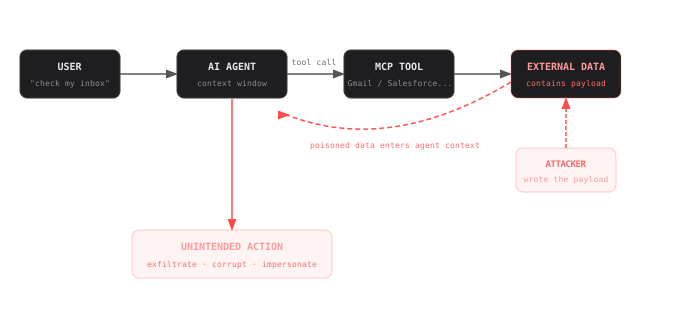
Indirect Prompt Injection in MCP Tools: 10 Real Examples & Defenses
See how MCP injection (indirect prompt injection through MCP tool calls) threatens your AI agents across Gmail, Slack, Salesforce and 7 other integrations, with defenses.
8 min
Frequently Asked Questions
Connect All Your Apps to Fin.
One MCP gateway, 540+ pre-built SaaS connectors. Set up in 5 minutes.