


Defender Scores and Thresholds in Logs
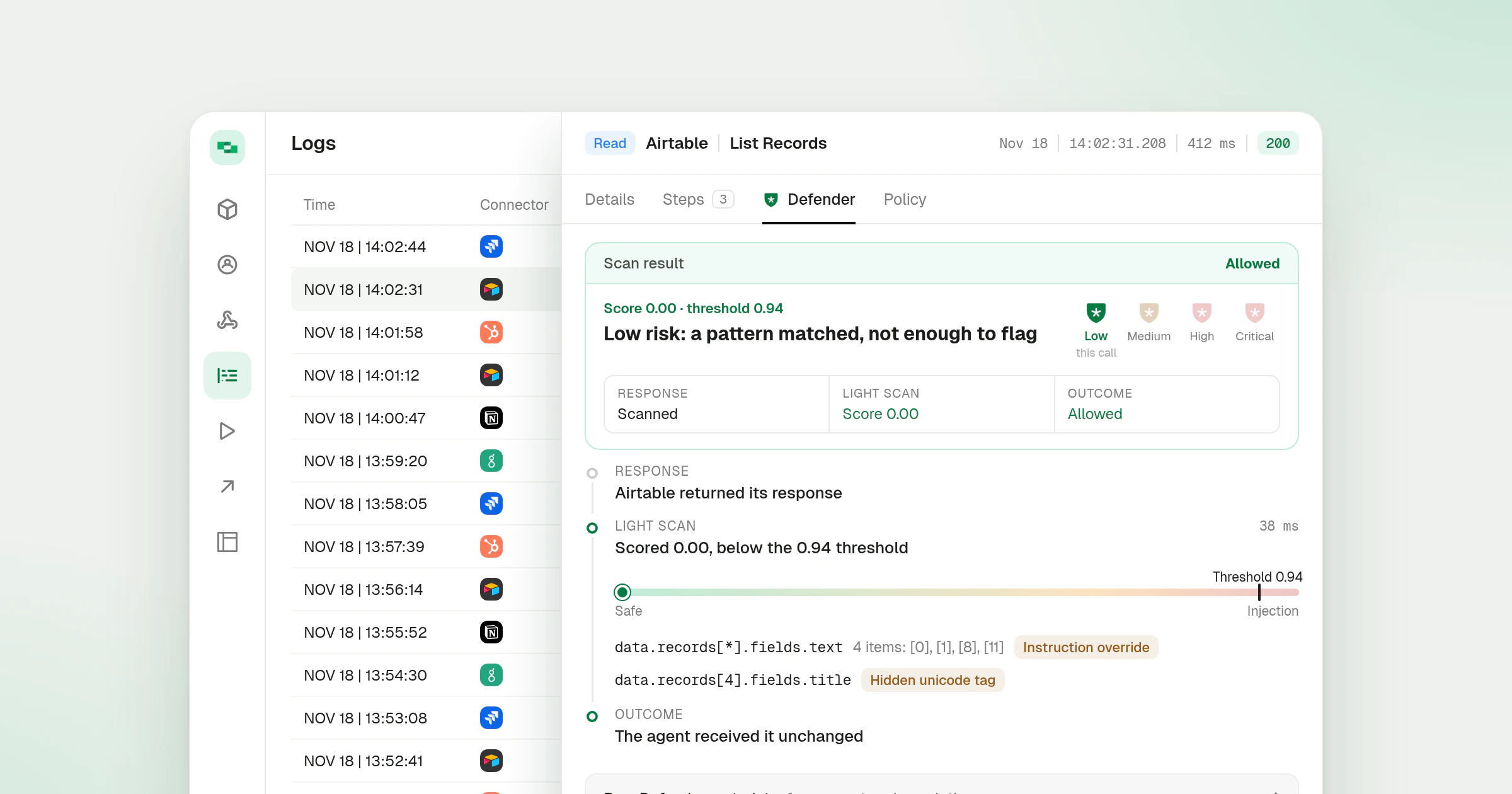
The Defender tab on a log now shows the threshold a call’s score was compared against, next to the score itself. Matched fields that repeat across a list fold into one row, and the request and response sheets show headers and query values the same way.
What’s new
- Score and threshold together. The verdict card reads like Score 0.00 · threshold 0.94 when the log recorded the threshold. Calls logged before thresholds were recorded say so.
- Scores you can compare. Scores are cut to two decimal places rather than rounded, so a score just under the threshold never shows as level with it.
- Repeated matches folded. Matched fields that differ only by list position become one row, such as
data.records[*].fields.textwith the positions it covers. - Headers and query values framed alike. Every header and query list sits in the same collapsible frame with its count. An empty value reads (empty) instead of a blank cell, and headers with no value are left out.
- Copy Request matches the screen. The copied request is built from the same header lines the sheet lists.
Defender explains how calls are scored and blocked, and Request Log Debugging covers reading a call’s logs. This builds on the revamped Logs page and the Defender launch.