


November 2026
Connectors Page Filters
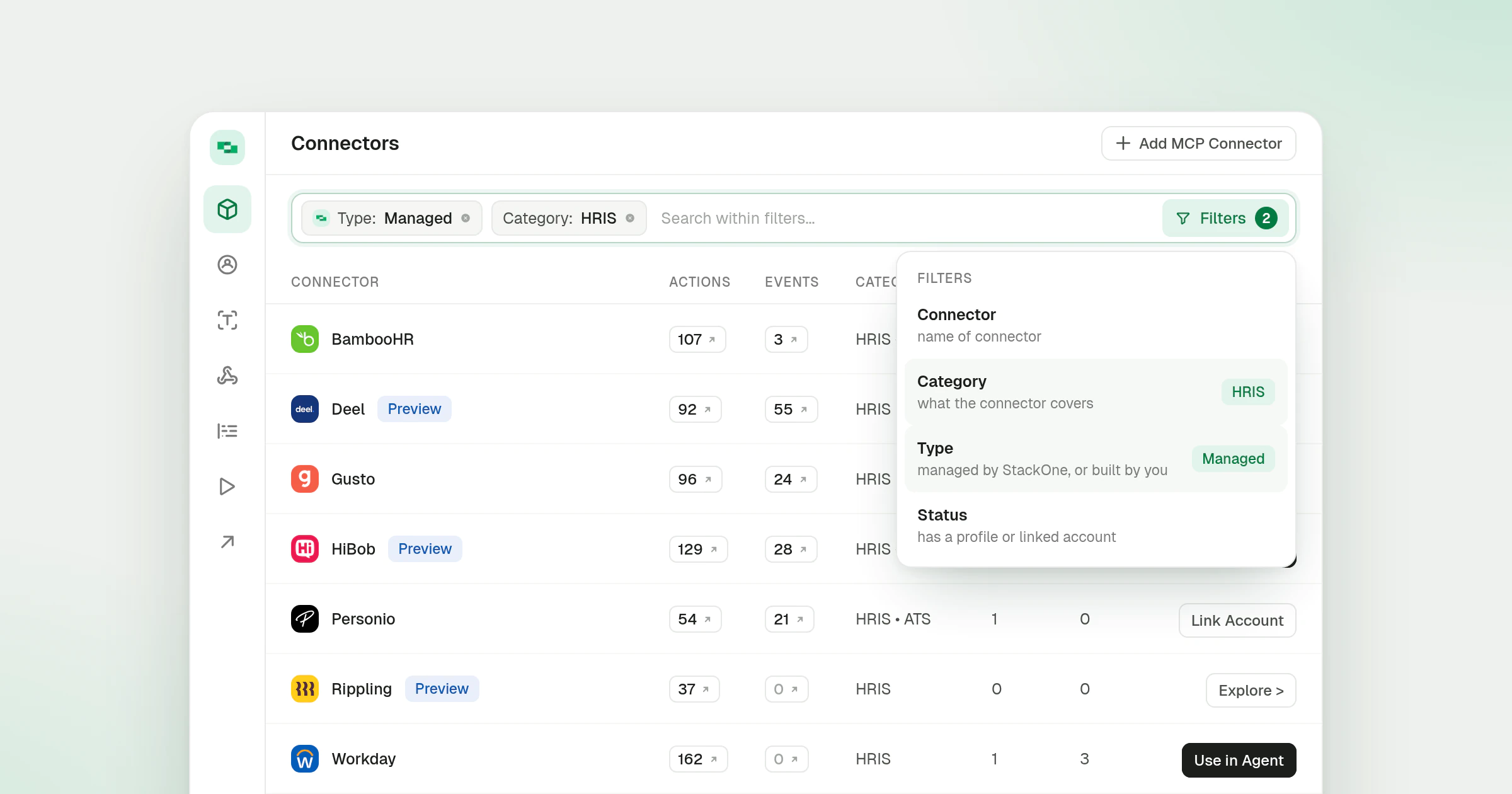
The Connectors page in the dashboard now searches and filters from one field. Typing in the field searches the list, and the Filters button at its right end opens the filter list, with a badge that counts the filters you have applied. Each applied filter shows as a chip inside the field, where you can edit or remove it.
What’s new
- Type filter. Pick Managed or Custom to list only the connectors StackOne maintains or only the custom connectors your team built.
- Category and connector filters. Narrow the list to one or more categories, such as ATS and HRIS, or to specific connectors. The connector filter shows each connector’s logo beside its name, and the Managed chip carries the StackOne mark.
- Configured only. The toggle that sat beside the search is now a filter in the same list.
- Filters in the URL. Every filter and search term is part of the page address, so a filtered view can be bookmarked, shared or reloaded, and Back and Forward step through your changes. Links saved before this change still open filtered.
- Searches on a connector’s tabs. The search on each tab of a connector’s page is kept in the URL the same way, so a link to a connector’s Actions tab can carry its search term.
The Connectors docs explain how connectors, actions and events relate, and Adding MCP Connectors covers adding a remote MCP server to the same list. A filtered row opens the connector page described in the Connector Profiles entry.