


November 2026
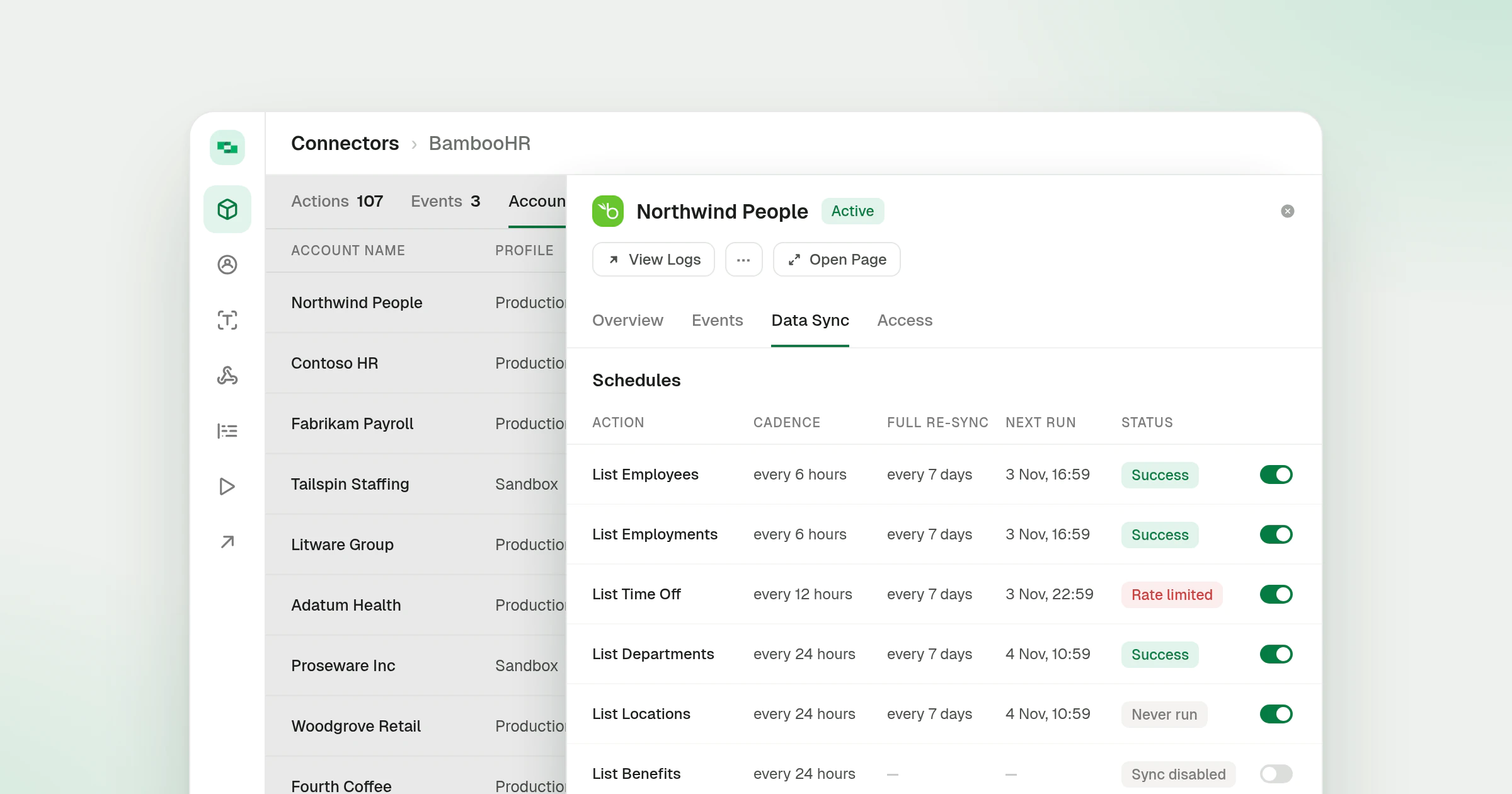
Account Side Panel on the Connector Page
On a connector’s Accounts tab, clicking an account now opens it in a side panel over the connector instead of leaving for the account page. The panel shows the account name, the connector logo and the account’s status, with the same tabs and actions as the account page.
What’s new
- Same actions as the page. The action menu, View Logs and every account tab are in the panel. Open Page opens the full account page when you need it.
- Links to the open panel. The open account and its tab are part of the page address, so a reload keeps the panel open, a copied link opens the same account for a teammate, and Back closes it.
- The list stays current. Suspending, enabling or reconnecting an account from the panel refreshes the list behind it. Deleting the account closes the panel and updates the account counts.
- Data Sync schedules fit the panel. The schedules table on the Data Sync tab uses shorter timestamps, such as
3 Nov, 10:59, and narrower columns, so it scrolls sideways only on narrow windows.
Linking Accounts covers how accounts are linked through a connector, and Shared Accounts explains accounts that several people work through. The panel opens on the connector page from the Connector Profiles entry.