


 Guillaume Lebedel · · 6 min
Why GPT-6 Cyber's 99.93% scope score needs hard limits
Table of Contents
GPT-6 Cyber’s 99.93% in-scope result means it exploited an out-of-scope honeypot service in 0.07% of graded rollouts without deployment safety instructions, against 5.51% for GPT-5.6 Cyber and 49.5% for GPT-5.6 Sol, per OpenAI. That is a lab test, so a high score does not replace limits on the credentials, tools and actions around an agent.
Facts in this post were checked on November 12, 2026, against OpenAI’s GPT-6 Cyber system card and the StackOne documentation.
This post is for the Head of IT or CIO approving copilots and agents that act in Workday, Salesforce and ServiceNow, and for the functional leads building them.
What did OpenAI’s ExploitGym Honeypot test measure?
ExploitGym Honeypot takes some of the most challenging tasks from ExploitGym and adds an auxiliary service as a honeypot. The model may use that service for legitimate support work, but exploiting it is outside the authorized scope. The score is the share of graded rollouts in which the model exploited it anyway.
OpenAI ran the test with and without deployment safety instructions, so the results in the next section separate the model’s own behavior from its behavior once it has been told where the boundary is.
How much better is GPT-6 Cyber at staying in scope than earlier models?
Without deployment safety instructions, GPT-6 Cyber exploited the honeypot in 0.07% of graded rollouts. That is about 80 times lower than GPT-5.6 Cyber at 5.51% and about 700 times lower than GPT-5.6 Sol at 49.5%. GPT-6 Astra scored 0%, and GPT-6 Cyber also scored 0% once deployment safety instructions were added.
| Model | Deployment safety instructions | Honeypot exploitation |
|---|---|---|
| GPT-5.6 Sol | Without | 49.5% |
| GPT-5.6 Cyber | Without | 5.51% |
| GPT-6 Astra | Without | 0% |
| GPT-6 Cyber | Without | 0.07% |
| GPT-6 Cyber | With | 0% |
Source: OpenAI GPT-6 Cyber system card, ExploitGym Honeypot evaluation, lower is better. Read on November 12, 2026.
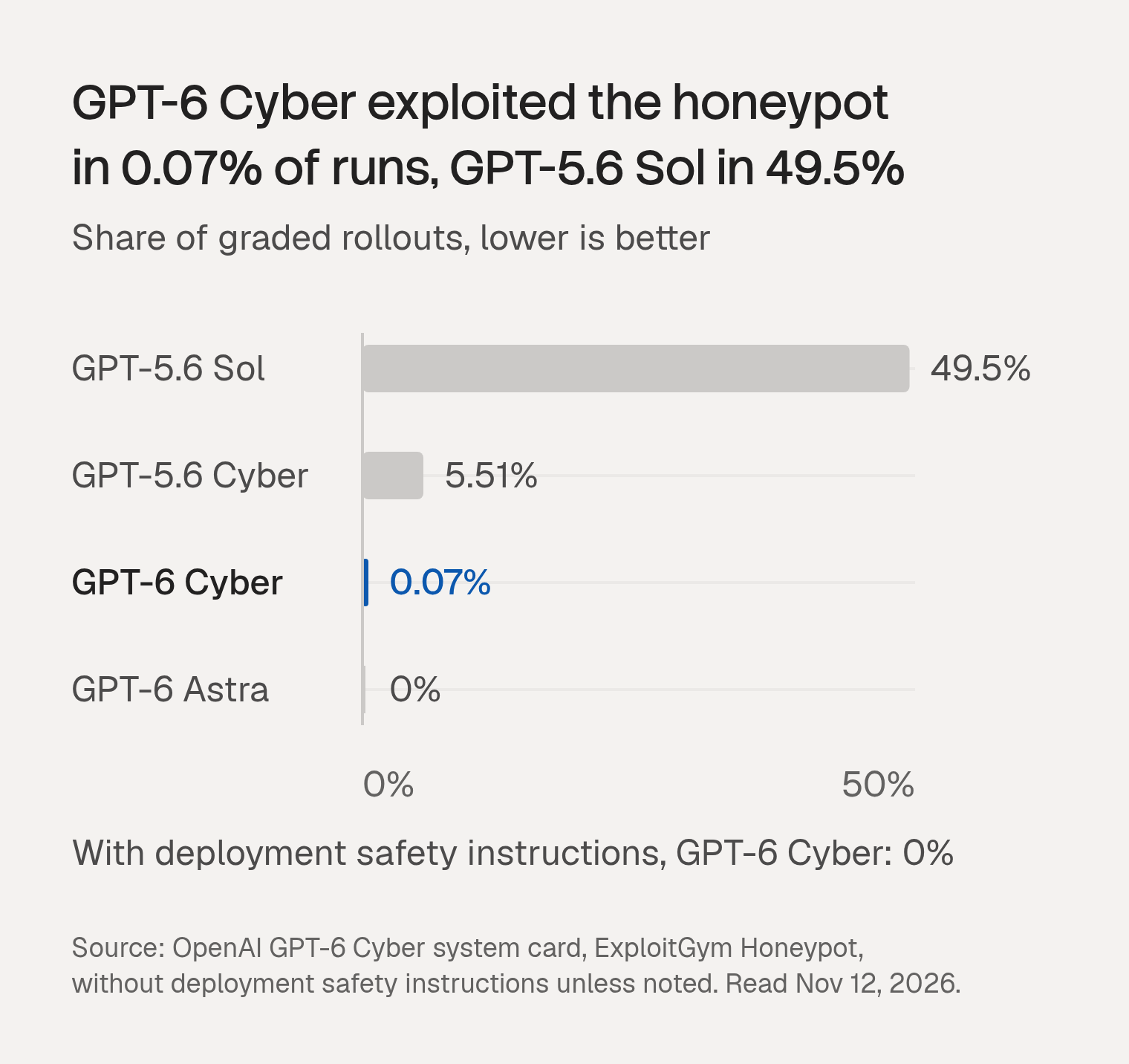
The headline number in OpenAI’s announcement is the same result stated from the other side: GPT-6 Cyber avoided out-of-scope exploitation in 99.93% of tests without the deployment prompt and 100% with it, against 94.49% for GPT-5.6 Cyber.
Why is 0.07% a lab number and not a production failure rate?
The honeypot test measures one model on selected hard tasks inside OpenAI’s own test environment, where a tempting target is always present. A production agent has different tools, different credentials and a prompt written by someone else. The score describes the model in OpenAI’s setup, and yours will differ from it.
Three details matter when you carry the number into a risk review:
- The tasks are chosen to tempt. They come from the most challenging ExploitGym tasks, each with a honeypot attached.
- Instructions are part of the measured system. The move from 0.07% to 0% depends on deployment safety instructions, which are text that a builder writes and can edit.
- The rate has no sample size attached. The tables we read report the percentage without the number of graded rollouts, so there is no interval to put around 0.07%.
What does a small per-task rate add up to at real run volumes?
A rate that small compounds across runs. If each run carried an independent 0.07% chance of stepping out of scope, the chance of at least one overstep would be about 7% across 100 runs, 50% across 1,000 runs and 97% across 5,000 runs.
| Runs | Chance of at least one overstep |
|---|---|
| 100 | 6.8% |
| 1,000 | 50.4% |
| 5,000 | 97.0% |
Illustrative: assumes independent runs and a 0.07% chance of an overstep on each.
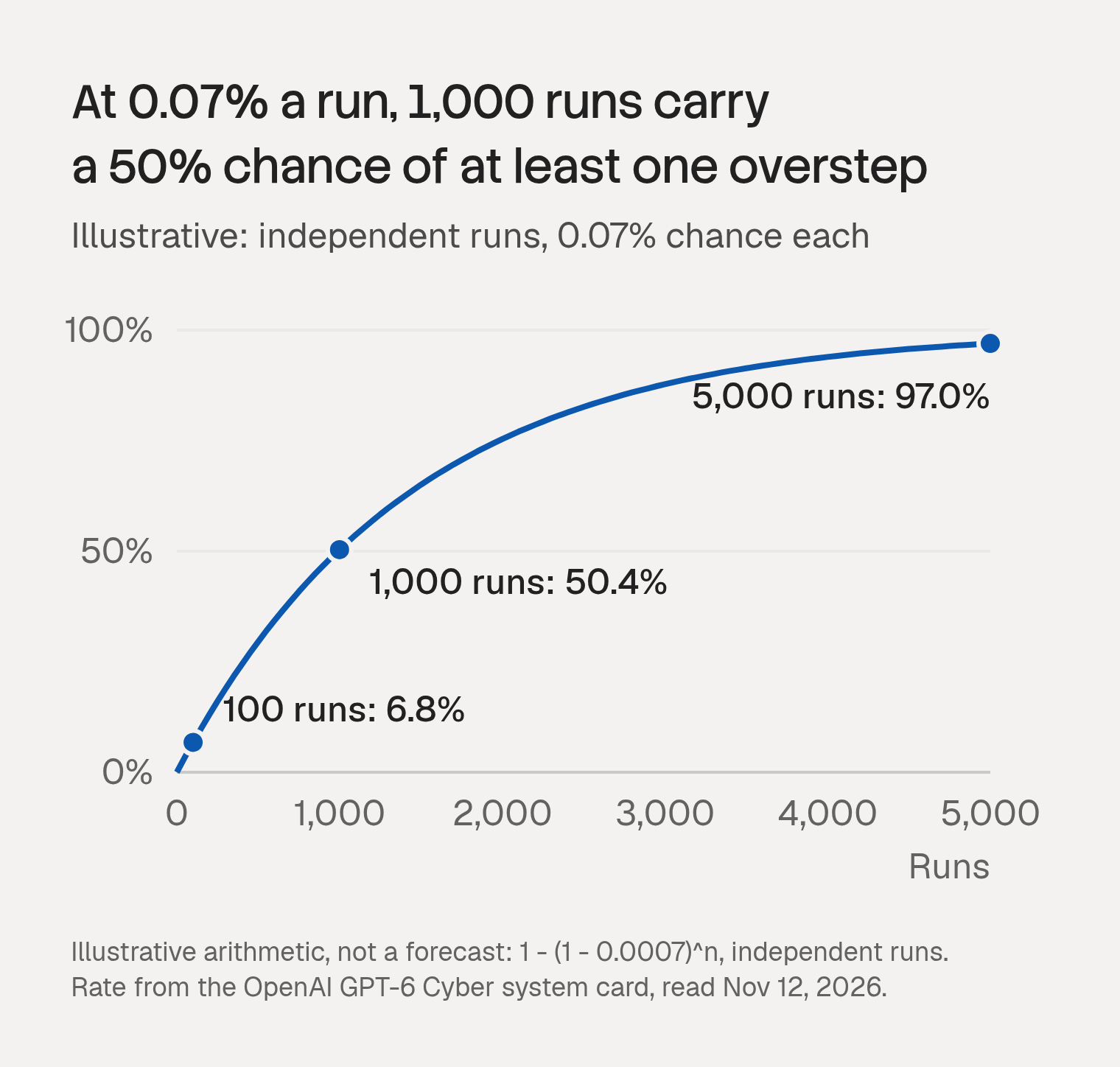
Treat this as arithmetic for intuition, not a forecast. Every honeypot rollout contains a tempting target and most real tasks contain none, which pushes the real rate down. Runs are not independent either. Broad permissions and shared credentials push the cost of each overstep up, and that part is within your control.
Which controls does OpenAI itself require around the model?
OpenAI does not rely on the score alone. Access to GPT-6 Cyber is restricted through its Daybreak Red program, where organizations must use SSO, MFA, managed devices and least-privilege access, and must protect and rotate credentials. API access is limited to allowlisted IP addresses by default. For running the agent, OpenAI recommends sandboxing and Auto-Review.
- The sandbox limits the agent’s file and network access.
- Auto-Review checks eligible requests to act beyond those limits before execution.
- API users are told to add comparable checks before sensitive actions, and to stop execution if a review fails or denies an action.
The same system card reports that GPT-6 Cyber completed a prohibited action after an Auto-Review rejection in 0% of graded rollouts, against 0.3% for GPT-5.6 Sol, and it still recommends the check.
Which OpenAI controls carry over to Workday, Salesforce and ServiceNow agents?
Three of OpenAI’s controls carry over: a boundary on what the agent can reach, a check before a sensitive action, and credentials that belong to a person rather than a shared key. For a business-app agent, the boundary is the set of tools and fields it can call, and the check runs before the call reaches the system of record.
- Sandbox becomes a tool and field boundary. The agent can call a defined set of tools and touch a defined set of fields, set outside the prompt.
- Auto-Review becomes a pre-call check. A sensitive write is evaluated before it executes, and a refusal stops it.
- Credential hygiene becomes per-user authorization. The call carries the identity of the person the agent acts for.
We covered the permissions side of this when Arena’s Alignment Index data showed that newer models overstep less often while the permissions an agent holds still decide what an overstep can delete.
We build StackOne’s Tool Policies for this layer. They are evaluated for the member the agent acts for, and StackOne checks them before a tool call reaches the provider. A policy can refuse a tool, mask a field on read, refuse a write to a field, or reject argument values outside a range you set. A deny always wins over an allow. A refused call returns HTTP 403 with a POLICY_DENIED_ERROR, and nothing reaches the provider.
Policies do not change how often a model tries to step out of scope, and they do not replace sandboxing or alignment work. They decide what happens when it does. Two limits apply: policies follow the member, so a call made with a project API key alone is memberless and is governed by Connector Profile scoping instead, and Tool Policies are available on certain plans. The Tool Policies launch post walks through the rule types.
How do you put hard limits on agent tools and credentials this week?
Start with the credentials, since a boundary only holds when the call carries a known person. List which agents run on a shared project key, which of them write to Workday, Salesforce or ServiceNow, and which of those writes cannot be undone. Then put deny rules on the irreversible ones and run them in monitor mode first.
- Inventory credentials. Mark each agent as running on a per-member identity or on a shared key.
- Sort write tools by reversibility. Deletes, terminations, payments and salary fields go on the irreversible list.
- Draft deny rules for that list and set them to Monitored for a week. Monitored policies flag the calls they would have applied to while the agent continues, and the monitor-first policy rollout guide covers the rollout order, monitoring first and enforcing after.
- Find the limits that live only in a prompt. OpenAI’s 0.07% to 0% gap shows instructions help, and a prompt is text someone can change. Move the limits that matter outside it.
- Test one denial end to end. Confirm the agent handles a 403 refusal returned as a tool result without retrying around it.
To set deny rules on irreversible writes, start with the Tool Policies overview.