
 Guillaume Lebedel · · 7 min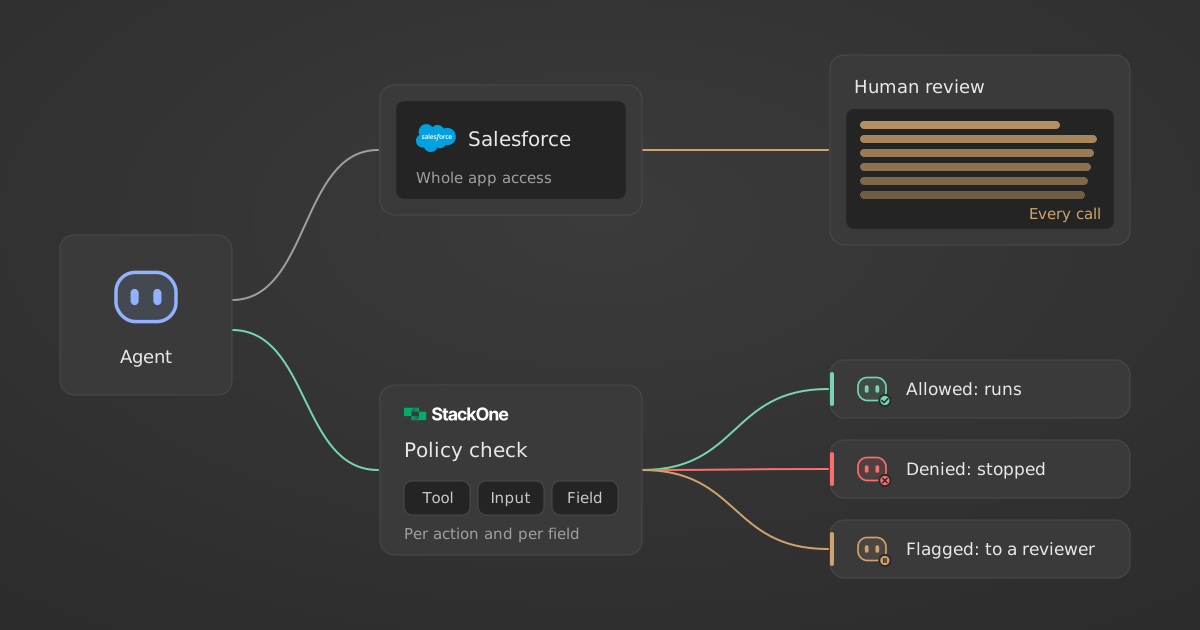
What is the AI agent Distrust Tax, and how do you cut it?
Table of Contents
The AI agent Distrust Tax is G2’s name for the cost of running AI agents that people do not fully trust. In G2’s 2026 AI Agents Report, released on 14 October 2026, 31% of 1,019 B2B decision-makers said staff spend six or more hours a week on AI agent oversight, mostly reviewing outputs, fixing errors and approving actions.
Facts in this post were verified against the sources linked below on 15 October 2026.
What did G2 find about the AI agent Distrust Tax?
G2’s July 2026 survey of 1,019 B2B decision-makers across North America, EMEA and APAC found that agents are in production, but oversight costs more than buyers planned: 45% say review and rework take more than a quarter of expected productivity gains. G2 defines the Distrust Tax as “the cost of operating agents under constrained trust.”
Adoption kept growing. According to G2’s announcement of the 2026 AI Agents Report, adoption among B2B software buyers rose from 69% to 86% in a year, and 66% of organizations now run agents in limited or scaled production.
The cost appears in the oversight data. All figures below come from G2’s full Crossing the Agentic Chasm report, released 14 October 2026.
| Oversight finding (G2, July 2026 survey) | Share of respondents |
|---|---|
| Staff spend 6+ hours a week overseeing agents | 31% |
| Oversight and rework cost more than a quarter of expected productivity gains | 45% |
| Agents cost more to operate than expected | 46% |
| Require human quality review before production | 52% |
| Reported an agent-related security incident in the past year | 36% |
| Keep a central agent registry | 27% |
For a CFO, the second row matters most: nearly half of companies say the productivity case they approved is losing more than a quarter of its value to review and rework.
Which oversight tasks take the most time?
Reviewing agent outputs is the most time-consuming oversight task, named by 26% of respondents. Fixing agent errors follows at 24%, and approving agent actions at 22%. Those three top G2’s list, and all three are people checking work just before or after the agent does it.
If the hours went on prompt writing or training, better onboarding would fix it. They go on inspection, because people do not know in advance what the agent may touch, so they check everything.
Why does AI agent oversight grow with company size?
AI agent oversight likely grows with company size because larger companies connect agents to more systems, hold more regulated data in them and route decisions through more approvers. G2 does not test the cause. In its data, 64% of enterprises and 61% of large enterprises need more oversight than expected, against 45% of SMBs.
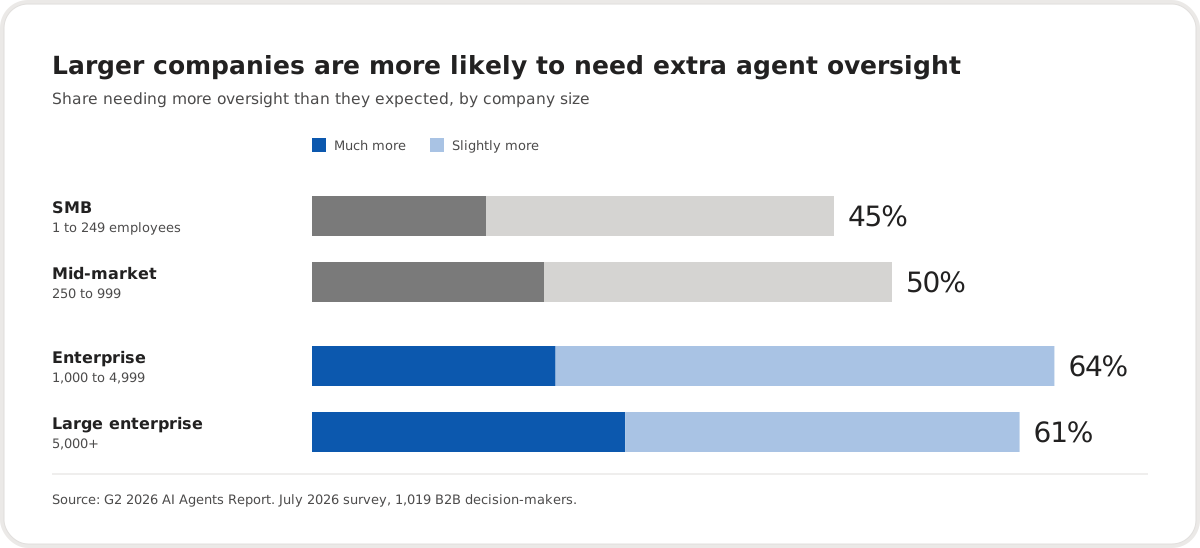
G2 also found that 40% of large enterprises spend six or more hours a week on oversight, against 21% of SMBs, and one in five large enterprises say oversight and rework cost more than half of their expected gains, nearly twice the SMB rate. The governance data fits the same pattern: 47% of organizations run agents under informal or department-led controls, and only 23% govern them centrally.
Why does coarse agent access force people to review everything?
Coarse agent access forces review of everything because the only control is whether the agent can use an app at all. If an agent can use Salesforce, it can read every field and call every write action the connecting user could. A reviewer has no way to know which records were safe to touch, so they check all of them.
Agents often inherit the broad access of whoever connected them. Compare that with how a company onboards a new finance hire: they can raise purchase orders up to a limit, they cannot open the payroll file, and their manager does not approve every email they send. The limits are written down in advance, so supervision is about exceptions.
Per-call approval does not fix this either. Approval prompts lose their value as volume grows, as our post on human-in-the-loop agent guardrails shows with an approver who signed off on a $6,531 AWS bill. The approver said yes, and nothing below the agent limited what the yes could do.
How do per-action and per-field policies reduce review work?
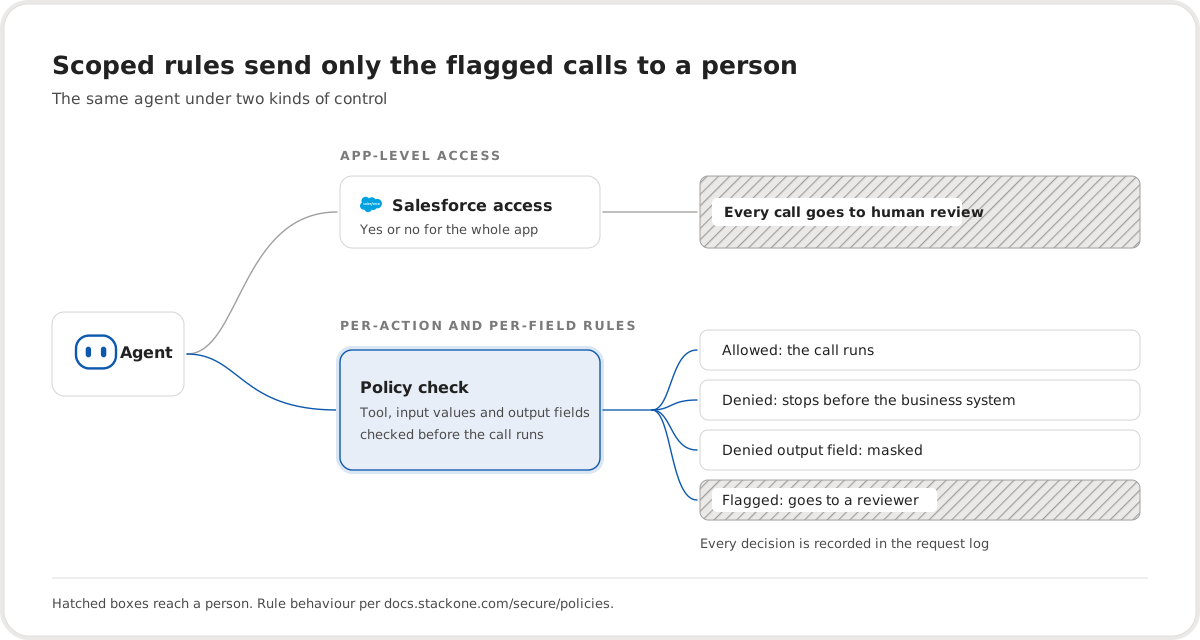
Per-action and per-field policies reduce review work by deciding in advance which tools, inputs and output fields each agent may use, and enforcing that before the business system is called. Anything outside the rules is blocked or masked and logged. People then review the flagged exceptions instead of rechecking every call the agent made.
In practice, a rule says something like: the recruiting agent may read candidates and schedule interviews, may not change offer amounts, and never sees the salary field. Our post on field-level agent policies for HR copilots walks through that salary example in detail.
StackOne Agent Tool Policies work this way. Policies are written in Cedar and apply to everyone, to selected users or to groups synced from your directory. A denied tool or input value stops the whole request before it reaches the business system. Denied output fields are masked before the response reaches the agent.
Every evaluated policy is recorded in the request log with its mode and decision, so a reviewer can trace each call to a person, a connector and a rule. One limit applies: calls made with an API key and no member identity do not receive member policies. The StackOne policies documentation covers the full rule format.
The audit side matters for the Distrust Tax too. A reviewer who can see what the agent attempted and which rule decided it does not need to reconstruct the run from app histories. Our guide to what an AI agent audit record should contain lists the fields to keep.
How should you roll out agent policies without blocking real work?
Roll out agent policies in monitor-only mode first, so rules record what they would have blocked without stopping anything. After about a week of logs, enforce for a test group, then for everyone. Staging matters because a rule that blocks a legitimate workflow sends people straight back to manual review.
- List your agents and what they connect to. Only 27% of G2’s respondents keep a central agent registry, so most teams start here.
- Write rules for the actions and fields each agent needs. Start with write actions and sensitive fields such as salary, bank details and offer amounts.
- Run every rule in monitor-only mode for about a week. Cover at least one full weekly cycle of the workflows the agent supports.
- Read the logs for unexpected matches and zero matches. An unexpected match shows a workflow the rule author did not know about. A zero match can mean an integration bypasses member identity.
- Enforce for a test group with named exemptions, then for everyone.
- Measure oversight hours before and after. This is the number that tells you whether the tax went down.
Our post on monitor-first agent policy rollout covers each stage, including what monitoring cannot tell you.
How do you measure the AI agent Distrust Tax in your own company?
Measure the AI agent Distrust Tax as the hours people spend reviewing, fixing and approving agent work, plus the rework cost, set against the cycle-time gain the agent was meant to deliver. G2 advises vendors to show buyers “how human approvals, review, exceptions, and rework affect net cycle time and cost per completed outcome.”
For a CIO, that means tracking review hours per agent and the share of calls that reach a reviewer. For a CFO, it means reporting cost per completed outcome net of oversight, not gross time saved. The G2 data shows why the net figure matters: 4 in 5 organizations using agents in high-volume workflows report cycle-time gains of at least 11%, and 45% lose more than a quarter of expected gains to oversight.
To find out which agent calls a rule would have blocked before you enforce anything, see how Agent Tool Policies run in monitor-only mode.