


November 2026
Action Effects in MCP Search Results
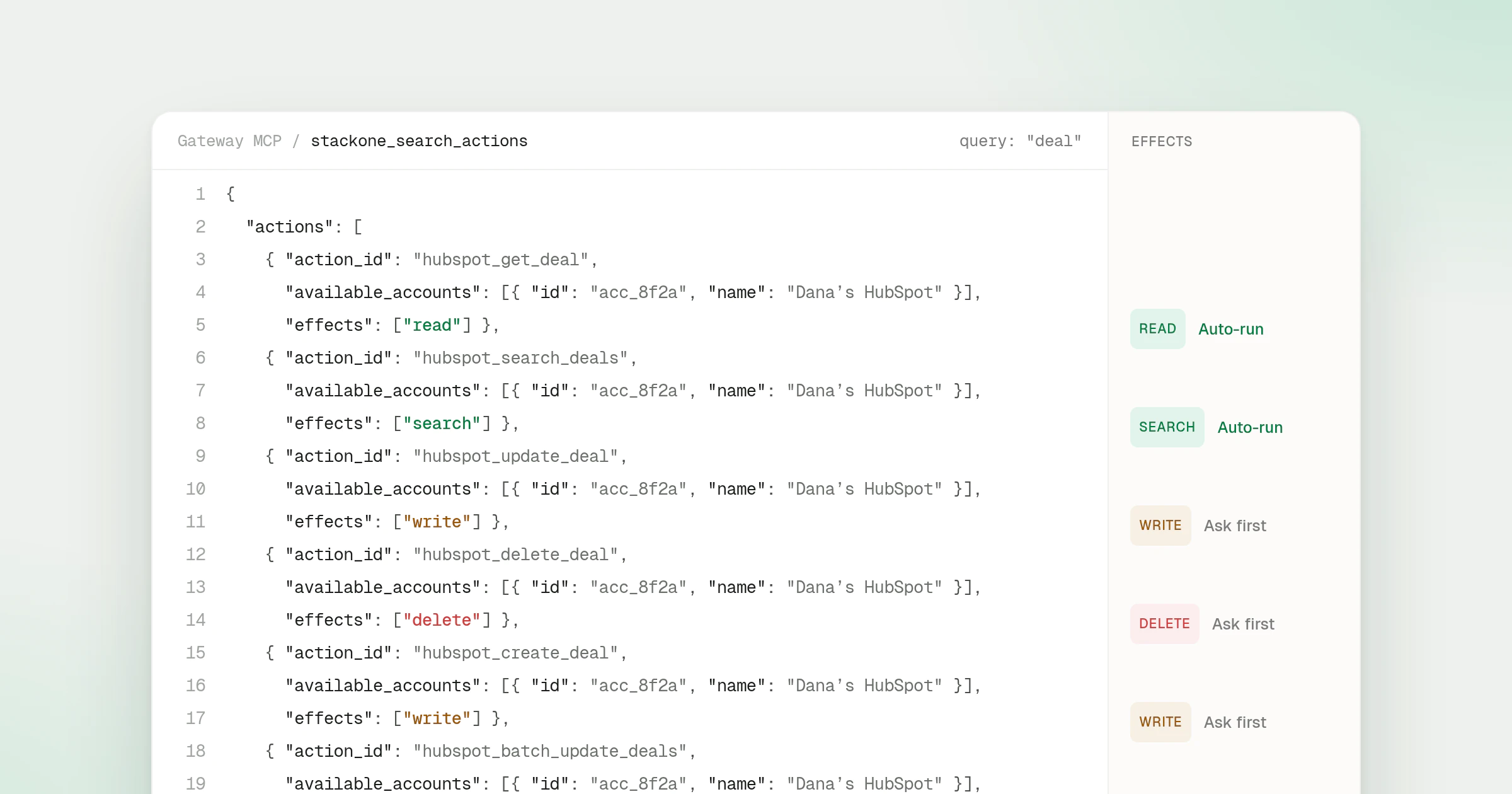
Search results on the Gateway MCP endpoint now carry each action’s effects. Every action that stackone_search_actions returns lists the effects its connector declares for it, so an agent can see that an action writes or deletes before it calls it instead of guessing from its name.
What’s new
effectson every search hit - Each action in the result has aneffectslist made ofread,search,write,deleteandexecute. The field is always present, and an action that declares no effects returns an empty list.- Both search tools - The session-wide
stackone_search_actionstool and the search tool scoped to a single account both return the field. - Taken from the account’s connector version - Effects come from the connector version each matching account runs. When accounts on different versions match the same action, the result lists every effect any of those versions declares.
- Synced records read as reads - A search hit that queries records kept by Data Sync carries
["read"].
Using effects for approval
With search and execute, an agent sees two tools rather than one tool per action, so per-tool MCP annotations do not apply to the actions it finds. The effects list on each search hit fills that gap: an agent or MCP client can run read and search actions straight away and ask the user before it executes a write or delete.
The values are the same ones behind the MCP tool annotations on individually exposed tools, and connector authors set them as described in the connector YAML reference. How agents find actions in the first place is covered in the Search and Execute entry.