


November 2026
Connect AI Apps Faster, With Access per Account
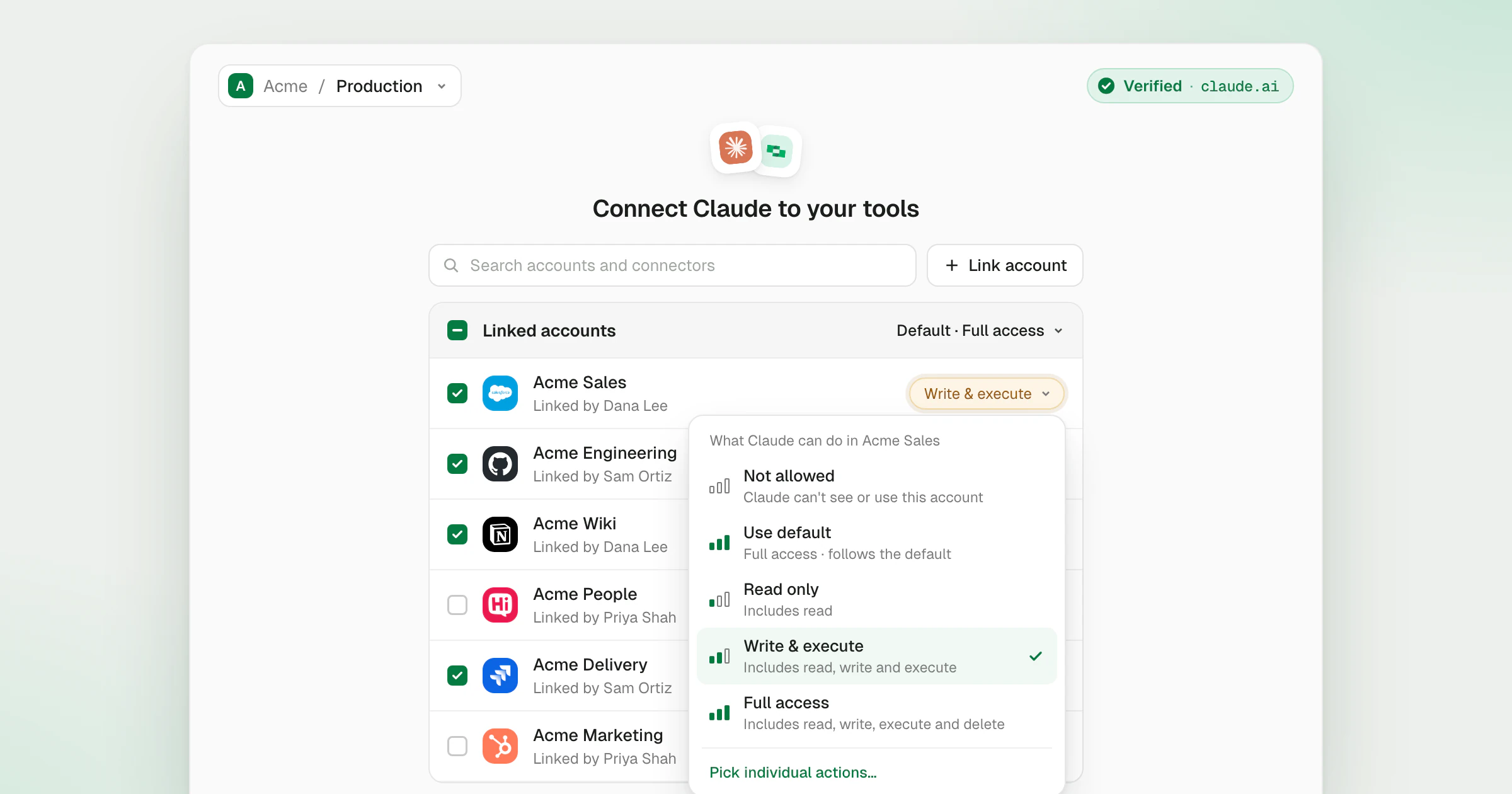
When an AI app connects to StackOne over MCP OAuth, the consent page now gives you more control in less space.
- Read, write or delete per account. Every linked account has an access level: Read only, Write & execute, or Full access, which adds delete. Set one default for every account you allow, change it for any account, or pick individual actions when you need finer control.
- Starts in the right place. The page opens on your most recent organization and project.
- Link accounts without leaving. Your linked accounts sit at the top, with the connectors you can still link below them. Link account adds a new one in place and ticks it, ready to authorize.
- Apply it to your other apps. Authorize on all connected apps gives your other verified apps the same accounts and access in one step, so an account you link here reaches them too.
- More room for your accounts. A tighter layout means more of the account list fits on screen.
A badge in the top corner shows whether StackOne has verified the app. Apps such as Claude, ChatGPT and VS Code show a green Verified badge. Other apps show an amber Not verified badge with the domain your access returns to. When a request would send access somewhere unsafe, the badge turns red and Authorize stays off.
To connect an app, see AI platforms in the docs.