


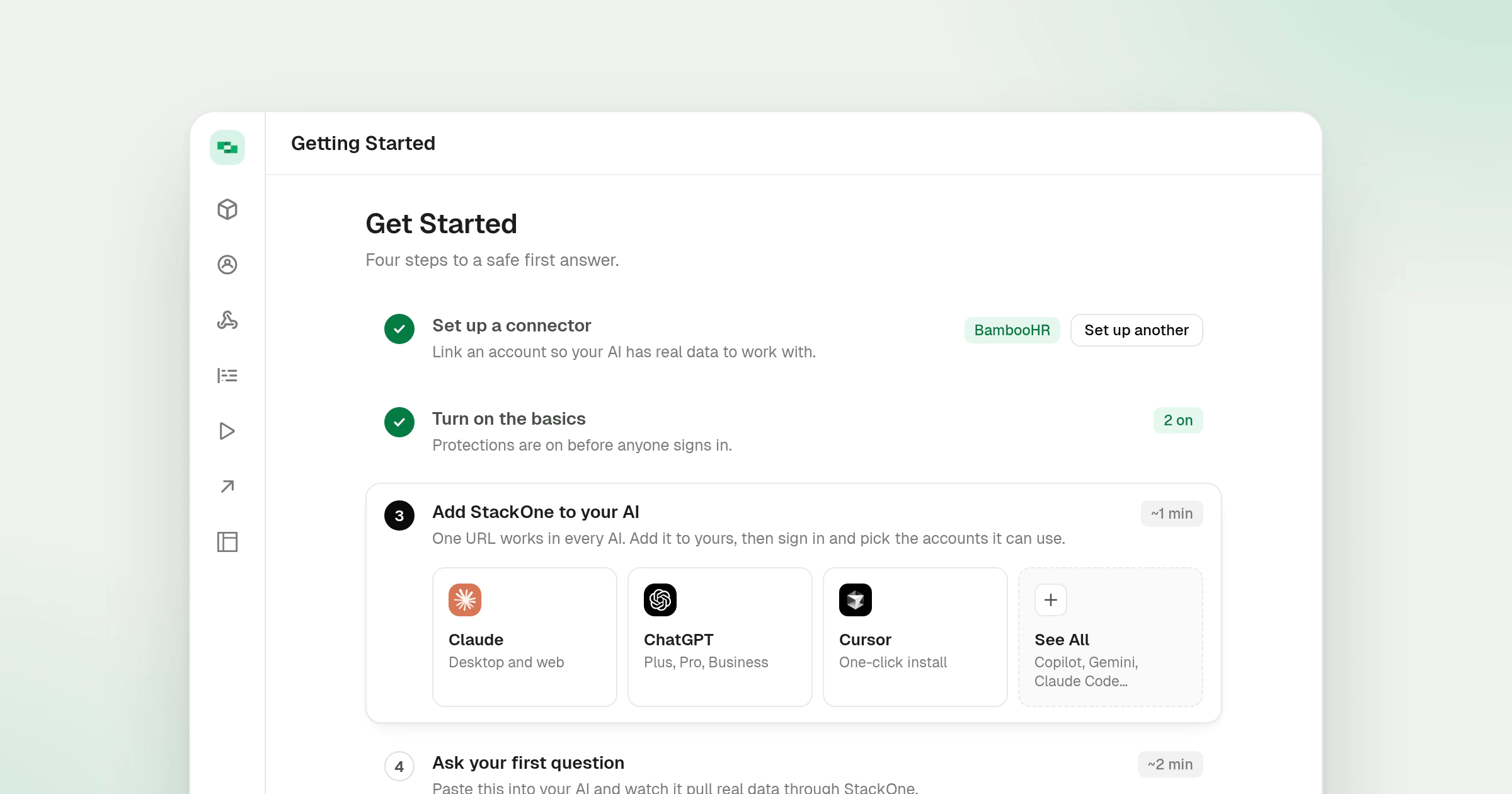
Redesigned Getting Started Page
The Getting Started page now lays its steps out in one centred column, and each step carries a tag at the right of its title row. Steps that need no setup from you move on with a Next button.
What’s new
- A tag on every step. While a step is open its tag shows the time it takes or a hint, such as ~1 min or Recommended. Once it is done the tag shows the result, such as the connector you set up, 2 on for protections or Answered for the first question.
- Next where a step can wait. In Turn on the basics, Next saves only what changed and opens the next step. Embed organizations, which have no AI client of their own to connect yet, also move past the AI and first question steps with Next, and a step passed this way reads Skipped. Once a connector is set up, the first step offers Set up another.
- Protections you can switch off. In Turn on the basics, both protections start switched on, as recommended, and either can now be switched off. The step points to Project Settings, where you can change them later.
- AI clients side by side. In Add StackOne to your AI, the AI clients sit in one row. Claude opens its setup guide in a new tab.
- Steps that match your plan. Gateway organizations get four steps, without Invite your team, and the page header reads Four steps to a safe first answer.
The Gateway quickstart covers the same path step by step, and the end-user guide for Claude covers connecting StackOne in Claude.