Announcing StackOne Defender: leading open-source prompt injection guard for your agent Read More

Connectors PingOne
Live 113 Actions

PingOne Integration for AI Agents

Connect your AI agent to 113 production-ready PingOne actions via MCP, A2A, or SDK — with agent authentication, optimized tool-calling execution, and built-in security.

StackOne
DrataGPLocalyzeFlipMindtoolsScreenloop

PingOne AI Agent Actions

113 production-ready actions for your agent to do more on PingOne.

113 Actions
List Certificates - List all X.509 certificates imported into the PingOne environment's certificate store.
Import Certificate - Upload a base64-encoded PEM X.509 certificate into the PingOne certificate store as SIGNING or ENCRYPTION usage.
List Populations - List every population (user segment) in the PingOne environment with optional SCIM filtering and cursor pagination.
Get Population - Retrieve one population by its PingOne ID, including its associated password policy and user count.
Create Population - Create a new population (user segment) in the PingOne environment with an optional default flag and password policy.
Update Population - Replace a population's name, description, default flag, and password policy via full PUT replacement.
Delete Population - Permanently delete a population. The population must be empty (no assigned users) before deletion.
Get Population Default Identity Provider - Retrieve the default identity provider assigned to a population for sign-on flows.
Update Population Default Identity Provider - Set or replace the default identity provider for a population so its users authenticate via that IdP by default.
Get Current User Info - Retrieve OIDC profile claims (sub, email, name, etc.) for the user represented by the current access token via the PingOne userinfo endpoint.
List Users - List users in the PingOne environment with SCIM filtering, cursor pagination, and configurable page size.
Get User - Retrieve one PingOne user by ID, optionally expanded with their group membership IDs or names.
Create User - Create a PingOne user with profile attributes, address, optional initial password, and population assignment.
Update User - PATCH update specific attributes of a user without replacing the full resource.
Delete User - Permanently delete a user and all of their associated data from the environment. Irreversible.
Get User Enabled Status - Check whether a user account is enabled (can sign in) or disabled.
Update User Enabled Status - Enable or disable a user account (disabled users cannot sign in).
Get User Password Metadata - Retrieve password-state metadata for a user (status, last-change timestamp, external-management flag) — never the password itself.
Set User Password - Administratively set a new password for a user without requiring their current password.
Get User Population - Retrieve the population a user currently belongs to.
Update User Population - Move a user to a different population, switching the password and sign-on policies that apply to them.
List User Groups - List every group the user is a member of, including groups inherited through nested group membership.
Add User To Group - Add a user as a direct member of a group so they inherit that group's role and policy assignments.
Get User Group Membership - Check whether a user is a member of a specific group and return the membership record.
Remove User From Group - Remove a user's direct membership from a group and revoke the associated inherited role/policy assignments.
List User Role Assignments - List every admin role assigned directly to a user with its scope type and scope ID.
Create User Role Assignment - Grant an admin role directly to a user at a specific scope (organization, environment, or population).
Get User Role Assignment - Retrieve one role assignment on a user, including the role reference and scope details.
Delete User Role Assignment - Revoke a specific admin role assignment from a user, removing the permissions it granted.
Get User Identity Provider - Retrieve the external identity provider currently linked to a user.
Update User Identity Provider - Link or re-link a user to an external identity provider, replacing any previous IdP association.
Get User Verify Status - Retrieve the current PingOne Verify identity-verification status for a user.
Update User Verify Status - Programmatically set the PingOne Verify identity-verification status on a user.
Get User Activities - Retrieve environment-wide user activity metrics (sign-ons, MFA usage, behavioral counters) aggregated across users.
List Groups - List all groups in the PingOne environment with SCIM filtering and cursor pagination.
Create Group - Create a new group (static or dynamic) with optional population scoping, userFilter, external ID, and custom data.
Get Group - Retrieve one group by ID, optionally including total member counts.
Update Group - Replace a group's name, description, userFilter, external ID, and custom data via full PUT replacement.
Delete Group - Permanently delete a group. All current members and role assignments are dropped automatically.
List Group Nested Groups - List all parent groups that contain this group as a nested (child) member.
Add Group To Group - Nest this group inside a parent group so its members inherit the parent's role and policy assignments.
Get Group Nested Group - Retrieve a single nested-group relationship record between a child group and a specific parent group.
Remove Group From Group - Break the nested-group relationship between a child group and its parent group (groups themselves are not deleted).
List Group Role Assignments - List admin role assignments attached to a group (members inherit these permissions).
Create Group Role Assignment - Grant an admin role to every member of a group at a specified scope (organization, environment, or population).
Get Group Role Assignment - Retrieve one admin role assignment attached to a group, including its role and scope.
Delete Group Role Assignment - Revoke an admin role assignment from a group. All members lose the permissions they inherited through it.
List Applications - List every application (OIDC, SAML, Worker, External Link, etc.) registered in the PingOne environment.
Create Application - Register a new OIDC, SAML, Worker, or external-link application with protocol-specific configuration.
Get Application - Retrieve a single application with its full protocol-specific configuration.
Update Application - Replace the full configuration of an existing application via PUT (name, enabled, protocol, type required).
Delete Application - Permanently delete an application and all of its dependent configuration (grants, attributes, assignments, secrets).
Get Application Secret - Retrieve the current (and previous, if any) client secret for an OIDC application.
Generate Application Secret - Rotate the client secret for an OIDC application, preserving the previous secret for graceful migration.
Delete Application Secret - Retire the previous (rotated-out) client secret so only the current secret remains usable.
List Application Grants - List every resource grant attached to an application (which API resources it can call and with which scopes).
Create Application Grant - Grant an OAuth application access to a specific API resource with a set of scopes.
Get Application Grant - Retrieve one resource grant on an application, including its resource and scope details.
Update Application Grant - Replace the scopes on a resource grant (resourceId and at least one scope are both required).
Delete Application Grant - Remove a resource grant, revoking the application's access to that API resource and its scopes.
List Application Sign-On Policy Assignments - List the sign-on policies attached to an application, in evaluation priority order.
Create Application Sign-On Policy Assignment - Attach a sign-on policy to an application at a given evaluation priority.
Get Application Sign-On Policy Assignment - Retrieve one sign-on policy assignment on an application (policy reference and priority).
Update Application Sign-On Policy Assignment - Replace the referenced policy and/or priority on an existing sign-on policy assignment.
Delete Application Sign-On Policy Assignment - Detach a sign-on policy from an application (the policy itself is not deleted).
List Application Role Assignments - List admin role assignments on an application (typically Worker Apps using Client Credentials).
Create Application Role Assignment - Grant a Worker App an admin role at a specific scope (organization, environment, or population).
Get Application Role Assignment - Retrieve one admin role assignment on an application, including its role and scope.
Delete Application Role Assignment - Revoke an admin role from a Worker App, removing its permissions at the assignment's scope.
List Application Attributes - List the application's attribute mappings (OIDC custom claims or SAML assertion attributes).
Create Application Attribute - Add an OIDC custom claim or SAML assertion attribute mapping to an application.
Get Application Attribute - Retrieve one attribute mapping on an application (claim/attribute name, expression, required flag).
Update Application Attribute - Replace the name, value expression, and required flag of an existing attribute mapping.
Delete Application Attribute - Permanently remove an attribute mapping so it is no longer emitted in tokens or SAML assertions.
List System Roles - List every built-in (system-defined) admin role available at the PingOne organization level.
Get System Role - Retrieve one built-in admin role with its full permission set and applicable scope types.
List Custom Roles - List all custom (environment-scoped) admin roles defined in the connected PingOne environment.
Create Custom Role - Define a new custom admin role with a specific permission set and applicable assignment scopes.
Get Custom Role - Retrieve one custom admin role with its full permission set and applicable scopes.
Update Custom Role - Replace the name, description, permissions, and applicable scopes of a custom admin role via full PUT.
Delete Custom Role - Permanently delete a custom admin role. All existing assignments of the role must be revoked first.
List Password Policies - List every password policy in the environment, including the default policy used when a population has none.
Get Password Policy - Retrieve one password policy with its full set of complexity, history, lockout, and expiry rules.
Create Password Policy - Create a new password policy with complexity, history, lockout, and age rules.
Update Password Policy - Replace the full configuration of a password policy via PUT (name plus the three exclusion flags are required).
Delete Password Policy - Permanently delete a password policy. Populations using it fall back to the environment default.
List Identity Providers - List every external identity provider (social and enterprise IdPs) configured in the environment.
Create Identity Provider - Configure a new external identity provider (OIDC, SAML, or social) for federated authentication.
Get Identity Provider - Retrieve one external identity provider with its full configuration (type, endpoints, credentials).
Update Identity Provider - Replace the full configuration of an external identity provider via PUT (name, type, and enabled are required; type cannot be changed).
Delete Identity Provider - Permanently delete an external IdP. Linked users keep their accounts but lose the federation link.
List Identity Provider Attributes - List the attribute mappings that translate external IdP claims into PingOne user attributes at sign-on.
Create Identity Provider Attribute - Add an attribute mapping that assigns an external IdP claim to a PingOne user attribute.
Get Identity Provider Attribute - Retrieve one attribute mapping on an IdP (PingOne attribute name, external claim expression, update mode).
Update Identity Provider Attribute - Replace the name, value expression, and update behavior of an IdP attribute mapping.
Delete Identity Provider Attribute - Remove an IdP attribute mapping so the associated external claim is no longer applied at sign-on.
List Sign-On Policies - List every sign-on policy in the environment. Each policy defines an ordered authentication flow (login, MFA, agreement).
Create Sign-On Policy - Create an empty sign-on policy shell. Add policy actions and application assignments afterwards.
Get Sign-On Policy - Retrieve one sign-on policy by ID (name, description, default flag, timestamps).
Update Sign-On Policy - Replace a sign-on policy's name, description, and default flag. Policy actions are managed separately.
Delete Sign-On Policy - Permanently delete a sign-on policy. All application assignments referencing it must be removed first; the default policy cannot be deleted.
List User MFA Devices - List every MFA device (TOTP, email, FIDO2, mobile, etc.) registered to a specific user with its status and type.
Pair User MFA Device - Start an MFA device pairing flow for a user (TOTP, FIDO2, EMAIL, or MOBILE).
Get User MFA Device - Retrieve one MFA device record for a user (type, status, nickname, activation timestamp).
Delete User MFA Device - Permanently remove a registered MFA device from a user. The user must re-enroll to use that device type again.
Update User MFA Device Nickname - Set or rename the user-facing nickname on an MFA device (e.g., "Work iPhone").
Get User MFA Enabled - Check whether MFA is enabled for a user (disabled users skip all MFA actions in sign-on policies).
Update User MFA Enabled - Enable or disable MFA for a user, overriding sign-on policy MFA requirements.
List Device Authentication Policies - List every device authentication (MFA) policy — these configure which MFA methods users may use and how.
Create Device Authentication Policy - Create a device authentication (MFA) policy with per-method enablement — all five methods (sms/email/mobile/totp/voice) must be configured.
Get Device Authentication Policy - Retrieve one device authentication (MFA) policy with its full per-method configuration.
Update Device Authentication Policy - Replace a device authentication (MFA) policy via full PUT — all five method enablement flags must be supplied.
Delete Device Authentication Policy - Permanently delete a device authentication (MFA) policy. The default policy cannot be deleted and all referencing sign-on actions must be updated first.

Do More, Build Less

Integration Infrastructure for PingOne AI Agents

Multiple Interfaces

Access integrations via API, AI SDKs, MCP & A2A.

PingOne MCP server
Managed Authentication

Pre-built authentication UI.

Agent auth
Falcon Engine

Every PingOne action runs on Falcon.

Agent Execution Engine
StackOne Defender
StackOne Defender Meta PG v1 Meta PG v2 DeBERTa 88.7% 67.5% 63.1% 56.9% Detection accuracy

88.7% prompt injection detection.

Prompt injection defense

"What impressed us most about StackOne is its ambition and clarity. They're creating infrastructure that modern software and the entire AI agent ecosystem can rely on. The depth of secure integrations, the pace of delivery, and the team's foresight into AI's future uniquely position StackOne to redefine this category."

Luna Schmid, Partner at GV

"We've been impressed by how quickly and deeply StackOne integrates with complex enterprise systems -- and now, with their focus on agent-to-agent interoperability, they're unlocking even more powerful use cases for customers. StackOne delivers all of the above in a universal layer -- without compromise."

Barbry McGann, SVP at Workday Ventures

G2 - High Performer G2 - Easiest To Do Business With G2 - Users Love Us G2 - Users Most Likely To Recommend G2 - Easiest Admin

Product Teams Love Building Agent Integrations With StackOne

G2

PingOne Agent Integration Resources

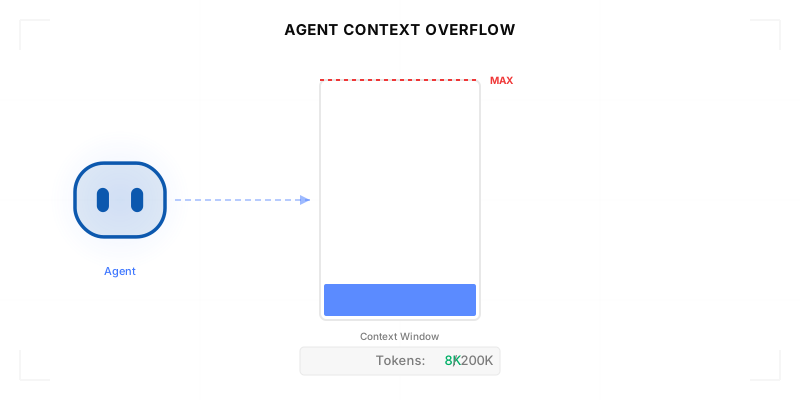
Agentic Context Engineering: Why AI Agents Kill Their Own Context Windows

AI agents exceed their context windows without knowing it. Six failure patterns and seven survival architectures for agentic context engineering.

15 min

MCP Code Mode: Keeping Tool Responses Out of Agent Context

Anthropic's code_execution processes data already in context. Custom MCP code mode keeps raw tool responses in a sandbox. 14K tokens vs 500.

11 min

Comparing BM25, TF-IDF, and Hybrid Search for MCP Tool Discovery

Benchmarking BM25, TF-IDF, and hybrid search for MCP tool discovery across 916 tools. The 80/20 TF-IDF/BM25 hybrid hits 21% Top-1 accuracy in under 1ms.

10 min

Put your AI agents to work

All the tools you need to build and scale AI agent integrations, with best-in-class connectivity, execution, and security.