
October 2026
Redesigned Command Palette
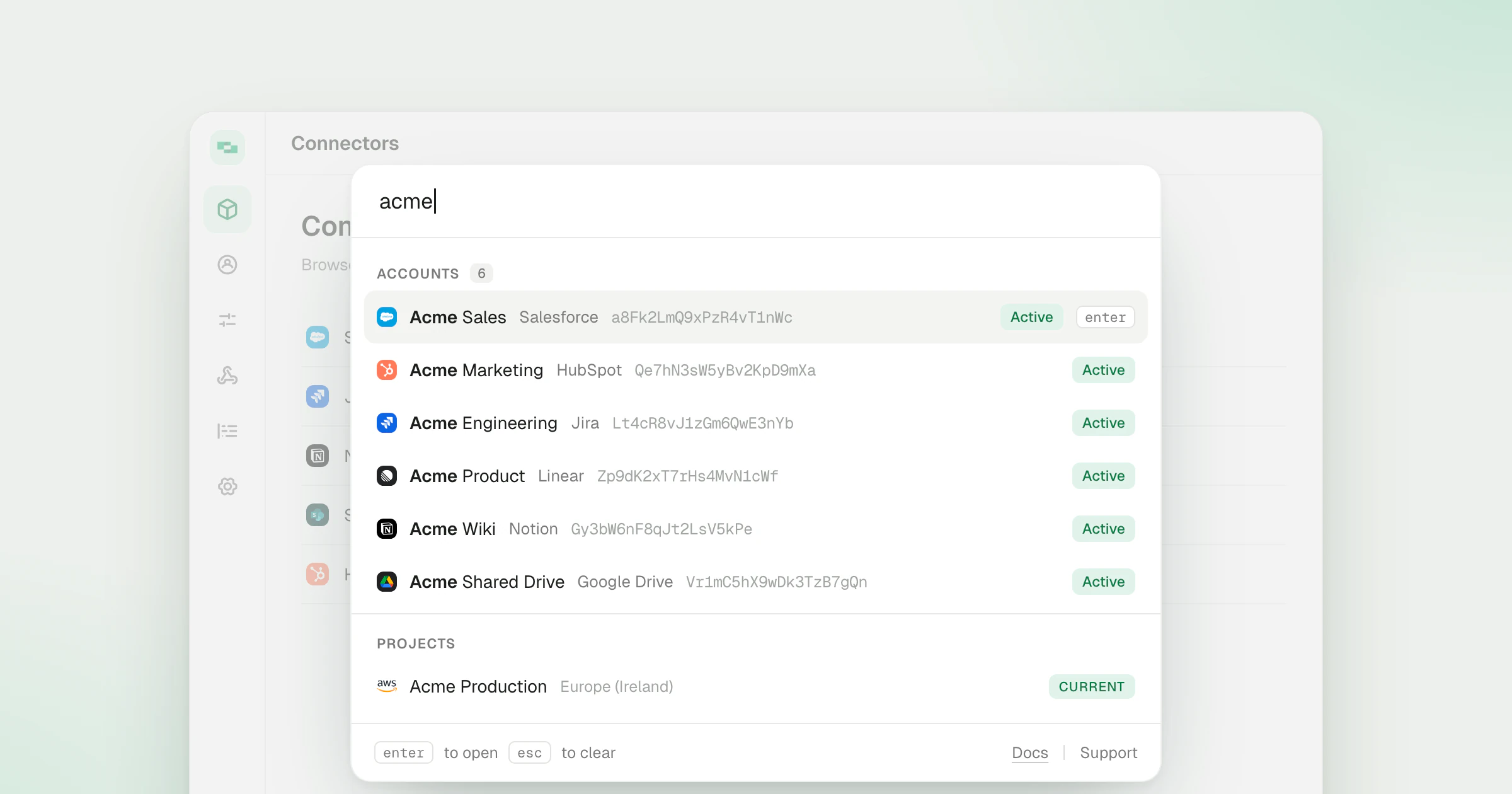
Press Cmd+K on Mac or Ctrl+K on Windows anywhere in the dashboard, or click Search in the sidebar, to open the redesigned command palette. It searches the accounts, connectors, connector profiles, projects and organizations you can reach, and Enter opens the one you pick.
What’s new
- Pages and actions follow your role. The palette runs the same access checks as the sidebar, so it never offers a page or action your role can’t open. Actions such as Link Account and Invite User sit at the top when it opens.
- Accounts, connectors and connector profiles. Search by what each row shows: account name, connector name or category.
- Projects show their region. Each project lists its deployed region by name, such as Europe (Ireland), next to the cloud provider’s logo. The project you’re in is tagged Current.
- Organization switching. If you belong to more than one organization, type its name and press Enter to switch. Switching opens the project you last used in that organization.
- Scope shortcuts. Start with
@for accounts,#for connectors,/for connector profiles or>to jump to a page or action. The scope shows as a chip, and the footer lists the shortcuts.
Every scope and shortcut is in the dashboard docs. For where the palette started, see the June 2025 launch.