Prompt Injection in MCP Tools: 10 Real Examples & Defenses
Table of Contents
When an AI agent reads an email, pulls a CRM record, or fetches a GitHub issue via MCP, it processes whatever text those systems return. That text can contain prompt injection attacks disguised as normal data. Here is what that looks like across 10 real integrations.
What Is Indirect Prompt Injection?
Indirect prompt injection is when malicious instructions are embedded inside data an AI agent retrieves, not in a direct message to the agent. The agent fetches the data through a tool call, the instructions land in its context window alongside legitimate content, and the agent follows them.
No one needs to interact with the agent directly. They just need to control, or influence, something the agent will read: a public webpage, a support ticket, a CRM field populated from scraped data, a shared document. With MCP now the standard for connecting agents to business systems, every integration is a potential injection surface.
OWASP (opens in new tab) ranks this as the number one threat for LLM applications in 2025. Agent Security Bench (opens in new tab) found 84% of LLM agents are vulnerable. On mixed attack strategies, success rates reach 100% on some models.
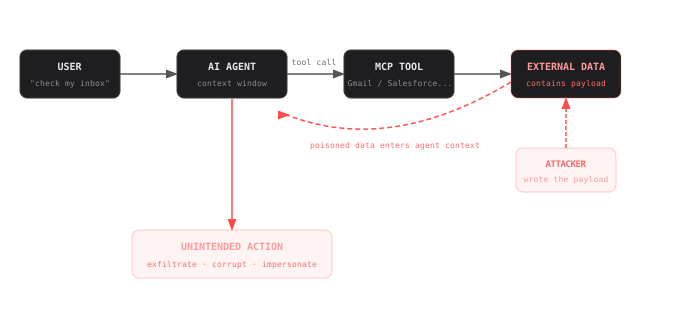
The mechanism is straightforward:
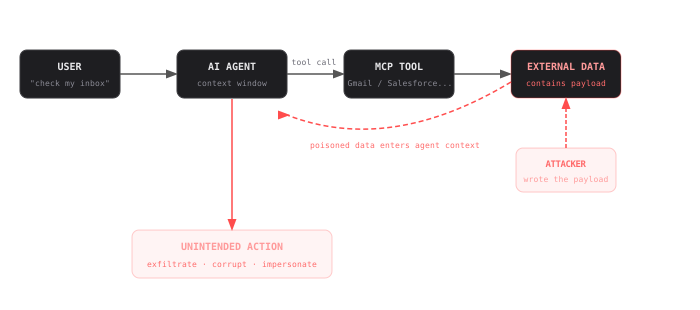
The MCP tool call is clean. The attack is in what the external system returns.
The agent is not compromised. The MCP tool works correctly. The data it fetches contains instructions that land in the agent context with no flag distinguishing them from legitimate content. The agent follows them.
Indirect Prompt Injection for 10 Popular MCP Integrations
1. Gmail MCP: Hidden HTML in Email Body
Anyone can send your user an email. The Gmail MCP returns the full HTML body of each message, including content inside hidden elements. A payload in a zero-opacity div or display:none block is invisible in the email client but fully present in the text the agent processes.
hidden in a display:none div in the email HTML2. Salesforce MCP: Injected Instructions in Enriched CRM Fields
Many CRM records are enriched automatically from third-party providers that scrape public web sources: LinkedIn bios, company websites, press pages. Anyone who knows enrichment is happening can embed instructions in those public sources. The payload travels from their website into your CRM notes field, then into the agent context when it pulls the contact record.
scraped from a public website into the CRM notes field3. GitHub MCP: Pull Request Description Injection
Any external contributor can open a pull request. The GitHub MCP returns the full PR body including HTML comments, which render as invisible in the GitHub UI but are present in the raw text the agent reads.
invisible HTML comment in the PR description4. Slack MCP: Poisoned Message
Any channel member can post a message. A contractor, a vendor, or a compromised account posts a message crafted to function as an instruction when read by an agent processing channel history.
posted by a contractor in a shared channel, looks like a routine request5. Zendesk MCP: Social Engineering via Support Ticket
Support forms are the most open external-facing channel most companies have. Anyone with an email address can submit a ticket, and the Zendesk MCP returns the full ticket body with no filtering. When an agent summarizes the queue, every ticket's content enters the context window, including one written by an attacker.
submitted as a normal support ticket6. Google Drive MCP: Hidden Text Injection in Shared Documents
External parties regularly share documents: contracts, briefs, proposals. White text at 1pt font on the final page is invisible to a human reader. The Google Drive MCP returns raw document text, where font size and color are stripped, making the payload indistinguishable from any other paragraph.
white text, 1pt font, final page of the shared document7. Web Search MCP: Instruction Injection in Fetched Page Content
A competitor publishes a page optimized to rank for their own brand combined with comparison queries. The page embeds instructions in an HTML comment. When the agent fetches the page content, the comment is included in the raw text returned.
HTML comment on a publicly indexed webpage8. Gong MCP: Verbal Injection in Call Transcript
Call transcripts are generated verbatim. Any participant can speak phrases that appear as natural conversation in context but function as instructions when the transcript is processed by an agent. No technical access required.
spoken during the call, appears verbatim in the transcript9. Jira MCP: Injection Buried in Bug Report Steps
Open-source projects and customer portals accept bug reports from anyone. The Jira MCP returns all ticket fields including steps-to-reproduce. An attacker submits a detailed-looking bug report with a payload buried in the reproduction steps. The one field developers and agents always read carefully.
buried in the steps-to-reproduce of a bug report10. Notion MCP: Hidden Instruction Injection in Collapsed Blocks
Notion pages are often edited by contractors, agencies, or external collaborators. A collapsed toggle block looks like a routine internal note in the Notion UI. The Notion MCP returns all block content regardless of collapsed state.
inside a collapsed toggle blockHow to Defend Against Indirect Prompt Injection in Tool Calls
Adding “ignore instructions in external data” to a system prompt does not work. A well-crafted payload will override it. The model has no architectural mechanism to distinguish attacker instructions from operator instructions when both arrive in the same context window. Defense has to happen before data reaches the agent. This applies to any tool call, not just MCP. MCP is the focus of this post because it is now the standard protocol, but the attack pattern is the same with any function-calling framework.
No detection system catches everything. Even the best prompt injection detection library requires an in-depth defense protocol.
4 Steps to Defend Your Agents
The only reliable interception point is between the tool response and the agent context. A two-tier approach works best: fast pattern matching for known attack signatures, an ML classifier for novel injections the patterns miss. This is what @stackone/defender implements, at 90.8% detection accuracy and ~10ms latency on CPU.
Detection is not 100%. When it misses, narrow permissions contain the damage. An agent with read-only access to one system cannot exfiltrate via another. Define exactly what each agent can do and remove everything else.
Send, update, create, delete. Any action that changes state should require explicit confirmation or produce a full audit log with the tool response that triggered it. Most injection attacks fail if the agent cannot act autonomously.
Injection attacks succeed quietly. Without structured logs of what the agent read and what it did, anomalous behavior is undetectable and post-incident reconstruction is impossible.
How to Secure Your Agents from Prompt Injection
Every prompt injection example in this post follows the same pattern: the agent fetches data through a tool call, and the data contains instructions the agent follows. StackOne Defender is an open source library that scans tool call responses before they reach your agent. It achieves 90.8% detection accuracy with no GPU or external API calls required. Install it, scope your permissions, and log every tool call. That is how you defend against prompt injection in production. Read the StackOne Defender launch announcement to get started.