
How to Build an AI Marketing Analytics Agent with Claude + an MCP Gateway
Table of Contents
Forget whether AI agents will replace your marketing team. Forget whether they’ll go rogue. The autonomous AI agent conversation is eating all the oxygen, and it’s about a future that’s still years out: METR finds frontier models hit only a 50% success rate on tasks that take humans about an hour, and under 10% on tasks that take half a day (opens in new tab). The burning agentic question is how to leverage an AI agent’s ability to navigate your marketing stack, and answer questions your marketing dashboards can’t.
What is a Marketing Analytics AI Agent?
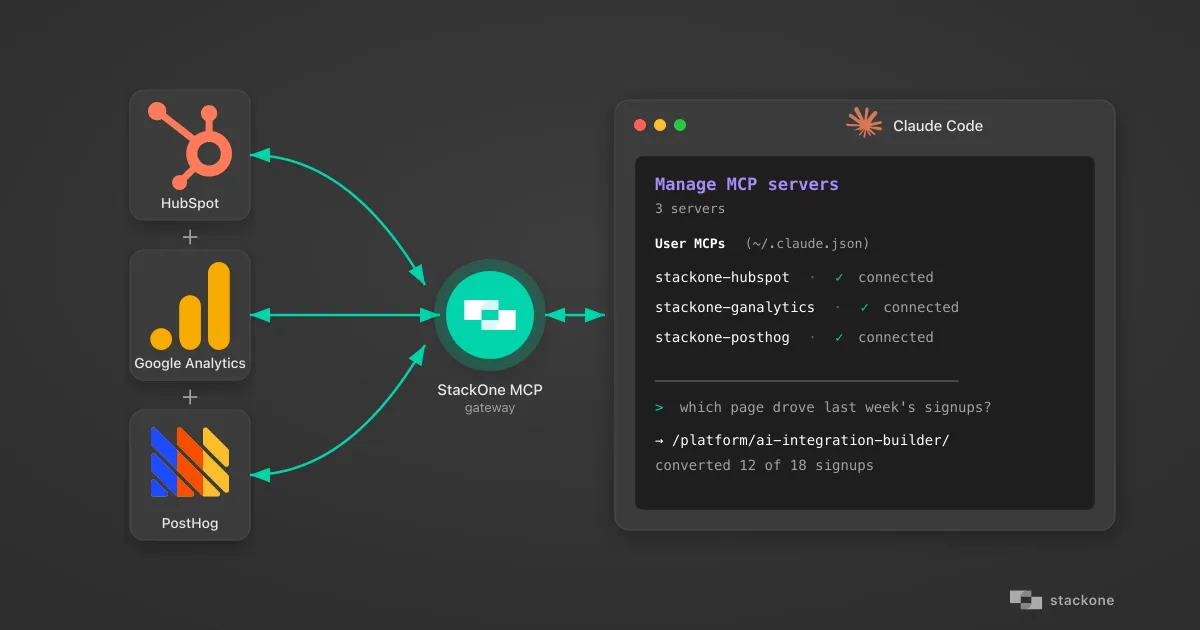
A marketing analytics AI agent connects an LLM to your stack (via an MCP gateway, for example) so it can query your marketing tools (web analytics, CRM, marketing automation, ad platforms), cross-reference across them, and answer questions in natural language.
I spent 30 minutes this morning trying it. GA4 and HubSpot, stitched into one chat. By the end I had four insights that my website analytics and CRM software were never going to surface. Not because the data wasn’t there, but because my dashboards weren’t built to ask the question.
This is what it looks like in practice.
What My Marketing Analytics AI Agent Surfaced from GA4 + HubSpot in 30 Minutes
Bot Traffic Inflating GA4 Numbers
Headline traffic was inflated by nearly 40% bot share. Real week-over-week growth was almost 20 points lower than the dashboard claimed. Most of this was residential-proxy and AI-scraper traffic, the kind GA4’s built-in IAB filter (the Interactive Advertising Bureau’s list of known bots and crawlers) wasn’t built to catch. Automated traffic now dominates the web (Imperva 2025: 51% of web traffic is automated, 37% bad bots (opens in new tab)). I flagged a country as bot traffic when its average session duration was under 5 seconds AND its engagement rate was under 15%: the behavioral signature of automated traffic that GA4’s filter hadn’t caught.
Spam Signups Slipping Past HubSpot
The agent surfaced a handful of spam signups in last week’s inbound: typo domains, disposable emails, mismatched form fields. I reviewed the flags and prompted it to update the records in HubSpot. This is interim; a CAPTCHA form will prevent many spam submissions. Until that ships, an agent that scans new signups and flags the obvious junk closes a gap our HubSpot doesn’t catch on its own.
AI Referrals: When GA4 and HubSpot Disagree
HubSpot reported zero AI referrals; GA4 showed significant traffic from ChatGPT and Claude for the same week. Two systems disagreed about the same number, neither flagged it. Without the agent cross-checking, one of them was going to end up as the source of truth in the wrong meeting.
How My Marketing Analytics Agent Rebuilt the Conversion Path
Some pages converted at an order of magnitude higher rate than others. To get the insight, the agent bridged a gap. Our HubSpot MCP wasn’t connecting to HubSpot’s /events/v3/events API endpoint (the one that surfaces page views, form interactions, and other behavioral events on a contact’s timeline), so I asked the agent to match each signup’s form-fill timestamp against GA4 sessions to rebuild the conversion path. That cross-MCP reasoning is what answers “which page actually drove the signup,” a question the GA4 dashboard wasn’t set up to answer immediately.
I didn’t open GA4 and create a new dashboard. I didn’t write SQL. I didn’t file a business operations ticket. I queried and challenged the agent for 30 minutes and walked away with a more accurate read on the business than any combination of dashboards in our stack would have produced.
AI Agents Bypass the Analytics UI, and That’s a Good Thing
Claude Desktop or Claude Code agents aren’t replacing your marketing analyst. They aren’t replacing your dashboards either, at least not for the questions you’ve already settled. What they’re replacing is the interface between you and the data. The chart, the filter, the date picker, the saved view, the “build a report” wizard. All of it exists because humans need a visual layer to navigate data. An agent doesn’t.
Dashboards are still excellent for settled questions. Once the metric is agreed (“weekly inbound signups by source”), the inputs are debugged, the spam screen is defined, the attribution is sorted: that view belongs on a dashboard. Reproducible weekly. Same answer every Monday. Set in stone.
But that’s the end state. Business doesn’t run on rails. Most teams are in the messy middle:
- figuring out what to measure
- debugging the inputs
- asking questions no one has built a chart for
- finding out why the attribution doesn’t make sense for some new reason every week
That’s where the UI becomes the tax: ten clicks to build a chart that answers a question you’ll only ask once. That’s where dashboards fail and agents win.
In the exploration phase, your AI agent isn’t competing with your analytics tool. It’s competing with the business operations ticket you didn’t bother filing because you knew it would take two weeks. An agent skips the interface entirely: you ask, it queries, you get the answer. Curiosity becomes the bottleneck instead of dashboard curation. More gets analyzed. More gets measured. More insights get drawn. You ask follow-up questions instead of accepting the chart you got.
The pattern is simple: agents for exploration, dashboards for reproduction. Most organizations I’ve worked with have it inverted. They use the UI to explore, paying the click-tax over and over for questions they’ll only ask once.
| Question type | AI Agent | Dashboard |
|---|---|---|
| Exploring a new question | Best fit | High click-tax |
| Reproducing a settled metric | Overkill | Best fit |
| Cross-referencing two systems | Native | Manual export |
| Same answer every Monday | Inconsistent | Reliable |
| Follow-up questions | Conversational | Build a new view |
| Auditable for the boardroom | Needs review | Authoritative |
Humans in the Loop: Why AI Agents Alone Aren’t Enough for Marketing Analytics
AI agents alone aren’t enough for marketing analytics because they hallucinate too often when running unsupervised. On Vectara’s HHEM leaderboard (opens in new tab) (April 2026), even top models hallucinate between 3 and 10% of the time on summarization tasks, with weaker models well above that. Exploratory analytics over your raw data is harder than summarization, so the rate climbs. That’s why “fire your team and let an agent run it” is reckless. Unless you want to end up like the Chevrolet of Watsonville dealership whose chatbot agreed to sell a $76,000 Chevy Tahoe for $1 (opens in new tab).
What works is the combination:
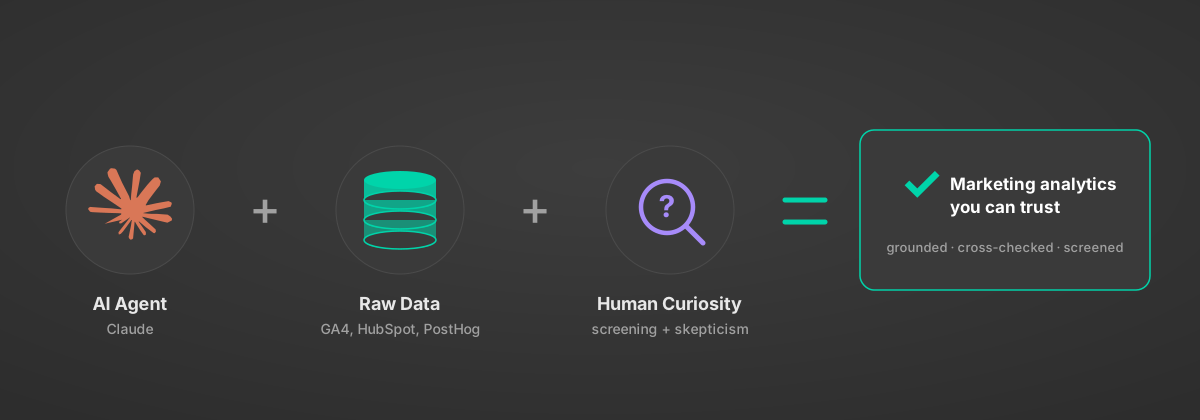
Anchor the LLM in the actual source systems (not summaries), cross-reference across them, question every datapoint and assumption it makes, and tell it to flag the things humans usually miss. The hallucination rate collapses once the agent is grounded in retrieved data instead of generating from memory.
That’s the AI configuration that matters. Not agent autonomy. The conversational interface, the agent’s data reach, and human curiosity and skepticism.
How to Connect Claude Desktop to GA4, HubSpot, and Any SaaS via an MCP Gateway
This is the part not every business has down. The practical version:
1. Pick the systems you need. Three, for me: GA4 MCP, HubSpot MCP, Notion MCP (the last one is where the report ends up).
2. Get the agent connected. In my case I use StackOne’s MCP gateway. I set up my SaaS connectors on the platform, which manages auth, permissions, and actions, then point Claude Code or Claude Desktop at it via a single MCP URL.
https://api.stackone.com/mcpThe other option is connecting to third-party MCP servers through each vendor’s marketplace. With StackOne all my connector authentications are centralized, and most integrations are richer (StackOne’s Notion integration, for example, helps edit content more precisely than Notion’s official MCP (opens in new tab)).
I also get the flexibility to build new MCP tools with the Connector Builder, or use agent-grade actions that the SaaS vendors themselves don’t ship. This is how I’ll add the missing page-views action to my HubSpot MCP. I’ll certainly add a PostHog MCP too, giving my Claude agent access to session tracking across StackOne’s docs, app, and website: a serious unlock for inbound marketing intelligence.
3. Challenge your AI agent with the insights you need. Don’t ask “show me last week’s traffic.” Ask “what was the journey for each of last week’s signups, and which page converted them?” That’s the type of question that’s time-consuming to answer through a UI, and the kind your AI agent will breeze through when it has structured data. My HubSpot MCP had limitations, but instead of dead-ending, the agent rebuilt the page-by-page path on Google Analytics for each form entry recorded in HubSpot. The dashboard wasn’t providing such a clear and fresh view of what had happened this week. Setting up a funnel view in Google Analytics would have sidetracked my effort and delayed the report. The agent did it in minutes, and the highest-converting page surfaced itself.
4. Be skeptical out loud. Question the agent’s strategy and the data, ensure it’s filtered irrelevant or erroneous data. Don’t assume its strategy is sound, and never take answers at face value. The always-pleasing AI attitude is not one you want to fall for. The agent won’t run checks unless you ask. Human skepticism is most of the value. That’s why the market is paying for AI that augments people, not AI that replaces them.
5. Promote what warrants a dashboard. If a question becomes “every week, same format, same sanity checks,” it belongs on a dashboard. Hardcode it. The agent did the discovery; the dashboard handles the reporting from there.
How Long Does It Take to Set Up a Claude Marketing Analytics Agent?
Setting up a Claude marketing analytics agent takes 30 minutes or less when you connect your SaaS through an MCP gateway like StackOne. The teams that wire this up this quarter will run circles around the ones still filing business operations tickets next quarter.
5 simple steps to connect your Claude agent to your tools:
- Create a StackOne account.
- Pick a SaaS connector from 530+ live agent integrations.
- Set up an auth config (opens in new tab) for your agent to access your SaaS.
- Scope its tool access (e.g., which AI actions are available to your agent).
- Ask Claude to update your MCP config file.
Et voilà. You have a new UI: your IDE, where you prompt Claude Code or Claude Desktop directly.
Try it → Get started with StackOne free.
How Can You Leverage AI Agents for Marketing Analytics Tomorrow?
You can leverage an AI marketing analytics agent by giving it direct access to the systems where your funnel data already lives (data analytics/CDP, CRM) through an MCP gateway.
The autonomy debate is about the future. The shift playing out in marketing and growth teams right now is more practical: an AI agent that reaches the right systems and asks the right questions collapses the discovery loop from days to minutes.
Dashboards keep their job. They hold the questions you’ve already answered and need to monitor. That’s why we built StackOne’s MCP gateway: to make AI marketing analytics agents trivial to wire up so you can get to the next question worth answering.
The rogue-agent debate can wait. Human curiosity, finally, is the bottleneck.
Want to see this set up live? Book a demo and we’ll walk through your stack.