
 Will Leeney · · 6 min read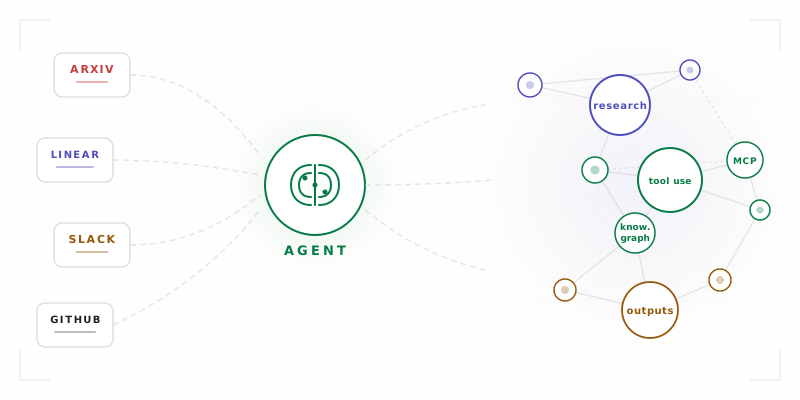
Supercharging Research with Agents
Table of Contents
At a recent talk at Imperial, I built a complete research system live, from scratch(ish), in front of an audience. Here’s the run-through of what I spoke about and how you can replicate it right now. If you’d prefer to flick through the slides, they’re available here.
The system does literature reviews, maintains a knowledge graph of your ideas, connects to your project management tools via MCP, and produces anything from paper drafts to grant proposals. It’s all built on top of tools that are either already open-source or freely available. First, I’ll detail some basic optimisations for using agents for the layman and then go into how to build a second brain.
The Context File
Before you can build anything interesting, the most basic improvement you can make is to your context file. Call it CLAUDE.md, agents.md, .cursorrules essentially this file allows you to not start from scratch when using agents. This file gets the model context on who you are and what your preferences are.
It can be as simple as this:
Always cite sources with links.
Prefer recent papers (last 2 years).
Output in markdown format.
The reason we need this is because the out-of-the-box model isn’t built for you specifically but to be optimal on average. LLMs are sycophantic because that’s what keeps people using the models and paying for tokens. Or maybe it’s because that’s what is most malleable under context so performs well on alignment? Either way, we need to steer it towards a version that is good for us rather than the average. There’s a great example inspired by Karpathy that demonstrates how to get LLMs to be surgical with changes and minimal in development.
Skills Are Recipes
Skills are for getting the LLM to do repeatable semi-nondeterministic processes. They’re like scripts, but instead of deterministic code, they give the LLM structured instructions for complex workflows.
/review           → check work before committing
/start-feature    → new branch, fresh context
/summarize        → condense any document
The magic is that you write them once and invoke them whenever needed. The /review skill is for holding your reviewing instructions, /start-feature for starting work on a new branch etc. The context file is for global knowledge (it applies everywhere), the skills are for local knowledge (it only applies for certain workflows).
Getting the Most Out of Your LLM
If you’ve ever found your agent getting lost in the weeds, you know the problem: context gets messy, plans go off track, and you end up chasing your tail.
The way I get by is through four key techniques:
Plan mode. Before doing anything, the agent outlines its approach. This lets you understand what the LLM has understood. It’s like making sure you’re sailing towards America before you set sail, rather than discovering you’re headed to Iceland after three weeks. Understand if the agent has the scope and context before letting it run wild on your code.
Rewind. When things go off track, don’t try to correct the path from where you are - walk back to the last good decision and take the right turn from there, giving it more context so that it doesn’t stray from the path on the second time round. We do this because the model has a fixed attention budget, if we waste attention on not paying attention to the “bad” context then we have less attention on the good context.
Verify. Define measurable outcomes, not vague goals. “Tests pass” is better than “make it good”. Write tests to reproduce bugs, then get the model to iterate until a solution is found.
Parallelise. You can run multiple agent sessions simultaneously, each working on different tasks. You’re no longer going on solitary journeys alone. You’re the master of an empire, sending agents off for 10 minutes while you focus on other things … giving context to another agent.
Routines While You Sleep
One of the most useful features I’ve discovered: background agents that run while you sleep and wake you up to results. This is subscription-maxxing but you may as well make use out of your usage limits. I have a VPS server for running my agents overnight but claude routines will also do the job. Use something like this for daily digests and have your own personal newsletter.
MCP: The Plug Socket for AI
The Model Context Protocol is what I’d call the USB port for AI. It allows LLMs to connect to external services in a standardised way. There’s a whole debate about what interface is best for connecting LLMs to external systems (MCP vs CLI vs Codemode), but I won’t go into that here because that’s for another time.
The basic premise is straightforward: your agent talks to MCP servers, and those servers talk to the world. GitHub, Linear, Slack, arXiv, Playwright - any service with an API can be wrapped as an MCP server.
At StackOne and disco.dev, we’ve built infrastructure that makes connecting MCP servers easier. But you can also run them natively. The point is that the agent’s world is now bigger than whatever it can generate internally - it can reach out and pull live data from the services you use every day.
During the talk, I demonstrated this by connecting to Linear and pulling outstanding issues for a project. The agent had full context of the team’s current priorities without me manually copying anything from the browser.
Building a Second Brain
Now for the fun part. Most (the good ones) researchers, writers, and engineers store and retrieve knowledge. Most people use a mix of tools: Notion, Obsidian, Google Docs, Twitter bookmarks, random browser tabs. It often gets fragmented over time because it’s difficult to stick to one system. We build up processes and systems to try to keep order in the system but humans are messy. We like to change things up, sometimes just because one platform is more visually appealing, sometimes because it’s fun to explore new things. However, this kind of breaks the whole point of having a system that is consistent over time. We want to dump information that is semi-structured and have the LLM just sort it out. So, my current system takes information from these various sources, processes it through an agent, and stores everything in a structured Obsidian vault with automatic knowledge graph generation.
arXiv  ──┐
Linear  ─┤
Slack  ──┤──► Agent ──► Knowledge Graph
GitHub  ─┤
Twitter ─┘
The sources can be structured or unstructured — it doesn’t matter. You just chuck things at the system. The agent reads everything and figures it out.
Feynman: Research + Draft + Review
I use this collection of open-source skills (Feynman) which are research-specific skills. Here are a couple of examples:
/literature-review— searches arXiv, reads papers, outputs a cited review with provenance tracking/deep-research— autonomous experiment loop that searches, reads, and synthesises across multiple sources/draft— writes papers, grants, and reports from your knowledge base/autoresearch— iterative improvement loop for optimising metrics. We pointed this at our own action search problem and took Hit@1 from 27.6% to 57.3%
Here’s what a literature review command looks like:
$ claude
> /literature-review "finetuning LLMs with new attention mechanisms"

# researcher agent → searches papers → verifier checks sources
# outputs cited review to outputs/ with provenance tracking
Graphify: Connect Everything
The fundamental piece that makes this work is graphify. This is a tool that extracts entities and relationships from your notes using natural language, runs community detection to find interesting clusters, and outputs a knowledge graph.
$ claude
> /graphify

# auto-detects vault/ → extracts entities + relationships
# community detection finds cross-paper connections
# outputs: HTML graph + JSON → vault/graphs/
The process is: dump stuff into the vault i.e. a lit-review, run /graphify, and the tool updates the graph. You get a visual representation of your entire knowledge base, with communities of related ideas automatically clustered together. The hierarchical structure helps the LLM to search your knowledge base more efficiently and has ~70% reduction in token usage for search. Each note has YAML frontmatter with title, tags, and source information:
---
title: Agent Architectures
tags: [paper, agents]
source: arXiv:2406.xxxxx
---
The Obsidian Vault
Here, Obsidian acts as an interface between your knowledge and you. This can be replaced with any other interface but it plays so nicely with graphify so I really recommend giving it a try. You can skip setting this up if you never want to look at your knowledge graph without an AI involved.
Before and After
To show the full value of this system, I demonstrated a grant writing workflow. Here’s what it looks like:
> look at my knowledge graph, check Linear for current
  project goals on WLR, pull recent Slack discussions
  from #ai-research, and draft a grant proposal for
  "agent tool use for research automation"
Before this system, writing a grant proposal meant: opening 15 tabs, searching through your notes manually, copying and pasting text, and hoping you remembered the relevant context.
After: the agent searches your knowledge graph for related work and citations, pulls your current milestones from Linear, references team discussions from Slack, and produces a draft (Obviously still review it …).
Take It Home
Everything I demonstrated is open-source. You can set up this system yourself:
# install the research skills
curl -fsSL https://feynman.is/install-skills | bash

# install the knowledge graph tool
pip install graphifyy

# install Obsidian
brew install --cask obsidian
Create a vault, connect your MCP servers, and start researching.
Reflections
The human role hasn’t disappeared, it’s just shifting. I wanted a system that unburdens me of the cognitive load of keeping my notes organised and now I have one. I’m still the one setting the direction, defining the questions and verifying the output.
There’s definitely an argument to be had around, if I’ve organised my whole knowledge base then I can make better connections than a machine. Honestly though, if I offload the lower cognitive parts of research, the maintaining and the organising, doesn’t it let me be free to pondering and wondering?