 Romain Sestier · · 8 min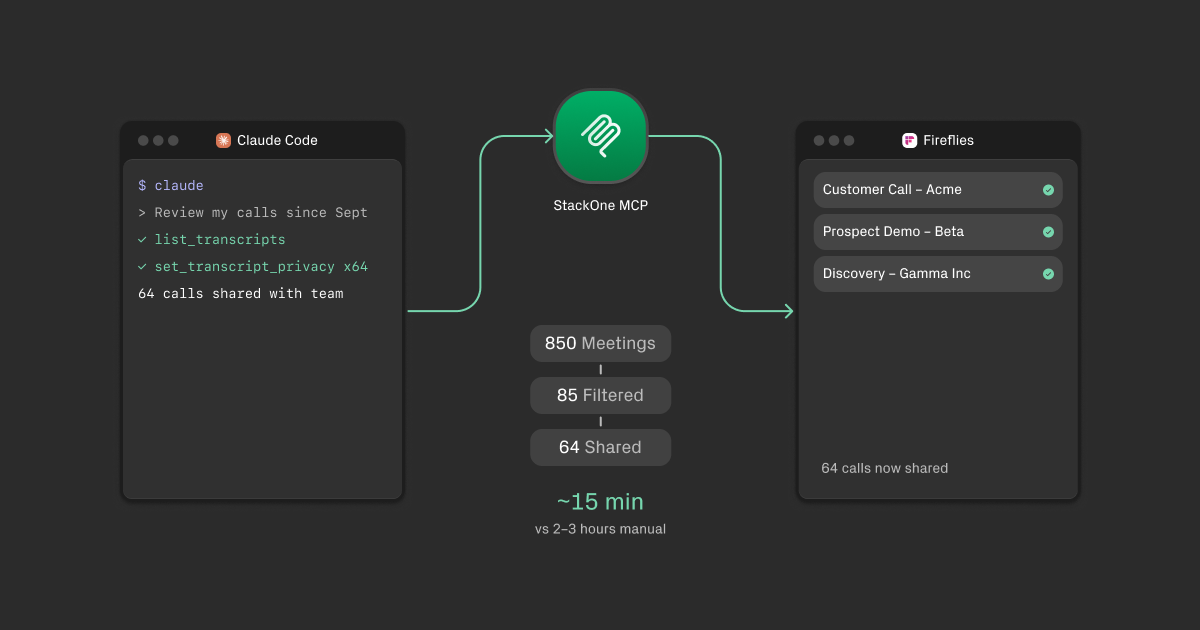
Automating Meeting Sharing with Claude Code + a Custom Fireflies MCP
Table of Contents
How I built a Fireflies connector in 10 minutes and used it to share several months of customer calls with my team.
Workflow Overview
The Problem: Automating Meeting Sharing
Several months of customer calls sat locked in Fireflies — hundreds of conversations with prospects, customers, and partners containing objections, feature requests, and competitive insights. Only meeting hosts could access recordings. Manual sharing would require opening each meeting, navigating settings, updating privacy levels 64 times — the type of task perpetually postponed.
The Approach: Use Fireflies MCP and Claude Code
The solution employed Claude Code with an MCP (Model Context Protocol) server to automate this workflow. MCP enables AI assistants to interact with external tools through standardized interfaces, providing Claude access to Fireflies.
Why Not Use the Official Fireflies MCP?
Fireflies offers an official MCP server optimized for common use cases: extracting insights, summarizing discussions, pulling action items, analyzing sentiment across meetings.
However, this workflow required write operations:
set_transcript_privacy— Change recording access permissionsupdate_transcript_channel— Organize transcriptscreate_soundbite— Create clips from transcripts
The official MCP focuses on read access, a reasonable design decision since most users query data rather than modify it programmatically. This necessitated an alternative approach.
Building a Custom Fireflies MCP with StackOne’s Falcon Connector Engine
Rather than writing a custom MCP server from scratch, the solution utilized StackOne’s AI Connector Builder to create a Fireflies connector in approximately 10 minutes.
The Falcon Connector Engine powers StackOne’s 200+ pre-built connectors. It enables defining connectors using YAML configurations that automatically expose through multiple protocols — including MCP for AI agents.
The AI Builder is an AI assistant operating within IDEs (Claude Code, Cursor, VS Code) using 20+ specialized MCP tools to automate the process:
- Research — Autonomously discovers Fireflies API documentation and endpoints
- Config Building — Generates YAML configurations adhering to Falcon specifications
- Validation — Validates syntax via CLI
- Testing — Tests actions against live API
- Deploy — Push via
npx @stackone/cli
The result is a YAML-defined connector exposing Fireflies’ full API surface — including required write operations. StackOne then serves this as an MCP server for Claude Code connection. For another example of Fireflies + Claude Code in production, see how Max built a customer support dashboard with MCP tools that imports meeting action items automatically.
The Custom Fireflies MCP: Full Action Reference
User Management
get_user(GET) — Retrieve API key owner info (user_id, name, email, admin status, transcript count, minutes consumed)list_users(LIST) — Retrieve all team users
Contacts & Analytics
list_contacts(LIST) — Retrieve meeting participants (email, name, picture, last meeting date)get_analytics(GET) — Team analytics: talk/listen ratios, sentiment, questions asked, filler words, meeting counts
Transcript Management
list_transcripts(LIST) — List transcripts with filters (limit, skip, fromDate, toDate, host_email, keyword)get_transcript(GET) — Full transcript: sentences, speakers, summary, action items, media URLsset_transcript_privacy(UPDATE) — Change privacy level: link, owner, participants, teammates and participants, teammatesupdate_transcript_channel(UPDATE) — Move transcript to specified channel
Soundbites (Clips)
create_soundbite(CREATE) — Create clips from transcripts (start/end time, title, media type, privacy)get_soundbite(GET) — Retrieve soundbite details including captions and sourceslist_soundbites(LIST) — List soundbites (filter by mine, team, transcript)
Channels
list_channels(LIST) — Retrieve available channels for organizing transcripts
Total: 12 actions covering the full Fireflies API — reads and writes.
Step-by-Step: Automating Meeting Sharing with Claude Code + Custom Fireflies MCP
Prerequisites
- Claude Code installed
- StackOne account with Fireflies connector configured
- Fireflies API key connected as linked account
Step 1: Configure Claude Code
Follow the StackOne Claude Code guide to connect the MCP server. First, set auth token in shell profile, then add MCP server via CLI:
# Set auth token in ~/.zshrc or ~/.bashrc
export STACKONE_AUTH_TOKEN=$(echo -n "{your_stackone_api_key}:" | base64)

# Add MCP server
claude mcp add \
  --transport http \
  --header "Authorization: Basic $STACKONE_AUTH_TOKEN" \
  fireflies \
  "https://api.stackone.com/mcp?x-account-id={your_fireflies_account_id}"

# Verify connection
claude mcp list
Step 2: Review Meetings
Start Claude Code with the task:
“Review all my Fireflies meetings since September. Identify customer and prospect calls — exclude internal meetings. Write them to local markdown with title, transcript ID, date, attendees, and category (CUSTOMER, PROSPECT, PARTNER, etc). Write progressively.”
Claude’s actions:
- Calls
list_transcriptswithfromDatefilter, paginating in batches of 50 - Filters out internal meetings (1:1s, stand-ups, all-hands)
- Identifies external companies from attendee domains
- Writes each batch to markdown file
Progressive writing prevents context window limitations. By writing to file incrementally, Claude avoids holding 850 meetings in memory. Extended sessions don’t lose data.
Step 3: Curate the List
Review the generated file and remove items not for sharing:
- Sensitive partner negotiations
- Investor calls
- Incomplete recordings
Result: 85 identified, 64 retained.
Step 4: Bulk Update Privacy
“Read the curated meeting file. For each meeting, set sharing to ‘Teammates and Participants’.”
Claude:
- Parses markdown file
- Extracts transcript IDs
- Calls
set_transcript_privacyfor each — running calls in parallel batches - Confirms completion
Step 5: Verify
Check Fireflies. The team now accesses 64 customer calls previously unavailable.
What the Custom Fireflies Connector Unlocks
With full API access via MCP, you can build workflows including:
- Auto-organize by deal stage — Move transcripts to channels based on CRM opportunity status
- Generate highlight reels — Create soundbites from AI-identified key moments
- Team onboarding — Auto-share relevant customer calls with new hires
- Competitive intelligence — Tag and surface calls mentioning specific competitors
Building Your Own Custom Connector with StackOne
This pattern isn’t Fireflies-specific. If you need an MCP server for tools lacking one — or existing ones don’t cover your use case — the AI Connector Builder generates it from API docs.
Time investment: ~10 minutes to create, instant deployment via StackOne CLI.
Output: A production MCP server exposing needed actions.
Resources
- Falcon Connector Engine Introduction
- AI Connector Builder Guide
- Claude Code + StackOne MCP Setup
- Claude Code Documentation
Get Started
- Sign up for free for StackOne
- Build a connector with the AI Connector Builder (or use an existing one)
- Connect it to Claude Code
- Start automating